EHR Replacement: Strategies for Cost Management and Data Preservation
Table of contents
- What This Transition Looks Like (The Shift in Reality)
- 1. Presentation Layer (Unified Web Application Interface)
- 2. Communication Middleware (Asynchronous Messaging Layer)
- 3. Interoperability Translators (FHIR and HL7 Adapters)
- 4. Storage Foundations (The Coexistence Engine)
- Why EHR Replacement Projects Fail
- Incomplete or poorly validated data migration
- Clinical workflow disruption
- Physician and staff resistance
- Interoperability gaps
- Regulatory and security work starts too late
- Training effort is underestimated
- There is no phased rollout or rollback strategy
- The True, Hidden Drain of an Aging System
- 1. The skyrocketing maintenance trap
- 2. The interoperability brick wall
- 3. The vendor data lock-in surprise
- 4. Revenue cycle inefficiencies
- EHR Modernization vs. EHR Replacement: Making the Right Choice
- Legacy EHR Replacement Roadmap
- Phase 1: Assess the Current Environment
- Phase 2: Select and Prepare
- Phase 3: Test and Roll Out
- Phase 4: Optimize After Go-Live
- Interoperability Requirements for Modern EHR Systems
- Operational efficiency: Conventional APIs
- The application layer: FHIR and SMART on FHIR
- The production baseline: Legacy HL7 support
- The ecosystem hub: HIE connectivity
- How Much Does Legacy EHR Replacement Cost?
- 1. Data auditing and cleanup (15-20% of total budget)
- 2. Integration and middleware engineering (40-50% of total budget)
- 3. Historical data archiving and infrastructure optimization (10-15% of total budget)
- 4. Training, adoption, and compliance readiness (15-20% of total budget)
- 5. The hidden cost most budgets miss: Parallel operations (5-10% of total budget)
- Typical budget allocation breakdown
- Typical EHR replacement costs by organization size
- Cost matrix summary
- Data Preservation: Managing Active Records vs. Cold Archives
- Historical records (the archival tier)
- How to decide which EHR data to migrate
- De-Risking the Launch: The Coexistence Model
- Regulatory and Security Considerations During EHR Replacement
- Encryption and access logs
- Zero-trust access isolation
- Certification, reporting, and retention requirements
- Illustrative Scenario: Replacing a Legacy EHR for a Multi-Location Provider
- Operational Readiness: Are You Ready to Migrate?
- Related Healthcare Solutions and Insights
- Frequently Asked Questions About EHR Replacement
- 1. How does an EHR replacement impact our current revenue cycle?
- 2. Can we keep our existing patient portal and third-party telehealth apps?
- 3. What happens to open insurance claims during the cutover?
- 4. Do we need to hire additional IT staff for the new cloud EHR?
- 5. How does a platform switch affect quality reporting and compliance?
- 6. How are records that are created or changed during the migration window handled?
- 7. How do you validate data after an EHR migration?
- 8. How do we manage legacy software licenses during the transition?
- 9. What should happen during the first weeks after go-live?
- 10. What should an organization evaluate when selecting a replacement EHR?
- Summary: Focus on a Controlled Transition
- EHR replacement blueprint at a glance
Let’s be honest: healthcare leaders rarely wake up and decide to replace an Electronic Health Record (EHR) system just because they want a shiny new software interface.
Usually, the decision is forced by years of compounding frustration. You realize you are paying increasingly high fees to an old vendor just to keep the system running. Your doctors complain that the software requires too many clicks and distracts them from actual patient care. To make matters worse, every time you try to connect a modern tool, such as a telehealth platform or a fast billing portal, the old database pushes back with errors.
An EHR does not become a liability simply because it is old. The real concern begins when support grows more difficult, maintenance costs keep rising, and routine changes require another custom workaround. At that point, keeping the system may reduce near-term spending while increasing the organization’s long-term cost and operational risk.
The real catch is that replacing a legacy EHR platform is not just a simple software installation. It is a major data migration, an operational shift, and a regulatory compliance challenge happening at the same time. This guide breaks down how to navigate the transition safely, protect historical records, control costs, and keep daily operations running smoothly.
EHR replacement is just one step in modernizing a healthcare organization's IT infrastructure. To learn more about how Emerline helps healthcare providers deliver digital transformation initiatives, explore our healthcare software development services.
What This Transition Looks Like (The Shift in Reality)
The biggest fear when replacing an old clinical system is the chaotic "interim period." Leaders worry that during the months of migration, data will get lost, sync errors will corrupt billing codes, or the entire database will lock up, leaving doctors unable to access patient charts.
To reduce these risks, we minimize direct point-to-point connections and implement a Progressive Coexistence Stack. This decoupled architecture allows the old system and the new platform to operate simultaneously, with integration and synchronization layers managing the exchange of data between them.
Here is how this architecture functions under the hood to keep your day-to-day operations stable:
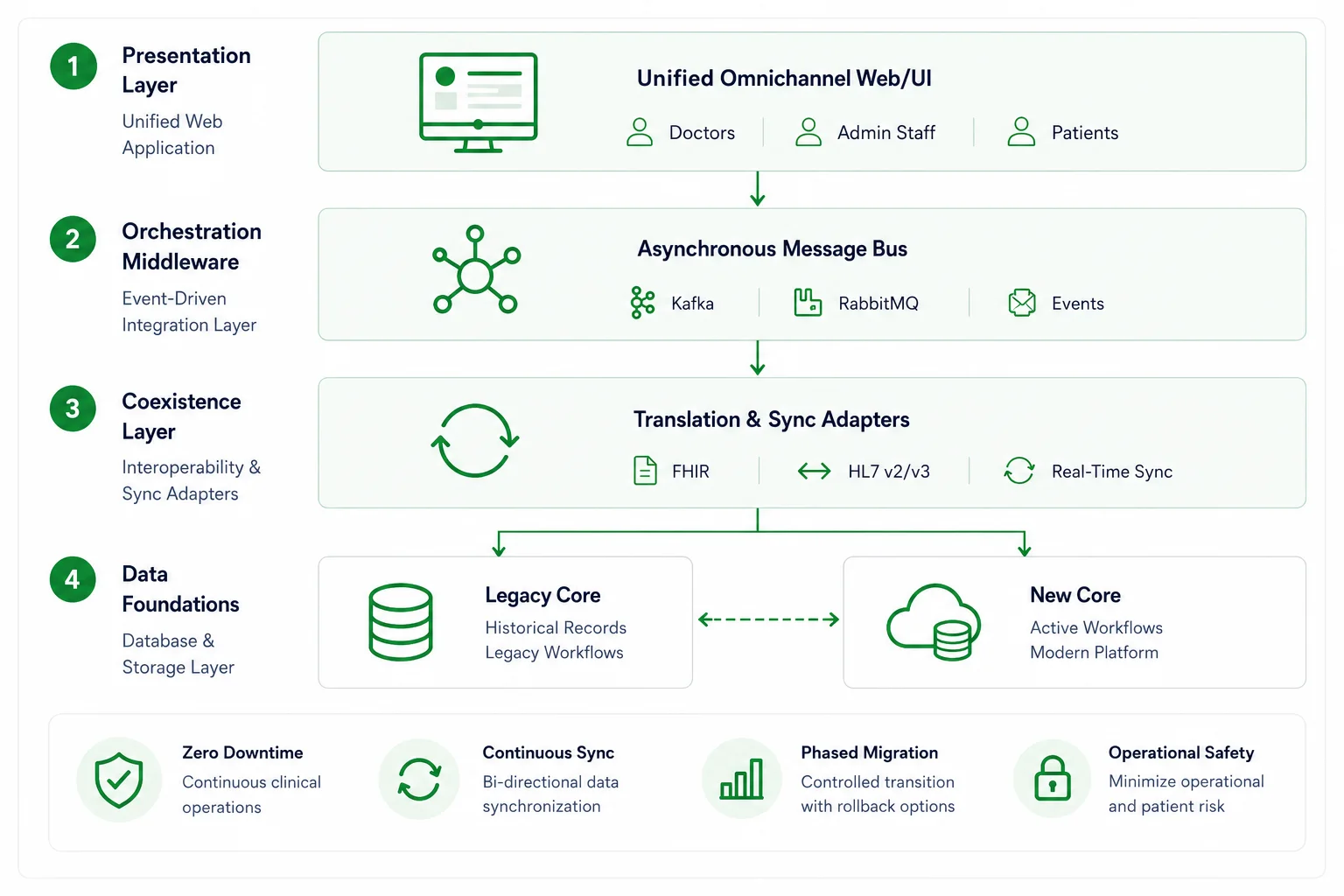
| Progressive Coexistence Stack | |
| Presentation layer | Unified omnichannel web/UI |
| Orchestration middleware | Asynchronous message bus |
| Coexistence layer | Translation & sync adapters |
| Data foundations | Legacy core - new core |
1. Presentation Layer (Unified Web Application Interface)
Forcing physicians to toggle between two separate programs during a transition adds friction to already demanding clinical workflows. To avoid this, the presentation layer provides your medical team with a single unified browser interface. Behind the scenes, the system automatically pulls patient information from whichever database holds the relevant record. By reducing the need to navigate multiple applications or enter the same information twice, the interface helps doctors maintain their focus on the patient throughout the consultation.
2. Communication Middleware (Asynchronous Messaging Layer)
Think of this middleware as a traffic buffer for your daily operations. When the legacy database slows down under a heavy data export batch, selected user actions and system events can be buffered and routed through an event-streaming platform like Apache Kafka or a message broker like RabbitMQ. For the front desk, this reduces the chance that background migration activity will interrupt appointment booking or other routine workflows. Registrars can continue submitting requests while the underlying system catches up.
3. Interoperability Translators (FHIR and HL7 Adapters)
Bridging the gap between old and new systems requires more than a simple format conversion, because the systems may rely on different exchange models. Many established healthcare connections use Health Level Seven Version 2 (HL7v2) message feeds, while newer applications may exchange resource-based data through Fast Healthcare Interoperability Resources (FHIR) APIs. This translation tier uses specialized translation and synchronization adapters to map HL7v2 messages, FHIR resources, and proprietary legacy structures between the two environments. As a result, an update made in one system can be correctly interpreted and processed by the other.
4. Storage Foundations (The Coexistence Engine)
When patient data is split between the legacy and new EHRs, keeping identities aligned becomes a critical part of the transition. Both systems need consistent matching rules and controlled synchronization as records and workflows move in stages. An Enterprise Master Patient Index (EMPI), or a comparable identity service, connects records that belong to the same patient and sends uncertain or duplicate matches for review. This helps preserve a coherent patient view while information remains distributed across two environments.
Why EHR Replacement Projects Fail
The coexistence model makes EHR replacement safer, but it does not make the project automatic. While the technology may be well designed, the migration can still go off track due to issues outside the architecture itself.
Most EHR replacement projects get into trouble because a technical plan collides with real clinical work. Physicians have years of muscle memory. Nurses know which screens must remain open during a shift change. Billing teams have learned how to work around the system’s quirks to ensure claims are paid.
In our experience, the projects that struggle usually have several things in common.
Incomplete or poorly validated data migration
A migration can be technically complete and still be clinically wrong. Record counts may match, but they may be missing relevant patient information, such as allergy statuses, medication histories, scanned documents, or links between encounters. Duplicate patient profiles can be carried into the new system, while old terminology is mapped to the wrong modern code.
The risk is especially high when extracted records move too quickly from the legacy system into the new core. Data should first be profiled, cleaned, mapped, and validated in a controlled staging environment. A defensible migration process also needs repeatable test conversions, automated reconciliation, and clinical review. The question is not simply “Did the row move?” but “Does the new chart preserve the meaning of the old one?”
Clinical workflow disruption
A system may look efficient in a product demonstration and still impair the workflow in a real clinic. A redesigned ordering process can add three clicks to every prescription. A new chart layout can hide the information a specialist checks first. A seemingly minor change to appointment status can break the handoff between reception and nursing staff. Workflow mapping should therefore capture what people actually do, not only what the official process document says they do.
Physician and staff resistance
Resistance is often described as a people problem. More often, it is a design and communication problem. If clinicians first see the new EHR shortly before go-live, they have no meaningful opportunity to shape it. When their concerns are dismissed as reluctance to change, trust disappears altogether.
Clinical representatives, billing users, administrators, and support staff should participate from discovery through pilot testing. Super-users can then help colleagues understand not only how the new workflow works, but why it changed.
Interoperability gaps
Connecting two systems is not the same as making them interoperable. A laboratory interface may successfully deliver a message while placing the result under the wrong encounter. A pharmacy connection may transmit a prescription but fail to return the expected status. An external provider may send a clinical document that the new EHR stores but cannot display usefully.
Testing must cover complete workflows, field meaning, exception handling, timing, and recovery — not just successful message transmission.
Regulatory and security work starts too late
Migration teams often focus on production security while overlooking temporary environments. Extract files, test databases, migration logs, screenshots, and support tickets can all contain protected health information. Access rules, audit trails, retention controls, and incident procedures must apply before the first real record enters a staging environment. Compliance is part of migration architecture, not a final approval step.
Training effort is underestimated
A one-hour webinar is not enough for a new clinical system. Different roles need distinct training. A physician, scheduler, nurse, laboratory user, and billing specialist may share the same EHR, but perform completely different tasks.
Training also needs protected time, realistic scenarios, a safe practice environment, shift coverage, and hands-on support after launch. Temporary productivity loss should be included in the operational plan and the budget.
There is no phased rollout or rollback strategy
The classic “big bang” cutover shuts down the old system on Sunday and expects the entire organization to work in the new one on Monday. That approach leaves little room to isolate defects or recover safely.
A phased rollout might begin with one clinic, one specialty, or new patient registrations. It should define clear entry criteria, success metrics, rollback triggers, and ownership for every decision during go-live.
The broader lesson is simple: treat EHR replacement as a multi-stage operational transition, not an overnight software switch.
The True, Hidden Drain of an Aging System
Maintaining an old EHR platform often looks like the safer, cheaper choice on paper. But if you look closer at your weekly operations, you’ll find that the old core is quietly bleeding cash in four distinct areas:
1. The skyrocketing maintenance trap
Legacy software depends on outdated technologies and proprietary codebases. As engineers who understand these older systems retire or move on, finding someone to fix a bug becomes incredibly difficult. With fewer specialists available, the support fees to keep your existing basic functionality operational continue to rise.
2. The interoperability brick wall
Modern healthcare depends on immediate, reliable data exchange. If your clinical core cannot connect through modern APIs such as FHIR, sharing information with outside laboratories, pharmacy networks, or imaging centers becomes a nightmare. Your staff ends up wasting hours on manual file exports, faxes, and fragile custom workarounds that constantly break.
3. The vendor data lock-in surprise
One of the most frustrating moments in a modernization project is discovering you don’t fully control your data. Many legacy platforms store patient records in proprietary formats that make extraction slow and expensive. Gaining access to your own decades of historical records can quickly become one of the largest, most unexpected line items in your migration budget.
4. Revenue cycle inefficiencies
An outdated system slows down everything, including your payments. If your platform cannot automate insurance eligibility checks or validate diagnostic codes in real time before claims are submitted, your billing team has to manually process more of the work. This drives up coding mistakes, delays submissions, and directly increases insurance claim denials.
EHR Modernization vs. EHR Replacement: Making the Right Choice
All those daily frustrations do not necessarily point to an immediate full system replacement. In some cases, targeted modernization may be the more practical first step. However, even if the legacy core appears reliable, it may still limit performance, scalability, or access to data. Wrapping an aging database in modern APIs can automate manual tasks and improve selected workflows, but it does not remove the technical debt inside the core. Therefore, existing latency, scaling constraints, proprietary structures, and high maintenance costs may remain.
You can only stretch a legacy system so far. If you find yourself paying for repeated custom patches just to keep basic operations running, modernization may no longer be a long-term investment. It may become a stopgap. When the right path is not obvious, healthcare IT consulting can help you assess the current environment, weigh the technical and operational tradeoffs, and define a strategy that supports your long-term goals.
Let’s look at the differences between the two paths:
| Factor | EHR modernization | Full EHR replacement |
| Cost | Lower initial CapEx. The budget is concentrated on API layers, modular interface updates, selected workflow integrations, testing, and security improvements; most of the legacy core remains in place. Existing licensing and maintenance costs may continue. | Higher upfront CapEx and transition-related OpEx. The budget may need to cover parallel system operations, ETL data migration, integration engineering, testing, security work, and comprehensive staff retraining. |
| Time | Iterative deployment cycles. Changes can be introduced in targeted phases that focus on urgent operational bottlenecks, without waiting for a complete platform transition. | A broader strategic program requiring assessment, platform configuration, infrastructure preparation, data migration, coexistence testing, and phased rollouts. Complex multi-hospital programs may extend across several years. |
| Clinical disruption | More contained disruption. Core clinical charting and many familiar workflows may remain largely unchanged, although the modules and processes being modernized still require testing and user preparation. | A wider organizational shift. Staff must adapt to new interfaces, redesigned charting and administrative workflows, new permissions, and different ways of accessing or documenting information. |
| Data migration complexity | Selective migration or synchronization. Only the data required by the new modules may need to be mapped, exchanged, or copied; this reduces the immediate migration scope while preserving dependence on the legacy database. | A broader ETL transition. Active data must be extracted, cleaned in a staging environment, mapped, validated, and loaded. The program may also require EMPI matching and a defined archive strategy for historical records. |
| Compliance effort | Focused on new APIs, modules, and data flows, while the legacy environment must continue meeting applicable access, audit, privacy, security, and retention requirements. | System-wide validation covering the new core platform, migration tools, temporary staging environments, updated access controls, audit trails, and historical data-retention policies. |
Modernization is the smarter move when the problems can be isolated and the core remains reliable, supportable, and capable of meeting future requirements. Replacement becomes the stronger option when the core itself is holding the organization back by driving up support costs, limiting access to data, restricting scale, or blocking modern interoperability.
At Emerline, we do not view this as a battle between “old” and “new.” The real question is whether the current EHR can support the organization’s clinical and operational plans for the next several years without creating more technical debt than value.
When the answer is no, replacement may be the more sustainable path. It should not start with picking a vendor. It should begin with a clear, phased roadmap.
Legacy EHR Replacement Roadmap
Once replacement becomes the right path, your next step is understanding what needs to move, what needs to change, and how to keep daily operations stable throughout the transition. At Emerline, we usually organize the process into four distinct phases.
Phase 1: Assess the Current Environment
A successful migration requires a realistic picture of the migration scope and the primary risks.
- Legacy system assessment: Review the core platform, custom modules, vendor dependencies, and support costs. You also need to pinpoint hidden security risks and known performance issues.
- Workflow mapping: Document how physicians, nurses, schedulers, and billing teams actually work on the floor. It is vital to capture the manual workarounds and exceptions that never appear in official process maps.
- Data quality audit: The primary goal here is to identify duplicate records, inconsistent fields, outdated codes, and proprietary formats before extraction begins. Emerline’s data migration services can help teams clean, map, validate, and transfer historical records while reducing migration risks and disruption to patient care.
- Interoperability analysis: Do not let external connections break during the switch. Catalog every laboratory, pharmacy, patient portal, and billing tool that currently relies on data exchanges with your existing EHR.
Phase 2: Select and Prepare
Choosing the new system comes next. Do not just look for the longest feature list. The perfect platform is the one that naturally fits the exact environment you uncovered in step one.
- Vendor selection: Demand proof over promises. Evaluate each platform directly against your everyday clinical workflows, integration necessities, and long-term data requirements.
- Implementation prep: You need to map out precisely which workflows are moving first and select a pilot group. Nailing down clear success criteria before the project officially starts is the best way to keep everyone focused.
Phase 3: Test and Roll Out
Taking a phased approach gives your organization breathing room to correct problems before they affect everyone.
- Pilot migration: Begin with a single location or department using representative data, real integrations, and actual end users.
- Parallel run: Keep the legacy environment available temporarily. This provides a safety net while teams compare records, validate data flows, and investigate discrepancies.
- Full rollout: Expand the system in controlled stages, ensuring you have clear readiness criteria and support coverage ready for each step.
Phase 4: Optimize After Go-Live
The work does not stop on launch day.
- Post-migration optimization: System performance, integration errors, support requests, and user feedback must be heavily monitored by your team.
- Final cleanup: Teams should refine training and pull out any temporary workarounds. You must also ensure historical data is correctly archived according to strict retention requirements.
Breaking the transition into phases keeps your daily risks low. Yet, this entire strategy rests on a single technical pillar. The new EHR must be fully capable of reliable data exchange across your broader healthcare network.
Interoperability Requirements for Modern EHR Systems
Breaking down the interoperability brick wall is not about picking a single modern standard and hoping for the best. Reliable data exchange requires a layered architecture that can support different eras of technology simultaneously. Rather than replacing older protocols entirely, the target environment brings several forms of data exchange together to keep daily workflows running.
Here is how these complementary layers connect in a real-world clinical environment.
Operational efficiency: Conventional APIs
Alongside specialized healthcare standards, a modern core relies on conventional REST APIs to handle everyday business operations. These integration channels connect the EHR to applications, such as scheduling software, CRM platforms, billing tools, and identity management systems. They allow operational data to flow across the organization while reducing the need for manual duplicate entry.
The application layer: FHIR and SMART on FHIR
For clinical data exchange, Fast Healthcare Interoperability Resources (FHIR) provides a modern framework that allows health systems to query and share specific clinical data elements. Secure access is then controlled through the platform’s authentication, authorization, and privacy mechanisms.
SMART on FHIR builds on this foundation. Rather than functioning as an app store, it gives authorized applications a standard way to launch within or connect to the EHR while receiving the relevant user and patient context. This standardized approach to application access can reduce workflow friction for physicians during patient care.
The production baseline: Legacy HL7 support
But healthcare is not entirely modernized yet. While FHIR supports newer API-based applications, traditional HL7 messaging remains widely used in everyday medical integrations. Many established diagnostic laboratories, imaging centers, hospitals, and pharmacy networks continue to rely on HL7 Version 2 feeds.
A well-engineered replacement environment must maintain stable HL7 connections, whether through the EHR itself or an appropriate interface engine and mapping layer. This helps preserve the critical data pipelines the organization already depends on.
The ecosystem hub: HIE connectivity
Finally, a modern system must look beyond the walls of its own organization. An emergency patient may arrive with no local history but with recent records held by another provider. Health Information Exchange (HIE) connectivity can give the care team access to available allergy information, medication lists, or imaging reports without a series of phone calls and faxes. That context supports faster decisions and may prevent tests from being repeated simply because earlier results cannot be found.
The goal of balancing all these layers is simple. Your clinical team should spend their time treating patients, not tracking down records across disconnected systems.
How Much Does Legacy EHR Replacement Cost?
Let’s be realistic about the numbers. Replacing an old EHR platform is almost never a simple software transaction. For most growing healthcare networks, the heaviest expenses do not come from the new platform license itself. The true financial weight lies in data migration, integration engineering, workflow redesign, and mitigating daily operational risks during the switch.
To build an airtight budget, leadership teams must account for five distinct categories: data preparation, infrastructure engineering, change management, compliance audits, and parallel system operations. Skipping these details is why many healthcare modernization projects run into financial trouble. It is incredibly easy to underestimate the heavy lifting required for data migration while focusing too much on the standalone price of the new software.
Here is exactly where your capital is distributed during a secure, custom transition program:
1. Data auditing and cleanup (15-20% of total budget)
You cannot migrate data safely until you know exactly what is sitting inside your old database. Over years of operation, clinical records accumulate duplicate patient profiles, missing demographic fields, inconsistent local codes, and outdated terminology. Depending on the data domain and jurisdiction, cleanup may include mapping diagnoses to ICD-10-CM, clinical concepts to SNOMED CT, and medication data to RxNorm.
This portion of the budget covers data profiling, terminology mapping, record-quality checks, extraction design, and initial test conversions. Automated reconciliation can accelerate the work, but uncertain mappings still require technical and clinical review. Resolving these issues before data reaches the new core helps reduce coding errors, rejected claims, and clinically misleading records after go-live.
2. Integration and middleware engineering (40-50% of total budget)
This is almost always your largest single investment. Modern healthcare systems do not run in isolation. Your EHR must talk to laboratories, pharmacies, imaging centers, billing tools, and customer portals. Instead of building rigid, direct connections that break during the next system update, this money is spent creating flexible integration middleware and API layers. The real goal here is to construct a foundation that easily accommodates future facility expansions or corporate acquisitions.
3. Historical data archiving and infrastructure optimization (10-15% of total budget)
Trying to push twenty or thirty years of unverified historical logs directly into your new live environment is an expensive mistake. It slows down chart loading times and complicates daily performance. Instead, older records should be routed into a low-cost, read-only immutable cold archive. This keeps your historical data completely safe and audit-ready for regulatory purposes, while lowering your ongoing cloud hosting costs and keeping the live database lean and fast.
4. Training, adoption, and compliance readiness (15-20% of total budget)
A flawless software platform means nothing if your physicians and billing teams refuse to use it. User adoption requires a dedicated budget for role-based staff training, isolated sandbox environments, and real-world workflow simulations. It also covers independent compliance readiness audits and security penetration testing. Investing heavily in your people during this phase usually yields a much higher return than buying additional software bells and whistles.
5. The hidden cost most budgets miss: Parallel operations (5-10% of total budget)
During a large migration, the organization may operate the legacy EHR and the new platform in parallel for a limited time. That means overlapping vendor fees, infrastructure costs, integration monitoring, and additional help desk support.
This overlap is not simply an unavoidable expense. It is a deliberate risk-control measure. Running both environments gives teams time to compare records, validate live workflows, and preserve a tested fallback option if a critical integration or data issue appears. In business terms, the organization accepts short-term transition OpEx to reduce the operational exposure of a single-day cutover.
Typical budget allocation breakdown
The table below provides directional planning ranges for the main cost areas of an EHR replacement. Actual allocations vary by project, and some activities may span more than one category.
| Cost category | Typical share of budget |
| Data auditing and cleanup | 15-20% |
| Integration and middleware engineering | 40-50% |
| Historical data archiving and optimization | 10-15% |
| Training, adoption, and compliance readiness | 15-20% |
| Parallel operations and contingency funds | 5-10% |
A successful EHR transition focuses on protecting your operations over the long haul, not just buying new tools. That is why your budget has to account for much more than the software vendor ticket price. Ultimately, the value of this entire project rests on four things: the cleanness of your data, the flexibility of your integrations, how easily your doctors adopt the system, and the sustainability of your infrastructure. Without these, you are just paying for an expensive technology update.
Typical EHR replacement costs by organization size
To provide a practical reality check on your upcoming deployment, here is how the migration timeline and overall investment might scale, based on the size of the healthcare organization. While every transition is unique, your operational footprint dictates the baseline budget.
- For a small practice, the financial commitment usually hovers between $150,000 and $500,000. The technical heavy lifting here is relatively contained: you are primarily moving active patient charts and re-establishing direct endpoints for core billing or local lab feeds. Without the burden of complex, cross-departmental workflow mapping, an independent clinic can typically wrap up the entire transition in a short 6-9 months.
- The moment you scale up to a mid-size healthcare organization, such as a regional network or a multi-site specialty group, the complexity multiplies. Suddenly, you need robust integration middleware just to keep data synchronized across different physical locations. Add in the necessity for deep compliance audits and specialized training for various clinical roles, and the scope expands significantly. Providers in this tier should brace for a 9-18-month journey, with investments generally landing anywhere from $500,000 to $5 million.
- Replacing the core of a multi-hospital network is less of an IT project and more of a multi-year strategic initiative. Enterprise systems are forced to navigate massive historical archives alongside incredibly complex HL7 and FHIR interoperability ecosystems. At this scale, a progressive coexistence model is an absolute mandate to ensure patient safety during the switch. As the legacy and modern platforms must run in parallel, these rollouts demand 12-24 months of rigorous execution. Budgets start at a baseline of $2 million, scaling upward based on custom engineering requirements and parallel operations.
Cost matrix summary
| Organization scale | Typical transition timeline | Typical investment budget |
| Small practice | 6-9 months | $150,000 to $500,000 |
| Mid-size healthcare organization | 9-18 months | $500,000 to $5 million |
| Multi-hospital network | 12-24 months | $2 million+ |
These ranges are directional estimates. Actual costs depend on data volume, integration complexity, number of facilities, customization requirements, compliance scope, and the selected migration model.
Data Preservation: Managing Active Records vs. Cold Archives
The single highest-risk moment in any system replacement project is data preservation. Your organization is legally and ethically responsible for decades of clinical documentation, lab results, imaging files, insurance claims, and immutable audit logs.
But here is a practical secret: attempting to force thirty years of unvalidated, messy historical logs into your brand-new transactional core is a major mistake. It complicates the migration and permanently slows down your new system's chart loading speeds. Instead, smart engineering teams split the data into two clear pipelines.
The following framework shows how Emerline separates active and historical data streams during migration to support production performance, controlled retention, and access to records when they are needed.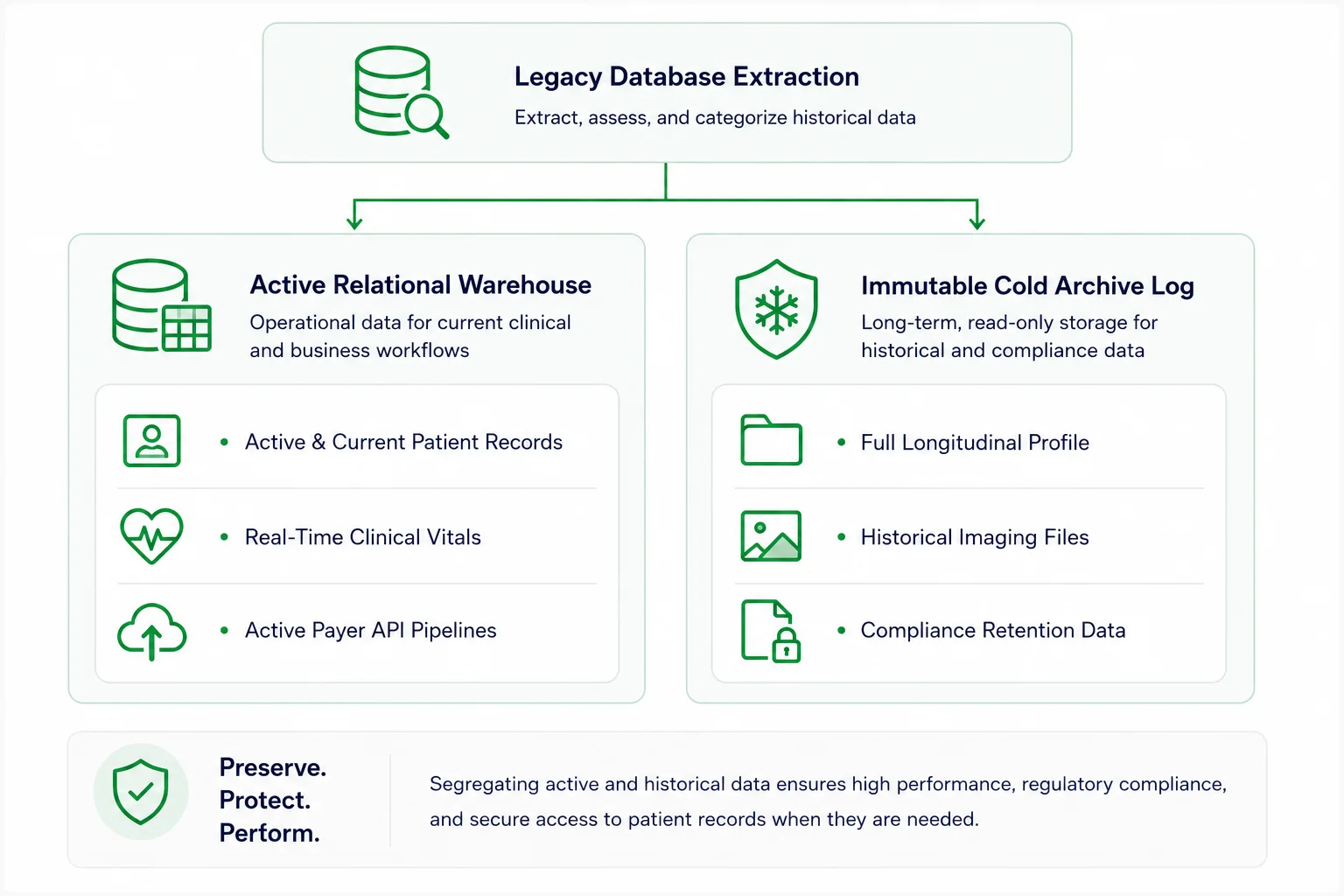 Active clinical data (the new core)
This includes the essential information required for ongoing patient care. You parse, clean, and migrate only what is active: current patient profiles, active treatment plans, and recent clinical encounters from the last three years. This keeps your new database light, fast, and agile.
Historical records (the archival tier)
What about the rest of the data? State medical-record laws, applicable CMS requirements, payer contracts, and litigation holds may require records to remain available for defined periods. While HIPAA does not prescribe one universal retention period, it still requires covered entities to protect retained patient information for as long as it is maintained.
Older records can be placed in a protected archival repository with read-only access and immutability controls. This helps keep them available for authorized clinical, legal, and audit needs without retaining information that is rarely accessed production-tier storage or incurring the associated processing costs.
How to decide which EHR data to migrate
You do not need to move every single historical record into your new production database. In fact, doing so will likely slow the new software down. The golden rule of migration says that not all data needs to live in the active core, but every necessary record must remain secure, accessible, and fully usable.
To separate information to move from the information that gets archived, technical teams usually filter legacy data through a few strict criteria.
- Clinical relevance and frequency of access: Is this information necessary for treating a patient today? Active care plans, recent labs, and ongoing prescriptions belong in the new system. A single consultation note from fifteen years ago should go to the archive.
- Data quality: Clean, structured data maps smoothly into modern software. If you have thousands of poorly formatted records or massive unstructured text files, moving them will only corrupt your clean new database.
- Legal and regulatory requirements: State laws and federal regulations dictate exactly how long you must retain medical records. Your archive must satisfy these strict retention policies without cluttering your daily clinical workflows.
- Target EHR capabilities: Modern platforms have specific architectural limits. Forcing decades of incompatible legacy files into a new system can create severe performance bottlenecks.
- Search and retrieval requirements: Archiving data does not mean dropping it into a black hole. You have to consider how easily a physician or a legal auditor can search, filter, and extract a historical record when they actually need it.
Emerline Case in Point (Custom Healthcare Engineering): Engineering a standalone medical ecosystem requires absolute synchronization across clinical, financial, and diagnostic modules. By delivering an enterprise-grade Custom EHR with robust, decoupled integration layers, custom charting views, and automated regulatory validation pipelines, our team completely resolved the usability and performance bottlenecks commonly found in off-the-shelf software packages, ensuring seamless data flow and clinical scalability for the provider.
De-Risking the Launch: The Coexistence Model
A safer launch is not built around one high-risk cutover date. It comes from moving the organization in manageable stages and giving teams a tested way to step back if something goes wrong.
A progressive coexistence strategy allows the organization to move in controlled stages. The new platform runs alongside the legacy software, while an integration layer synchronizes data and gradually routes selected workflows to the new environment.
For instance, you can onboard new patients or route a single department, such as outpatient care, through the new core first, while keeping inpatient services on the old system. You move departments, locations, or patient groups in incremental waves. If an integration issue appears, its impact remains limited, and teams can pause or reverse that stage before the issue affects the broader organization.
To see how Emerline helps healthcare organizations build, modernize, and integrate custom EMR/EHR solutions, explore our EMR/EHR software development services.
When pulling data out of a legacy database, avoid creating unnecessary direct point-to-point connections to the new core. They can make validation, monitoring, and future changes harder to manage.
Use an intermediate integration or event-streaming layer that can receive extracted data before it reaches the target database. Independent validation services then clean, map, and verify the records, reducing the chance that legacy data issues will be carried into the new environment.
This coexistence period also creates a temporary security and compliance challenge: patient information might move through the legacy system, migration services, and the new EHR at the same time. Each part of that environment needs appropriate access controls, auditability, and data protection.
Regulatory and Security Considerations During EHR Replacement
During coexistence, electronic protected health information (ePHI) may exist in more places than usual. It can pass through the legacy EHR, extraction files, test databases, migration services, backups, and the new platform.
Securing the production EHR alone is therefore not enough. Requirements under the Health Insurance Portability and Accountability Act (HIPAA) and the Health Information Technology for Economic and Clinical Health (HITECH) Act need to be considered across the entire migration path, including temporary environments that store or process real patient data.
Encryption and access logs
A modern EHR environment should protect stored patient data with strong encryption: for example, Advanced Encryption Standard (AES) with 256-bit keys, and secure data in transit via TLS 1.2 or TLS 1.3 protocols where supported.
These technologies are a strong starting point, not a complete compliance strategy. Legacy interfaces, encryption-key management, access controls, and the organization’s risk profile must also shape the final security design.
Access logs are equally important. During coexistence, the organization should be able to determine:
- who opened, changed, exported, or migrated a record
- when the action occurred
- which environment processed it
- whether the action succeeded or failed
These logs help teams investigate discrepancies, detect unusual behavior, and demonstrate that access controls are working. They also need protection against unauthorized changes.
Zero-trust access isolation
An EHR replacement may involve dozens of internal and external contributors, but that does not mean everyone should be able to see or change the same information. Access should reflect each person’s assigned responsibilities.
Physicians need clinical records, billing teams need financial data, and engineers may need controlled access to system configurations and logs. Role-based permissions, multi-factor authentication, and timely removal of temporary accounts reduce the risk that one mistake or compromised login will affect the wider environment.
Never let migrated patient charts or financial histories remain in browser caches or local device logs during your team testing windows.
Emerline uses short-lived session tokens, invalidates active sessions at logout, and applies automatic timeouts where appropriate. We also prevent sensitive records from being cached or stored locally. These controls reduce the exposure of patient charts and financial data if a device is lost or compromised.
Certification, reporting, and retention requirements
Certification should be checked against the organization’s real needs before a vendor is selected. The Office of the National Coordinator for Health Information Technology (ONC) certifies specific capabilities of a health IT product, not the implementation as a whole.
The same principle applies to reporting. Requirements from the Centers for Medicare & Medicaid Services (CMS) vary by provider type and program participation. A certified EHR is useful only if it supports the reporting, interoperability, and patient-access workflows for which the organization is responsible.
Retention decisions also belong at the beginning of the project. HIPAA does not establish one universal retention period for every medical record. Timelines may instead be shaped by state law, other federal or program-specific requirements, contracts, and internal policy.
Some information will remain in the production EHR, while older records may move to a historical archive. In either case, it must stay protected, traceable, and available for the required period.
Emerline Case in Point (Ecosystem Compliance): Migrating complex data reporting streams away from legacy databases requires strict technical governance. Emerline handled this by building a secure, enterprise-scale Analytics Platform for Digital Healthcare. By constructing robust role-based access frameworks and secure data-ingestion adapters, we helped reduce legacy reporting bottlenecks while supporting the secure, encrypted, and auditable handling of sensitive clinical files.
Illustrative Scenario: Replacing a Legacy EHR for a Multi-Location Provider
Consider a regional provider operating five outpatient clinics on an unsupported legacy EHR. Here is how a phased replacement could work across the network.
The challenge: growing fragmentation. Each clinic has developed its own documentation practices and manual workarounds. Patient information is scattered across the network, workflows vary by location, and aging connections to laboratories, pharmacies, and billing systems require increasing support from the IT team.
The solution extends beyond the new EHR. A modern platform becomes the clinical core. Middleware supports existing HL7 feeds alongside newer FHIR APIs, while a secure, read-only archive maintains accessible historical records without loading decades of data into the production environment.
The transition starts with one location. After auditing and preparing the data, the team launches the new environment at a pilot clinic. For a limited time, the legacy and new systems operate in parallel, allowing records, integrations, and daily workflows to be checked before the replacement reaches the wider network.
The wider rollout follows in stages. Once the pilot meets the agreed clinical, technical, and operational criteria, the remaining clinics move in controlled waves. More complex locations can receive additional preparation rather than being forced into the same schedule.
The result is a more manageable path toward shared workflows, gradual staff adoption, continued access to historical information, and the controlled retirement of the legacy platform.
Operational Readiness: Are You Ready to Migrate?
Before the next rollout stage begins, the project team should confirm that the organization is ready across data, integrations, security, training, and operational support. This working matrix provides a practical go/no-go check.
| Target area | Core operational requirement | Readiness criteria | Ready? |
| Data inventory | Active records, historical data, attachments, and data silos have been identified across all affected locations. | The inventory is complete, data owners are assigned, and each source is marked for migration, archiving, or decommissioning. | Yes / No |
| Quality audit | Duplicate profiles, missing or corrupted fields, coding inconsistencies, and data-mapping risks have been assessed. | Data-quality issues are documented, the remediation approach is confirmed, and validation criteria are defined. | Yes / No |
| Interoperability | The new environment can support the organization’s required exchange workflows, including existing HL7 v2 feeds and relevant FHIR APIs. | Priority workflows have passed end-to-end testing with representative data and external partners where required. | Yes / No |
| Archive policy | Rules for retaining, accessing, searching, retrieving, and disposing of historical records have been approved in line with applicable requirements. | The retention schedule, archive access model, and disposal rules have received the required legal, compliance, and operational approvals. | Yes / No |
| Integration map | Required laboratory, pharmacy, imaging, billing, payer, portal, and health information exchange connections are documented and assigned for testing. | Each integration has an owner, test plan, dependency status, and confirmed cutover sequence. | Yes / No |
| Access control | Role-based permissions, multi-factor authentication, privileged access, and temporary project accounts have been reviewed. | User roles are approved, privileged and temporary access is limited; account removal procedures are confirmed. | Yes / No |
| Local data protection | Controls limit unnecessary caching, downloads, logs, and other temporary copies of sensitive information on user devices. | Browser and device controls have been tested, and any approved exceptions are documented. | Yes / No |
| Training readiness | Role-based training, practice environments, trained internal support users, and go-live assistance are in place. | Required users have completed training, and support coverage and escalation paths are confirmed for go-live. | Yes / No |
| Compliance validation | Regulatory, privacy, security, and retention requirements have been reviewed by the responsible compliance, legal, and security experts. | Required reviews and approvals are complete, while unresolved findings have an owner and mitigation plan. | Yes / No |
| Rollback and recovery | Deployment gates, rollback triggers, decision authority, downtime procedures, and recovery time / recovery point objectives (RTO and RPO) have been defined for critical workflows. | Recovery objectives are approved based on business impact, and rollback, restoration, data reconciliation, continuity, and communication procedures have been tested. | es / No |
A “no” does not always mean the entire replacement must stop. It does mean that the unresolved area needs a clear owner, mitigation plan, and acceptance criteria before the next location, department, or workflow moves to the new environment.
Related Healthcare Solutions and Insights
Replacing a legacy EHR creates a stronger foundation for the organization’s broader digital health strategy. From there, providers can add new care channels, improve patient interactions, and reduce some of the administrative work surrounding daily clinical operations.
- Bring virtual care into the wider clinical workflow. Telehealth is more useful when it works with the organization’s existing systems and processes rather than becoming another isolated tool. Explore how Emerline helps healthcare providers build secure and scalable telehealth solutions.
- Make digital healthcare easier to use and operate. Thoughtful interfaces and self-service features can simplify common patient interactions and reduce routine work for administrative teams. Read more in How a User-Friendly App Reduces Healthcare Costs.
Frequently Asked Questions About EHR Replacement
1. How does an EHR replacement impact our current revenue cycle?
Transitioning to a new system creates a temporary drag on billing speed. Your staff will naturally take longer to process claims as they navigate unfamiliar screens. To buffer this cash flow dip, financial executives often accelerate outstanding submissions prior to go-live and tap into short-term credit facilities. Once the learning curve flattens, the modern platform generally boosts clean claim rates, but anticipating that initial revenue lag is a critical planning step.
2. Can we keep our existing patient portal and third-party telehealth apps?
The answer comes down to your integration framework. Older patient portals hardcoded to legacy databases frequently require replacement. In contrast, modern third-party applications built on standard APIs like SMART on FHIR can usually plug directly into the new core. This modular approach allows clinics to swap the underlying EHR while preserving the familiar patient-facing experience.
3. What happens to open insurance claims during the cutover?
Migrating partially processed claims is a well-known operational hazard. Mapping errors during extraction can easily stall payments. The standard financial playbook dictates leaving active accounts receivable in the legacy environment until they close, while routing all new patient encounters through the replacement EHR. Your billing team will essentially manage two workflows temporarily to protect incoming cash.
4. Do we need to hire additional IT staff for the new cloud EHR?
Moving to a cloud-based EHR shifts the technical burden rather than eliminating it. You will spend less time on server maintenance and hardware provisioning, but your need for API management, data governance, and interoperability design will grow. Organizations typically upskill their current infrastructure engineers or bring in specialized cloud architects to manage these modern data pipelines.
5. How does a platform switch affect quality reporting and compliance?
Preserving your value-based care metrics requires deliberate data engineering. Merging historical quality data from a retired database with incoming records from a new system is rarely straightforward. Many healthcare networks deploy a centralized analytics data warehouse to normalize this information, ensuring their CMS reporting remains continuous and accurate throughout the transition year.
6. How are records that are created or changed during the migration window handled?
The first data extract is rarely the last. While teams clean and test the initial dataset, clinicians continue documenting visits, updating medications, receiving results, and correcting patient information in the legacy EHR. The migration plan therefore needs a method for capturing those changes. Depending on the architecture, this method may involve incremental extracts, change-data capture, controlled synchronization, or a short data-entry freeze for selected workflows. Before go-live, teams reconcile the final changes against the target system and confirm which platform is now the authoritative source. Without that step, records can be technically migrated and still be out of date on launch day.
7. How do you validate data after an EHR migration?
A successful migration must pass two tests: technical completeness and clinical usability. Technical teams can compare record counts, required fields, codes, documents, and relationships between data objects. Clinicians then need to confirm that the resulting chart still tells the right story. A laboratory value under the wrong encounter is not a successful migration simply because the row reached the new database.
8. How do we manage legacy software licenses during the transition?
Your legal team needs to secure short-term extensions for your legacy software well before the migration begins. This coexistence phase requires overlapping vendor agreements. More importantly, these transitional contracts must explicitly guarantee your right to extract historical data and maintain read-only archival access without incurring punitive fees from the outgoing vendor.
9. What should happen during the first weeks after go-live?
The first weeks should be treated as a stabilization period, not as the end of the project. Teams need a visible process for triaging issues, escalating clinical or financial risks, and distinguishing urgent defects from lower-priority improvement requests. Clinical super-users can provide immediate peer support on the floor, while technical teams monitor integrations, response times, access problems, and data discrepancies. Revenue cycle specialists should track claim flow and rejected transactions. Short daily reviews help leadership see where intervention is needed before a local issue develops into a wider operational problem.
10. What should an organization evaluate when selecting a replacement EHR?
Standardized product demonstrations rarely expose a platform's actual limits. The most effective evaluation strategy involves role-based stress testing. You need to measure specific operational metrics under simulated peak loads: calculate the exact click-depth for recurring prescriptions, track time-to-chart for nursing staff, and monitor first-pass clean claim rates. Real-world constraints reveal the true cost of ownership.
Summary: Focus on a Controlled Transition
A new EHR does not automatically solve the problems presented by the old one. Poor-quality data, fragile integrations, unclear workflows, and weak governance can follow the organization into the replacement environment, unless they are addressed during the transition.
That is why the strongest replacement programs combine technical migration with operational preparation. They move in stages, validate data in context, preserve access to historical records, and involve clinical teams before the new system reaches the entire organization.
Done well, EHR replacement becomes more than an exit from aging technology. It creates a cleaner, more adaptable foundation for patient care and future growth.
EHR replacement blueprint at a glance
| Architecture area | Recommended approach |
| Migration pattern | Progressive coexistence or sidecar model |
| Integration model | Event-driven integration layer where appropriate |
| Data integrity | Automated cleansing, mapping, validation, and ETL |
The replacement will deliver lasting value only if the new environment can grow without accumulating the same constraints as the legacy system. Interoperable systems, flexible integration, disciplined data governance, and proportionate security controls make it easier to add new workflows, services, and technologies as the organization’s needs change.
Disclaimer & Limitation of Liability: This article is provided for general informational purposes and does not constitute legal, medical, compliance, or technical advice. Regulatory, security, and data-retention requirements vary by organization, jurisdiction, and program participation. Healthcare providers should review their specific obligations with qualified legal, compliance, and technical professionals before making implementation decisions.
Updated on Sep 28, 2026