AI Agents for Patient Scheduling: How to Turn Missed Appointments Into Recovered Revenue
Table of contents
- Key takeaways
- Why Traditional Appointment Scheduling Leaks Revenue
- No-shows
- Late cancellations with unfilled slots
- Missed and abandoned calls
- Front-desk labor consumed by scheduling mechanics
- The no-show problem isn’t the same in every practice
- What Is an AI Scheduling and No-Show Recovery Agent?
- Scope boundaries
- No clinical triage
- Emergency detection with a hard stop
- Escalation to humans with full context preserved
- Deterministic guardrails against model hallucination
- How It Works
- Prevention loop
- Intelligent booking
- Predictive no-show risk scoring
- Risk-adjusted outreach
- Mitigating algorithmic bias
- Recovery loop
- Two-way reminders
- Waitlist backfill
- 24/7 inbound handling
- Re-engagement loop
- Post-miss outreach
- Chronic no-show identification and special handling
- Where an agent still struggles
- Integrating a Scheduling Agent with Healthcare Systems
- Integration paths: FHIR, HL7 v2, and legacy systems
- Telephony and voice AI integration
- Mapping your booking rules: the underrated discovery step
- Integrate with people, not just systems
- Ready-Made Platforms vs. Custom Development
- What ready-made platforms deliver and their limitations
- When custom development is the better choice
- The hybrid path: platform first, custom at scale
- Compliance, Safety, and Patient Trust
- HIPAA
- The Telephone Consumer Protection Act (TCPA)
- General Data Protection Regulation (GDPR) and international compliance
- Safety
- Equity and accessibility
- Transparency
- Metrics and ROI
- What to track and what to measure it against
- Setting honest expectations
- A simple ROI illustration
- Implementation Roadmap
- Step 1: Discovery
- Step 2: Integration
- Step 3: Pilot
- Step 4: Measure
- Step 5: Scale
- Common mistakes that undermine otherwise sound deployments
- Conclusion
- Frequently Asked Questions
- How do AI agents reduce no-shows in healthcare?
- Does an AI scheduling agent integrate with Epic, athenahealth, or other EHRs?
- How long does it take to implement an AI scheduling agent?
- How much does an AI scheduling agent cost?
- Will an AI agent replace our front-desk staff?
- How does an AI scheduling agent work for elderly patients or those who don't use apps?
- What if our patients don't want to talk to an AI?
- Is an AI scheduling agent HIPAA compliant?
The global average no-show rate for medical appointments is approximately 23%, and it stays stubbornly high despite years of interventions. Reminder calls go unanswered, automated texts get ignored, and waitlists rarely fill a slot in time. Schedules look fully booked weeks out, yet the day arrives with gaps that generate neither care nor revenue.
The real problem isn't no-shows themselves — it's that the systems built to fight them can't. Phone-based booking, manual reminders, and static outreach lack the structural capability to prevent no-shows or backfill freed slots fast enough to recover the lost time. By the time a cancellation is processed, the chance to refill is gone.
Scheduling is one of the highest-impact applications within the broader landscape of AI agents in healthcare. An AI agent for patient scheduling takes a fundamentally different approach, intervening at every stage where manual workflows fall short. Instead of just sending reminders, it analyzes historical and behavioral data to flag patients likely to miss a visit and acts before the no-show happens. When a cancellation comes in, it reaches waitlisted patients in real time and fills the gap — no waiting for staff to work a call queue. And when a patient does miss, it launches re-engagement outreach before the care relationship lapses.
Key takeaways
- Missed appointments aren't simply a reminder problem. In fact, revenue is lost through no-shows, unfilled cancellations, abandoned calls, and front-desk overload. One-way reminders address only the first of these challenges, leaving the others unresolved.
- An AI scheduling agent provides three lines of defense. It predicts and prevents no-shows, refills canceled slots from the waitlist within minutes, and re-engages patients the same day they miss.
- Integration depth is critical. Without write-back and real-time event access to your EHR/PMS, the agent offers only basic chatbot functionality, and slot recovery cannot occur.
- A realistic executive goal is a 20–40% reduction in no-shows. At a five-provider clinic, this equates to approximately $300,000 in recovered annual revenue.
Why Traditional Appointment Scheduling Leaks Revenue
When practices review their no-show rate, the natural reaction is to see it as the core issue. No-shows are highly visible and easily measured, so the response seems obvious: send more reminders. But they're a symptom, not the root cause. Revenue leaks from four distinct areas in the traditional scheduling system, and reminder services, while helpful, only address one of these gaps.
No-shows
It's the most visible gap — and the one with the least durable progress. A patient who doesn't arrive for a scheduled visit represents a complete loss of clinical capacity: the slot was reserved, the clinician was available, and nothing happened. Given the high global no-show rate, practices are routinely operating at significantly reduced effective utilization, even when their schedules appear fully booked.
Late cancellations with unfilled slots
Cancellations with advanced notice could, in principle, be filled if action is taken quickly. In reality, manual waitlist management rarely keeps pace. By the time staff recognize an opening, consult the waitlist, follow up with patients, and wait for responses, the slot often remains empty. These cancellations, which could have been filled with new appointments, ultimately waste clinical capacity — effectively the same as a no-show.
Missed and abandoned calls
Patients unable to reach the practice to book appointments typically look elsewhere. Research indicates that about 60% hang up after one minute on hold, and studies show that practices miss 15% to over 40% of incoming calls during business hours, with higher rates in smaller practices. Each missed call is a lost appointment — and often a lost patient — before the front desk even notices.
Front-desk labor consumed by scheduling mechanics
Beyond the lost revenue from empty slots and missed calls, traditional scheduling requires significant staff time for callbacks, voicemail chains, rescheduling, and waitlist management. Those hours could go to work requiring real judgment — complex concerns, care coordination, in-person support — instead of rule-based logistics.
Reminder services partially address only the first gap. They do nothing for the other three. This imbalance forms the basis for considering AI scheduling agents.
The table below makes the operational contrast clear:
|
Traditional scheduling |
AI scheduling agent |
|
|
Availability |
Business hours only; calls that arrive after closing go straight to voicemail. |
Around-the-clock access via phone, SMS, and web, regardless of when a patient decides to reach out. |
|
Reminders |
One-directional SMS or manual calls, delivered on the same rhythm to every patient on the schedule. |
Two-way, risk-stratified outreach: patients identified as higher cancellation risks receive more frequent touchpoints and a more accessible path to rescheduling. |
|
Reaction to a cancellation |
Staff identify the gap, begin working through the waitlist manually; slots frequently remain empty for hours. |
Waitlisted patients are notified within minutes of a cancellation; the first to confirm takes the slot. |
|
No-show handling |
Reactive by default: the missed visit is logged, and follow-up depends on how much availability the front desk has that day. |
Predictive and proactive: high-risk appointments are flagged in advance, and patients who miss a visit receive same-day re-engagement outreach. |
|
Staff workload |
Significant daily hours consumed by routine booking calls, confirmation follow-ups, and waitlist dialing. |
Routine scheduling volume handled by the agent; staff attention shifts to complex cases and patients who genuinely need direct assistance. |
The no-show problem isn’t the same in every practice
The 23% global average hides enormous variation, and it changes what an agent should optimize for. Behavioral health and psychiatry carry the highest risk of any specialty — typical clinic rates of 18% to 22%, roughly double primary care, driven by structural barriers like stigma, transportation, and cost. There, the highest-leverage move is prevention plus friction removal: risk scoring paired with concrete offers like a telehealth alternative, which reduces no-shows more in behavioral health than anywhere else. Primary care sits closer to the high teens, often cited around 18–20%, and lives on throughput, so waitlist backfill and call deflection matter most. Dental and elective practices run lower — roughly 10% to 18% — so the return comes more from front-desk relief and patient collections than from prediction. And safety-net clinics see the steepest curve: 25% to 30%, against 12–15% in standard primary care, driven largely by transportation barriers.
Two things follow. First, benchmark against your own specialty, not the global average — a dental practice hitting 14% and a behavioral health clinic hitting 14% are having completely different days. Second, weight the three loops to match. An agent tuned for a behavioral health clinic (prevention-heavy, telehealth-forward) and one tuned for a referral-based specialty group (confirmation and easy rescheduling for long-lead appointments) share a codebase but not a configuration. Generic doesn’t fit here.
What Is an AI Scheduling and No-Show Recovery Agent?
The term "AI scheduling" gets applied loosely to tools that range from a simple online booking widget to a fully autonomous agent capable of managing a practice's entire appointment pipeline. The gap between these tools decides whether a practice gets a marginal convenience bump or a real shift in utilization and revenue.
To clarify: An AI scheduling and no-show recovery agent is an autonomous system that converses with patients across any channel, has real-time access to the schedule, takes actions itself (book/reschedule/cancel/backfill), and uses a predictive no-show risk model. Rather than surfacing options for a human, it performs the tasks itself — booking, rescheduling, cancellations, waitlist backfill, and outreach driven by a continuously updated risk model that scores each patient's likelihood of missing their upcoming visit. The entire cycle, from initial booking through no-show risk management to post-miss re-engagement, runs within a single, coordinated agent workflow.
Here’s what that looks like in one interaction. A patient calls at 9 p.m. on a Sunday — long after the front desk has gone home. The agent answers on the first ring, recognizes the caller from the number, and confirms identity with a date of birth before discussing anything specific. The patient wants to move Thursday’s appointment. The agent checks live availability in the EHR, sees the patient is established with Dr. Lin, offers three slots that fit the visit type, books the one the patient picks, writes it back to the schedule, and texts a confirmation — all before hanging up. The Thursday slot that just opened up doesn’t sit empty: within minutes the agent offers it to the first eligible patient on the waitlist. No voicemail, no callback queue, no slot lost. That single call touched booking, identity verification, real-time calendar write-back, and waitlist backfill — four things that, done manually, would have spanned two business days and three staff members.
How it compares to the tools already used in most practices:
|
Online booking portal |
Reminder service |
RPA automation |
AI scheduling agent |
|
|
Autonomy |
None – the patient navigates the interface and completes every step without any assistance. |
Dispatches messages on a predetermined schedule, regardless of whether the patient responds or engages. |
Executes prescripted sequences that break the moment an unexpected input or interface change occurs. |
Makes independent decisions and acts on them – booking, rescheduling, backfilling, and escalating as circumstances require. |
|
Two-way communication |
No. It’s a self-service interface, not a dialogue. |
No. Notifications travel in one direction only; patient responses go nowhere. |
No. There is no conversational capability built into the workflow. |
Yes. Conducts genuine back-and-forth conversations with patients via phone, SMS, or web chat in natural language. |
|
Real-time calendar access |
Partial. Patients can browse available slots but cannot modify existing bookings. |
No. It reads appointment data to trigger messages but cannot interact with the calendar itself. |
Limited. Can write through rigid, pre-mapped steps that fail outside a narrow set of expected scenarios. |
Full. Reads live availability and writes confirmed bookings directly to the EHR or PMS in real time. |
|
No-show prediction |
No. |
No. |
No. |
Yes. A continuously updated risk model scores each patient’s cancellation likelihood, adjusting reminder intensity and outreach strategy accordingly. |
Scope boundaries
A well-designed agent is defined by both its deliberate omissions and its autonomous actions. These two aspects are linked: clearly defining what the agent does not do is essential for responsible deployment. Therefore, the following boundaries are non-negotiable:
No clinical triage
The agent's domain is scheduling logistics, and it stays there without exception. It does not ask patients to describe their symptoms to assess their condition, offer an opinion on whether a visit is medically warranted, or make any determination that a licensed clinician would ordinarily make. Patients seeking guidance on their health are directed to the appropriate clinical channel; the agent does not answer the client’s concerns.
Emergency detection with a hard stop
During a conversation, if a patient describes symptoms that suggest a potential medical emergency, such as chest pain, difficulty breathing, acute neurological changes, or anything similar, the agent immediately exits the scheduling workflow. It does not attempt to book an urgent appointment or apply its own judgment to the severity of the situation; it clearly instructs the patient to call 911 or go directly to the nearest emergency department, and the automated flow stops there.
Escalation to humans with full context preserved
Situations that fall outside the agent's defined scope are immediately handed off to a staff member. This includes: coverage and insurance questions, multi-appointment rescheduling scenarios that require clinical coordination, or any indication that a patient is confused, distressed, or dissatisfied. Critically, the complete conversation transcript is included with the case, so the patient never has to re-explain their situation to the person picking up where the agent left off.
Deterministic guardrails against model hallucination
Because the agent uses an LLM in its reasoning layer, explicit technical controls keep the model's probabilistic nature from causing scheduling errors. The agent can only present appointment slots that are returned in real time by the EHR or PMS API — it has no ability to fabricate or infer availability. Every booking is validated on the server-side before a confirmation is issued to the patient, ensuring that a hallucinated or outdated slot cannot be offered, let alone confirmed.
How It Works
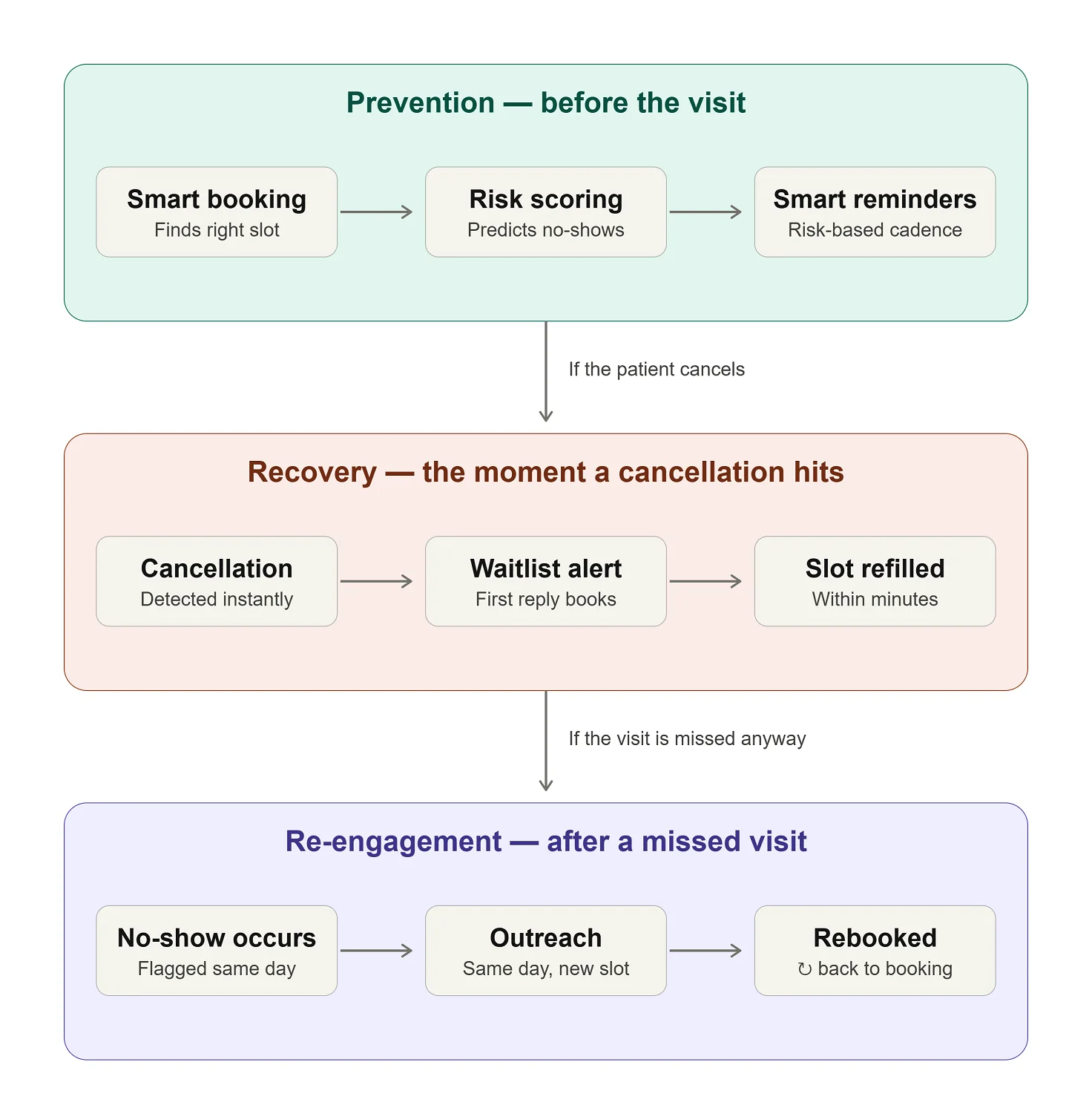
An AI scheduling agent operates across three sequential loops, each addressing a distinct stage of the appointment lifecycle. The prevention loop runs before the visit to minimize risk; the recovery loop activates immediately when a slot is vacated; and the re-engagement loop follows up if a patient misses an appointment. Together they form a closed-cycle workflow no single traditional tool covers. The diagram below shows how the stages connect.
Prevention loop
Intelligent booking
The agent’s primary responsibility is to match each patient to the correct time slot from the start, applying separate logic for new and established patients. Instead of simply listing available times, it routes bookings based on visit reason, relevant specialty, appropriate provider, and required slot type. This precision at the outset minimizes issues later in the process that can lead to cancellations: a patient booked into an unsuitable slot is already at higher risk of not showing up.
Predictive no-show risk scoring
This is the most consequential capability in the prevention loop, and it sets the stage for downstream interventions in the workflow. Instead of treating all patients as equally likely to attend, the agent continuously scores each appointment against a multi-variable risk model. Inputs include the patient's historical attendance, the lead time between booking and the appointment, the day and time, visit type, distance from the clinic, and even local weather, since research links weather to attendance. This risk score informs the outreach and handling in later steps.
The predictive evidence for this approach is compelling. A study conducted in the UAE achieved 86% model accuracy and a 50.7% reduction in no-shows using a comparable risk-scoring framework. Centerpoint Health, a federally qualified health center in Ohio, implemented a predictive model on the healow platform, integrated with eClinicalWorks EHR, resulting in a 24% improvement in show rates for high-risk visits and achieving 90% prediction accuracy. Total Health Care, an FQHC serving 50 providers in Baltimore, achieved a 34% reduction in no-shows among high-risk patients and generated 309 additional visits within 45 days of deployment using the same healow model.
Risk-adjusted outreach
After risk scores are assigned, the agent adjusts outreach accordingly, rather than sending the same reminder to every patient. Low-risk patients receive a single SMS reminder. High-risk patients receive a proactive voice-agent call and a concrete offer, such as a more convenient time, a closer location, or a telehealth alternative, to reduce barriers to attendance.
Mitigating algorithmic bias
Risk scoring at this level of granularity carries a meaningful ethical obligation. To maintain algorithmic fairness, the model must be continuously audited to ensure that socio-demographic factors, proxy variables, or geographic data points such as zip codes do not systematically bias the agent into applying more restrictive scheduling rules or more aggressive overbooking strategies against vulnerable or minority patient populations. Bias in a scheduling model can constitute a discriminatory access barrier with regulatory and ethical consequences that extend well beyond scheduling performance metrics.
Recovery loop
This is where most tools stop at “reminder” and where an agent pulls ahead. Reminders try to prevent a no-show; recovery assumes some will happen anyway and fights to save the revenue regardless. When a cancellation lands at 4 p.m. for a 9 a.m. slot the next morning, a human waitlist doesn’t stand a chance — by the time someone notices, calls down the list, and waits for a callback, the morning is gone. An agent closes that window to minutes: it detects the opening the instant it’s registered, reaches the waitlist in parallel rather than one call at a time, and gives the slot to whoever confirms first. The difference between a reminder system and a recovery agent is the difference between hoping a slot stays filled and actively refilling it the moment it doesn’t.
Two-way reminders
When a patient needs to cancel or reschedule, the agent handles it within the same conversational thread without requiring the patient to call the clinic, navigate a portal, or wait for business hours. A patient who responds to a reminder with "I can't make it" is immediately offered alternative available slots and can confirm a new appointment in that same exchange. Frictionless rescheduling of this kind converts what would otherwise become a no-show or a lost patient into a retained appointment.
Waitlist backfill
Upon registering a cancellation, the agent immediately identifies the next eligible patient on the waitlist, reaches out to them, and offers the vacated slot. The first respondent secures the appointment. This automated process, which traditionally could take hours of phone calls and waiting, completes in minutes, filling gaps with appointments before staff notices the vacancy.
24/7 inbound handling
If a patient calls outside normal business hours to book, reschedule, or cancel an appointment, the agent ensures the call is answered. Available 24/7, it lets patients connect on their own schedule — and turns every previously missed call into a booking opportunity.
Re-engagement loop
Post-miss outreach
When a patient misses an appointment despite prevention efforts, the agent initiates re-engagement outreach on the same day, in a neutral, non-punitive tone, with an immediate offer to rebook. The urgency here is real: patients who miss a single appointment experience approximately 70% attrition within 18 months, compared to 19% for those with no missed visits on record. Same-day re-engagement, before the patient has had time to disengage from the care relationship, is the intervention that makes the biggest difference to long-term retention.
Chronic no-show identification and special handling
Patients who accumulate a pattern of missed visits are flagged by the agent as requiring a specific operational approach. For this group, the agent applies modified scheduling rules to safeguard the practice’s capacity while maintaining continuity of care: a 24-hour confirmation requirement to hold the slot, eligibility for double-booking where clinically appropriate, and more frequent pre-visit outreach. The objective is to manage the increased risk responsibly and consistently, not to penalize these patients.
Where an agent still struggles
A guide that only lists strengths isn’t worth trusting, so here’s the honest boundary. Agents handle high-volume, rule-shaped work well; they get shakier the further a conversation drifts from that. Genuinely complex, multi-step coordination — booking a procedure that requires sequencing across three departments and a pre-op clearance — still benefits from a human owning the thread. Patients with significant cognitive impairment, or callers in acute distress, need a person, and the right design escalates fast rather than pushing through. Language coverage is real but finite: an agent fluent in the top languages your patient population speaks is achievable; one that gracefully handles every dialect and accent is not, yet. And prediction is probabilistic — a risk model narrows uncertainty, it doesn’t eliminate it, so no-shows won’t go to zero and shouldn’t be expected to.
None of this is an argument against deployment. It’s an argument for scoping the agent to what it does well, escalating cleanly on the rest, and being honest with patients and staff about the line. The failures we see aren’t from the technology reaching its limits — they’re from deployments that pretended it had none.
Integrating a Scheduling Agent with Healthcare Systems
The difference between a healthcare chatbot that promises a callback and an agent that actually books is the depth of AI integration. There are three levels. With read-only access, the agent can see availability, but a human still makes the booking, eroding the value of 24/7 coverage. With write-back access, the agent can create, modify, and cancel appointments in the EHR or PMS. With event-driven access, the agent learns about a cancellation immediately.
The third level is essential for slot recovery: a canceled slot must be refilled within hours, so an overnight sync is too late. Determine which level your systems support before evaluating vendors — it defines what the agent can realistically do.
Integration paths: FHIR, HL7 v2, and legacy systems
Modern EHRs expose scheduling through Fast Healthcare Interoperability Resources (FHIR) functionality (Schedule, Slot, and Appointment) via developer programs (Epic, Oracle Health, athenahealth). One caveat: read access is easy, but write-back to create appointments may require a separate partnership and vendor review, which can affect timelines. For secure, authenticated system-to-system access, the architecture should support SMART on FHIR Backend Services authorization (OAuth 2.0 client credentials), with access tokens scoped to scheduling resources, e.g., system/Slot.read and system/Appointment.write.
Systems without FHIR usually speak Health Level Seven Version 2 (HL7 v2): Scheduling Information Unsolicited (SIU) messages (S12 for new appointments, S13 for reschedules, S15 for cancellations) provide exactly the real-time event stream the recovery loop needs. It isn't fashionable, but half the industry's integrations still run on it.
For legacy systems with no API, workarounds include integration engines, an RPA bridge over the PMS interface, or scheduled exports. Each workaround comes with a cost: RPA breaks on UI updates, batch exports harm responsiveness. Almost anything can be integrated. It is important to correlate the agent to what integration supports, not vice versa.
Before the agent writes anything, it must match the caller to the right patient record (name, date of birth, phone). Otherwise, you trade a no-show problem for a duplicate-chart problem. To prevent unauthorized protected health information (PHI) disclosure under the Health Insurance Portability and Accountability Act (HIPAA) Privacy Rule (45 CFR § 164.514(h)), the agent must use a non-intrusive Identity Verification Protocol (e.g., verifying phone ANI against the PMS record and a verbal date of birth or 2-factor SMS passcode) before discussing appointment details, provider names, or reasons for visits.
Telephony and voice AI integration
Since most bookings still happen by phone, the voice AI agent plugs into your phone system, not just your EHR, typically via SIP trunking or direct integration with existing CCaaS (Contact Center as a Service) platforms like Genesys, Five9, or RingCentral. . Two deployment positions are available: front door (agent answers and routes calls) or overflow (handles missed and after-hours calls). Either way, two things are non-negotiable: a warm transfer to a human with the full transcript attached, so patients never repeat themselves, and graceful degradation — if the EHR API goes down, the agent queues the request for staff instead of dropping the call.
Mapping your booking rules: the underrated discovery step
The biggest risk in scheduling integration is archaeological. Half of a clinic's booking rules aren't documented; they live in the front desk's heads. Before any agent goes live, the following rules must be extracted and formalized: visit types and durations; new-versus-established patient policies; provider-specific constraints ("Dr. X doesn't take new patients on Fridays"); which visit types qualify for telehealth; payer restrictions by provider; buffer policies; and double-booking policies.
The mismatch between rule complexity and platform flexibility is the most common reason scheduling tools fail. Run the following self-check audit before selecting a vendor:
- Can you list every appointment type, its duration, and who may book it?
- Do any providers have personal scheduling rules that exist only as verbal agreements?
- Which visit types are eligible for telehealth, and who decides?
- Do payer contracts restrict which providers a patient can see?
- What are your double-booking and buffer policies, and are they written down?
If any of these answers depend on knowledge held solely by an individual front desk staff member, it identifies areas requiring immediate process formalization and documentation as part of your project’s discovery backlog.
Integrate with people, not just systems
The agent handles routine bookings, confirmations, and reschedules; staff handle complex cases, insurance questions, and front desk duties. Two artifacts make this work: a written escalation protocol (outlining which situations go to a human and response timing) and a phased rollout (shadow mode first, then after-hours and overflow, then the front line, with metrics at each step). Rollouts assigned to the front desk get sabotaged; rollouts that ease their workload gain champions.
Ready-Made Platforms vs. Custom Development
How you deploy shapes cost, integration, data governance, and capabilities. It's not just speed vs. flexibility — it's a choice between different cost structures, risk profiles, and long-term trajectories.
What ready-made platforms deliver and their limitations
Platforms like Hyro, Tars, and Retell enable a practice to go live within two to four weeks, using pre-built conversation flows and connectors for widely used EHRs. For single-site practices with standard setups, this speed is attractive. At scale, costs rise with per-interaction pricing, complex booking needs may exceed platform templates, and PHI is handled on the vendor’s infrastructure.
When custom development is the better choice
Custom development is preferable for multi-provider networks with complex scheduling logic, for organizations that use legacy or non-standard systems, or for organizations that must keep PHI in-house. At high volumes, platform fees may exceed the cost of ownership, shifting the economics toward building and maintaining a tailored system.
A quick way to tell which side you’re on. Custom is likely the right call if you recognize two or more of these:
- Your EMR or PMS is legacy, heavily customized, or has no modern scheduling API.
- You run multiple systems across sites and need one agent to work across all of them.
- Your booking rules are genuinely complex — specialty-specific logic, payer-driven provider restrictions, multi-appointment coordination.
- Compliance or policy requires PHI to stay inside your own infrastructure, not a vendor’s cloud.
- Your appointment volume is high enough that per-interaction platform pricing would exceed the cost of owning the system.
If none of these apply and your setup is standard, a ready-made platform will almost certainly get you there faster and cheaper — and that’s the honest answer. Custom earns its cost when your environment is the reason platforms fall short.
The two deployment paths compared:
|
Ready-made platform |
Custom development |
|
|
Time to value |
2-4 weeks, with pre-built EHR connectors and conversation flows ready to configure. |
2-4 months, covering discovery, integration, and a structured pilot phase. |
|
Cost model |
OpEx: subscription or per-interaction fees that scale with volume. Cost-effective to start, increasingly expensive at scale. |
CapEx plus maintenance: a larger upfront investment with no-per-interaction fees, typically more economical at high appointment volumes. |
|
Integration depth |
Well-suited to mainstream EHRs such as Epic, athenahealth, and eClinicalWorks; limited reach into legacy or non-standard systems. |
Engineered around your actual environment, including legacy PMS platforms, custom telephony setups, and multi-system configurations. |
|
Data control |
Conversation data and PHI are processed within the vendor’s infrastructure, governed by a Business Associate Agreement (BAA). |
PHI remains within your own environment, with full control over audit trails and data retention policies. |
|
Customization |
Configurable within the platform’s existing templates; complex booking rules may not fit, and changes beyond the template depend on the vendor’s release schedule. |
Any booking logic the organization can articulate can be built; the development backlog belongs to you. |
|
Vendor lock-in |
High: conversation flows, integrations, and historical scheduling data reside in the vendor’s platform. |
Low: you own the codebase and retain the freedom to change developers, hosting environments, or underlying models. |
The hybrid path: platform first, custom at scale
For most organizations, the practical approach is sequential. Starting with a ready-made platform helps validate the impact, build familiarity, and provide ROI proof. Once limitations become clear, moving to a custom system is a well-informed, not speculative, step. The pilot proves value; the custom build captures it fully.
Moving from a proof of concept to infrastructure that holds up at scale is where an experienced development partner earns its place — and it’s the work Emerline does across healthcare systems.
Emerline builds custom healthcare automation that writes back into the systems you already run — including the hard cases where an off-the-shelf platform can’t reach. For a US healthcare provider, we built an on-demand “Uber-like” system for doctors: a web and mobile app with in-app appointment scheduling for patients, backed by a custom EMR with a built-in document editor and integrations for online payment and e-prescription. When an off-the-shelf editor would have boxed in the workflow, the team built the document engine from scratch on JSON-based templates so it could adapt as requirements changed (Uber-Like App for Doctors with Custom EMR). That’s the engineering that decides whether an agent actually books — real-time scheduling, write-back into a custom EMR, and integrations that hold up in production — rather than a demo that stops at “I’ll have someone call you back.”
Compliance, Safety, and Patient Trust
Deploying an agent carries real regulatory and reputational stakes. Getting compliance and safety right is what makes deployment defensible.
HIPAA
Once a scheduling agent handles PHI on behalf of a covered entity, it becomes a HIPAA business associate, with binding obligations. A signed BAA is required for every vendor, including the LLM provider. But a BAA alone no longer satisfies most hospital security teams. Often, the API configuration with the LLM provider must enforce a Zero Data Retention (ZDR) policy, ensuring PHI is neither retained beyond the moment of processing nor used to train the provider's foundational models.
The Telephone Consumer Protection Act (TCPA)
TCPA governs automated calls and texts to patients, and the rules are easy to underestimate. There is a narrow healthcare-related exemption that allows certain purely informational contacts — like an appointment reminder — without prior express consent. But that exemption narrows sharply the moment an artificial or prerecorded voice is used: an AI voice agent placing automated calls generally triggers prior-express-consent requirements that a live informational reminder would not. The practical rule for deployment: obtain and document consent tied to each channel, make opt-out immediate and honored across all of them, and treat AI-voice outreach as consent-required by default rather than relying on the exemption.
General Data Protection Regulation (GDPR) and international compliance
For EU patients, the bar is higher. Health data is a special category under GDPR Article 9, requiring a specific legal basis beyond general consent. And any action driven solely by the risk model — like requiring confirmation to hold a slot — may count as automated decision-making under Article 22, giving patients the right to human intervention, to contest the decision, and to an explanation. Cross-jurisdiction deployments need to satisfy both frameworks, not default to the looser one.
Safety
Safety architecture must be explicit and tested. Emergency detection — identifying life-threatening symptoms and directing patients to emergency services — can't be an afterthought. The agent must avoid clinical advice, symptom interpretation, or guidance that clinicians provide. Identify and stress-test edge cases before launch, with clear escalation paths verified for real scenarios.
Equity and accessibility
A scheduling agent that works well for younger, digitally fluent patients but poorly for elderly patients, non-English speakers, or those without reliable smartphone access is not a practice-wide solution — it inadvertently stratifies access to care. Multilingual support is a baseline requirement for any practice serving a linguistically diverse population. The voice channel is not an optional add-on; it is the primary access path for patients who cannot or do not engage with SMS or web-based interfaces. And for every scenario the agent handles, there must be a clear, low-friction path to a human staff member for patients who need it. This path must be offered proactively at the first sign that the automated flow is not serving the patient well.
Transparency
Patients have a right to know they’re talking to an AI agent. This is both an ethical and practical necessity. Patients who discover interactions with undisclosed AI often lose trust not only in the technology but also in the provider. The agent should clearly identify itself at the beginning of each interaction, in every channel.
Metrics and ROI
The business case is only clear if you set the baseline before launch. Skip it, and you can't prove change, justify expansion, or optimize. The metrics below form the core measurement framework; baseline values for each should be documented and agreed upon before launch.
What to track and what to measure it against
- No-show rate: Overall and segmented by risk tier, so that the model's predictive accuracy can be evaluated independently from aggregate scheduling trends.
- Backfill rate: The share of canceled slots that are successfully refilled before the appointment time passes; this is the most direct measure of the recovery loop's effectiveness.
- Booking conversion rate: The proportion of inbound scheduling interactions that result in a confirmed appointment, across all channels the agent handles.
- Call deflection rate: The share of scheduling contacts resolved by the agent without staff involvement, which captures the administrative relief the system delivers.
- Average speed to answer: How quickly inbound contacts are picked up, including after-hours, compared to the pre-deployment baseline.
- Staff hours saved: Weekly time previously consumed by call-backs, rescheduling conversations, waitlist dialing, and voicemail management, tracked against the same baseline period.
Setting honest expectations
A 20-40% reduction in no-shows is typical for a multi-payer US practice, per vendor deployments and FQHC case studies. The highest published result, a 50.7% reduction at Emirates Health Services, reflects unique conditions: a single EHR network, a 21% baseline no-show rate, and dedicated coordinators acting on risk predictions daily. Organizations with fragmented payers, multiple EHRs, or varied patients should plan based on the middle of the realistic range.
A simple ROI illustration
Consider a mid-size practice with five providers, 500 weekly appointments, a 20% no-show rate, and a $200 average slot value. That's 100 lost slots weekly and $20,000 in unrealized revenue. A 30% no-show reduction recovers 30 visits, about $6,000 weekly or $300,000 annually. Set against typical pricing — roughly $500–$3,000 per month for a platform, or a one-time build plus maintenance for a custom agent (see the FAQ for ranges) — the payback period is months, not years. Backfill revenue sharpens the calculation further.
The math scales with your size. The same logic — lost slots × slot value × realistic reduction — produces very different numbers depending on the practice:
| Practice profile | Weekly appts | No-show rate | Slot value | Lost revenue/yr | Recovered at 30% |
| Solo / small practice | 150 | 18% | $150 | ~$210K | ~$63K |
| Mid-size group (5 providers) | 500 | 20% | $200 | ~$1.04M | ~$312K |
| Multi-site network | 2,000 | 18% | $200 | ~$3.74M | ~$1.12M |
These are directional — plug in your own slot value and baseline, and remember the figure counts only prevented no-shows. Backfilled cancellations, deflected calls, and recovered staff hours sit on top of it. If your baseline is already low thanks to existing reminders, scale the reduction down and lean the business case on backfill and call deflection instead.
Implementation Roadmap
Deployment rewards preparation and sequencing. A stage-gated rollout beats a rushed one. Here are the five steps.
Step 1: Discovery
Before any configuration begins, measure the current state with precision: document the overall and risk-segment no-show rates, quantify call abandonment rates and average hold times, and calculate the weekly staff hours consumed by rescheduling, waitlist management, and voicemail follow-up. Audit the practice's booking rules in detail and include the visit type logic, new and established patient flows, and provider-specific preferences. Additionally, take a complete inventory of the EHR, PMS, and telephony systems the agent will need to connect with. This groundwork establishes the baseline against which everything else will be measured and prevents the common failure mode of deploying an agent into a workflow that hasn't been fully understood.
Step 2: Integration
With the discovery audit complete, connect the agent to the live schedule and configure the booking logic: map visit types to the appropriate slot types and providers; encode new-patient versus established-patient rules; and define the escalation paths that determine when the agent hands a conversation to a staff member. Integration with the telephony layer should be thoroughly validated at this stage, including after-hours handling and fallback flows that activate when the agent reaches the boundaries of its defined scope.
Step 3: Pilot
Launch in one site or department with a limited scope. Start with reminders and rescheduling; add backfill automation and inbound handling later. Run the pilot for 6-8 weeks, which is long enough to collect data and brief enough for momentum. Involve front-desk staff from the start, clarify responsibilities, and set up direct feedback to capture issues.
Step 4: Measure
After the pilot, compare performance to the baseline for every metric in Step 1. Look for reduced no-shows and improved backfill rates, less staff time on routine scheduling, and higher conversion rates as signs that the agent is working, or as areas to refine before expanding. ROI calculation becomes concrete now.
Step 5: Scale
With pilot results, expand to more sites and introduce advanced scenarios, such as: waitlist automation, post-miss re-engagement, and full inbound handling. Treat each addition as a mini-pilot, applying the same measurement rigor, since scheduling complexity varies across sites, and what worked initially may need adjustment.
Common mistakes that undermine otherwise sound deployments
The failure modes are predictable: launching without a baseline (nothing to measure against), automating everything at once instead of proving one stage, sidelining the front-desk team (which quietly kills adoption), and skipping a defined escalation protocol. None are technology problems — they're discipline problems, and the roadmap above exists to avoid them.
Conclusion
An AI scheduling agent is an integral component of the end-to-end patient journey, from a patient's decision to seek care through intake, clinical documentation, coding, and follow-up. Scheduling and intake are operationally linked: the scheduling agent optimizes appointment allocation and then transitions directly to the intake agent, which manages demographic capture, insurance verification, and clinical record preparation prior to the visit. Collectively, these capabilities target two critical points where administrative friction is highest, staff workloads are most intense, and the disparity between actual and optimal patient experience is greatest.
Organizations that automate these two stages sequentially or in parallel tend to see compounding returns rather than additive ones. Fewer empty slots increase daily revenue; cleaner intake data means fewer claim denials; and patients who encounter less friction at both touchpoints are more likely to remain within the care continuum over time.
To move beyond just filling your schedule and to build the patient journey infrastructure that supports sustained attendance, Emerline's team brings both healthcare domain knowledge and engineering expertise. If you want to understand how an AI scheduling agent could support your specific needs and operational priorities, get in touch to start the conversation.
Frequently Asked Questions
The questions below address what healthcare organizations most commonly ask when evaluating AI scheduling agents, covering how they work, what they cost, and what it takes to deploy them responsibly.
How do AI agents reduce no-shows in healthcare?
AI scheduling agents address no-shows at three distinct points in the appointment lifecycle. Before the visit, they analyze factors such as a patient's attendance history, how far in advance the appointment was booked, and the visit type to identify which appointments are at elevated risk, and then increase the frequency and urgency of outreach for those patients specifically. During the reminder period, they make rescheduling genuinely easy: a patient who can't make it can move their appointment within the same conversation rather than ignoring the reminder and simply not showing up. And when a cancellation does come in, the agent offers the vacated slot to waitlisted patients immediately, so the time isn't wasted, regardless of the reason for the opening. Published outcomes range from 20%-40% reductions in no-show rates across typical US practice settings, with some peer-reviewed studies reporting reductions exceeding 50%.
Does an AI scheduling agent integrate with Epic, athenahealth, or other EHRs?
Yes. Modern scheduling agents connect to major EHR and practice management platforms, such as Epic, Oracle Health (Cerner), athenahealth, eClinicalWorks, and NextGen, through FHIR APIs or direct integrations. This gives the agent live access to provider availability and allows automatic writeback of confirmed bookings. For legacy systems without open APIs, integration is still possible through middleware or custom connectors, though it requires additional discovery.
How long does it take to implement an AI scheduling agent?
That depends on the deployment approach. A ready-made platform with pre-built EHR connectors can typically go live in 2-4 weeks. A custom-built agent generally takes 2-4 months, depending on complexity. In either case, piloting one location or workflow, such as reminders and rescheduling, and measuring against a baseline for 6-8 weeks before expanding, yields the most durable outcomes.
How much does an AI scheduling agent cost?
Ready-made platforms are typically priced as monthly subscriptions or per-interaction. For healthcare-grade solutions with HIPAA compliance and EHR integration, subscriptions generally range from $500 to $3,000 per month, depending on volume and features, while usage-based pricing typically runs from $0.07 to $0.30 per minute of conversation. These models are accessible to start, but they become more expensive as call and message volume increase. Custom development involves a larger upfront investment — typically starting in the tens of thousands of dollars, with ongoing maintenance costs on top — but it eliminates per-interaction fees entirely and gives the organization full ownership of its data and booking logic. For multi-provider organizations with high appointment volumes, that trade-off usually favors custom development over time. As a practical reference point, a practice with 500 weekly appointments and a 20% no-show rate is losing roughly $20,000 per week in unused slots. A 30% reduction in no-shows recovers far more than either deployment option costs.
Will an AI agent replace our front-desk staff?
No — it changes what they spend their time on. The agent absorbs the high-volume, repetitive work: answering routine booking calls, sending reminders, processing reschedules and cancellations, and filling open slots from the waitlist. Front-desk staff remain responsible for complex cases, insurance questions, in-person patient interactions, and any conversation the agent escalates to them with a full transcript attached. Most organizations find that their teams experience the agent as relief from the most draining parts of the job rather than as a threat to it.
How does an AI scheduling agent work for elderly patients or those who don't use apps?
This is where voice AI agents carry the most weight. Patients who prefer to call rather than use a portal or mobile app speak with the agent in natural language, and the agent handles booking, confirmation, or rescheduling. Appointment reminders can be delivered by phone rather than text, and any patient can request to be connected to staff at any time. A thoughtfully designed agent expands access for these patients, as the phone line is answered around the clock, instead of rolling to voicemail after business hours.
What if our patients don't want to talk to an AI?
It's a fair concern, and the answer is built into how a well-designed agent behaves rather than assumed away. First, the agent identifies itself as an AI at the start of every interaction — patients aren't deceived, and transparency is what preserves trust. Second, a path to a human is offered proactively. The moment a patient sounds confused, frustrated, or simply asks for a person, the agent hands off with the full conversation attached. In practice, most patients care less about whether they're talking to an AI and more about whether their problem gets solved quickly — and a line that's answered at 9 p.m. on a Sunday, with no hold music, tends to win people over faster than the principle worries suggest. The patients who want a human still get one — every time.
Is an AI scheduling agent HIPAA compliant?
It can be, and it must be. Because the agent handles protected health information, every vendor in the technical chain — including the underlying AI model provider — needs to sign a Business Associate Agreement. The system must encrypt data in transit and at rest, minimize PHI captured in logs and conversation transcripts, and operate under a clearly documented retention policy. For text and voice outreach, the deployment must also meet TCPA consent requirements for automated communications. These obligations apply equally to ready-made platforms and custom-built agents. They should be part of the vendor evaluation from day one, not a compliance review that happens after a contract is signed.
Published on Jul 2, 2026