Power BI and Microsoft Fabric Integration: Enterprise Architecture, Benefits, Migration Guide, and Best Practices
Table of contents
- Quick Answer: How Power BI and Microsoft Fabric Work Together
- Key takeaways for decision makers
- Why Power BI Alone Is Not Enough for Enterprise Analytics
- The data fragmentation problem
- Governance and security complexity
- When Should Enterprises Move to Fabric?
- Decision matrix for Fabric adoption
- What Is Microsoft Fabric?
- Power BI vs. Microsoft Fabric Decision Framework
- Functional boundary comparison
- Technical Mechanisms of Power BI and Microsoft Fabric Integration
- 1. Direct Lake mechanics: how VertiPaq reads delta parquet directly
- 2. Paradigm shift: unified semantic modeling in the cloud
- 3. Integrated security and access inheritance (OneSecurity)
- 4. Enterprise ALM and DevSecOps integration
- Technical Comparison of Power BI Connection Modes to Fabric
- Enterprise Microsoft Fabric + Power BI Architecture Diagram
- Benefits of Power BI and Microsoft Fabric Integration
- Microsoft Fabric Limitations and Considerations
- 1. Capacity planning complexity
- 2. Legacy ETL migration overhead
- 3. Governance maturity requirements
- 4. Specialized skill gaps
- Microsoft Fabric Migration Strategy: Step-by-Step Roadmap
- Phase 1: Assessment and discovery
- Phase 2: Architecture and governance design
- Phase 3: Data platform migration
- Phase 4: Power BI modernization and transition
- Phase 5: Training, adoption, and optimization
- How Long Does Microsoft Fabric Implementation Take?
- Implementation timeline estimates
- Microsoft Fabric Implementation Cost Considerations
- Microsoft Fabric vs. Traditional Data Platforms
- Comparative data platform landscape
- Why Choose Emerline for Microsoft Fabric and Power BI Implementation
- Frequently Asked Questions
In modern enterprise environments, data volumes grow exponentially, yet many organizations still face a familiar challenge: data remains siloed, inconsistent, and administratively heavy. As an enterprise scales, its business intelligence requirements quickly outgrow the boundaries of standalone visualization tools.
Many organizations reach a common point of friction. They invest heavily in Power BI, only to realize that reporting tools alone cannot resolve a fragmented underlying data architecture. When separate business units build local data extraction pipelines, duplicate semantic models, and maintain disconnected spreadsheets, the resulting data discrepancies lead to reporting latency, security vulnerabilities, and strategic misalignment.
Resolving this bottleneck does not require abandoning existing business intelligence investments. Instead, the solution lies in upgrading the underlying data foundation. By integrating Power BI with Microsoft Fabric, organizations can transition from fragmented, dashboard-centric reporting to a unified, governed, and AI-ready enterprise analytics ecosystem.
This implementation guide outlines the architectural frameworks, connection mechanics, decision matrices, and technical considerations required to execute a successful enterprise integration.
Quick Answer: How Power BI and Microsoft Fabric Work Together
Microsoft Fabric and Power BI operate as a unified, full-stack analytics platform. Microsoft Fabric serves as the comprehensive data operating system - handling ingestion, lakehouse storage (OneLake), data engineering, data science, and centralized governance. Power BI functions as the native experience and visualization layer, querying Fabric’s optimized data layers directly via Direct Lake mode without data replication. This combined architecture ensures that all corporate reports, semantic models, and predictive AI workloads source data from a single, governed, and real-time ledger of truth.
Key takeaways for decision makers
- Decoupled architecture: Power BI remains the front-end presentation and visualization layer, while Microsoft Fabric provides the robust back-end data engineering and storage infrastructure.
- OneLake as the Single Source of Truth: OneLake reduces data silos by providing a single, logical data lake for the entire enterprise, minimizing data replication and transfer overhead.
- Direct Lake mode efficiency: Direct Lake mode allows Power BI semantic models to work directly with Fabric-managed data, eliminating traditional, scheduled import refreshes and DirectQuery latency.
- Centralized metric governance: Unifying semantic models within Fabric ensures that business logic, KPIs, and security parameters are defined once and inherited by all downstream reports.
- AI and Machine Learning readiness: Fabric prepares your data estate for advanced AI workloads, allowing enterprise teams to leverage built-in Azure Machine Learning integrations and Copilot features.
- Success requires governance first: A successful Fabric transition is not merely a technical migration; it requires a structured operating model, clear data ownership, and strict lifecycle controls.
Why Power BI Alone Is Not Enough for Enterprise Analytics
Power BI offers excellent visualization capabilities and self-service reporting. However, when deployed as a standalone solution in a large-scale enterprise, structural data challenges inevitably emerge.
The data fragmentation problem
Large enterprises generate data across hundreds of disparate environments, including ERP databases, CRM platforms, legacy local servers, external SaaS APIs, and unmanaged spreadsheets. When Power BI is utilized without a unified backend data platform, analysts are forced to build local data transformation pipelines using Power Query inside individual .pbix files.
This decentralized data preparation leads to:
- Dataset duplication: Multiple departments import identical source tables into separate Power BI workspaces, inflating cloud storage costs and processing overhead.
- Refresh limitations: Importing millions of transactional rows into the Power BI service causes frequent refresh failures, timeout bottlenecks, and performance degradation.
- Calculation inconsistency: Different analysts write slightly different DAX formulas to calculate the same core business metric (such as "Gross Margin" or "Active Customers"), leading to conflicting numbers in executive boardrooms.
Governance and security complexity
When data ingestion and transformation are decentralized, enforcing enterprise-grade compliance becomes highly complex. Securing data at the individual workbook level requires managing Row-Level Security (RLS) configurations across hundreds of separate reports. This lack of centralized data oversight increases the risk of compliance failures, data leaks, and unauthorized access to sensitive operational records.
When Should Enterprises Move to Fabric?
Before embarking on an enterprise-wide Fabric migration, organizations should evaluate whether their analytical scale warrants the adoption of Microsoft Fabric. Not every business intelligence environment requires a full Fabric implementation.
Decision matrix for Fabric adoption
| Business Scenario | Current Architecture | Recommended Solution |
| Few data sources, small datasets (under 10 GB), simple schemas | Spreadsheets, flat files, or single-source databases directly connected to Power BI. | Power BI Standalone: Existing import models and basic scheduled refreshes are usually sufficient. |
| Multiple ERP/CRM systems, regional data silos, high data duplication | Siloed databases, fragmented Power BI datasets, and localized Excel transformation layers. | Microsoft Fabric Recommended: OneLake consolidates data sources, and Direct Lake mode eliminates duplicate storage. |
| Enterprise-wide governance, unified semantic layers, and strict security rules | Manual permission mapping across disconnected workspaces; decentralized DAX calculations. | Microsoft Fabric Recommended: Centralized security policies applied directly in Fabric are inherited by all reports. |
| Active AI/ML roadmap, predictive analytics pipelines, and data science integration | Disconnected Python/R scripts, manual data exports to external ML environments. | Microsoft Fabric Recommended: Native Azure ML integrations allow models to train directly on OneLake Parquet files. |
What Is Microsoft Fabric?
Microsoft Fabric is a unified, SaaS-based enterprise analytics operating system that consolidates data warehousing, data movement, data engineering, data science, and business intelligence into a single, cohesive environment.
Prior to Fabric, building an enterprise-grade Microsoft analytics stack required data architects to manually provision, configure, and integrate multiple separate services (such as Azure Data Factory, Azure Synapse Analytics, Azure Data Lake Gen2, and Power BI Premium).
Microsoft Fabric eliminates this operational complexity by offering a single, managed SaaS workspace where all analytics workloads are natively integrated. Rather than converting data into proprietary vendor formats, Fabric writes all data as industry-standard, highly compressed Delta Parquet files inside OneLake - the logical data lake for the entire organization.
Power BI vs. Microsoft Fabric Decision Framework
To design a scalable modern analytics platform, technology leaders must clearly understand the functional boundaries between Power BI and Microsoft Fabric.
Functional boundary comparison
| Capability | Power BI (Standalone) | Microsoft Fabric (Unified Platform) |
| Primary Functional Role | Analytics visualization, dashboarding, and self-service reporting. | End-to-end data platform, ingestion, lakehouse storage, engineering, and governance. |
| Primary Target Audience | Business analysts, line-of-business leaders, and executive stakeholders. | Data engineers, data scientists, database administrators, and BI professionals. |
| Data Storage Layer | In-memory Power BI cache (VertiPaq) or direct query to source databases. | Unified enterprise OneLake storing data in standardized Delta Parquet formats. |
| Data Ingestion Capabilities | Power Query (M formula language) optimized for lightweight tables. | Scalable Data Factory pipelines, copy activities, and high-volume dataflows. |
| Data Engineering & Spark | Non-existent; limited to local mashup engines. | Enterprise Spark compute pools with Python, Scala, and SQL Notebook support. |
| Data Warehousing | Limited to basic dataflows and datamarts. | Fully-featured, highly scalable SQL Data Warehouse with separate compute scaling. |
| Machine Learning Workloads | Limited to basic AI visuals and pre-trained cognitive services. | Native Azure ML integration, MLflow tracking, and custom model deployments. |
| Enterprise Governance | Restricted to workspace and semantic model security boundaries. | Centralized, tenant-wide security via OneSecurity and Microsoft Purview integration. |
Technical Mechanisms of Power BI and Microsoft Fabric Integration
The integration of Power BI with Microsoft Fabric is not merely a new connector in a list of sources; it represents a fundamental architectural paradigm shift. It unifies the visualization layer (Power BI) and the storage layer (OneLake) at the query engine level.
Four core technological pillars enable this integration.
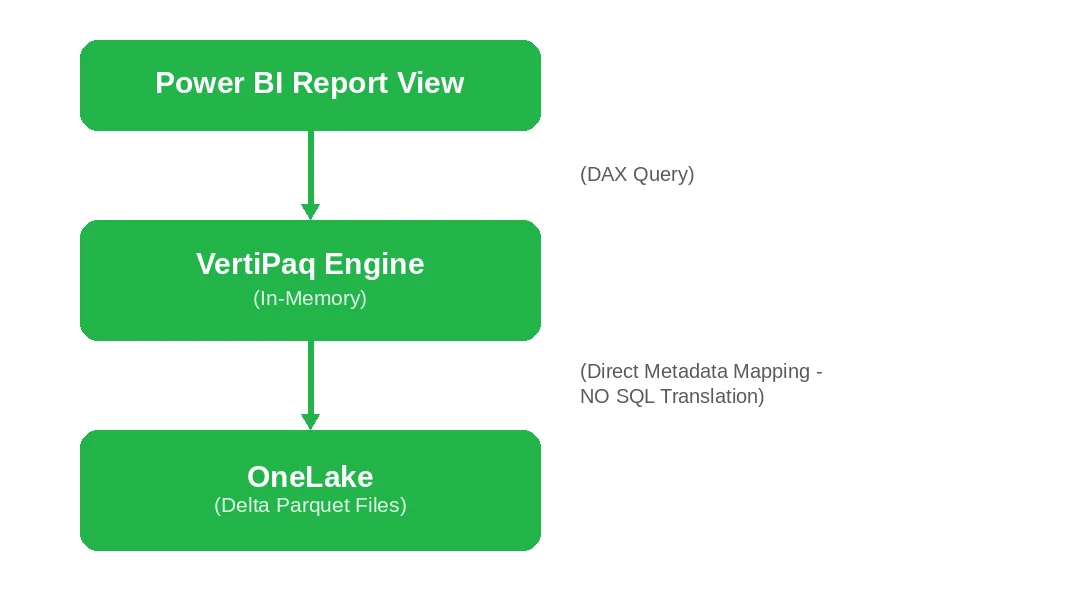
1. Direct Lake mechanics: how VertiPaq reads delta parquet directly
Before Microsoft Fabric, Power BI architects had to choose between two restrictive data access modes:
- Import mode: Fast performance by compressing data into the local VertiPaq in-memory cache, but limited by dataset size limits and the latency of scheduled refreshes.
- DirectQuery mode: No data duplication and real-time access, but sluggish performance because every user interaction translates DAX queries into heavy SQL statements run against the source database.
Direct Lake mode resolves this dilemma by bypassing import-based copy routines and SQL translation:
- Direct metadata mapping: Instead of translating DAX queries into SQL, the VertiPaq engine maps the semantic model metadata directly to the Delta Parquet physical files in OneLake. It loads the exact columns requested by a user query into memory on-demand, using Microsoft's V-Order compression algorithm.
- Fallback behavior: If a query exceeds the memory limits of your allocated Fabric Capacity (F SKU), or utilizes unsupported model configurations (such as certain types of calculated columns), Power BI gracefully drops back into DirectQuery mode via the SQL analytics endpoint. This prevents out-of-memory crashes while protecting user experience.
2. Paradigm shift: unified semantic modeling in the cloud
With Fabric, the traditional process of creating local Power BI Desktop files (.pbix) containing both the data model and the layout is replaced by a cloud-first, centralized modeling environment.
- Default semantic models: Whenever a Lakehouse or Data Warehouse is provisioned in Fabric, the system automatically generates a Default Semantic Model. This model exposes all tables written to the curated "Gold" layer of your lakehouse. If a data engineer alters a table schema or adds a column in the database, the semantic model updates instantly.
- Custom semantic models: For enterprise-scale reporting, default models can be too broad. Architects can design Custom Semantic Models in the Fabric web portal, selecting specific tables, defining complex many-to-many relationships, writing standard corporate DAX measures, and establishing security access filters.
- XMLA endpoint read/write: Every Fabric semantic model exposes an XMLA endpoint. This allows developers to use professional external development tools - such as Tabular Editor 3, DAX Studio, and ALM Toolkit - to manage enterprise models, write advanced scripts, and run performance tuning directly against the cloud-managed model.
3. Integrated security and access inheritance (OneSecurity)
When Power BI reports connect to traditional, external data warehouses (like Snowflake or Databricks), security roles and Row-Level Security (RLS) rules must be duplicated across both the database and the reporting layer.
The integration between Fabric and Power BI solves this through OneSecurity:
- Security rule inheritance: Row-Level Security (RLS) and Object-Level Security (OLS) rules defined on the SQL Analytics Endpoint or Lakehouse inside Fabric are automatically inherited by the downstream Power BI semantic models.
- Seamless Single Sign-On (SSO): When an end-user opens a report, their Entra ID (Azure AD) identity token is passed securely down to the underlying OneLake storage. Data access policies are evaluated at the storage level in real time, eliminating the need to write complex USERPRINCIPALNAME() DAX code in individual reports.
4. Enterprise ALM and DevSecOps integration
Historically, .pbix files operated as binary "black boxes," making version control, code diffing, and code collaboration in Git difficult. The Fabric integration introduces professional lifecycle management:
- PBIP project format: Power BI reports and semantic models can be saved in the developer-friendly Power BI Project (.pbip) format, which splits reports into plain-text folders containing Tabular Model Definition Language (TMDL) files and structured JSON.
- Git integration: Fabric workspaces connect directly to Azure DevOps or GitHub repositories. When a developer modifies a semantic model or custom measure in the cloud or via Tabular Editor, the change can be tracked, reviewed, and committed directly to Git.
- Deployment pipelines: Fabric provides native deployment pipelines (Development $\rightarrow$ Test $\rightarrow$ Production). This allows teams to automate release management, enforce approval gates, and automatically parameterize database connection strings as reports move through the release lifecycle.
Technical Comparison of Power BI Connection Modes to Fabric
To clearly understand the structural differences, we can compare how the query engine behaves across different connection configurations:
| Technical Parameter | Legacy Import Mode | Legacy DirectQuery Mode | Modern Direct Lake Mode |
| Data Storage Location | Compressed in-memory VertiPaq cache in Power BI cloud. | Left in the source transactional or warehouse database. | In OneLake as open, standardized Delta Parquet files. |
| Scheduled Refresh Required? | Yes. Requires scheduling recurrent runs to load fresh data. | No. Queries run live against the database. | No. Data is instantly accessible as soon as Spark writes to OneLake. |
| Query Execution Path | VertiPaq engine scans local memory. | DAX converts to SQL; queries run on target database; results return. | VertiPaq directly maps and loads Delta Parquet columns into RAM. |
| Data Scale Limits | Constrained by the RAM limit of your allocated Power BI capacity. | Constrained only by the computing power of the source database. | Virtually unlimited. Only the active columns requested are loaded into memory. |
| Source System Query Load | High, concentrated spike during scheduled batch refresh windows. | Constant, transactional load with every visual rendering or click. | Zero load on source OLTP. Queries run against Fabric's serverless capacity. |
Enterprise Microsoft Fabric + Power BI Architecture Diagram
A standard enterprise implementation organizes the data, processing, and consumption layers into a unified, secure flow:
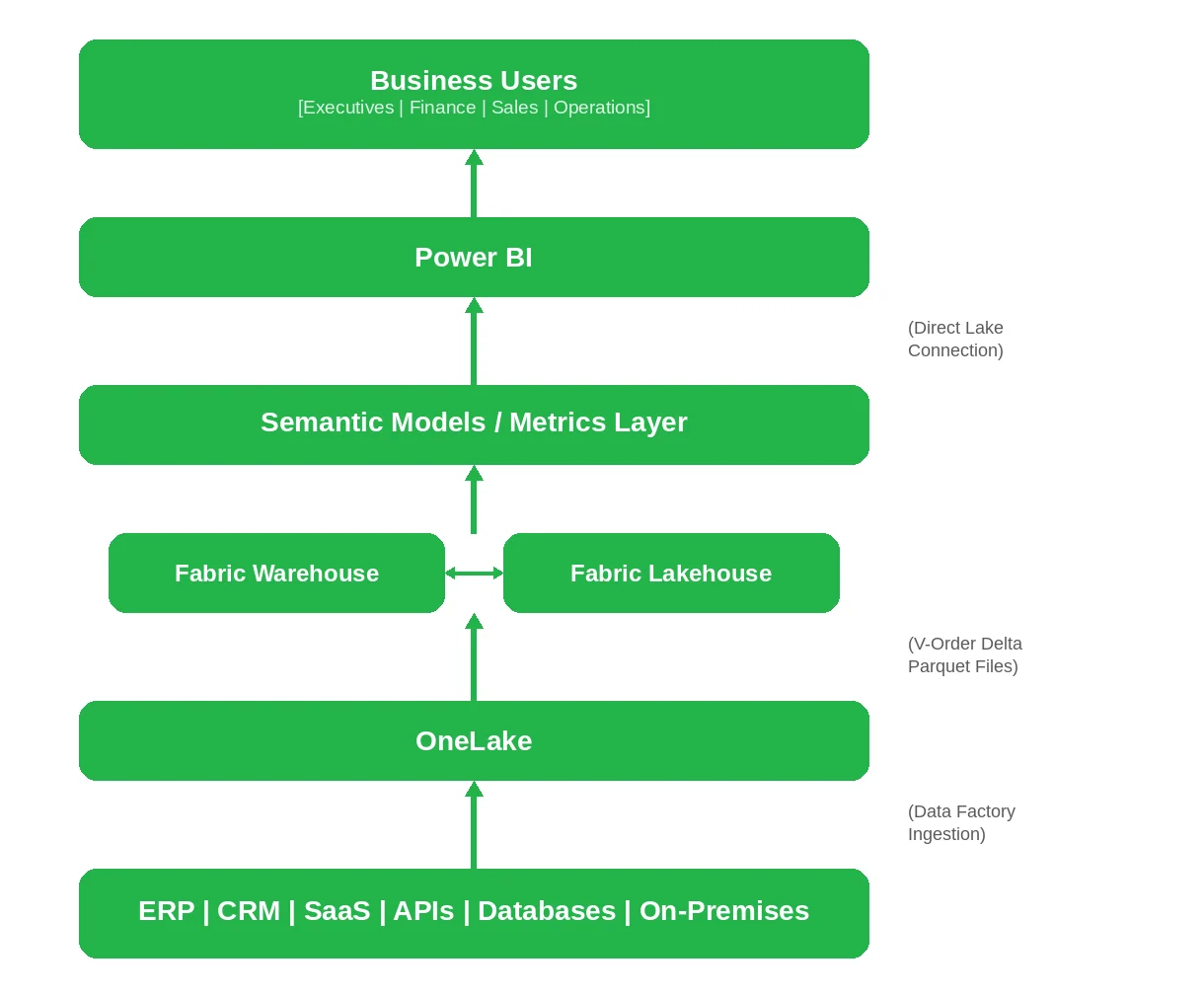
- The data source layer: Consists of all primary transactional systems. Fabric's Data Factory leverages secure on-premises data gateways and virtual network (VNet) data gateways to establish encrypted tunnels with internal databases, protecting internal networks.
- The platform storage layer (OneLake): All ingested datasets are consolidated into OneLake. Within OneLake, organizations leverage Shortcuts - a virtual file capability that allows Fabric to reference and query data stored in external cloud environments (such as AWS Amazon S3 or Google Cloud Storage) without copying or transferring the physical files, avoiding cloud data egress fees.
- The analytics and semantic layer: The raw transactional tables are processed through Spark engines and structured into dimensional schemas. Microsoft Purview is integrated at this layer to automatically discover data, catalog assets, trace data lineage, and enforce corporate data classification policies.
- The consumption layer (Power BI): Power BI connects directly to the curated semantic models. Executive leadership, business analysts, and operational teams consume interactive dashboards through the Power BI Service. Because the entire architecture is tied to Microsoft Entra ID, user permissions configured at the database level automatically apply to all downstream reports.
Benefits of Power BI and Microsoft Fabric Integration
Organizations that migrate from standalone Power BI deployments to an integrated Microsoft Fabric platform achieve improvements across several core business areas:
- Improved consistency across reports
By consolidating data into OneLake and establishing unified semantic models, enterprises can reduce conflicting report outputs and inconsistent calculations. Every department - from Finance to Supply Chain - queries the exact same certified dimensional schemas, ensuring better consistency across all corporate dashboards.
- Faster analytics delivery
Direct Lake mode can reduce the need for traditional, scheduled import refreshes. As soon as new data lands in the Fabric Lakehouse, it is instantly available in Power BI reports, reducing reporting latency and accelerating operational decision-making.
- Lower data platform complexity
Integrating Power BI with Microsoft Fabric allows organizations to decommission expensive, complex, and disjointed legacy technology stacks. This consolidation simplifies vendor management, reduces cloud infrastructure costs, and minimizes the need for specialized IT maintenance.
- AI-ready enterprise data
Microsoft Fabric organizes and structures your enterprise data, preparing your organization to leverage advanced artificial intelligence. With your data consolidated in Delta Parquet formats within OneLake, you can seamlessly deploy built-in Microsoft Copilot integrations to generate automated report drafts, write complex DAX calculations, and execute predictive machine learning models using natural language.
Microsoft Fabric Limitations and Considerations
For a balanced implementation strategy, organizations must evaluate the technical trade-offs and current limitations of Microsoft Fabric before initiating a migration:
1. Capacity planning complexity
Fabric compute power is managed through F SKUs (Fabric Capacity). Unlike standard SaaS pricing, organizations must actively monitor and manage capacity consumption. High-concurrency query spikes, poorly written DAX calculations, or unoptimized Spark jobs can trigger temporary capacity throttling, causing performance drops for downstream Power BI reports.
2. Legacy ETL migration overhead
Migrating to Fabric is not a "lift-and-shift" operation. Existing legacy ETL pipelines (e.g., SSIS, complex SQL stored procedures, or third-party data integration tools) must be rebuilt or refactored to align with Fabric’s Spark-based and Dataflow-driven engines. This requires significant engineering effort and code validation during the migration phase.
3. Governance maturity requirements
Fabric simplifies data access by offering unified storage (OneLake). However, without strict, pre-configured workspace security policies, tenant admin controls, and standardized naming conventions, the platform can quickly suffer from workspace clutter, duplicate shortcuts, and fragmented data ownership.
4. Specialized skill gaps
To maximize the value of Microsoft Fabric, internal IT teams must expand their skills beyond traditional Power BI development. Organizations will require data engineering expertise in PySpark/SQL Notebooks, delta lake management, and cloud-native network architecture.
Microsoft Fabric Migration Strategy: Step-by-Step Roadmap
Transitioning your enterprise analytics infrastructure to Microsoft Fabric requires a structured, multi-phase execution path to guarantee zero business downtime.
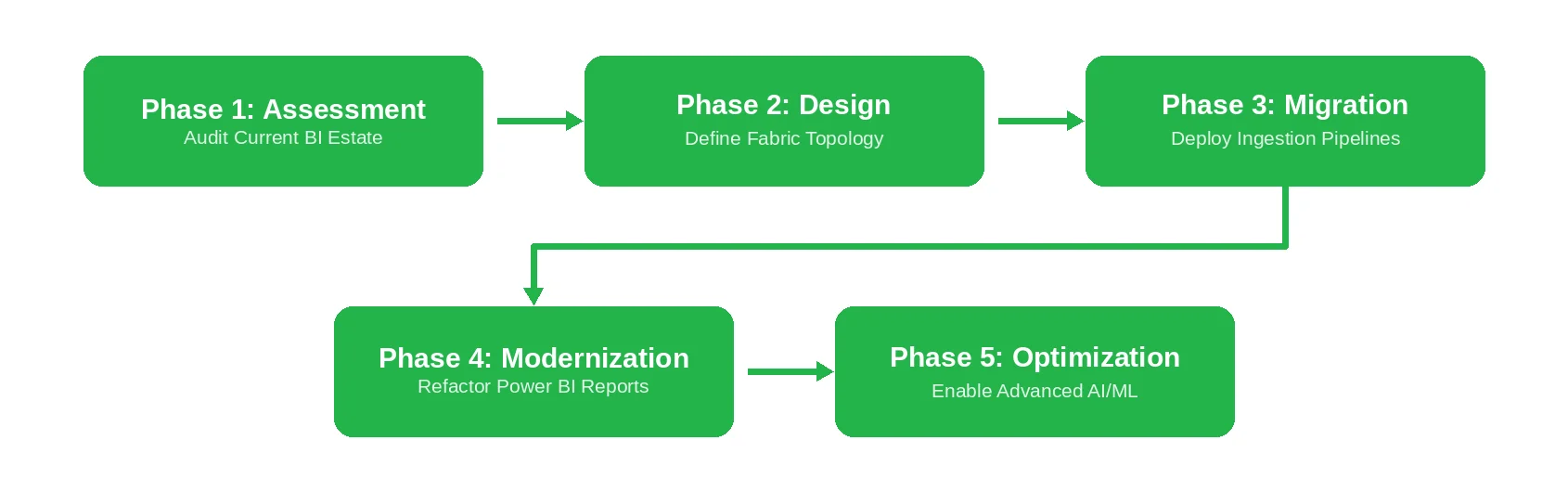
Phase 1: Assessment and discovery
Run a comprehensive audit of your current Power BI workspaces, active datasets, underlying database sources, and reporting dependencies. Identify redundant files, unused reports, and unoptimized data models to define your migration scope.
Phase 2: Architecture and governance design
Design your target Fabric workspace topology, OneLake folder structures, and security frameworks. Define your workspace boundaries, map Entra ID security groups, establish data classification policies, and determine your required Fabric capacity requirements.
Phase 3: Data platform migration
Establish secure connections to your primary data sources. Deploy Fabric Data Factory pipelines to automate ingestion, configure OneLake shortcuts to reference external cloud assets, and build Spark-based lakehouse processing workflows to structure your gold-tier tables.
Phase 4: Power BI modernization and transition
Refactor your legacy Power BI reports to connect directly to your newly established, certified Fabric semantic models. Transition high-volume workspaces from legacy Import models to high-performance Direct Lake mode, and publish modernized dashboards to secure business portals.
Phase 5: Training, adoption, and optimization
Roll out targeted, role-based training programs across your departments to drive platform adoption. Monitor your Fabric capacity utilization to optimize performance, establish ongoing data quality checks, and begin deploying advanced AI and machine learning features.
How Long Does Microsoft Fabric Implementation Take?
The timeline required to deploy Microsoft Fabric depends heavily on your data complexity, migration scope, and organizational governance maturity.
Implementation timeline estimates
| Migration Scope | Typical Duration | Focus Areas | Key Deliverables |
| Departmental Analytics Pilot | 3–6 Weeks | Individual business unit tracking, limited data sources, and fast-path dashboards. | A certified department semantic model and dynamic Power BI reporting suite. |
| Business Unit Migration | 1–3 Months | Multi-system data ingestion, intermediate data transformation, and cross-workspace security mapping. | A fully functional Fabric Lakehouse and consolidated regional reporting dashboards. |
| Enterprise Platform Modernization | 3–12 Months | Full-scale ERP/CRM database integration, automated governance rules, global security, and continuous AI modeling. | A globally distributed enterprise data platform, tenant-wide governance, and cross-entity BI. |
Microsoft Fabric Implementation Cost Considerations
When planning your Microsoft Fabric migration budget, technology leaders should evaluate several key cost drivers:
- Fabric capacity requirements: Fabric is billed based on pre-allocated compute capacity (F SKUs), allowing organizations to dynamically scale compute resources up or down to align with active work hours.
- Data volume and Lakehouse storage: OneLake storage is charged at standard cloud rate structures based on active storage sizes, making data data deduplication and compression highly cost-effective.
- Engineering and migration effort: The complexity of your legacy data structures, custom code debt, and integration requirements dictates the required consulting and engineering hours.
- Support and enablement services: Ongoing platform optimization, data governance training, and Center of Excellence (CoE) enablement ensure long-term, self-sustaining operations.
Microsoft Fabric vs. Traditional Data Platforms
Evaluating Microsoft Fabric against traditional market alternatives highlights key differences in architectural approaches and operations.
Comparative data platform landscape
| Platform | Core Strength | Architectural Model | Primary Advantage | Primary Trade-off |
| Microsoft Fabric | Unified end-to-end SaaS analytics. | Integrated, in-memory Delta Lake (OneLake) engine. | Seamless native Power BI and Azure ecosystem integration. | Requires capacity planning (F SKU management). |
| Snowflake | High-performance cloud data warehousing. | Decoupled compute and SQL storage warehouse. | Exceptional SQL performance and multi-cloud availability. | Separate platform integration needed for reporting. |
| Databricks | Advanced data engineering and machine learning. | Open, lakehouse architecture based on Spark. | Industry-leading data science and heavy processing power. | High technical skill requirements and platform complexity. |
| Traditional BI Stack | Standardized, existing enterprise reporting. | Distributed on-premises or hybrid databases. | No immediate platform migration costs. | High maintenance overhead and data fragmentation. |
Why Choose Emerline for Microsoft Fabric and Power BI Implementation
Transitioning your enterprise analytics infrastructure away from unmanaged data silos and manual reporting into a secure, automated, and unified Microsoft Fabric environment requires a partner with deep specialized capabilities across cloud data engineering, advanced database modeling, and strict enterprise security protocols.
Establishing a scalable data platform demands more than simply deploying standard software features; it requires aligning your entire operational data estate to protect margins, eliminate compliance risks, and accelerate reporting cycles. Minor architectural errors or configuration oversights within data lakehouse schemas can result in inaccurate reports, processing latency, and unexpected cloud capacity costs.
As a certified Microsoft Solutions Partner with deep capabilities across the enterprise cloud and data engineering ecosystem, Emerline helps mid-market and enterprise businesses convert traditional, manual reporting tasks into smooth, automated corporate operations. We focus on optimizing your underlying data pipelines, ensuring your modern analytics architecture supports rapid business growth while completely removing technical debt from your core platforms.
Our elite data engineering and analytics teams collaborate directly with your product owners, security officers, and technology leads to clean technical debt, integrate siloed line-of-business platforms, and deploy performant cloud-native solutions tailored to your exact regulatory and operational constraints.
Emerline provides comprehensive end-to-end support for your Microsoft Fabric migration:
- Fabric architecture design: Creating highly optimized, scalable, and secure lakehouse and warehouse structures tailored to your data footprint.
- Power BI modernization: Transitioning legacy reports from heavy import models to high-performance Direct Lake semantic models.
- Advanced data engineering: Building robust, automated Data Factory ingestion pipelines and Spark Notebook transformation scripts.
- Governance and security configuration: Implementing tenant-wide security roles, data classification policies, and Purview integration.
Contact our enterprise architects today to arrange a comprehensive technical readiness evaluation of your current analytics environment, streamline your global compliance footprint, and establish a secure, automated source of operational truth.
Frequently Asked Questions
- What is the difference between Microsoft Fabric and Azure Synapse?
Azure Synapse is a Platform-as-a-Service (PaaS) solution that requires manual provisioning, networking configuration, and resource integration across multiple components. Microsoft Fabric is an integrated Software-as-a-Service (SaaS) platform where all data workloads - including Synapse Data Engineering, Warehousing, and Data Factory - are natively managed under a single, unified workspace.
- Is Microsoft Fabric replacing Azure Data Factory?
No. Microsoft Fabric integrates Azure Data Factory’s ingestion and pipeline capabilities as a core SaaS workload. While standalone Azure Data Factory PaaS services remain supported by Microsoft, Fabric’s Data Factory provides a more streamlined, integrated experience inside the unified OneLake environment.
- Does Microsoft Fabric replace a data warehouse?
Yes. Microsoft Fabric includes a fully-featured, serverless SQL Data Warehouse workload. This warehouse stores all transactional tables as open Delta Parquet files in OneLake, separating compute from storage to deliver high-performance SQL querying without the management overhead of traditional SQL databases.
- What is the difference between Power BI and Microsoft Fabric?
Power BI is the front-end experience layer of the analytics stack, focused on data visualization, reporting, and self-service analytics. Microsoft Fabric is the broader, full-stack data engine that sits beneath Power BI, providing the centralized ingestion, storage (OneLake), data engineering, and governance required to power enterprise-wide analytics.
- Can Power BI work without Microsoft Fabric?
Yes. Power BI can operate as a standalone visualization tool, connecting directly to individual databases, local files, and external cloud services. However, integrating Power BI with Microsoft Fabric is highly recommended for large enterprises seeking to eliminate data duplication, automate refreshes, and establish centralized governance.
- How does OneLake improve enterprise analytics?
OneLake serves as a single, logical data lake for the entire enterprise, eliminating data silos by storing all information in standard Delta Parquet formats. It allows different business units to share data securely through Shortcuts without physical replication, significantly reducing data duplication and storage costs.
Published on Jul 29, 2026