Microsoft Fabric: Is It Worth It for Your Enterprise?
Table of contents
- Key takeaways
- What Is Microsoft Fabric?
- Key Benefits of Microsoft Fabric
- When Microsoft Fabric Is Overkill
- Data < 2 TB
- Stable ETL pipelines
- Traditional BI reporting
- When Microsoft Fabric Makes Sense
- Large-scale data platforms
- Real-time Analytics
- Complex data engineering environments
- Microsoft Fabric vs. Traditional Azure Stack
- Microsoft Fabric Cost and ROI Considerations
- When Fabric reduces costs
- When Fabric increases costs
- How to evaluate ROI
- Decision Framework: Should You Migrate?
- Frequently Asked Questions
- Conclusion: Partner with Emerline for Your Data Strategy
For enterprise Chief Information Officers (CIOs) and Data Architects, the pressure to modernize infrastructure is unceasing. The latest wave of disruption centers on Microsoft Fabric services — promoted as a unified, SaaS-based data platform destined to replace the fragmented Platform-as-a-Service (PaaS) architectures of the last decade. The marketing narrative promises a single logical data lake, a universal open data format, and revolutionary memory-speed streaming directly into dashboards.
But behind the high-gloss product demonstrations lies a multi-million-dollar financial and operational question: Is Microsoft Fabric an absolute operational necessity for your business, or is it an expensive overkill designed to solve problems your data estate doesn't actually have?
At Emerline, our principle as an enterprise technology partner is grounded in objective Return on Investment (ROI), not tech-stack hype. In this pragmatic evaluation, we step away from the marketing brochures to give you an honest look at when you should aggressively migrate to Fabric, when you should completely avoid it, and how to maximize your existing Power BI investments without over-provisioning your cloud budget.
Key takeaways
- The 2 TB operational threshold: Microsoft Fabric typically yields a positive ROI when your core analytics data estate scales past 2 to 3 Terabytes. Below this threshold, optimized Power BI Pro/PPU setups remain more cost-effective.
- The zero-copy financial advantage: Standardizing on OneLake with open Delta Parquet files eliminates the traditional "data inflation tax," cutting infrastructure costs by removing redundant database clones and ETL staging layers.
- DirectLake mode breakthrough: By mapping report engines straight to cloud storage files at memory speed, Fabric eliminates the forced trade-off between dashboard rendering performance and real-time data freshness.
- The overload and throttling risk: Fabric’s continuous background compute smoothing can mask poorly written queries. Migrating unoptimized legacy workloads without architectural refactoring leads to capacity unit exhaustion and platform throttling.
What Is Microsoft Fabric?
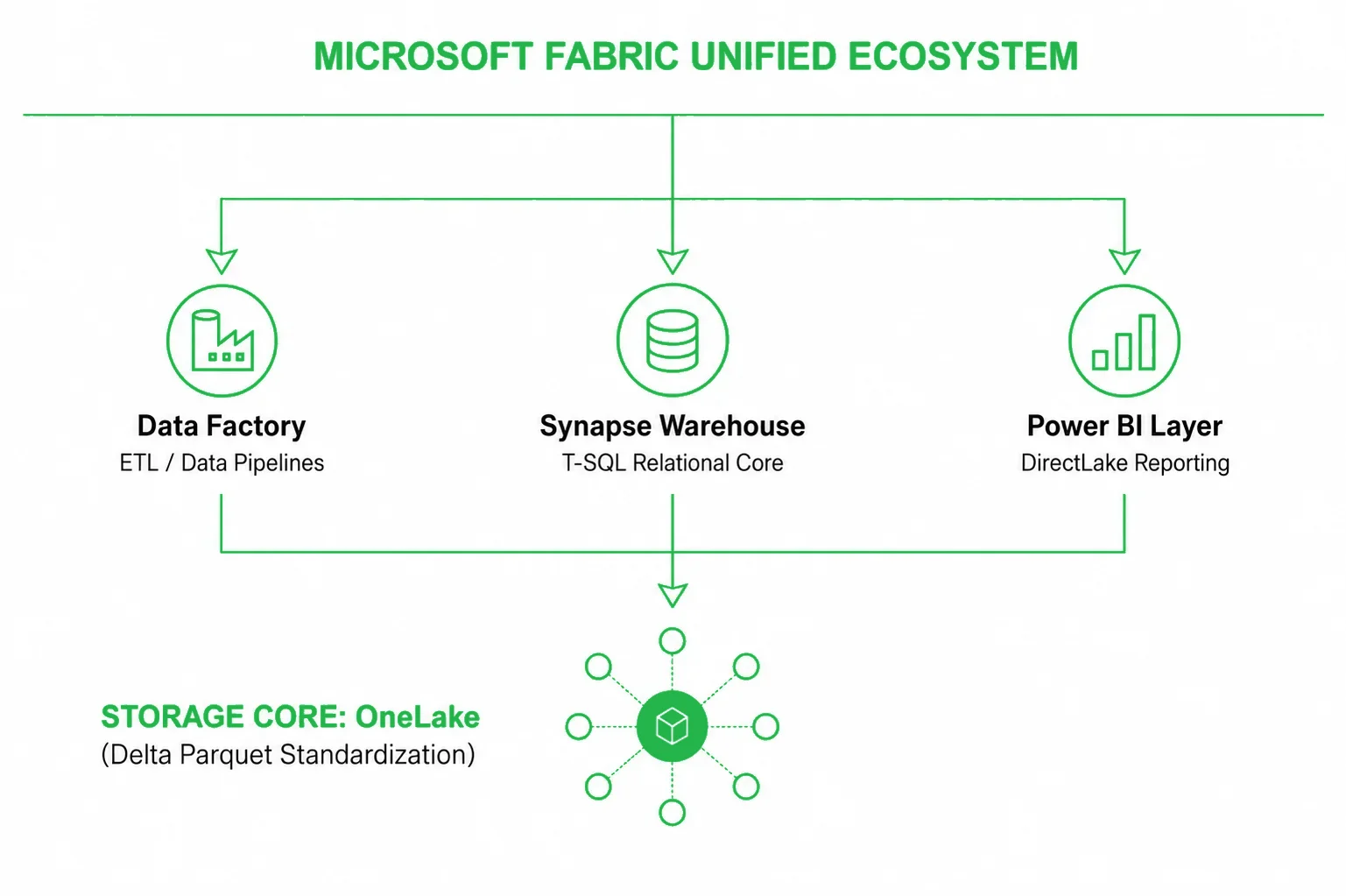
Microsoft Fabric is an all-in-one, cloud-native Software-as-a-Service (SaaS) data platform that consolidates fragmented analytics tools into a single, collaborative ecosystem. At its foundational core sits OneLake, a unified, logical data lake automatically provisioned for the entire tenant that eliminates physical data silos across departments.
By standardizing all data storage on the open-source Delta Parquet format, Fabric allows its specialized compute engines—spanning Data Engineering, Synapse Data Warehousing, Data Factory, and Data Science—to query the same physical files simultaneously without data duplication. This tight integration unlocks DirectLake Mode, a revolutionary query routing mechanism that enables Power BI reports to load massive data columns straight into memory at hardware-resident speeds, completely bypassing traditional data import and scheduled refresh phases.
Ultimately, Fabric shifts enterprise data management from a complex Platform-as-a-Service (PaaS) assembly task to an instantly accessible, centrally governed analytics environment.
Key Benefits of Microsoft Fabric
While Microsoft Fabric is often discussed as a technical replacement for fragmented Azure analytics stacks, its real value lies in operational simplification, data accessibility, and the elimination of the "technical tax" that organizations pay when moving data between disparate systems.
- Unified data architecture
Traditionally, data teams are forced to build and maintain bridges between data lakes (for data engineers) and data warehouses (for SQL developers). Fabric unifies these environments natively. Through the use of Workspaces, engineers, data scientists, and business intelligence analysts operate within the same interface, leveraging shared compute resources and viewing the exact same semantic metadata. This cohesion breaks down organizational silos and dramatically speeds up the development lifecycle for new analytical products.
- Radical reduction in data duplication
In a legacy data estate, data inflation is a hidden infrastructure cost. Data is extracted from source databases, landed in a raw lake, copied into a staging schema, transformed into production warehouse tables, and then duplicated yet again into proprietary caches within a Power BI dataset. Fabric’s Zero-Copy Architecture eliminates this chain of replication. Because data is stored exactly once as a Delta Parquet file within OneLake, multiple compute engines interact with the same physical storage block, cutting cloud storage bills and eliminating data version synchronization errors.
- Faster time-to-insight with DirectLake
Query performance has historically come at the cost of data freshness. Import mode is fast but relies on long-running, scheduled processing windows; DirectQuery mode is live but strains data warehouse resources and slows down dashboard rendering under high user concurrency. Fabric’s DirectLake mode solves this trade-off. By mapping the Power BI Analysis Services engine straight to the open-source Delta Parquet files in OneLake, the system loads data at hardware-resident speeds. Executives interact with live operational metrics operating at memory speed, with no data refresh latency.
- Simplified security and compliance governance
Managing security boundaries across fragmented analytical systems introduces major compliance risks. Data security teams are typically forced to configure ACLs in the data lake, mirror those definitions within the SQL warehouse, and rebuild them using Row-Level Security (RLS) within individual BI models. Fabric implements a unified security inheritance pattern. When a data governance policy—such as column-level masking or row-level filtering—is established at the OneLake or Data Warehouse layer, that exact security context flows down automatically to the Power BI layer, ensuring audit-ready compliance without administrative duplication.
- Lower IT administrative overhead
Operating a multi-tier PaaS architecture requires significant DevSecOps and administrative effort. Teams spend valuable cycles configuring complex networking rules, setting up Virtual Networks (VNets), managing Azure Service Principals, and tuning dedicated cluster warmup times. As a fully managed SaaS platform, Microsoft Fabric abstracts this infrastructure layer entirely. Clusters are "instant-on," scaling up and down automatically on demand, allowing your data engineering team to focus on extracting business value from data rather than managing cloud infrastructure pipelines.
When Microsoft Fabric Is Overkill
Microsoft Fabric is not a default requirement for running a highly successful, data-driven enterprise. If your data estate falls into the following parameters, migrating to Fabric right now will likely yield a negative ROI, introducing unnecessary architectural complexity and higher baseline subscription costs without a measurable performance lift.
Data < 2 TB
If your relational data warehouse and historical data aggregates sit comfortably below 1–2 TB, the proprietary VertiPaq in-memory engine inside standard Power BI is already exceptionally efficient. When properly modeled, a 500 GB relational database can compress down to less than 50 GB inside a Power BI Import model. Paying for a continuous, serverless Fabric capacity (F-SKUs) to process data at this scale is structurally inefficient.
Stable ETL pipelines
If your legacy Azure Data Factory (ADF) pipelines or SQL Server Integration Services (SSIS) packages execute smoothly within your nightly processing windows, and your business users open their dashboards to fresh, daily aggregated data, your current system is working. Migrating these functional pipelines to Fabric Data Factory pipelines or Spark Notebooks just to achieve "SaaS unity" is a waste of engineering resources.
Traditional BI reporting
Fabric excels at breaking down silos between Data Engineering, Data Science, and BI. However, if your business units do not require real-time machine learning inference, high-velocity streaming IoT ingestion, or complex Python/Spark-driven data manipulation, you do not need a multi-engine platform. Classical relational SQL views feeding optimized Power BI Star Schemas remain the industry gold standard for traditional corporate reporting.
When Microsoft Fabric Makes Sense
Conversely, architectural limits are real. As an enterprise data estate scales, there comes a clear tipping point where a fragmented PaaS architecture begins to collapse under its own weight. If your organization is hitting the following functional bottlenecks, a transition to Microsoft Fabric is an architectural necessity to prevent data stagnation.
Large-scale data platforms
When your enterprise handles multi-terabyte or petabyte-scale data lakes, data duplication becomes a massive financial drain. In a traditional stack, data lands in a lake, moves to a staging area, copies into a data warehouse, and caches again inside Power BI. Transitioning via a strategic Power BI to Microsoft Fabric migration introduces a zero-copy architecture that solves this: data is stored exactly once in OneLake, and every engine reads from that single universal file, instantly flattening storage costs.
Real-time Analytics
If your business demands immediate visibility on high-velocity data streams (e.g., global logistics, rapid retail inventory shifts, high-frequency financial tracking) without compromising on report rendering speeds, Fabric is a necessity. DirectLake mode delivers the sub-second query speed of Import mode with the live data freshness of DirectQuery, completely removing the query strain from your relational engines.
Complex data engineering environments
If your data engineering team spends up to 40% of their weekly operational cycles troubleshooting broken ETL pipelines whose only job is to ferry data between disconnected cloud components, your technical debt is too high. Fabric unifies the orchestration, data warehouse, and visualization layers into a single SaaS workspace, eliminating network subnet complexities, service principal configurations, and cross-component authentication bottlenecks.
Microsoft Fabric vs. Traditional Azure Stack
Understanding the operational boundary between a traditional PaaS architecture and Microsoft Fabric requires analyzing how each platform handles compute allocation, data storage, and query execution.
| Operational Dimension | Traditional Azure Stack (ADF + Synapse + Power BI) | Modern Fabric SaaS Architecture (F-SKU Capacity) |
|
Data Storage Approach |
Fragmented, proprietary data caches and duplicated report extracts. | Single, open-standard logical repository (OneLake) using Delta Parquet. |
| Compute Engine Logic | Fixed compute resources locked exclusively to specific siloed tasks. | Dynamically shared serverless compute engines for SQL, Spark, and BI. |
| Performance Safeguards | System drops subsequent user queries if local memory limits are breached. | Computational Smoothing dynamically balances peak loads over a 24-hour window. |
| Security Configuration | Disconnected permissions configured manually across multiple systems. | Native Microsoft Entra ID security inherited automatically from storage to report. |
| Financial Allocation | Fragmented bills across multiple Azure services, making chargeback complex. | Consolidated capacity limits featuring granular consumption metrics. |
Microsoft Fabric Cost and ROI Considerations
Microsoft Fabric is not inherently cheaper than a traditional Azure stack. Organizations often focus heavily on the consolidated SaaS user experience while underestimating the impact of continuous F-SKU capacity consumption. To evaluate whether Fabric makes financial sense, IT leaders must look past simple license swapping and analyze the total cost of ownership (TCO).
When Fabric reduces costs
Fabric delivers significant cost reductions in architectures marked by heavy underutilization or massive data redundancy. In a standard PaaS stack, you pay independently for idle Azure Synapse Data Warehouse DWUs, processing power for Azure Data Factory integration runtimes, and dedicated Power BI Premium nodes (P-SKUs).
Fabric consolidates these isolated costs into a single, shared pool of Fabric Capacity (F-SKUs). Furthermore, Fabric introduces a background management feature called Smoothing. This feature spreads short, intensive compute spikes (such as a massive, hour-long PySpark data processing run) across a continuous 24-hour window. This allows organizations to provision a smaller, less expensive base capacity tier that safely "bursts" past its nominal limits without crashing user dashboards or triggering immediate overage fees.
When Fabric increases costs
Fabric can inadvertently drive up infrastructure costs if an organization implements a "lift-and-shift" migration of unoptimized legacy workloads. Because Fabric relies on a shared serverless compute pool, poorly designed, non-indexed SQL queries or inefficiently coded Spark loops will continuously burn through your capacity units (CUs). If your capacity experiences cumulative, unmitigated overload, the platform engages Throttling. When throttling is active, background ETL processes stall and interactive reporting dashboards experience severe latency, forcing IT leaders into unexpected, expensive capacity upgrades to maintain baseline operations.
How to evaluate ROI
To accurately measure the ROI of a Microsoft Fabric deployment, data leaders must quantify both hard infrastructure savings and soft operational efficiencies:
- Storage cost deflation: Calculate the savings realized by replacing multiple duplicated SQL staging databases and data extracts with a single OneLake repository.
- Engineering efficiency: Measure the reduction in engineering hours spent on building, monitoring, and debugging brittle cross-component ETL pipelines.
- Business velocity: Quantify the economic value of moving from a 24-hour data refresh lag to live, sub-second data availability via DirectLake mode.
Decision Framework: Should You Migrate?
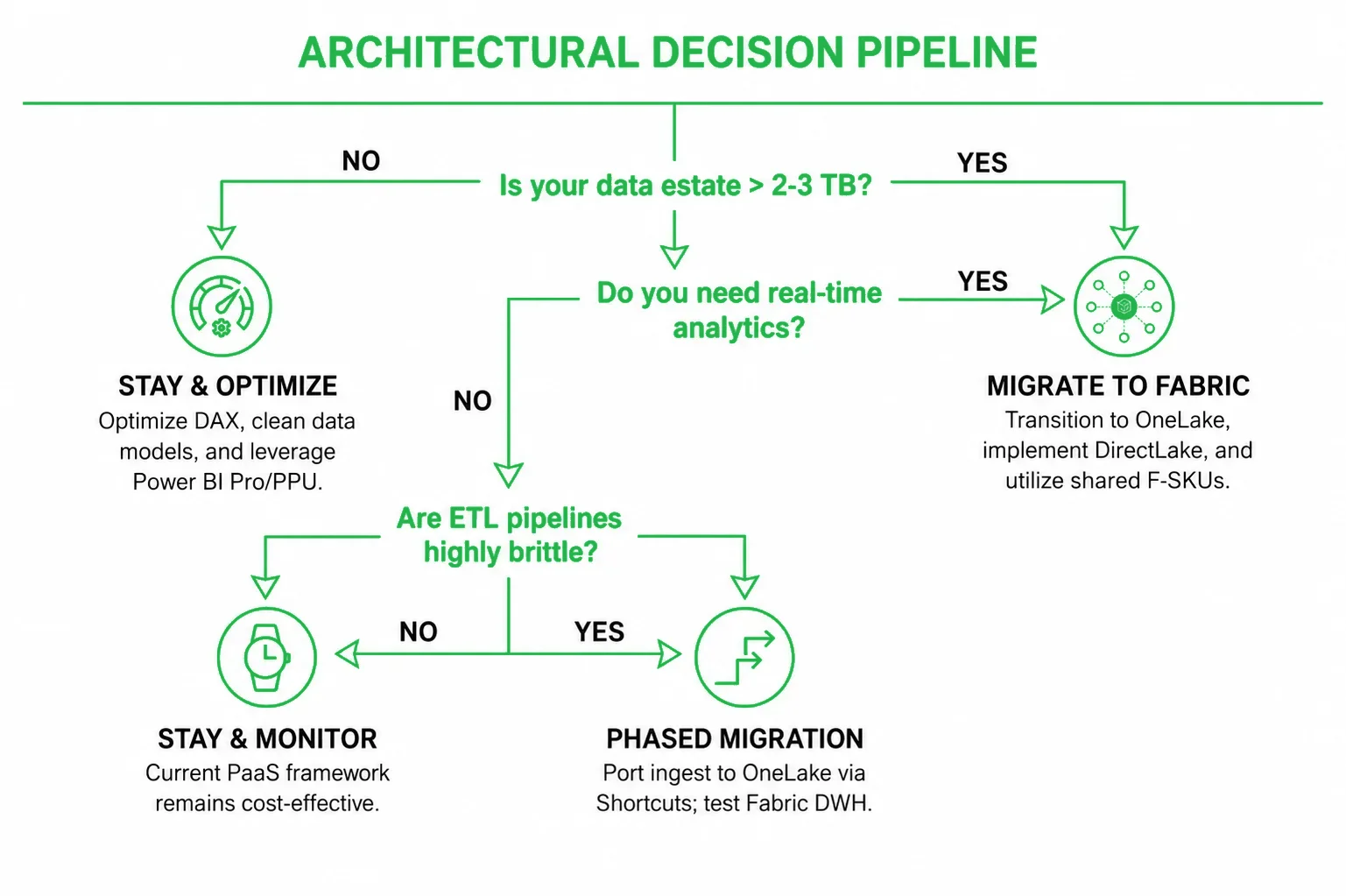
To strip the vendor pressure out of your next infrastructure roadmap meeting, use this objective technical scorecard to determine your path forward:
Frequently Asked Questions
Is Microsoft Fabric replacing Power BI?
No, Fabric integrates Power BI. Power BI serves as the specialized visualization and business intelligence layer within the broader Microsoft Fabric SaaS ecosystem, upgraded to stream data natively out of OneLake without manual data caching.
Is Fabric worth it for small businesses?
Generally, no. For small businesses operating with sub-terabyte datasets and standard analytical reporting, the entry cost of a continuous Fabric Capacity (F-SKU) outpaces the immediate ROI. Utilizing standalone Power BI Pro or Premium per User (PPU) licenses remains more cost-effective.
Can Microsoft Fabric replace Azure Synapse Analytics?
Yes, Fabric is designed as the strategic evolutionary successor to Azure Synapse. It absorbs Synapse's independent SQL warehousing, Apache Spark engineering, and Data Factory orchestration layers into a single, unified SaaS experience, deprecating the need to deploy and manage separate Synapse workspaces.
Do you still need Power BI with Microsoft Fabric?
Yes. Fabric handles the back-end infrastructure—data lake consolidation, warehouse storage, pipeline orchestration, and data science modeling—but you still require Power BI as the front-end presentation and semantic layer to model metrics, build dashboards, and deliver interactive insights to business users.
Conclusion: Partner with Emerline for Your Data Strategy
Transitioning from traditional business intelligence setups to an integrated Microsoft Fabric environment represents a major architectural shift rather than a basic tool replacement. However, building a clean, centralized data core within Fabric is also a prerequisite for rolling out advanced corporate automation layers. If your organization plans to deploy advanced, autonomous AI products and custom AI agents on top of corporate data, they will require a secure, unified data foundation like OneLake to act as their absolute corporate knowledge base.
Transitioning a high-capacity data ecosystem requires a secure roadmap, meticulous capacity optimization, and deep architectural design. Minor misconfigurations in workload isolation or table structures can trigger capacity unit throttling and impact user dashboards.
As an established global technology partner with deep expertise as a Microsoft Solutions Partner, Emerline helps organizations mitigate transition risks, eliminate technical legacy debt, and restructure backend architectures via expert data engineering services. We evaluate your active Power BI Premium footprint, optimize data models for DirectLake connectivity, and ensure your unified analytics infrastructure is production-ready.
Contact our enterprise data and analytics engineers today to arrange a comprehensive evaluation of your data platform strategy, map your capacity milestones, and establish a high-performance modern data estate.
Published on Jun 25, 2026