Microsoft for Manufacturing: Solutions, Architecture, AI, and Implementation
Table of contents
- How the Microsoft Manufacturing Ecosystem Fits Together
- Where Microsoft Creates Value
- Digital engineering
- Intelligent factories
- Supply chain
- Connected products and workforce
- Sustainable operations
- Data, Integration, and AI: The Foundation Underneath Those Scenarios
- Manufacturing data has to be usable
- Integration needs to preserve business context
- AI exposes weak data foundations quickly
- What Implementation Looks Like in a Real Manufacturing Environment
- Question 1: What needs to stay, change, or disappear?
- Question 2: What should the target operating model look like?
- Question 3: How to phase the rollout?
- Question 4: What happens around go-live?
- Common Challenges and Architectural Trade-Offs
- Cloud and edge need different jobs
- Legacy systems are not automatically technical debt
- IT/OT integration raises the stakes
- Security has to cover both IT and OT
- Production continuity shapes the rollout
- What Affects Implementation Costs
- Where the budget usually moves
- Building a more reliable estimate
- Why Emerline for Microsoft Manufacturing Transformation?
- Conclusion
- Key Questions About Microsoft for Manufacturing
- Is Microsoft for manufacturing a single product?
- Which Microsoft product is most relevant to manufacturing operations?
- Can Microsoft work with existing MES or factory systems?
- Where does Microsoft Fabric fit into manufacturing?
- How is AI used in Microsoft manufacturing scenarios?
Few manufacturers operate on a clean, unified technology stack. Product data may sit in PLM and CAD systems, production teams rely on MES and shop-floor applications, ERP handles planning and finance, and operational data flows through IoT, quality, warehouse, and analytics platforms introduced at different stages of the company’s growth. The result is often a capable but fragmented environment in which engineering, production, supply chain, and business teams work with different views of the same operation.
Microsoft for manufacturing is designed for that reality. It is not a single manufacturing application, but an ecosystem that brings together technologies such as Dynamics 365, Azure, Microsoft Fabric, Microsoft 365, Power Platform, and Microsoft AI, alongside partner and third-party solutions. Microsoft currently frames its manufacturing strategy around four broad scenarios: digital engineering, intelligent factories, resilient supply chains, and connected customers.
The practical value comes from how those technologies work together across business systems, factory operations, data, and AI. For a manufacturer, the aim is usually not to replace every existing system with Microsoft technology. A more realistic approach is to connect the systems that already matter, decide where standard Microsoft capabilities fit, and build a more consistent flow of data between engineering, factories, supply chain, service, and enterprise applications. In brownfield environments with established MES, PLM, ERP, SCADA, and IoT platforms, this often starts with the kind of architecture, integration, and modernization planning covered by Microsoft consulting services.
How the Microsoft Manufacturing Ecosystem Fits Together
The easiest way to understand Microsoft for manufacturing is to stop thinking in terms of individual products and look instead at the roles those products play across the manufacturing environment. Dynamics 365 handles core business and operational processes; Azure extends into cloud, edge, IoT, and engineering workloads; Microsoft Fabric brings operational and enterprise data into a common analytics environment; Power Platform and Microsoft 365 support workflows and frontline users; and Microsoft’s AI services sit across these layers rather than operating as a separate system.
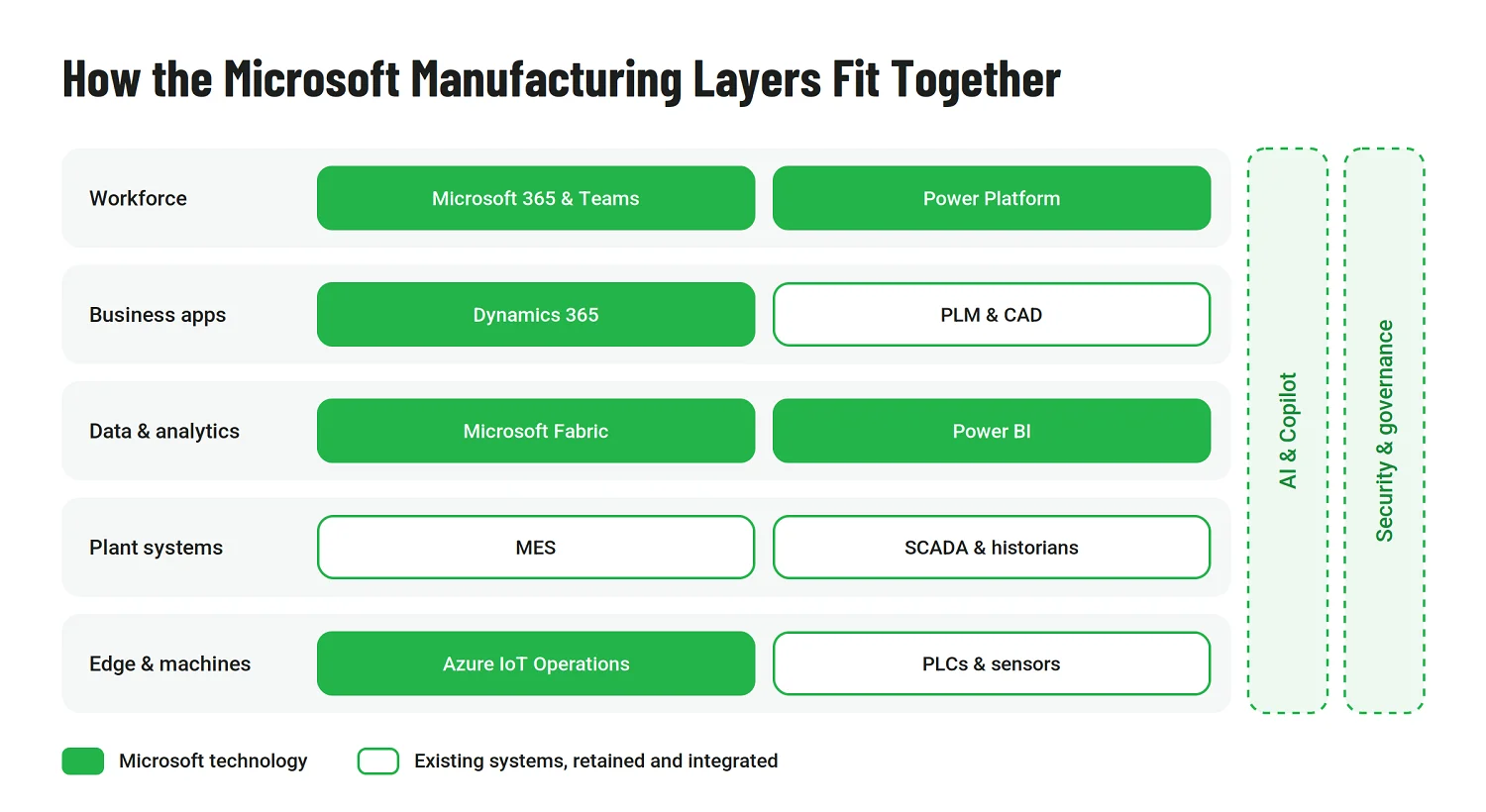
A simplified view looks like this:
|
Area |
Typical Microsoft role |
|
Business and operations |
Dynamics 365 Finance and Supply Chain Management support finance, planning, procurement, inventory, warehousing, production, and asset-related processes. |
|
Factory and edge |
Azure IoT Operations, Azure Arc, and related services connect industrial data and edge environments with cloud platforms. |
|
Data and analytics |
Microsoft Fabric and Power BI bring together manufacturing, enterprise, and IoT data for reporting, real-time analysis, and AI use cases. |
|
AI and automation |
Microsoft AI, Copilot, and Copilot Studio support analytics, assistants, agents, and workflow automation. |
|
Workforce and applications |
Microsoft 365 and Power Platform extend digital workflows to operators, technicians, supervisors, and other frontline roles. |
|
Security and governance |
Defender for IoT, Purview, identity controls, and Azure security services support IT, OT, and data governance requirements. |
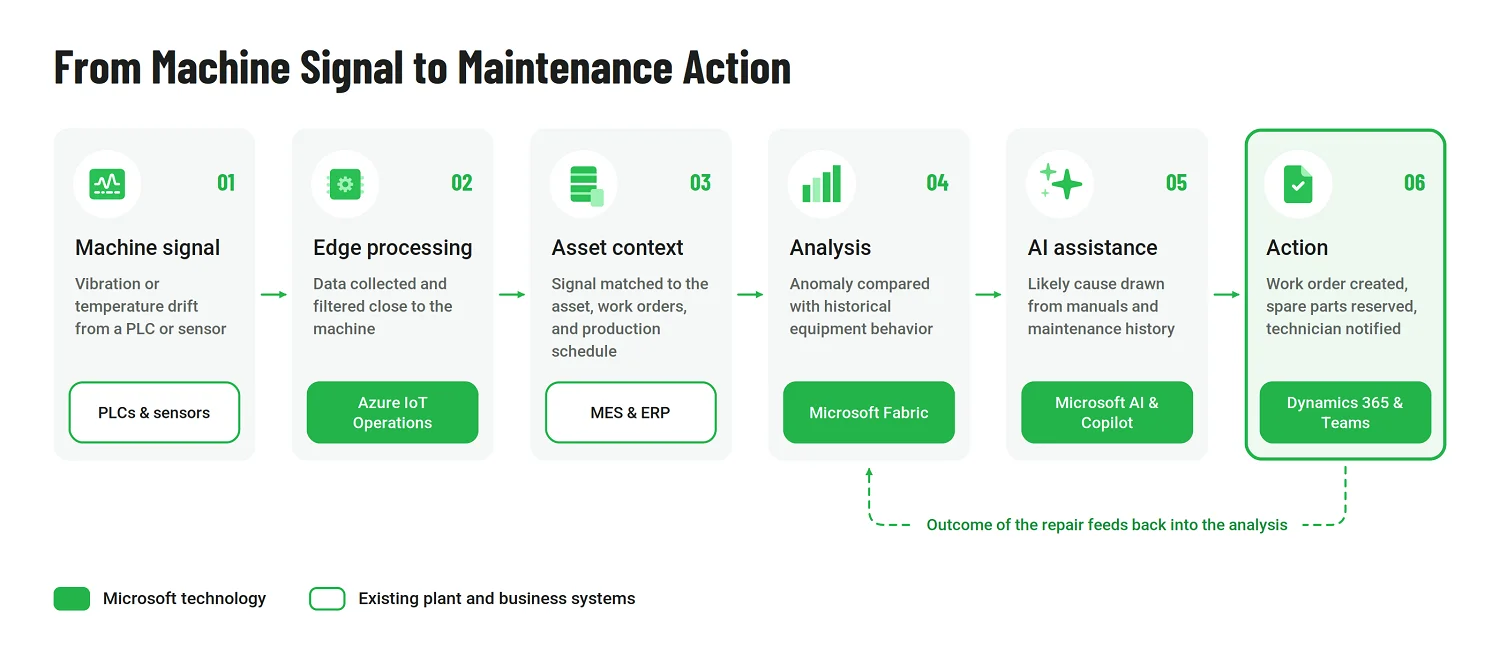
In practice, these layers are not deployed in isolation. A production issue might begin with machine or PLC data at the plant edge, appear alongside work-order or production information in an MES or ERP system, and then be analyzed through Fabric or Power BI. If AI is involved, the same workflow may also draw on maintenance history, quality records, technical documentation, or other enterprise data. It is necessary to design those connections around the manufacturing process, not the individual products or platforms.
This is especially important in brownfield environments. Existing MES, PLM, SCADA, ERP, historians, and specialized plant applications often remain in place, while Microsoft technologies provide selected capabilities around them. The architecture therefore depends heavily on data ownership, synchronization, integration patterns, security boundaries, and which processes should remain local to the plant versus move into shared enterprise platforms.
A well-designed environment does not have to use the same technology stack everywhere. The objective is consistency where it creates value — shared data, common governance, reusable integration patterns, and clearer visibility across operations — without assuming every plant or process needs the same technology stack.
Where Microsoft Creates Value
Where Microsoft creates the most value depends on the manufacturer’s priorities. For one company, that may be engineering and product development; for another, plant visibility, supply-chain planning, service, or frontline execution. The question worth asking is which parts of the environment would benefit most from better-connected data, workflows, and decision support.
Digital engineering
Product development often spans PLM and CAD systems, simulation tools, engineering change processes, and production requirements in different environments. Microsoft technologies can help connect more of that information without requiring engineering teams to abandon the specialized tools they already use.
Azure can provide scalable infrastructure for compute-intensive design and simulation workloads, while digital-twin technologies can bring product, asset, and operational information into the same analytical context. Once production and quality data begin feeding back into engineering, teams can investigate how design decisions affect manufacturability, equipment behavior, and product performance rather than treating development and operations as separate stages. AI can add another layer by helping engineers work with technical documentation, requirements, and quality information.
The real value is in shortening the distance between design decisions and what happens in production.
Intelligent factories
Factory modernization starts with visibility. Machines, programmable logic controllers, manufacturing execution systems, historians, quality systems, and enterprise applications may all contain useful information, but it is often difficult to see those signals together.
Microsoft’s intelligent-factory stack combines edge connectivity, IoT, operational data, analytics, and AI so plant-floor information can be used in a broader operational context. Azure IoT Operations and Azure Arc can support edge environments, while Dynamics 365, Fabric, Power BI, and AI services can contribute to production monitoring, analysis, and decision support.
That foundation supports use cases such as production visibility, predictive maintenance, and AI-assisted quality analysis. These use cases are most valuable when they are tied to reliable plant data and clear operational workflows. A predictive-maintenance model, for example, is only useful if the organization can connect the warning to maintenance planning, asset history, spare parts, and the people responsible for acting on it.
Supply chain
Manufacturing planning becomes difficult when demand, materials, inventory, capacity, procurement, and production are viewed separately. A customer-order change may affect raw-material requirements, available capacity, warehouse stock, and supplier commitments at the same time.
Dynamics 365 Supply Chain Management provides capabilities across planning, procurement, inventory, warehousing, production, and fulfillment, while Microsoft continues to add AI-assisted forecasting and exception-management capabilities.
The larger opportunity is to make dependencies easier to see. Planners can work with demand and supply information alongside production constraints instead of discovering conflicts only after they affect the schedule. AI is valuable when it helps narrow attention to the exceptions that deserve human review, such as supplier delays, capacity shortages, forecast changes, or inventory risks, rather than trying to automate every planning decision.
Connected products and workforce
The manufacturing relationship with a product does not necessarily end when it leaves the factory. Connected equipment can continue to provide operating data that supports remote monitoring, service planning, anomaly detection, and product improvement. That creates a feedback loop between customers, field service, engineering, and product teams.
Dynamics 365 Field Service and Azure-based IoT capabilities can support these service models, including predictive interventions and connected-product scenarios. For some manufacturers, the same foundation can also support subscription, usage-based, or outcome-oriented services.
A similar principle applies inside the plant. Operators, maintenance technicians, quality teams, warehouse employees, and supervisors often need information while they are working, not later at a desktop. Microsoft 365, Teams, Power Platform, and Copilot can bring instructions, forms, approvals, maintenance tasks, quality reporting, and operational information closer to the point of work. Done well, these tools bring manufacturing information closer to the people who need to act on it.
Sustainable operations
Manufacturers can also use connected operational data to understand energy and resource consumption in production. Combining information on equipment utilization, production output, and operating conditions makes it easier to identify efficiency losses and where changes reduce energy use or waste.
Microsoft’s data, analytics, IoT, and AI capabilities can support this type of analysis without turning sustainability into a separate technology stack. The same factory data used for production monitoring, maintenance, and optimization can also contribute to sustainability initiatives where the required measurements and reporting processes are in place.
Data, Integration, and AI: The Foundation Underneath Those Scenarios
A predictive-maintenance use case may draw on machine telemetry, work orders, maintenance history, and asset records. Quality analysis may require process parameters, inspection results, traceability data, and engineering information. Supply-chain decisions depend on a completely different combination of demand, inventory, procurement, production capacity, and supplier data.
What these scenarios have in common is that none of them works well with isolated data. The challenge is making the right information available in context, at the right level of freshness, and with clear ownership.
Manufacturing data has to be usable
Factories generate data continuously, but that data often sits in systems designed for different purposes: ERP, MES, historians, quality applications, maintenance platforms, PLM, warehouse systems, IoT platforms, and engineering tools.
A useful data foundation needs to answer practical questions such as:
- Which system is the authoritative source for a product, asset, work order, batch, or production event?
- How current does the data need to be for the use case?
- Who owns it, and who has access to it?
- How should plant-level information be combined with enterprise data?
- Which data needs harmonization before it can support analytics or AI?
Microsoft Fabric can provide a shared environment for data engineering, analytics, business intelligence, real-time intelligence, and AI. In manufacturing, that may mean bringing together ERP, MES, IoT, quality, maintenance, and other operational data without forcing every source system into the same application. For organizations using Fabric as part of that architecture, Microsoft Fabric consulting can cover data model design, governance, implementation, analytics, and AI integration.
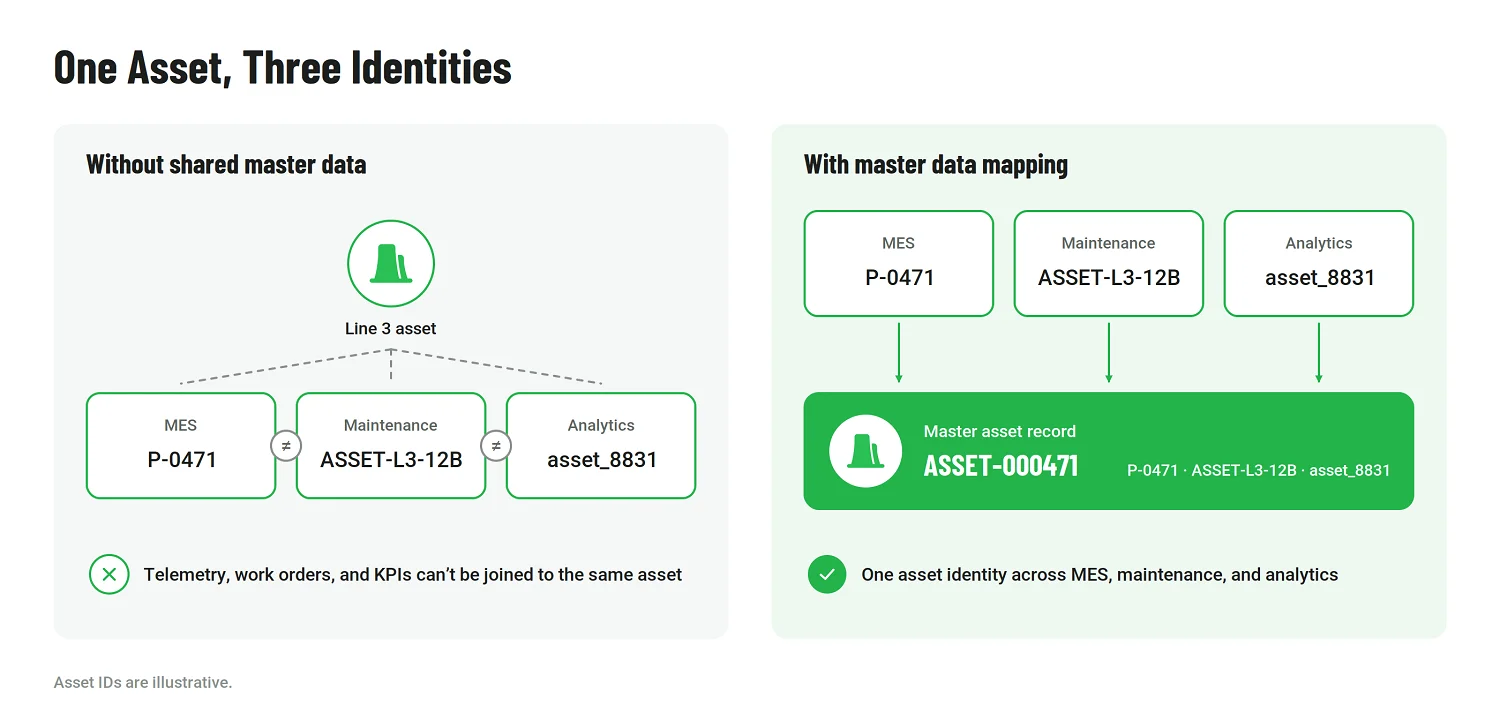
The important point is consistency. If an asset has one identifier in MES, another in maintenance, and a third in analytics, connecting the platforms technically will not solve the underlying data problem.
Integration needs to preserve business context
Manufacturing integration is rarely just about moving fields from one database to another.
Consider a few typical exchanges:
|
Process |
Information that needs to move |
Why context matters |
|
Engineering change |
Product revision, BOM, routing, specifications |
Production and procurement need to know which version is valid and when the change takes effect |
|
Production reporting |
Orders, quantities, scrap, downtime, completion status |
ERP and planning systems need operational results in a form they can interpret |
|
Maintenance |
Equipment condition, alarms, asset history, work orders |
A sensor signal only becomes useful when it is associated with the correct asset and maintenance process |
|
Quality |
Inspection results, process parameters, traceability records |
Engineering and operations need to relate a defect to the product, batch, machine, or process conditions |
This is why Microsoft integration in manufacturing often spans Dynamics 365, Azure, Fabric, Power Platform, and third-party ERP, MES, PLM, SCADA, historian, and IoT systems rather than staying inside a single Microsoft environment.
The architecture also has to reflect how factories operate. Some information can move in batches. Other events need near-real-time processing. Certain plant functions must continue even when a cloud connection is unavailable. Security boundaries between IT and operational technology add another layer of complexity.
These decisions affect reliability far more than the choice of connector or API alone.
AI exposes weak data foundations quickly
AI makes these dependencies more visible because it depends on both data quality and context.
A maintenance assistant, for example, may need equipment manuals, service history, current telemetry, and work-order information. A quality application may combine visual inspection with process conditions and traceability records. An AI-supported planner needs current demand, supply, inventory, and capacity data before its recommendations can be useful.
Microsoft is expanding AI across production, maintenance, quality, engineering, supply chain, and frontline work through machine learning, copilots, and agents. But the value of those tools still depends on the underlying manufacturing data.
That creates several requirements before AI is introduced at scale:
- Trusted sources, so the system is working with reliable information
- Clear access rules, particularly for engineering IP and operational data
- Sufficient context, so an AI system can relate information to the correct asset, product, order, or process
- Monitoring and governance, so outputs and automated actions can be reviewed
- Integration with operational workflows, so insights lead to action rather than another dashboard
Security belongs in the same design. Manufacturing environments combine enterprise IT with machines, industrial networks, production systems, and intellectual property. Microsoft technologies such as Defender for IoT, Purview, identity services, and Azure security capabilities can support those requirements. The controls still need to be designed around the actual factory architecture. Sophisticated AI cannot compensate for unclear data ownership, weak integration, or inconsistent operational context.
What Implementation Looks Like in a Real Manufacturing Environment
Manufacturing implementations rarely begin with a blank slate. A plant may already have a long-running ERP, a separate MES, local SCADA systems, PLCs from different generations, custom interfaces, spreadsheets that support critical workflows, and equipment that cannot simply be taken offline while a new platform is introduced. That makes the implementation sequence just as important as the target architecture.
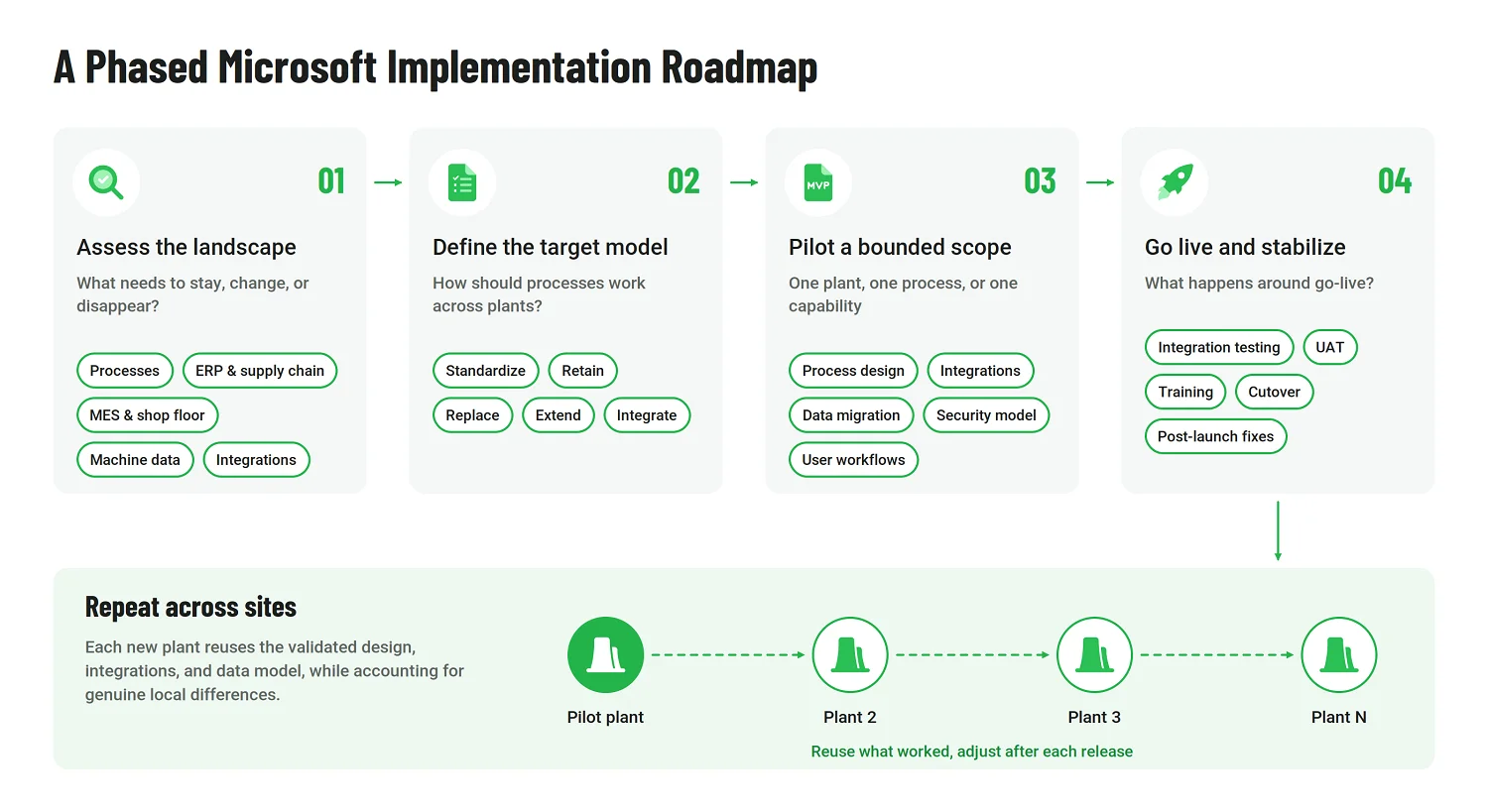
A practical Microsoft manufacturing program usually starts by answering four questions.
Question 1: What needs to stay, change, or disappear?
The first task is to understand the current operating environment in enough detail to make realistic decisions. That includes more than an application inventory.
The assessment should cover:
- Production and manufacturing processes
- ERP, supply chain, warehouse, and inventory systems
- MES, SCADA, PLCs, and other shop-floor technologies
- Engineering and product-lifecycle systems
- Quality, traceability, maintenance, and asset management
- Machine and sensor data
- Reporting and analytics
- Cybersecurity, governance, and existing integrations.
The purpose is to identify dependencies. A legacy application may look like an obvious replacement candidate until it becomes clear that three plants, several machines, and a regulatory reporting process depend on it. Conversely, a locally developed workflow may be a good candidate for standard Dynamics 365 or Power Platform functionality.
Question 2: What should the target operating model look like?
Technology decisions become easier once the organization has agreed on how processes should work across plants and business units.
That includes deciding which processes can be standardized and where local differences are legitimate. Planning, procurement, maintenance, quality, production reporting, and warehouse operations may all follow different practices across sites. Replicating those differences in a new platform can preserve unnecessary complexity, while forcing every plant into the same process can create equally serious problems.
The target model should define:
|
Decision |
Typical question |
|
Standardize |
Which processes should work consistently across sites? |
|
Retain |
Which existing systems still perform their role well and should remain? |
|
Replace |
Where does legacy technology create enough cost or limitation to justify migration? |
|
Extend |
Where do standard Microsoft capabilities need additional workflows or applications? |
|
Integrate |
Which plant and enterprise systems must continue exchanging data? |
Microsoft environments can combine standard Dynamics 365 functionality with Azure, Power Platform, and other services where manufacturing processes require extensions.
Question 3: How to phase the rollout?
A multi-plant manufacturer rarely benefits from changing every system and location at once.
A first phase might focus on one plant, one business process, or one clearly bounded capability. That creates an opportunity to validate the process design, integrations, data migration, security model, and user workflows before the approach is repeated elsewhere. The next sites can then reuse what worked while accounting for genuine local differences.
The rollout sequence also depends on technical dependencies. Advanced analytics may need data harmonization first. Predictive maintenance for manufacturing may depend on machine connectivity and asset master data. A new production-planning process may require aligned ERP, MES, and inventory information before it can be introduced reliably.
For this reason, the roadmap should reflect the actual manufacturing environment instead of treating ERP, factory connectivity, analytics, and AI as independent projects.
Question 4: What happens around go-live?
In manufacturing, deployment is only one part of implementation. Testing needs to reflect real production scenarios, interfaces need to remain reliable under operating conditions, and users need to understand how their daily work will change.
A rollout may involve data migration, integration testing, user acceptance testing, training, cutover planning, and a post-launch stabilization period. Some environments also require parallel operation or carefully planned transition windows because production cannot stop while systems are switched over.
Post-go-live work is equally important. Early production use often exposes gaps that were difficult to reproduce during testing: unusual routing combinations, local exceptions, integration timing problems, data-quality issues, or workflows that make sense on paper but slow operators down in practice.
The strongest implementations leave room for adjustment after the first release. The objective is a stable operating model that can be extended across plants and capabilities over time, with each phase building on what has already been validated.
Common Challenges and Architectural Trade-Offs
In manufacturing, the difficult decisions are rarely about whether a technology exists. They are about where to draw the boundaries: what should be standardized, what should remain local, which systems deserve replacement, and which should continue as part of the target architecture.
A Microsoft-based transformation involves several trade-offs that need to be resolved deliberately rather than treated as implementation details.
|
Trade-off |
What needs to be decided |
|
Standardization vs. plant-level flexibility |
Which processes, data models, and controls should be common across sites, and where do local production realities justify exceptions? |
|
Cloud vs. edge processing |
Which workloads can run centrally and which need to stay close to machines because of latency, resilience, or connectivity requirements? |
|
Modernization vs. coexistence |
Which legacy systems should be replaced, and which still serve a useful purpose and should be integrated instead? |
|
Speed vs. operational continuity |
How quickly can the organization change without introducing unacceptable risk to production? |
|
AI ambition vs. data readiness |
Which AI use cases are realistic with the data available today, and which require further data engineering first? |
Cloud and edge need different jobs
Not every industrial workload belongs in the cloud. Some production processes depend on fast local processing or need to continue operating even when external connectivity is interrupted. Other workloads, such as enterprise analytics, cross-plant reporting, and AI training, benefit from centralized cloud capabilities.
Microsoft’s edge-to-cloud model supports both patterns through technologies such as Azure IoT Operations and Azure Arc. The architectural decision is which parts of the workload belong in each environment and how information should move between them.
Legacy systems are not automatically technical debt
Factories often contain equipment and applications installed at very different times. Some are expensive to maintain or difficult to integrate; others remain reliable and closely matched to the production process they support.
Replacing everything at once is rarely realistic. Microsoft’s interoperability model allows MES, PLM, ERP, IoT, and other systems to remain in place while selected parts of the landscape are modernized progressively.
That puts more emphasis on interfaces, data ownership, and system boundaries. A coexistence strategy can reduce disruption, but only if responsibilities between old and new platforms are clearly defined.
IT/OT integration raises the stakes
Connecting ERP or analytics platforms to shop-floor systems is more demanding than a conventional business-application integration. Manufacturing environments introduce different protocols, real-time requirements, ownership models, and operational consequences when something fails.
The design needs to define how production data is synchronized, which events require immediate response, what happens when a connection fails, and which systems remain responsible for operational control.
Security has to cover both IT and OT
Manufacturing security extends beyond enterprise applications and user accounts. Connected machines, industrial networks, production systems, and operational data all become part of the attack surface.
Controls must cover asset visibility, identity, segmentation, monitoring, and governance across both IT and OT environments. The architecture must preserve production availability, which can make security decisions more nuanced than in a purely corporate IT setting.
Production continuity shapes the rollout
New systems often have to be introduced without disrupting ongoing production. That makes rollout sequencing, testing, fallback procedures, integration design, and cutover planning part of the architecture rather than purely project-management decisions.
What Affects Implementation Costs
The budget for a Microsoft manufacturing program depends less on the number of Microsoft products involved than on the environment they fit into. A single plant with standardized processes and relatively modern systems is a very different implementation from a multi-site manufacturer with several MES platforms, legacy integrations, different production models, and local OT architectures.
A practical estimate usually spreads the budget across several major workstreams:
|
Implementation area |
Approximate share of total implementation budget |
|
Solution design and manufacturing consulting |
10–15% |
|
ERP / manufacturing configuration and customization |
20–25% |
|
MES, OT, IoT, and system integration |
20–30% |
|
Data migration and data preparation |
8–12% |
|
Testing and quality assurance |
8–12% |
|
Training and change management |
5–10% |
|
Project management |
8–10% |
|
Post-go-live support and stabilization |
5–10% |
Disclaimer: These figures are illustrative planning ranges rather than fixed Microsoft or Emerline pricing. They show how the relative weight of individual workstreams can vary across implementations; they should not be combined mechanically into a single sample budget. Actual allocation will depend on plant complexity, architecture, integration requirements, and rollout scope.
Where the budget usually moves
Several factors change the balance quickly.
- Plant and site complexity. One facility with common processes is easier to design and test than a rollout across plants with different equipment, production models, and local applications.
- IT/OT integration. Connecting ERP with MES, SCADA, PLCs, historians, IoT platforms, and edge infrastructure often becomes one of the larger engineering workstreams because the interfaces have different protocols, timing requirements, and operational consequences.
- Legacy architecture. Older systems may need custom APIs, middleware, data conversion, or periods of parallel operation. Keeping a legacy application can sometimes be cheaper than replacing it, but coexistence still carries integration and support costs.
- Data migration and harmonization. Product masters, bills of materials, routings, assets, inventory, quality records, and maintenance data may use different structures and identifiers across sites. Cleaning and aligning that information can take significant effort before migration even begins.
- Customization. Standard Dynamics 365 and Microsoft capabilities can reduce implementation effort where they fit the process. Highly specialized manufacturing requirements may call for extensions, which add development, testing, and long-term maintenance.
- Analytics and AI. Predictive maintenance, AI-assisted quality, digital twins, real-time analytics, and agents require more than model development. They also add data engineering, governance, integration, evaluation, and monitoring work.
Building a more reliable estimate
The estimate becomes much more useful once the current landscape and target operating model are clear. That means mapping ERP, MES, PLM, SCADA, IoT, quality, maintenance, warehouse, and analytics systems across the plants in scope, then deciding which processes and platforms will remain, which will be replaced, and where new Microsoft capabilities will be introduced.
From there, the budget can be divided into phases. A manufacturer may begin with one plant, one process, or one bounded capability, validate the design and integrations, and then extend the approach to additional sites. This makes it easier to separate core platform work from later investments in factory connectivity, data modernization, advanced analytics, or AI.
Requirements analysis, configuration, integration, deployment, training, and stabilization also need to be considered together when scoping Microsoft implementation services. Leaving one of those workstreams outside the initial estimate can make an apparently lower-cost proposal more expensive once the rollout is underway.
The most credible budget comes from the manufacturer’s actual plant footprint, systems, data, integrations, and rollout plan.
Why Emerline for Microsoft Manufacturing Transformation?
Microsoft manufacturing programs often cut across several layers at once: enterprise applications, plant systems, data platforms, IoT, analytics, security, custom development, and AI. Emerline’s relevance comes from combining Microsoft engineering with manufacturing, Industry 4.0, and industrial IoT experience, so these areas can be addressed as parts of the same transformation rather than separate technology projects.
|
Capability |
Manufacturing relevance |
|
Microsoft engineering |
Azure, Microsoft Fabric, Power Platform, .NET, security, data, and AI |
|
Manufacturing expertise |
Production, connected operations, Industry 4.0, and plant-level digitalization |
|
Data and analytics |
ERP, MES, IoT, and operational data integration for reporting, analytics, and AI |
|
Integration |
Connecting Microsoft platforms with MES, PLM, SCADA, IoT, ERP, and third-party systems |
|
AI and automation |
Predictive maintenance, quality analytics, Copilot, AI agents, and workflow automation |
|
Custom applications |
Power Apps, .NET, Azure services, and manufacturing-specific extensions |
|
End-to-end delivery |
Consulting, architecture, implementation, integration, optimization, and ongoing support |
The Microsoft practice highlights 15 years of Microsoft expertise, 100+ Microsoft and .NET specialists, and 100+ completed Microsoft implementations. Its manufacturing portfolio also includes a smart-manufacturing engagement for FUCHS using Microsoft Azure and an enterprise digitization project for a global lubricant manufacturer where critical data-processing time was reduced to 2 seconds.
For manufacturers, this breadth is useful when one initiative spans factory connectivity, enterprise applications, data architecture, analytics, and AI. The transformation can move from architecture and implementation into integration and optimization without treating each layer as an unrelated workstream.
Planning a Microsoft manufacturing transformation? Talk to Emerline about your current IT/OT landscape, integration priorities, and the right starting point for a phased rollout.
Conclusion
Microsoft for manufacturing is most effective when treated as an architecture and transformation ecosystem. Dynamics 365, Azure, Fabric, Power Platform, Microsoft 365, security technologies, and AI each address different parts of the manufacturing environment; the real work is deciding how they should fit around existing plant systems, processes, and data.
For most manufacturers, that means starting with the operating model and the current IT/OT landscape, then deciding where standardization, integration, modernization, and new capabilities will create the greatest value. A phased approach makes it possible to improve the technology foundation without losing sight of production continuity.
Key Questions About Microsoft for Manufacturing
Is Microsoft for manufacturing a single product?
No. It combines Microsoft technologies and partner solutions across Dynamics 365, Azure, Microsoft Fabric, Microsoft 365, Power Platform, AI, security, and other services. The final architecture depends on the manufacturer’s plants, processes, systems, and transformation goals.
Which Microsoft product is most relevant to manufacturing operations?
Dynamics 365 Supply Chain Management is one of the main business applications for production, planning, procurement, inventory, warehousing, order management, and asset-related processes. It typically works alongside other Microsoft and third-party systems rather than covering the entire manufacturing landscape alone.
Can Microsoft work with existing MES or factory systems?
Yes. Existing MES, PLM, SCADA, IoT, and other industrial systems can remain part of the architecture. Microsoft technologies can integrate with them through Azure services, APIs, Fabric, Power Platform, and Dynamics 365, depending on the environment.
Where does Microsoft Fabric fit into manufacturing?
Fabric can provide a shared data and analytics layer across sources such as ERP, MES, IoT, quality, maintenance, and operational systems. That foundation can support reporting, real-time analytics, and AI use cases without replacing every source system.
How is AI used in Microsoft manufacturing scenarios?
Current use cases include production analysis, predictive maintenance, quality, engineering assistance, supply-chain planning, and frontline support. Their effectiveness still depends heavily on the quality, accessibility, and governance of the underlying manufacturing data.
Published on Oct 20, 2026