Microsoft for Retail: How the Ecosystem Supports Commerce, Operations, Data, and AI
Table of contents
- Microsoft for Retail at a Glance
- How Microsoft Supports Retail Operations
- Commerce and customer experience
- Merchandising and product operations
- Supply chain and store operations
- Frontline workforce
- Data, analytics, and AI
- Architecture and Integration
- Implementation Considerations
- What Drives Implementation Cost
- Integration complexity
- Data migration and data quality
- Standard functionality or custom development?
- Store footprint and rollout
- Testing, cutover, and stabilization
- Data, analytics, and AI workloads
- How to build a more realistic estimate
- Why Emerline for Microsoft Retail Transformation
- Conclusion
- What Retailers Often Want To Know Before Planning a Microsoft-Based Transformation
- What is Microsoft for Retail?
- Is Microsoft for Retail a single product?
- Can Microsoft for Retail work with existing retail systems?
- Does Microsoft support physical stores as well as E-commerce?
- How does Microsoft Fabric fit into a retail environment?
- Does Microsoft for Retail include AI?
- What affects the cost of a Microsoft for Retail implementation?
Retail technology rarely lives in one system, as today, a customer might browse online, check local stock, buy in store, choose home delivery, and contact support later. Behind that journey are commerce platforms, POS, customer data, inventory, supply chain systems, analytics, and increasingly AI — often introduced at different times and not originally designed to work together.
Microsoft for Retail brings many of these capabilities into the same technology landscape through Dynamics 365, Microsoft Fabric, Power Platform, Azure, Microsoft 365, and Microsoft AI. Its retail portfolio covers customer experience and commerce, merchandising, supply chain, store operations, data, and employee workflows. The practical value comes from deciding how those technologies should work together around the retailer’s existing processes, data, and systems.
For organizations already using Microsoft technologies, or considering a broader Microsoft-based retail environment, implementation is as much an architecture and integration question as a product choice. Emerline’s Microsoft consulting services support this work across strategy, architecture, integration, modernization, data, and AI. This guide looks at where Microsoft fits across retail operations and what retailers should consider when turning the individual capabilities into a workable technology environment.
Microsoft for Retail at a Glance
The exact Microsoft stack will vary by retailer, but most implementations draw on a core group of products across commerce, customer engagement, operations, data, automation, and AI.
| Microsoft solution | Role in retail |
| Dynamics 365 Commerce | Supports E-commerce, point of sale, order management, inventory visibility, loyalty, and omnichannel fulfillment. |
| Dynamics 365 Customer Insights | Brings customer data together for segmentation, personalized journeys, and customer engagement. |
| Dynamics 365 Supply Chain Management | Supports planning, procurement, inventory, warehouse operations, and fulfillment. |
| Microsoft Fabric and Power BI | Provide the data, analytics, and reporting layer for combining retail data and turning it into operational insight. |
| Power Platform | Extends retail processes through low-code applications, workflow automation, and custom integrations. |
| Microsoft 365 for frontline workers | Supports communication, collaboration, task management, and day-to-day employee workflows across stores and other locations. |
| Copilot Studio and Azure AI | Support AI assistants, agents, and intelligent applications for customer, employee, and operational use cases. |
The value comes from how these products are combined around the retailer’s existing processes and systems. A business may start with commerce or supply chain, for example, and introduce additional data, automation, or AI capabilities as the architecture develops.
How Microsoft Supports Retail Operations
Microsoft’s retail portfolio spans both customer-facing and operational processes. The strongest use cases are usually where those two sides of the business meet — for example, when a customer checks availability online, places an order, collects it in store, or needs support after purchase. That journey depends on commerce, inventory, fulfillment, customer data, and store systems working from consistent information.
Commerce and customer experience
Dynamics 365 Commerce supports digital and physical retail through E-commerce, point of sale, distributed order management, loyalty, and omnichannel fulfillment. Store Commerce extends the same environment into physical locations, where associates may need access to customer, product, order, and inventory information while serving shoppers.
Customer Insights adds the customer-data layer. It can bring information from different interactions into unified profiles and use that data for segmentation and personalized journeys. For retailers operating across stores, websites, apps, and other channels, this helps reduce the disconnect between how the business sees a customer in one channel and how that same customer is treated in another.
This becomes particularly useful in journeys that cross channels. A shopper may research a product online, check stock at a nearby store, complete the purchase with an associate, and later arrange a return through a different channel. The quality of that experience depends less on the number of applications involved than on whether customer, order, and inventory data remain consistent throughout the journey.
Merchandising and product operations
Retail merchandising depends on consistent product, pricing, promotion, inventory, and sales data. Dynamics 365 and the wider Microsoft data environment can support product and assortment management, pricing and promotions, inventory visibility, analytics, and AI-assisted catalog enrichment.
Supply chain and store operations
Customer experience in retail is closely tied to operational execution. A product shown as available online still has to exist in the right location, be allocated correctly, and reach the customer through the promised fulfillment route.
Dynamics 365 Supply Chain Management supports planning, procurement, inventory, warehouse operations, and fulfillment. For retailers, this can help connect demand signals from stores and digital channels with the decisions made further upstream in the supply chain.
At store level, Store Commerce supports transactions, assisted selling, inventory work, and order fulfillment. It can also operate in supported offline scenarios, which matters in physical retail where a temporary connectivity issue cannot simply stop sales activity. The result is a retail environment in which stores function as part of the wider commerce and fulfillment network rather than as isolated endpoints.
Frontline workforce
Store associates need access to customer, product, inventory, order, and operational information without constantly moving between disconnected systems. Store Commerce can bring many of these workflows into the retail environment, while Microsoft 365 for frontline workers supports communication, collaboration, task management, and day-to-day coordination across locations. AI-assisted tools can extend this further by helping employees find information and complete routine tasks within their existing workflows.
Data, analytics, and AI
Retail generates data continuously — from transactions, customer interactions, products, promotions, inventory movements, store activity, and supply chain operations. The challenge is rarely collecting more of it. It is making that data usable across the business.
Microsoft Fabric and Power BI provide the data and analytics layer for bringing information from multiple systems together and using it for reporting, operational analysis, forecasting, and AI. For retailers working with Microsoft Fabric, this may include data-platform architecture, migration, analytics, integration, and preparing data for AI-driven use cases.
AI depends on that data environment rather than operating as a separate initiative. Microsoft’s retail scenarios include shopping assistants, associate support, product-content enrichment, customer service, and store-operations use cases. Copilot Studio and Azure AI provide tools for building these experiences, while Power Platform can extend retail processes through low-code applications, workflow automation, analytics, and integrations.
The practical limitation is data quality and access. An AI assistant cannot reliably answer inventory questions, support an employee, or automate a retail process if the underlying information is incomplete, inconsistent, or poorly governed. For that reason, data architecture and AI readiness need to be considered together.
Architecture and Integration
In most retail environments, Microsoft technology has to work alongside systems that are already running the business. A retailer may introduce Dynamics 365, Microsoft Fabric, Power Platform, or Azure while continuing to use established E-commerce platforms, payment systems, warehouse applications, loyalty solutions, marketplaces, and other third-party software.
The architectural challenge is therefore less about choosing individual products and more about deciding how systems, processes, and data should fit together. Product, pricing, customer, order, and inventory information may pass through several applications during a single transaction or customer journey. Each data domain needs a clear system of record, along with rules for synchronization, access, and updates.
When planning the architecture, three questions are particularly useful:
- What stays? Existing ERP, commerce, warehouse, payment, or specialist systems that continue to meet business needs.
- What moves? Processes or data domains that are better consolidated within the Microsoft environment.
- What connects? Systems that should remain independent but need reliable application, process, or data integration.
These decisions become especially important in omnichannel retail. An online storefront may receive product and pricing information from one system, inventory availability from another, fulfillment updates from a warehouse platform, and customer data from Dynamics 365. If those exchanges are poorly designed, inconsistencies can quickly appear across channels — from outdated stock information to delayed order updates or duplicate customer records.
Replacement is not always the most practical route. A mature commerce platform, ERP, warehouse system, or other specialist application may continue to serve its purpose well. In those cases, integration can preserve useful existing investments while allowing new Microsoft capabilities to be introduced where they add value.
For retailers working across Microsoft and third-party environments, Microsoft integration may involve application and data integration, API design, process automation, and modernization of existing interfaces. The aim is to create an architecture that can accommodate new channels, services, and data requirements without having to be redesigned every time the retail environment changes.
Implementation Considerations
Retail transformation usually happens while the stores remain open, digital channels continue taking orders, warehouses keep shipping, and customer service teams still need access to updated information. That is why sequencing is just as important as the technology itself.
Before starting the implementation, clarify the following points:
- Scope and priorities. Which processes need to change first, and which can remain as they are for now?
- Standard functionality versus customization. Where can Microsoft capabilities support the process as designed, and where is a genuine business-specific extension required?
- Data migration. Which customer, product, pricing, inventory, loyalty, and historical data needs to move, and how will its quality be validated before cutover?
- Rollout strategy. Should changes be introduced by store, region, brand, channel, or business function?
- Adoption and change management. How will new processes affect store associates, merchandisers, warehouse teams, customer service, and other day-to-day users?
The balance between standardization and customization deserves particular attention. Retail systems often accumulate years of local adaptations, workarounds, and integrations. Reproducing all of them in a new environment can carry the same complexity forward. At the same time, forcing every brand, region, or store format into an identical process may ignore legitimate operational differences. The implementation therefore needs to distinguish between complexity that can be removed and variation that the business genuinely needs.
Data migration is another area where implementation effort is easy to underestimate. Product catalogs, customer records, pricing, loyalty information, inventory, and transaction history may need cleansing, mapping, deduplication, and validation before they can be used reliably in the new environment. The same work also affects reporting and AI: migrating inconsistent data does not make it more useful simply because it now sits on a newer platform.
Store deployment brings its own constraints. POS, payment processing, local hardware, connectivity, receipts, inventory work, and offline operation all need to be tested under real store conditions. A technically sound cloud architecture still has to work during busy trading periods, temporary network interruptions, and phased rollouts across locations with different operating requirements.
People are part of the implementation as well. A change that looks straightforward from an architecture perspective may alter everyday work for cashiers, store managers, planners, marketers, warehouse staff, or customer service teams. Training should therefore be built around the tasks each role actually performs rather than treated as a final step before go-live.
For retailers planning a broader Microsoft transformation, Microsoft consulting can support the early work around scope, architecture, implementation planning, modernization, security, and the transition from existing systems. A phased roadmap is usually more practical than trying to redesign commerce, stores, data, supply chain, and AI in a single release.
What Drives Implementation Cost
There is no single price for a Microsoft for Retail implementation because the cost depends on both the Microsoft products involved and the work required to fit them into the retailer’s existing environment.
Even the platform itself is licensed in different ways. Dynamics 365 Commerce and Supply Chain Management are primarily user-based, while Customer Insights uses tenant and capacity licensing. Microsoft Fabric is capacity-based, Power Platform has several user and process licensing models, and Copilot Studio can introduce usage-based Copilot Credit consumption. The commercial model therefore changes according to the applications, number and type of users, data volumes, and AI or analytics workloads included in the scope.
For implementation planning, the following areas usually have a greater impact on the budget than the headline software price:
| Cost driver | What affects the effort |
| Microsoft licensing and cloud capacity | Products selected, number and type of users, customer data volumes, Fabric capacity, Power Platform usage, and AI or agent consumption. |
| Integration | Number of existing systems, API availability, real-time versus batch requirements, payment and marketplace connections, warehouse systems, and custom interfaces. |
| Data migration | Number of source systems, historical data retained, data quality, mapping, cleansing, deduplication, validation, and migration rehearsals. |
| Customization and extensions | Differences between standard Microsoft functionality and the retailer’s pricing, promotions, loyalty, fulfillment, store, or operational processes. |
| Store rollout | Number of stores and registers, devices and peripherals, connectivity, offline requirements, deployment topology, and rollout approach. |
| Testing and cutover | End-to-end processes, integrations, peak transaction volumes, user acceptance testing, migration dry runs, performance testing, and go-live preparation. |
| Data, analytics, and AI | Data engineering, Fabric workloads, reporting requirements, governance, model or agent usage, testing, and monitoring. |
| Adoption and ongoing support | Training, rollout waves, post-launch support, release management, regression testing, and continuous improvement. |
Integration complexity
Integration is one of the areas where apparently similar projects can diverge quickly in cost.
A retailer implementing Dynamics 365 Commerce alongside an established ERP, warehouse platform, payment provider, marketplace integrations, loyalty system, and third-party E-commerce services has a very different implementation scope from a business working largely within an existing Microsoft environment.
The number of integrations is only part of the picture. Their design matters as well. A nightly product-data import is considerably simpler than real-time inventory availability across stores and digital channels, where delays or failures can directly affect what customers see and what the business promises to fulfill.
Existing interfaces may also need to be redesigned instead of a simple reproduction. Carrying a large collection of point-to-point integrations into the new architecture can preserve the technical debt the transformation was intended to reduce.
Data migration and data quality
The amount of data being migrated is less important than how usable that data is.
Retail datasets commonly include product catalogs, variants, prices, promotions, customer profiles, loyalty records, inventory, suppliers, historical orders, and transaction data. When these records come from several legacy systems, additional work may be needed to resolve duplicates, inconsistent identifiers, missing values, outdated records, and incompatible data structures.
Microsoft’s own Dynamics 365 implementation guidance recommends testing data migration repeatedly before cutover and validating data quality, scripts, processes, and migration performance rather than leaving migration to the final project stage.
That work has a direct effect on cost. Migrating several years of clean, consistently structured information is a different task from reconciling customer, product, and inventory data accumulated across acquisitions, regional systems, and legacy applications.
Standard functionality or custom development?
Customization is another major variable.
Microsoft products provide substantial standard functionality, but retailers often have distinctive processes around pricing, discounts, loyalty, order routing, promotions, fulfillment, store operations, or integrations with specialist applications. Some of those requirements justify extensions; others may be legacy practices that no longer need to be carried forward.
The decision has consequences beyond the initial development effort. Microsoft’s Dynamics 365 implementation guidance explicitly notes that extensions add ongoing maintenance and support costs as well as initial development costs.
A useful question during scoping is therefore not simply “Can this be customized?” but “Does this process create enough business value to justify owning and maintaining the customization?”
That distinction can materially change both the implementation budget and the long-term cost of operating the platform.
Store footprint and rollout
Physical retail adds costs that do not exist in a purely digital implementation.
Store Commerce deployments can involve registers, local hardware, peripherals, Commerce Scale Unit configurations, networking, and offline operation. Microsoft supports different Store Commerce deployment models, and offline configurations introduce additional synchronization and infrastructure considerations. Microsoft also recommends validating performance against the actual production workload rather than relying on minimum system specifications.
This means that the number of stores alone is not enough to estimate rollout effort. Two chains with the same store count may have very different costs if one uses standardized hardware and processes while the other has several POS configurations, regional requirements, payment setups, or connectivity constraints.
The rollout model matters too. A phased deployment can spread change across manageable waves, while a larger simultaneous cutover concentrates testing, training, deployment, and support activity into a shorter period.
Testing, cutover, and stabilization
Testing is sometimes underestimated because it is treated as a final project phase. In a retail environment, it needs to cover far more than whether individual screens or functions work.
A realistic test scope may include commerce-to-ERP transactions, payment processing, inventory updates, promotions, returns, fulfillment, store hardware, offline behavior, integrations, migrated data, security, peak loads, and end-to-end customer journeys.
Microsoft recommends beginning testing early and running multiple test cycles throughout implementation, with each cycle functioning much like a rehearsal for go-live. Its go-live guidance also calls for repeated migration tests, system integration testing, user acceptance, cutover preparation, and validation of production readiness.
These activities consume project effort, but reducing them merely to lower the initial budget can shift the cost into production problems and post-launch remediation.
Data, analytics, and AI workloads
Adding Microsoft Fabric, advanced analytics, or AI changes the cost model again.
Fabric uses capacity rather than a simple application licence, so the required compute depends on the workloads running on the platform. Copilot Studio similarly supports usage-based consumption through Copilot Credits.
The implementation effort also extends beyond enabling a service. Retailers may need to prepare data pipelines, permissions, governance, semantic models, evaluation processes, and monitoring before analytics or AI can be used reliably in production.
For this reason, an AI shopping assistant or store agent should not be budgeted only as an AI feature. Its cost also depends on the customer, product, order, inventory, and operational data it needs to access and on how reliable those underlying systems already are.
How to build a more realistic estimate
A useful estimate should be built from the actual retail environment rather than from a generic price per store or percentage allocation.
Before establishing the budget, the project team should be able to answer:
- What is being implemented? Define the Dynamics 365, Fabric, Power Platform, Azure, and AI capabilities actually included in the first scope.
- What remains in place? Identify the ERP, commerce, POS, warehouse, payment, CRM, loyalty, marketplace, and other systems that must continue operating.
- What must be integrated or migrated? Map interfaces, data domains, history, volumes, ownership, and synchronization requirements.
- What is genuinely custom? Separate business-specific requirements from processes that can use standard Microsoft functionality.
- How will the rollout happen? Account for stores, registers, users, hardware, deployment waves, testing, training, cutover, and post-go-live support.
- What will continue to cost money after launch? Include Microsoft licences, cloud and data capacity, AI usage, application support, integration maintenance, regression testing, and future releases.
This produces a much more useful estimate than applying a standard implementation ratio. It also makes the trade-offs visible: reducing scope, retaining an existing system, simplifying a customization, migrating less history, or delaying an AI workload can each affect a different part of the budget.
Why Emerline for Microsoft Retail Transformation
Retail transformation on Microsoft rarely stops at one product. Commerce, data, integration, custom development, cloud infrastructure, AI, and post-launch support can all become part of the same program. Emerline’s Microsoft consulting practice covers that wider scope, from architecture and modernization planning to implementation, integration, and ongoing development.
A few figures give an indication of the scale of the practice:
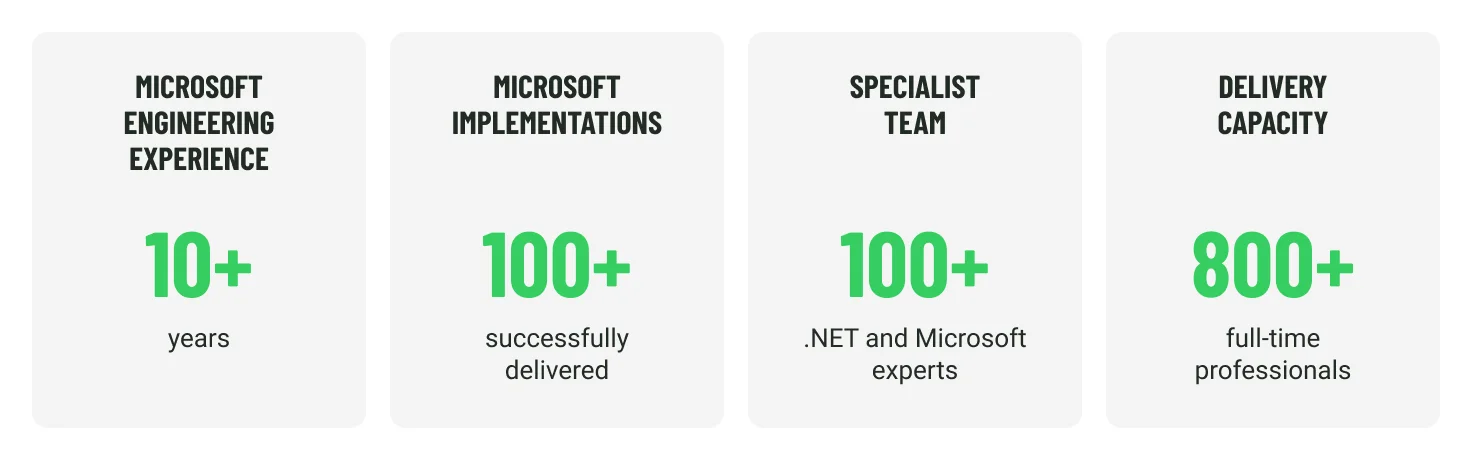
Emerline also holds Microsoft Solutions Partner designations across Data & AI, Security, Digital & App Innovation, and Infrastructure. That breadth is relevant to retail programs where Dynamics 365 or Power Platform may need to work alongside Azure infrastructure, analytics, custom applications, and existing enterprise systems.
Retail-specific project work gives a clearer picture of how that expertise translates into practice. In one project for an international retail chain, Emerline built a Power BI and Azure analytics environment that brought together data from ERP, POS, supply chain, CRM, and E-commerce systems. The work covered data integration and governance, Power BI analytics, and machine-learning use cases including demand forecasting and supply chain optimization. According to the case study, the implementation contributed to a 2.5% increase in operating profit and a $4 million annual reduction in losses.
This kind of experience is particularly relevant when a retailer is modernizing an established technology environment rather than replacing it wholesale. The same program may involve Microsoft platform configuration, custom engineering, data work, integration with third-party systems, and support after go-live. Keeping those disciplines within one delivery structure can help maintain continuity as the program moves from architecture and planning into implementation and further development.
Conclusion
Microsoft for Retail is most useful when the challenge extends beyond replacing an individual application. Retailers may need commerce, store operations, supply chain, customer data, analytics, and AI to work across an environment that also includes existing platforms and third-party systems, and that is why the quality of the architecture and implementation decisions are as important as the Microsoft products themselves. Clear data ownership, sensible integration, realistic migration plans, controlled customization, and a rollout strategy that reflects day-to-day retail operations all influence how well the technology performs after go-live.
For retailers considering a broader Microsoft transformation, the practical starting point is to identify where the current environment creates friction: inconsistent data, disconnected channels, limited inventory visibility, manual processes, or systems that are difficult to extend. From there, the Microsoft stack can be introduced where it solves a defined operational problem, with additional capabilities added as the business and technology environment evolve.
What Retailers Often Want To Know Before Planning a Microsoft-Based Transformation
What is Microsoft for Retail?
Microsoft for Retail is a combination of Microsoft business applications, cloud services, data technologies, and AI capabilities used across retail operations. Depending on the implementation, the environment may include Dynamics 365 Commerce, Customer Insights, Supply Chain Management, Microsoft Fabric, Power Platform, Azure, Microsoft 365, and AI services.
Is Microsoft for Retail a single product?
No. Microsoft for Retail is an ecosystem rather than a standalone application. Retailers select the products and services that match their requirements and integrate them with existing commerce, ERP, POS, warehouse, payment, customer, and other systems where necessary. The final architecture can therefore differ considerably between retailers.
Can Microsoft for Retail work with existing retail systems?
Yes. A Microsoft-based retail transformation does not necessarily require replacing the entire existing technology landscape. Established E-commerce platforms, warehouse systems, payment solutions, marketplaces, loyalty applications, or specialist software can remain in place when they continue to meet business needs. The implementation then needs clear rules for integration, data ownership, and synchronization.
Does Microsoft support physical stores as well as E-commerce?
Yes. Dynamics 365 Commerce includes capabilities for both digital and physical retail, while Store Commerce supports point-of-sale and store operations. Supported configurations can also provide offline capabilities, which is important where store transactions need to continue during temporary connectivity interruptions.
How does Microsoft Fabric fit into a retail environment?
Microsoft Fabric can bring together data from sources such as POS, E-commerce, customer systems, inventory, promotions, and supply chain applications for reporting, analytics, and AI use cases. Its role becomes particularly important when a retailer needs a shared data environment rather than separate reporting structures for different systems or departments.
Does Microsoft for Retail include AI?
Microsoft supports retail AI scenarios across customer service, shopping assistance, employee workflows, merchandising, content, store operations, and analytics. The practical scope depends on the underlying data, integrations, permissions, and business processes available to the AI system.
What affects the cost of a Microsoft for Retail implementation?
There is no standard implementation price. Cost depends on the Microsoft products and licenses involved, number of users and stores, integration complexity, data migration, customization, testing, rollout requirements, analytics workloads, AI usage, training, and ongoing support. The retailer’s existing technology landscape is usually one of the biggest variables because it determines how much must be replaced, migrated, or integrated.
Published on Sep 22, 2026