Microsoft Fabric vs Power BI Premium: Architecture, Pricing and Migration Guide
Table of contents
- Quick Answer: Fabric vs Premium Key Difference
- Key takeaways
- Microsoft Fabric vs Power BI Premium: Quick Comparison
- Strategic comparison of analytical ecosystems
- Is Power BI Premium Being Replaced by Microsoft Fabric?
- Storage Architecture and Data Duplication
- Power BI Premium: Import vs DirectQuery
- DirectLake: Fabric's architectural advantage
- DirectLake vs Import Mode vs DirectQuery
- Compute Models and Capacity Management
- Power BI Premium (P-SKUs)
- Microsoft Fabric (F-SKUs)
- Power BI Premium to Fabric capacity mapping
- Understanding Fabric smoothing
- Microsoft Fabric vs Power BI Premium Pricing Comparison
- Capacity pricing (approximate monthly list prices)
- Key pricing notes
- Practical interpretation
- When Microsoft Fabric May Not Be the Right Choice
- Example Migration Scenario
- Before: Fragmented Analytics Stack
- After: Microsoft Fabric Unified Architecture
- Technical Checklist for Capacity Migration
- Frequently Asked Questions
- Strategic Direction: Microsoft Fabric Data Estate Modernization
The architecture of enterprise business intelligence is shifting away from isolated reporting silos toward unified data estates. For organizations running large-scale analytics on Power BI Premium, the platform has long provided dedicated capacities, robust semantic models, and advanced paginated reporting.
However, as data volume scales into the multi-terabyte range, traditional boundaries between data engineering and business intelligence introduce system friction. Data teams find themselves managing complex extraction, transformation, and loading (ETL) pipelines just to copy and move records from raw data lakes into separate data warehouses, and then into isolated Power BI import caches. This continuous replication introduces data latency, drives up storage fees, and complicates access control.
The transition to Microsoft Fabric represents a major evolutionary step for teams currently relying on Power BI Premium. Fabric is a unified, end-to-end SaaS data platform that integrates data engineering, data warehousing, real-time analytics, data science, and business intelligence into a single environment built around OneLake.
Quick Answer: Fabric vs Premium Key Difference
Microsoft Fabric is the next evolution of Power BI Premium. While Power BI Premium focuses primarily on business intelligence and reporting, Fabric brings together data engineering, data warehousing, analytics, and BI within a single SaaS platform. Built around OneLake, Fabric reduces data duplication and simplifies data management across the organization. With DirectLake, reports can access data directly from OneLake, helping organizations maintain fast performance while reducing reliance on complex refresh processes.
Key takeaways
- Unified storage infrastructure: Replaces fragmented data extracts with a single, logical repository called OneLake, standardizing all enterprise data into the open-source Delta Parquet format.
- Zero-copy performance engines: Eliminates traditional data refresh pipelines by utilizing DirectLake mode, allowing reports to stream metrics directly from storage at memory speeds.
- Smoothed compute allocations: Transitions from rigid, node-specific reporting resources to flexible capacities that share processing power across data engineering and BI tasks.
- Consolidated financial governance: Merges separate compute and storage bills into a single SaaS capacity model to eliminate redundant infrastructure spend and resource waste.
Microsoft Fabric vs Power BI Premium: Quick Comparison
Microsoft Fabric and Power BI Premium share the same business intelligence foundation, but they address different organizational needs. Power BI Premium was built primarily for enterprise reporting, semantic modeling, and dashboard delivery. Microsoft Fabric extends those capabilities into a unified analytics platform that combines data engineering, data integration, data warehousing, real-time analytics, and business intelligence within a single SaaS environment.
For organizations evaluating the future of their analytics stack, the key question is no longer limited to report performance. The decision increasingly centers on whether maintaining separate tools for data integration, warehousing, and business intelligence remains sustainable as data volumes, governance requirements, and real-time analytics demands continue to grow.
The table below highlights the key architectural and operational differences between Power BI Premium and Microsoft Fabric.
Here is the refined, scannable comparison matrix mapping the primary architectural and operational parameters between both environments.
Strategic comparison of analytical ecosystems
| Category | Power BI Premium | Microsoft Fabric |
| Best For | Reporting and dashboarding | Unified analytics and data platforms |
| Data Storage | Power BI datasets | OneLake |
| Data Movement | Often requires ETL and data copies | Reduced data duplication |
| Reporting Performance | High (Import Mode) | High (DirectLake) |
| Data Freshness | Depends on refresh schedules | Near real-time access |
| Data Engineering | Separate tools and services | Built-in |
| Data Warehouse | External platform required | Included |
| Real-Time Analytics | Limited | Native support |
| Licensing Model | Premium Capacity (P-SKUs) | Fabric Capacity (F-SKUs) |
| Long-Term Direction | Established BI solution | Microsoft's primary analytics platform |
While Power BI Premium remains a powerful solution for enterprise reporting, Microsoft Fabric is designed to unify the entire analytics lifecycle – from data ingestion and transformation to warehousing, advanced analytics, and business intelligence.
For organizations looking to reduce data duplication, simplify governance, and modernize their analytics architecture, Fabric represents Microsoft's long-term vision for enterprise analytics.
Is Power BI Premium Being Replaced by Microsoft Fabric?
No. Microsoft Fabric is not a replacement for Power BI Premium in the traditional sense. Instead, Microsoft positions Fabric as the next evolution of the Power BI ecosystem, extending business intelligence capabilities with integrated data engineering, warehousing, and analytics services.
Existing Power BI reports, dashboards, and semantic models continue to run within Fabric capacities without requiring redevelopment. Organizations can move workloads to Fabric gradually, adopting capabilities such as OneLake and DirectLake over time rather than performing a full platform migration.
For most enterprises, the transition from Premium to Fabric is less about replacing Power BI and more about consolidating analytics workloads onto a unified platform.
Storage Architecture and Data Duplication
One of the most significant differences between Power BI Premium and Microsoft Fabric is how data is stored and accessed. Traditional Power BI architectures often require multiple copies of the same data across data lakes, warehouses, and imported semantic models. As data volumes grow, this approach increases storage costs, synchronization overhead, governance complexity, and data latency.
A typical Power BI Premium architecture often looks like this:
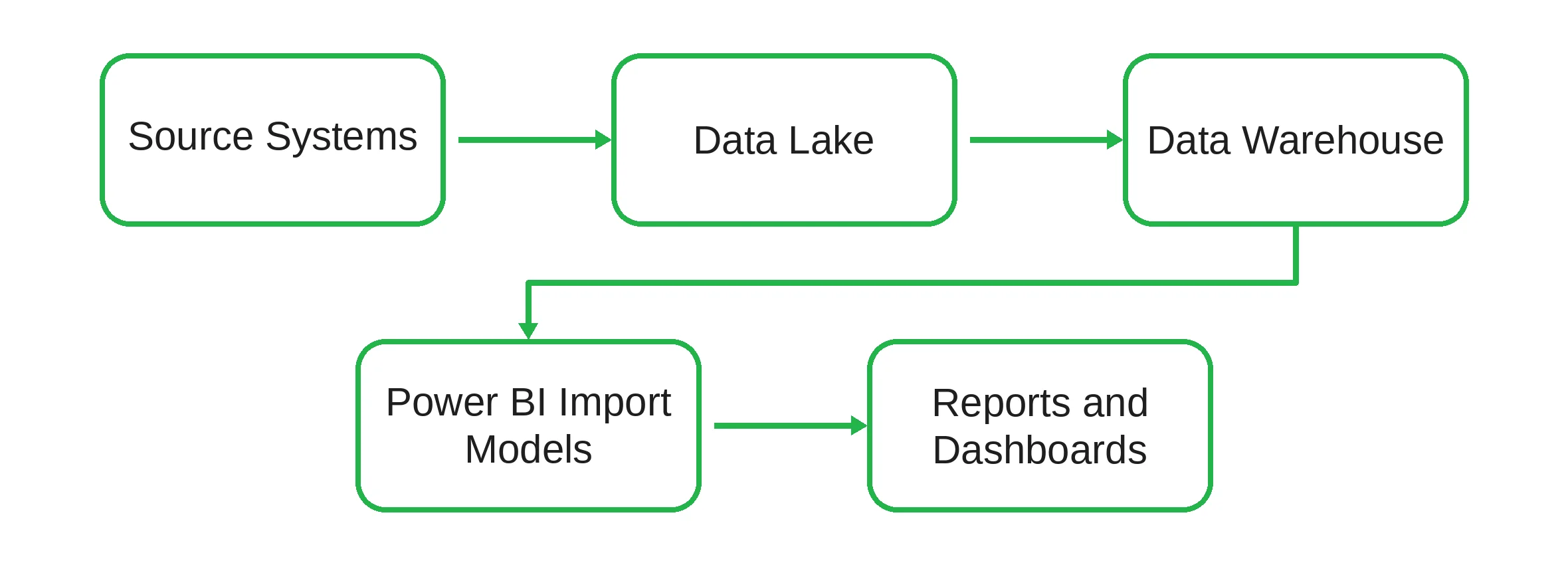
Each layer introduces additional processing and data movement before information reaches business users.
Power BI Premium: Import vs DirectQuery
Historically, Power BI Premium has required organizations to balance performance and data freshness through two primary connectivity modes.
Here is the finalized comparison table outlining the core strengths and operational limitations of both traditional data connection modes.
| Mode | Strengths | Limitations |
| Import Mode | Fast dashboard performance and responsive user experience. | Requires scheduled refreshes, increases storage duplication, and may introduce data latency. |
| DirectQuery | Real-time access to source data without refreshes. | Higher query latency, increased source system load, and reduced performance under heavy concurrency. |
For many enterprise environments, this trade-off has been a longstanding architectural challenge.
DirectLake: Fabric's architectural advantage
Microsoft Fabric introduces DirectLake, a storage access mode that allows Power BI semantic models to read data directly from OneLake without relying on traditional import refreshes or DirectQuery execution against source systems.
The architecture becomes significantly simpler:
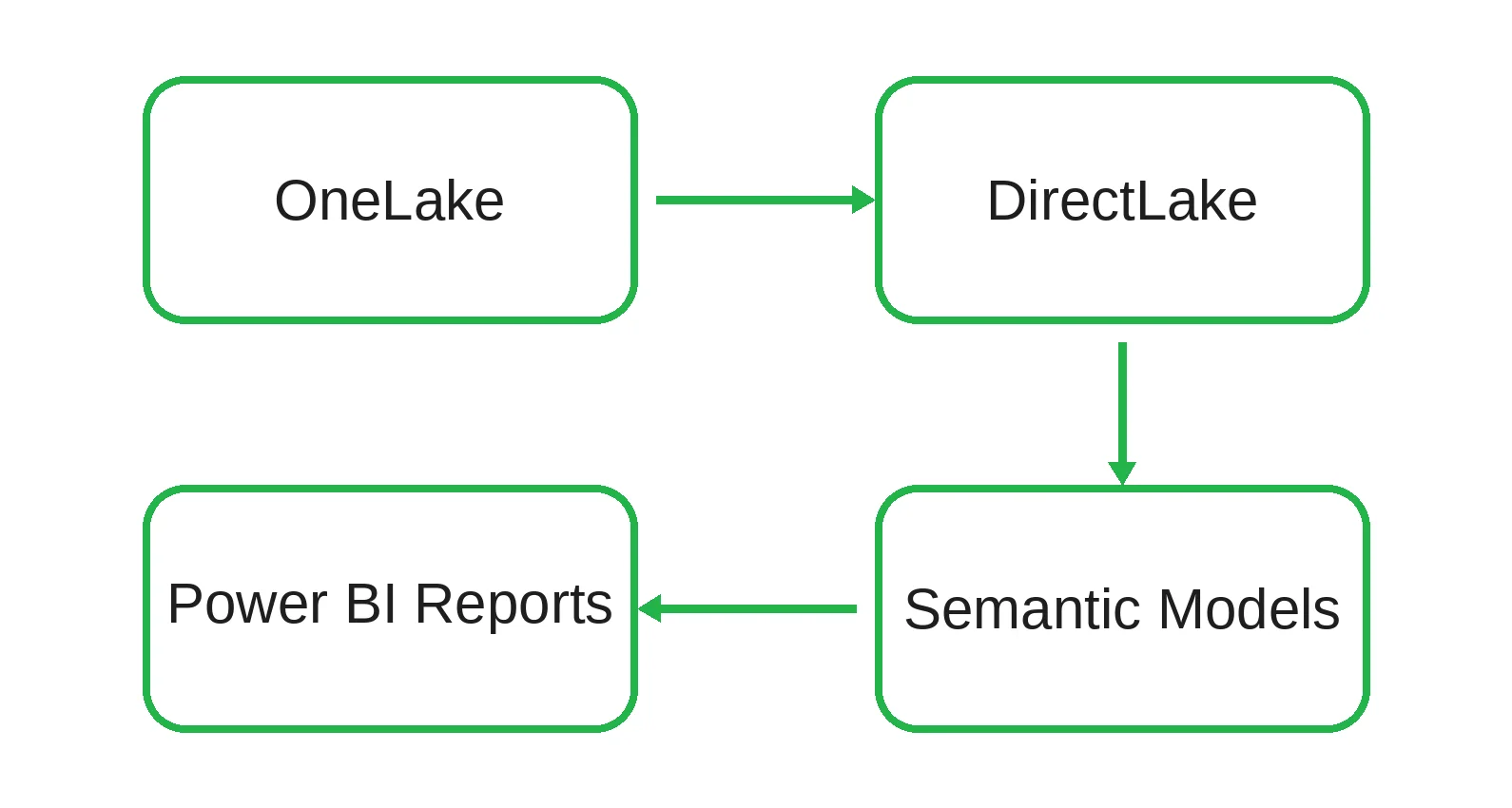
By reducing data movement and minimizing duplicate storage layers, DirectLake helps organizations maintain high-performance reporting while providing near real-time access to analytical data. This approach simplifies governance, reduces operational overhead, and eliminates many of the refresh-related limitations associated with traditional BI architectures.
DirectLake vs Import Mode vs DirectQuery
Here is the optimized comparison matrix detailing the exact engineering and capability trade-offs between the primary data connection modes.
| Capability | Import Mode | DirectQuery | DirectLake |
| Refresh Required | Yes | No | No |
| Query Performance | Fast | Variable | Fast |
| Data Freshness | Scheduled | Real-Time | Near Real-Time |
| Storage Duplication | High | None | Minimal |
| Source System Load | Low | High | Low |
| Scalability | Medium | Medium | High |
For many organizations, DirectLake removes the traditional need to choose between dashboard performance and data freshness, making it one of the most significant architectural innovations introduced with Microsoft Fabric.
Compute Models and Capacity Management
Storage modernization is only one part of the transition from Power BI Premium to Microsoft Fabric. The second major change involves how compute resources are allocated and consumed.
Power BI Premium (P-SKUs)
Power BI Premium provides dedicated capacities designed primarily for reporting and semantic model workloads. This approach delivers predictable performance and workload isolation, but capacity utilization can be uneven. Resources may sit idle during off-peak hours while becoming constrained during large dataset refreshes or periods of high user activity.
As organizations scale, it is common to encounter scenarios where refresh operations compete with interactive reporting workloads, resulting in reduced dashboard responsiveness and additional capacity upgrades.
Microsoft Fabric (F-SKUs)
Microsoft Fabric introduces a shared capacity model measured in Capacity Units (CUs). A single Fabric capacity can support multiple workloads, including:
- Data Engineering
- Data Factory pipelines
- Spark processing
- Lakehouses
- Data Warehouses
- Power BI workloads
- Real-Time Analytics
By consolidating these services under a unified capacity model, Fabric helps organizations improve resource utilization while reducing platform fragmentation.
Power BI Premium to Fabric capacity mapping
Organizations planning a migration commonly use the following baseline sizing equivalencies:
| Power BI Premium | Microsoft Fabric |
| P1 | F64 |
| P2 | F128 |
| P3 | F256 |
| P4 | F512 |
| P5 | F1024 |
Actual capacity requirements should be validated through workload testing, concurrency analysis, and ongoing monitoring.
Understanding Fabric smoothing
One of Fabric's key innovations is a workload management mechanism known as smoothing. Instead of allowing short-term compute spikes to consume capacity immediately, Fabric distributes resource consumption over time. This helps reduce workload contention and maintain a more consistent user experience across reporting and data processing activities.
While smoothing improves capacity stability, it is not a substitute for good architecture. Poorly optimized data models, inefficient transformations, and excessive background workloads can still increase capacity consumption and lead to throttling. Organizations should continue to follow best practices for data modeling, workload governance, and capacity monitoring to ensure predictable performance at scale.
Microsoft Fabric vs Power BI Premium Pricing Comparison
Pricing between Microsoft Fabric and Power BI Premium is best understood at the capacity level, where both platforms are commonly compared using equivalent enterprise SKUs.
Capacity pricing (approximate monthly list prices)
| Capacity Tier | Power BI Premium (P-SKU) | Microsoft Fabric (F-SKU PAYG) | Microsoft Fabric (F-SKU 1-Yr Reserved) |
| Entry Level | Not Applicable | F2 (~$263/month) | F2 (~$156/month) |
| Small Workloads | Not Applicable | F8 (~$1,051/month) | F8 (~$625/month) |
| Mid Tier | Not Applicable | F32 (~$4,205/month) | F32 (~$2,501/month) |
| Enterprise Baseline | P1 (~$4,995/month) | F64 (~$8,410/month) | F64 (~$5,003/month) |
| Mid Enterprise | P2 (~$9,990/month) | F128 (~$16,819/month) | F128 (~$10,005/month) |
| Large Scale | P3 (~$19,980/month) | F256 (~$33,638/month) | F256 (~$20,011/month) |
All pricing values are approximate and may vary by region, agreement type, and Microsoft licensing terms.
Key pricing notes
- “Not applicable” indicates that the equivalent capacity tier does not exist within the Power BI Premium SKU model, as Premium does not offer a granular entry-level scaling structure like Fabric.
- P1 and F64 are commonly treated as comparable enterprise baseline capacities for BI workloads.
- Fabric pricing includes additional workloads such as Data Engineering, Data Factory, Data Science, and Real-Time Analytics within the same capacity.
- Power BI Premium is BI-focused, while Fabric consolidates multiple analytics domains into a unified pricing model.
Practical interpretation
At first glance, Power BI Premium may appear simpler in pricing structure due to its BI-only focus. However, most enterprise architectures require additional Azure services to replicate Fabric functionality, including data pipelines, compute engines, and warehousing layers.
As a result, Fabric consolidates multiple previously separate cost centers into a single capacity-based model, while Power BI Premium distributes costs across multiple services.
When Microsoft Fabric May Not Be the Right Choice
Despite its architectural advantages, Microsoft Fabric is not automatically the optimal solution for every organization. In some environments, existing Power BI Premium setups remain sufficient and more cost-effective.
A Fabric migration may not be necessary if:
- Your data volumes are relatively small and can be efficiently handled within existing Power BI models without performance constraints.
- Power BI is used primarily for reporting and visualization, without broader requirements for data engineering or advanced analytics workloads.
- Existing Power BI Premium capacities are consistently underutilized and already meet performance and scalability requirements.
- Data engineering processes are minimal, stable, or fully dependent on external legacy systems that cannot realistically be consolidated or migrated.
- Current data refresh cycles already satisfy business SLAs without causing latency or operational bottlenecks for end users.
In these scenarios, introducing Fabric may add architectural complexity without delivering proportional value, particularly if the organization does not require a unified analytics platform.
Example Migration Scenario
Consider an enterprise operating a 5 TB Azure Data Lake environment, a separate SQL data warehouse, a Power BI Premium P2 capacity, and multiple scheduled ETL pipelines running nightly refresh processes.
Before: Fragmented Analytics Stack
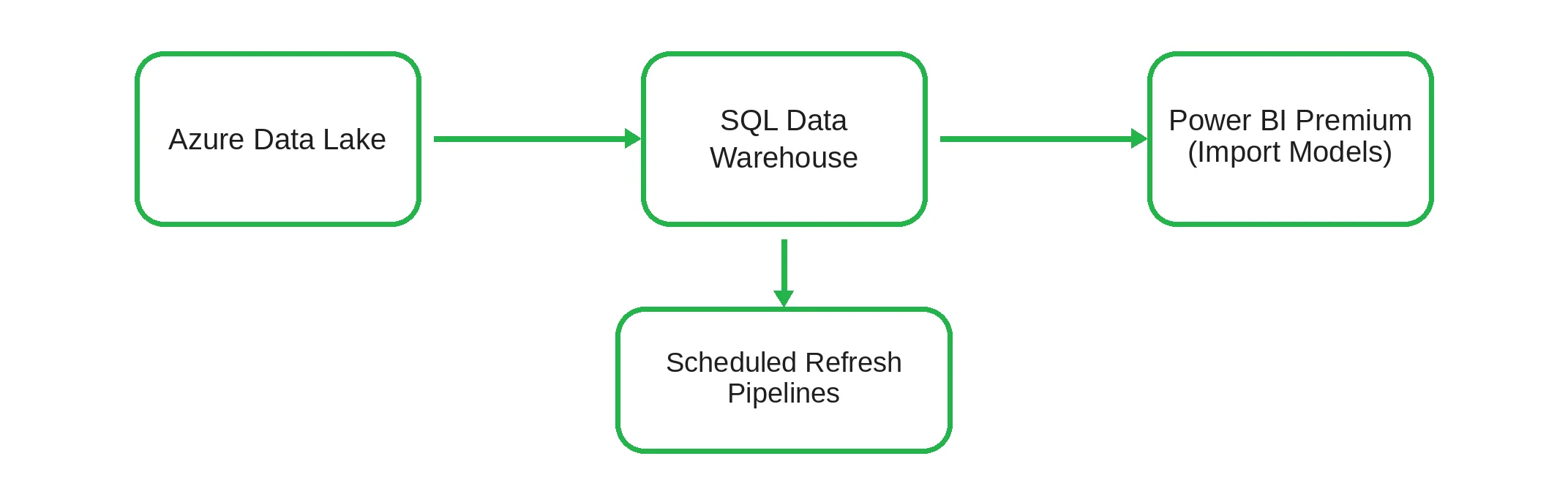
In this architecture, data is copied and transformed across multiple systems, resulting in data duplication, refresh latency, and increased operational overhead.
After: Microsoft Fabric Unified Architecture
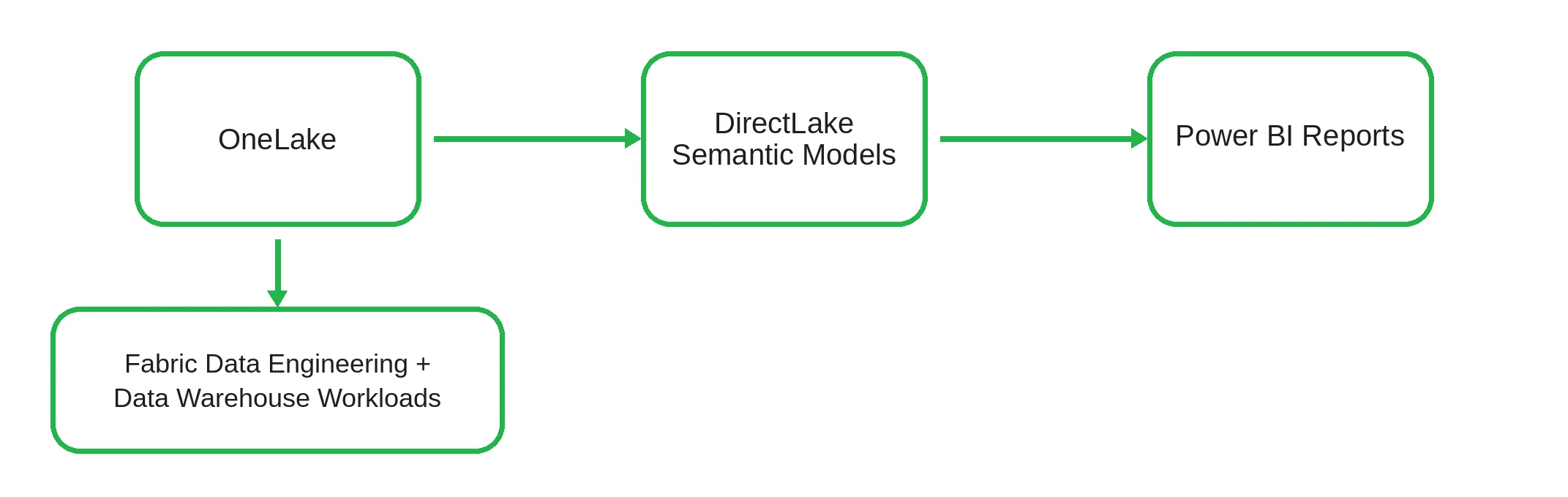
After migrating to Microsoft Fabric, the data estate is centralized in OneLake. DirectLake reduces the need for traditional import-based refresh pipelines by enabling semantic models to read data directly from the lake layer.
This consolidation reduces data duplication, simplifies pipeline management, and brings data engineering, warehousing, and BI workloads into a shared Fabric capacity (e.g., F128).
This type of modernization delivers the most value in organizations where data engineering and business intelligence are currently separated across multiple platforms and require continuous synchronization.
Technical Checklist for Capacity Migration
Before modernizing an enterprise tenant and routing production workloads into Microsoft Fabric, the following operational areas should be validated:
- Capacity planning assessment: Map existing Power BI Premium capacity usage to appropriate Fabric F-SKUs, taking into account peak utilization, concurrency patterns, and workload distribution.
- Data architecture readiness: Review and adjust upstream ingestion pipelines to ensure data is stored in open-standard Delta Parquet format, enabling DirectLake compatibility where applicable.
- Governance and workspace isolation: Define clear separation between development, testing, and production workspaces to prevent data engineering workloads from impacting production reporting performance.
- Connectivity and network validation: Update on-premises data gateways to the latest supported runtime version and validate high-throughput data ingestion into OneLake.
- Monitoring and cost management setup: Enable the Fabric Capacity Metrics application and establish monitoring processes for workload tracking, utilization analysis, and internal chargeback allocation where required.
Frequently Asked Questions
Do I need to rebuild my Power BI reports when migrating to Fabric?
No. Existing Power BI reports, dashboards, and semantic models continue to work within Microsoft Fabric capacities without requiring redesign or re-engineering. Fabric is designed to be backward-compatible with existing Power BI artifacts.
Can DirectLake completely replace Import Mode?
Not in every scenario. DirectLake is optimized for large-scale lake-based architectures and near real-time analytics. However, Import Mode may still be preferable for smaller datasets, highly curated models, or scenarios requiring full in-memory control.
Does Fabric require Power BI Pro licenses?
Yes. Users typically still require Power BI Pro or Premium Per User (PPU) licenses for content creation and consumption. In addition, Fabric capacity (F-SKU) is required to host and serve workloads at scale, depending on the deployment model.
What happens to existing Premium workspaces during migration?
Existing Power BI Premium workspaces can be reassigned to a Fabric capacity (F-SKU) through the Power BI admin settings without breaking reports, datasets, or user access permissions.
Can Fabric work with Azure Data Lake Storage (ADLS Gen2)?
Yes. Microsoft Fabric supports OneLake shortcuts, which allow secure virtual access to external storage systems such as Azure Data Lake Storage, without requiring physical data duplication.
What are Capacity Units (CU)?
Capacity Units (CUs) are the underlying measure of compute resources in Microsoft Fabric. They dynamically allocate processing power across workloads such as reporting, data engineering, warehousing, and real-time analytics within a shared capacity.
Is Microsoft Fabric suitable for small businesses?
Yes, Fabric can support organizations of all sizes. However, its full value is typically realized in environments that require integrated data engineering, warehousing, and analytics beyond basic reporting needs.
What happens if DirectLake reaches capacity limits?
If a DirectLake semantic model exceeds available capacity resources, Fabric may degrade query performance or temporarily switch execution behavior to maintain service availability. Performance then depends on workload optimization and capacity sizing.
Strategic Direction: Microsoft Fabric Data Estate Modernization
Adopting Microsoft Fabric requires alignment across data architecture, governance, and cloud strategy. Many organizations work with experienced partners to ensure a structured and low-risk migration to a unified analytics platform.
As a Microsoft solutions partner, Emerline helps enterprises modernize legacy data estates and consolidate analytics workloads into Microsoft Fabric, including services such as Microsoft consulting services and Azure cloud consulting aervices.
Our approach supports a gradual transition to Fabric while maintaining existing reporting continuity and introducing capabilities such as OneLake and DirectLake.
Published on Jul 2, 2026