How High-Fidelity Prototypes Help Validate Enterprise System Logic Before Development Begins
Table of contents
- Key takeaways
- Why Static Designs No Longer Work on Complex Projects
- How To Validate Enterprise Logic Before Code and Cut Costs by Up to 20%
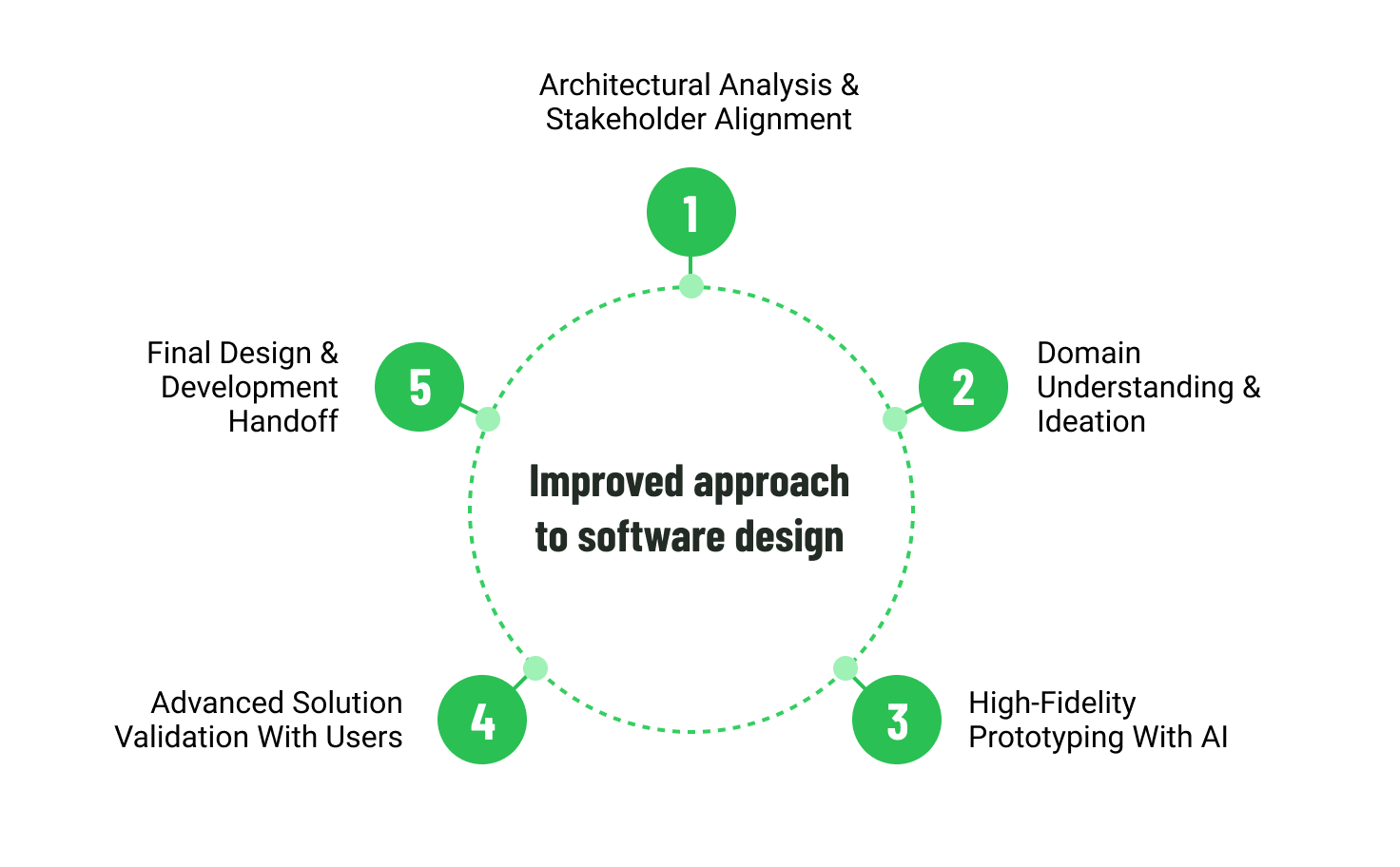
- 1. Architectural analysis and stakeholder alignment
- 2. Domain understanding and ideation
- 3. High-fidelity prototyping accelerated with AI tools
- 4. Advanced user validation
- 5. Final design and development handoff
- Checklist of Prototype Readiness for Transfer to Development
- High-Stakes Scenario: Designing Interfaces For High-Concurrency Operations
- Comparison of Software Design Approaches
- When High-Fidelity Prototyping Is Not Necessary
- Conclusion
- Expert Support in Product Discovery and UX Design
- Frequently Asked Questions
The main challenge in complex enterprise software projects often emerges before development begins. Even highly skilled teams can struggle to deliver successful outcomes because of assumptions, dead-end workflows, and logical inconsistencies throughout the system.
The gap between business expectations and technical implementation becomes especially problematic in large-scale systems with multiple user roles, integrations, and business processes. Critical workflow dependencies and edge cases often remain undiscovered until development is already underway, fueling change requests, delayed releases, and growing technical debt.
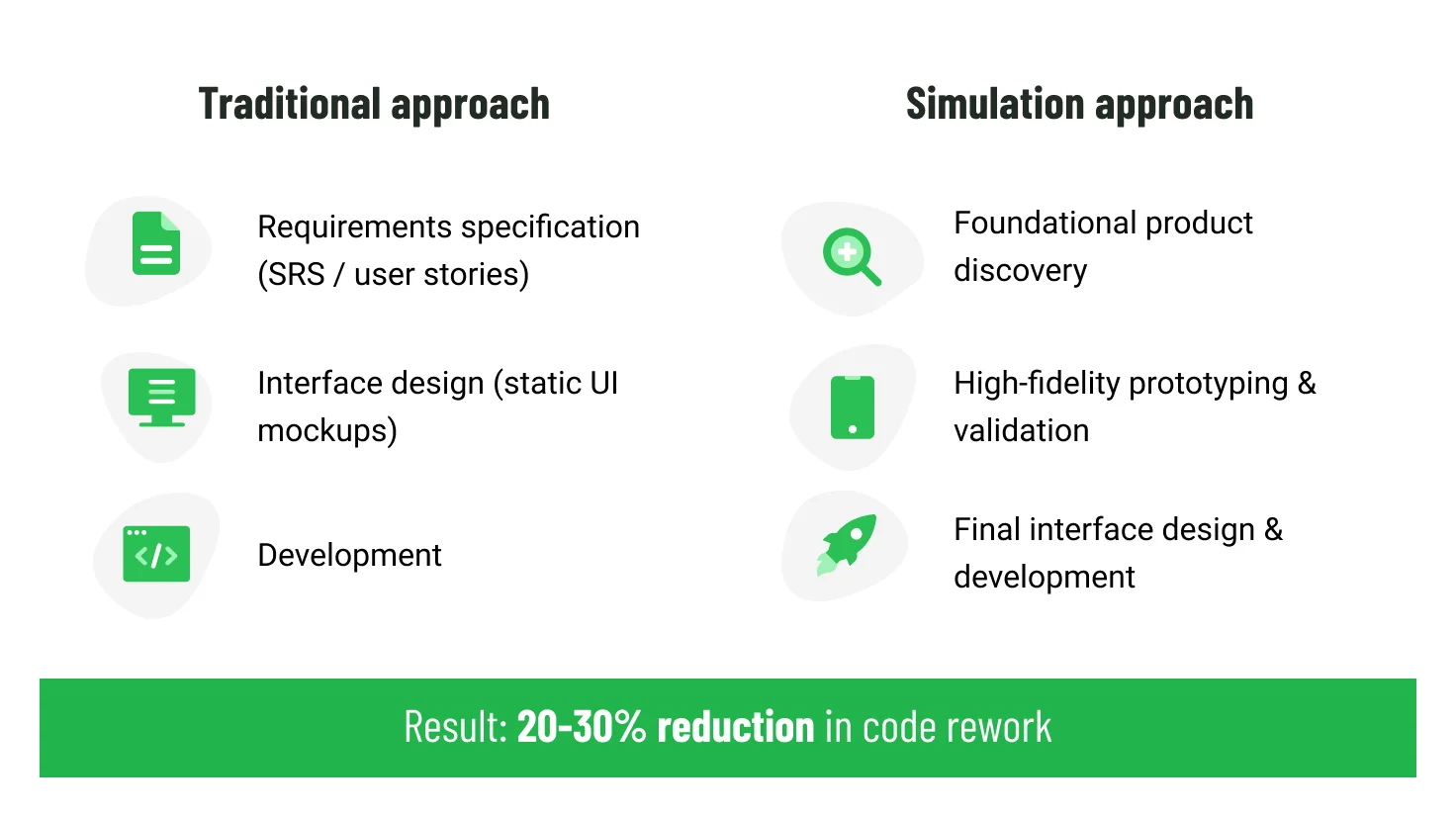
To reduce these risks, organizations increasingly validate product logic before writing code. Through product discovery and high-fidelity prototyping, teams can transform requirements into interactive simulations that replicate realistic workflows, user interactions, and business scenarios. This allows stakeholders to identify gaps and align expectations early in the process, creating a stronger foundation for development, reducing risks, and creating more solid user experience.
Key takeaways
- Stakeholders' alignment before development: the interface and product logic are approved as an interactive model before the development team writes code, so everyone agrees on what "done" looks like.
- Error and alternative path handling: error states and edge cases are designed upfront, so users always get clear guidance and never a dead end.
- Dynamic behavior validation: interactive prototypes simulate real-time data changes and concurrency, revealing race conditions and logic breaks that static designs miss.
- Accelerated feedback loops: validating assumptions with a clickable model cuts the discovery-to-feedback cycle from weeks to days, catching flaws when they're still cheap to fix.
Why Static Designs No Longer Work on Complex Projects
Enterprise platforms always work with dynamic data states: the interface on the screen must instantly rebuild depending on the user's role, regional rules, calculation formulas, or previously entered data. Relying on static visuals carries a greater risk of missing scenarios, states, or errors that will surface only during development.
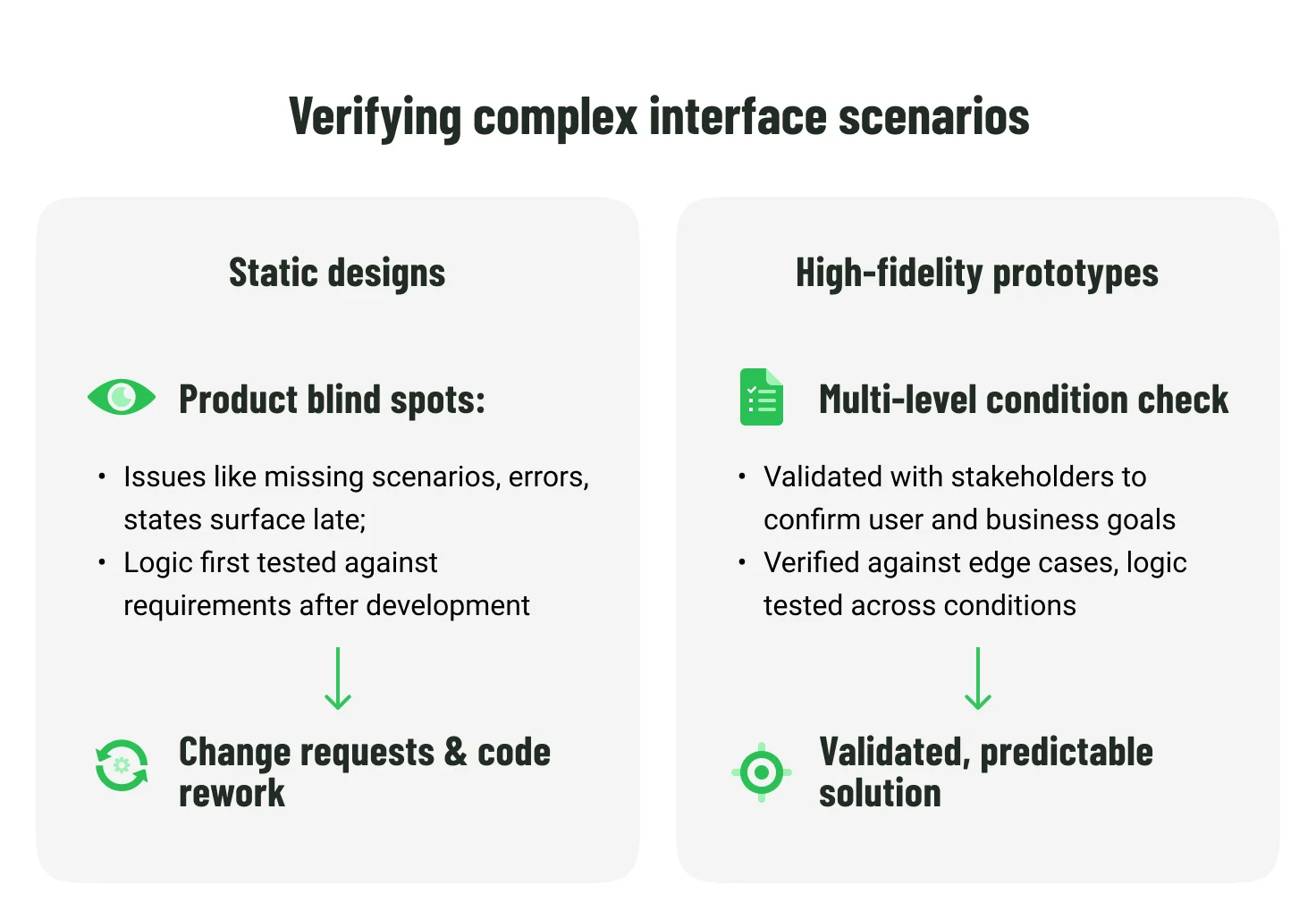
High-fidelity prototyping solves this problem by adding interactive logic directly into the design.
For example, when designing an online portal for corporate lending, the prototype can process amounts entered by the user in real time: apply conditional formatting, change approval steps depending on the volume of limits, and dynamically update payment schedules. This allows the product team to catch logical errors at an early stage and hand over a verified model to developers.
Quality UI/UX design on enterprise projects requires architectural precision of the interface. Check out how our experts design scalable systems, assemble interactive components, and translate complex business algorithms into intuitive IT solutions on the prototyping service page.
How To Validate Enterprise Logic Before Code and Cut Costs by Up to 20%
Pre-build project stages deserve the same architectural rigor as the future system itself. By integrating product discovery and high-fidelity prototyping, teams can gain a deeper understanding of both business and user needs, validate technical feasibility, and stay on track with deadlines and budget. This approach also aligns stakeholders around a shared product vision, minimizes scope creep, and delivers a smoother end-user experience.
Below is a five-step framework to apply when working on complex enterprise software:
1. Architectural analysis and stakeholder alignment
Before opening any design tool, the Product Discovery team conducts a deep audit of the current infrastructure and aligns with key stakeholders. Engineers study legacy database dependencies, map out active APIs, and determine entity relationships while discovery leads facilitate workshops to capture business goals, user pain points, and success criteria.
Pairing a system analyst (backend architect) with a UX designer from day one allows to confirm the solution is technically feasible and grounded in real user and business needs.
Need to assess legacy systems, APIs, and data dependencies before modernization? Talk to our product discovery specialists.
2. Domain understanding and ideation
With a clear technical landscape and stakeholder alignment in place, the team can turn its full attention to understanding the core problem at hand. By mapping user journeys and information architecture, they begin to shape a vision of how users will move through the system and what they need to accomplish at every step along the way.
Building on that foundation, the team moves into ideation, sketching out potential solutions and creating low-fidelity models to test structure and flow. This phase is all about exploring possibilities and validating the overall direction before committing time and resources to high-fidelity interactions.
Depending on the project, visual design may run in parallel with prototyping or be deferred until after the core logic is confirmed. During Product Discovery, however, the primary emphasis remains on understanding the domain and testing ideas rather than polishing the final user interface.
3. High-fidelity prototyping accelerated with AI tools
At this stage, teams translate business logic and validated concepts into clickable simulations. Speed is critical when testing product hypotheses, so AI-driven prototyping has become an integral part of the workflow.
Generative models handle the heavy lifting by creating complex interactions, populating screens with realistic multilingual content, building conditional logic, and more. Tasks that once took weeks now take days.
4. Advanced user validation
The high-fidelity prototype becomes a live testing ground. Instead of showing static screens to stakeholders, teams run behavioral testing cycles with real users.
Interactive simulation allows teams to track which steps cause confusion and where the business process logic breaks down. Testing prototypes with representative users helps identify usability and requirements issues early in the project, when changes are still easy and inexpensive to make.
The insights gathered at this stage directly inform refinements to the prototype before the design is finalized for development.
5. Final design and development handoff
Once the prototype is validated, teams finalize the visual layer. The finished prototype serves as an exact instruction set for developers. Lengthy requirements specifications and static mockups alone are difficult to interpret, especially when a product is complex and layered with logic behind every interaction.
With a clickable prototype alongside visual assets, developers can see exactly what needs to be built. The prototype also gives the Quality Assurance team a clear reference for creating comprehensive test case scenarios, even before developers start writing code.
Checklist of Prototype Readiness for Transfer to Development
Before handing design specifications over to development, the prototype should be validated against the following criteria:
- Visual consistency. Interface elements such as colors, spacing, typography, and components align with brand guidelines and the selected UI framework.
- Role-based behavior. The prototype reflects different access levels by adjusting available features and data based on user roles.
- Input validation rules. Constraints such as field formats, length limits, masking, and duplicate prevention are represented in forms to validate data integrity logic.
- Error handling scenarios. Key failure cases are covered, including API errors, network timeouts, and authorization failures.
- Loading and performance states. Data loading, delays, and high-load conditions are simulated. For large datasets, the prototype helps evaluate whether standard loaders are sufficient or whether skeleton screens or progressive rendering improve usability.
- Technical feasibility. Engineering validates that the interactions, states, and animations defined in the prototype are feasible within the target architecture.
High-Stakes Scenario: Designing Interfaces For High-Concurrency Operations
When designing enterprise software where thousands of users may attempt to access the same resource simultaneously, for example reserving the last available unit in stock, concurrent requests can create race conditions. This is where high-fidelity prototyping goes beyond static design by encouraging teams to define how the system should behave before development begins.
On the backend, these situations are handled using techniques such as optimistic locking, pessimistic locking, transactions, or distributed coordination. The technical solution may be well understood, but users never see database locks or processing queues. They only experience the interface. Without carefully designed interactions, even a short delay can feel like a frozen application, an endless loading spinner, or an unexpected error.
It is precisely at the high-fidelity prototyping stage that the Discovery team determines how the interface will respond to these backend processes.
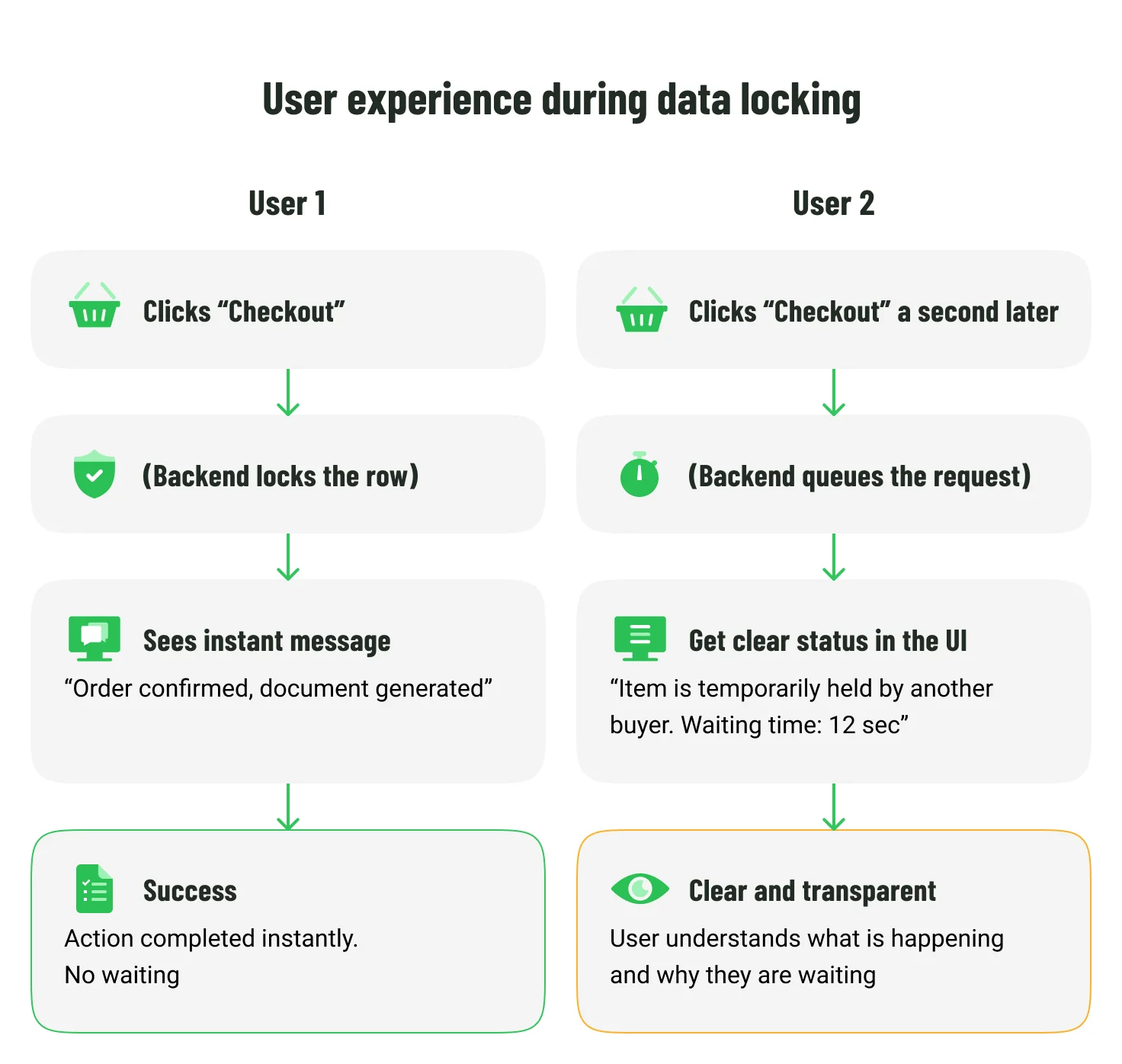
High-fidelity prototypes make it possible to validate these interface states before implementation:
- Informative waiting states. Instead of appearing frozen, the interface displays a progress indicator or a queue status message.
- Dynamic interface updates. If a resource is temporarily locked, the relevant controls can be disabled or the affected item marked with a status such as "Update in progress" to prevent repeated actions.
- Timeout and recovery scenarios. When processing exceeds an acceptable threshold, different UX approaches can be evaluated, such as notifying the user by email instead of leaving them waiting indefinitely.
Designing these scenarios early helps align the user experience with the underlying system behavior, reducing ambiguity before implementation and avoiding redesign later in development.
Comparison of Software Design Approaches
| Process Parameter | Static screen designs | High-fidelity prototypes |
| Requirements Representation Accuracy | Medium. Multiple screens illustrate different scenarios, although complex workflows remain difficult to communicate. | High. Interactive simulations provide an unambiguous model of the product's logic and behavior. |
| Risk of Non-Targeted Budget Waste | Medium. Static designs help align visual expectations early, but gaps in interaction logic may still emerge during development. | Low. Catching logical errors early reduces development costs by up to 50%. |
| Verification of Logical Conditions | Medium. Different interface states can be illustrated, yet dynamic behavior and state transitions cannot be verified. | High. Interactive variables allow teams to verify complex scenarios and state changes. |
| Quality of Handoff to Development | Medium. Static mockups provide clear visual direction. Additional documentation is still essential to explain interaction logic. | High. Static mockups provide visual specs, while interactive prototypes demonstrate logic and behavior. This makes grasping complex interfaces easier and faster. |
When High-Fidelity Prototyping Is Not Necessary
High-fidelity prototyping isn't always the right tool. When the product is a lightweight internal tool, a proof-of-concept, or an early MVP, simpler methods like wireframes or flow diagrams often do the job. If business rules are straightforward, integrations are few, and change is cheap, teams can move straight to code.
Where high-fidelity prototyping shines is in complexity: intricate workflows, multiple user roles, strict compliance, distributed systems, or sizable budgets. In these environments, validating assumptions upfront costs a fraction of what it takes to fix architectural or usability flaws after the fact.
Conclusion
Successful enterprise software projects are rarely defined by code quality alone. The real difference lies in crafting and validating requirements, workflows, and user interactions before development starts.
High-fidelity prototyping gives teams a concrete way to test logic, surface hidden dependencies, and align stakeholders around a shared vision while there's still time to course-correct. Validate assumptions upfront, and development shifts from discovery to delivery.
Expert Support in Product Discovery and UX Design
Transforming complex business requirements into scalable digital products requires an excellent understanding of user needs, business processes, and system behavior long before development begins. Emerline helps organizations validate product concepts, optimize user experiences, and design high-fidelity prototypes that align business goals with technical implementation.
Whether you're modernizing enterprise software, designing a new digital platform, or validating complex workflows, our product discovery and UX experts can help reduce uncertainty and create a development-ready blueprint for your product.
Contact our experts to review your product vision, optimize design systems, and build a solid foundation for successful digital product development.
Frequently Asked Questions
Will a detailed Product Discovery phase delay the overall launch date of our product?
No. Although allocating time for full research seems like an extension of the initial stage, in the long run, it significantly shortens the overall development cycle. Finding and fixing a logical error in a high-fidelity prototype takes a couple of hours. Rewriting the same functionality in already finished compiled code will take weeks of expensive work by programmers. Preliminary validation protects against missed deadlines and makes the product launch predictable.
Can high-fidelity prototypes simulate complex enterprise-level calculations?
Yes, high-fidelity prototypes can simulate business logic such as pricing rules, thresholds, or workflow conditions. In more advanced cases, prototyping tools or lightweight scripting can be used to model interactive calculations. However, the goal is typically to approximate system behavior well enough for validation, not to fully replicate production-level logic.
How is the security of confidential information ensured during prototype testing?
Data security during prototype testing is typically ensured through the use of anonymized or synthetic datasets that replicate structure without exposing sensitive information. Access to prototypes is controlled through sharing permissions within design or prototyping tools, and in more sensitive environments, testing may be limited to secure staging setups.
Published on Jul 20, 2026