Why Your Workflow Needs Automation (And How To Do It Right)
Table of contents
- Key takeaways
- Five Signs a Workflow Needs Automation
- Cycle time rises disproportionately as volume increases
- Error rate creeps up under load
- No single source of truth
- Status is invisible to stakeholders
- The workflow caps growth, not the market
- What Automation Doesn't Fix by Itself
- Unclear or constantly changing rules
- Poor or inaccessible data
- Missing process ownership
- The Six Building Blocks of Workflow Automation
- 1. Trigger and structured intake
- 2. Decision rules, classification, and human checkpoints
- 3. Routing and orchestration
- 4. Integration with existing systems
- 5. System of record, visibility, and audit trail
- 6. Exception handling, monitoring, and improvement
- Workflow Automation in Practice
- AI-powered lead acquisition
- Digital approval workflows
- Integration-led automation
- Low-Code, Integration, or Custom Development?
- Low-code automation
- Integration-led automation
- Custom development
- How We Automate Workflow Processes
- 1. Discovery and process mapping
- 2. Solution design
- 3. Iterative development
- 4. Testing under realistic load
- 5. Rollout with training, not just deployment
- 6. Post-launch monitoring and optimization
- How to Measure Whether Workflow Automation Worked
- Cycle time
- Error rate
- Transparency and auditability
- Scalability headroom
- Establish the baseline before implementation
- Conclusion
- Frequently Asked Questions About Workflow Process Automation
- What is workflow process automation?
- How is workflow automation different from process automation?
- How do I know if my workflow is ready for automation?
- Does workflow automation require AI or machine learning?
- How long does a workflow automation project typically take?
- What's the biggest reason workflow automation projects fail?
- Which workflow decisions should remain human?
Manual workflows often work well enough at low volumes. Problems appear as the business grows: approval queues get longer, sales leads wait for follow-ups, and employees spend more time coordinating tasks across inboxes and spreadsheets.
The process itself may not have changed much. What changes is the amount of work passing through it. Informal reminders and manual handoffs become harder to manage, and workflow process automation starts to make sense. But adding software isn't always the right first move. Sometimes the better solution is to remove an unnecessary approval, clarify responsibilities, or connect systems that already do their jobs well.
A law firm's document review and a manufacturer's purchase-order approval process have different requirements, but the questions behind automation are similar. Where does work slow down? Which decisions follow clear rules? What happens when something goes wrong? And which systems already support the process?
The answers help determine whether the next step is process redesign, system integration, a workflow platform, or custom development. This article looks at those choices and the practical considerations behind them.
Key takeaways
- Automation begins with process clarity. Unstable rules, poor data, and unclear ownership should be addressed before they are translated into software.
- Different bottlenecks require different approaches. Low-code tools suit standardized workflows, integration connects existing systems, and custom development supports specialized logic, high loads, or AI-driven decisions.
- Human judgment remains part of good automation. High-risk approvals, ambiguous exceptions, and decisions with legal, financial, or reputational consequences still require accountable review.
- Implementation discipline matters as much as technology. Process mapping, iterative delivery, realistic load testing, user training, and post-launch monitoring all influence whether the solution succeeds in practice.
- Results must be measured against a baseline. Cycle time, error rate, transparency, and scalability headroom should be recorded before implementation and reviewed again after the workflow stabilizes.
Five Signs a Workflow Needs Automation
A workflow doesn't need automation just because it involves manual work. A task that takes five minutes once a week may not be worth changing. An approval that holds up every customer order is a different matter. These five signs help identify when manual steps have become a constraint on the business.
Cycle time rises disproportionately as volume increases
A request might take an hour to process but spend another half-day waiting in a queue. When that waiting time keeps growing with volume, making the processing step faster won't necessarily help. The first thing to find out is where requests accumulate and why they aren't moving forward. This is often the first sign anyone notices, since it shows up directly in complaints about turnaround time. Emerline's AI-powered lead acquisition project is a good illustration of how this plays out in practice: as inbound volume grew, manual lead handling simply couldn't keep pace, and automating the qualification and routing steps helped the business process growing lead volumes more efficiently.
Error rate creeps up under load
Mistakes don't necessarily mean people are getting careless. More often, they mean volume has outpaced the team's capacity for manual quality checks. This pattern is well documented: IBM cites research in which manual data-entry error rates ranged from 0.55% to 26.9%. When a workflow depends on manual re-keying, cross-checking, or copy-pasting between systems, that variance is a structural risk, not a training issue.
No single source of truth
When information about the same request lives in several spreadsheets, inboxes, and business applications, even a simple status check can take unnecessary effort. Different teams may be working with different versions of the same record.
Automation won't solve that problem unless the workflow has a reliable source of truth. Before connecting the systems, it's worth establishing which application owns the relevant data and where the current process status should be maintained.
Status is invisible to stakeholders
When there's no shared visibility into where things stand, people compensate by asking. Constantly. "Where's my order?" "Any update on this candidate?" "Have you signed off yet?" These pings feel small individually, but they add up to a steady drain on the people who actually own the process, pulling them out of their work to answer questions the system should answer on its own.
The workflow caps growth, not the market
This is the clearest signal of all: the business could plausibly take on more customers, more candidates, or more orders, but a manual step in the middle of the process is what's holding it back. When demand exists and the constraint is internal, it becomes a capacity problem, and it's usually solvable.
What Automation Doesn't Fix by Itself
Automating a poorly defined process rarely fixes what's wrong with it. If employees follow conflicting rules, data arrives incomplete, or nobody owns the exceptions, those problems will still exist after implementation. They may even become harder to spot once the workflow runs without constant human involvement.
Some issues need to be resolved in the process itself before software can make a meaningful difference.
Unclear or constantly changing rules
Automation can't resolve contradictory policies or fuzzy decision criteria, because there's nothing consistent to encode. If two people in the business would classify the same request differently depending on who you ask, building that logic into software doesn't remove the ambiguity; it just picks one interpretation and applies it rigidly every time, often without anyone realizing a choice was made at all. Before automating a decision point, the rule behind it needs to be settled, not just written down.
Poor or inaccessible data
A system can only route, validate, or act on what it can actually see. If the input data is incomplete, inconsistent, or locked away in a source that the automation can't access, the process will fail in ways that are harder to catch than when a human simply muddles through. In a manual workflow, employees often fill in missing information or correct inconsistencies without documenting those decisions. Once the process is automated, those workarounds are no longer available. Missing fields, conflicting values, and inaccessible records need to be addressed explicitly.
Missing process ownership
Automating a workflow doesn't answer who's responsible for it going forward. Someone still needs to handle exceptions the system wasn't designed for, update the rules as the business changes, and support users when something breaks. Without a clearly assigned owner, even a well-built automation drifts out of step with how the business actually operates, and the gap between what the system does and what the business needs tends to widen quietly until it's a problem again.
The Six Building Blocks of Workflow Automation
Before building a workflow from scratch, it's worth looking at what the existing systems already handle. A CRM may take care of task assignments, an ERP may hold order information, and a workflow engine may only need to coordinate the steps between them.
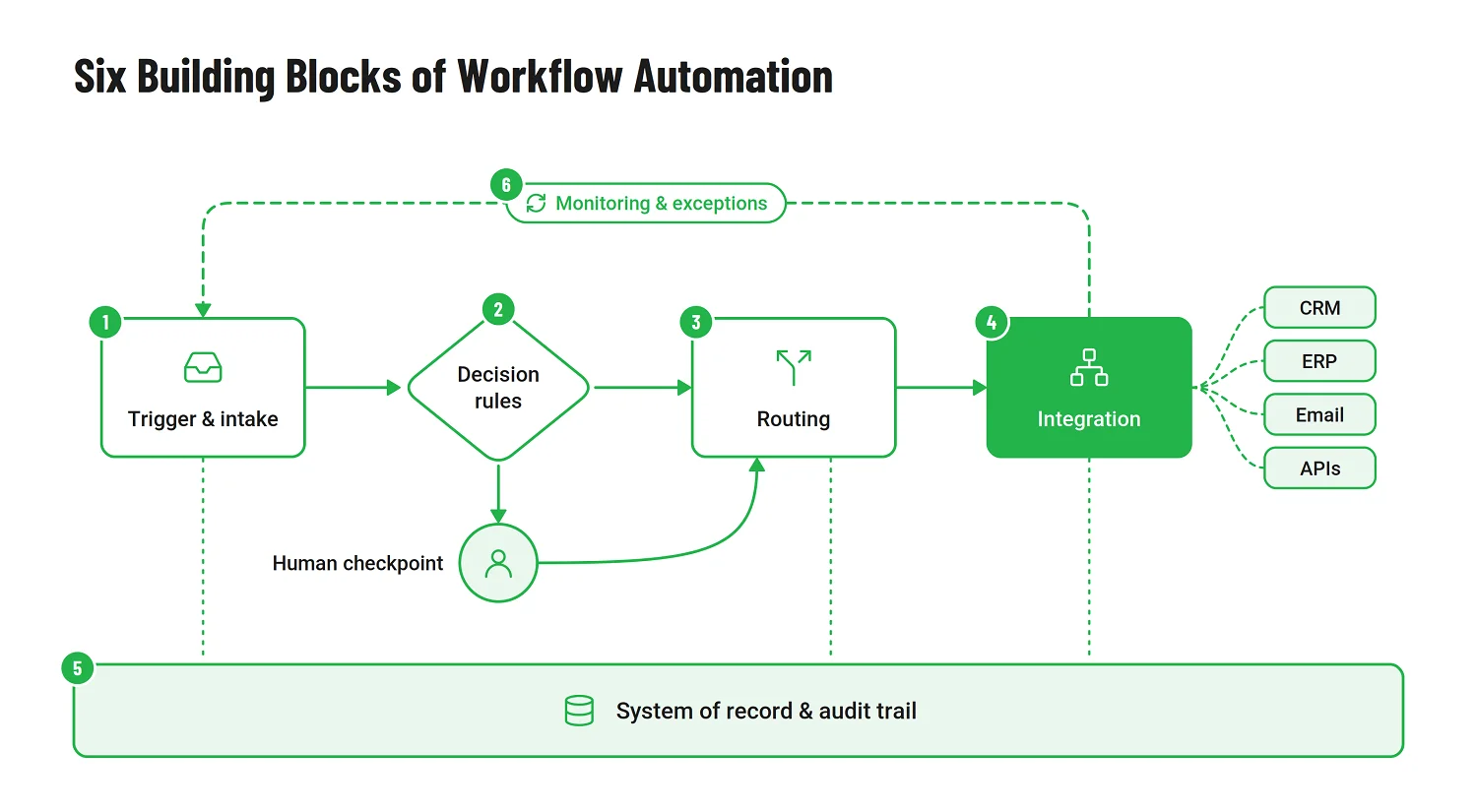
The following six components provide a useful way to assess what's already covered and what still needs to be designed.
1. Trigger and structured intake
Every workflow starts somewhere: a form submission, an incoming document, an email, an API call, a new record appearing in another system. The trigger defines what kicks off the process, and structured intake determines how cleanly the initial data enters the system. Problems at intake tend to surface later, often after a request has already moved through several systems. Required fields, duplicate submissions, and inconsistent formats are much easier to handle at the entry point than halfway through execution.
2. Decision rules, classification, and human checkpoints
If a decision follows clear, stable rules, there's little reason to involve machine learning. Rule-based logic is easier to test and usually more predictable. ML becomes useful when the inputs vary too much for a manageable set of fixed conditions, as with documents that arrive in different formats or requests that require classification based on several signals.
Even then, the workflow needs a way to handle uncertain results rather than treating every model prediction as a reliable decision.
Not every step should be automated end-to-end. Some decisions, including material approvals and exception handling, require human review when they involve significant judgment or risk. A well-designed workflow knows exactly where those checkpoints belong and treats them as a feature, not a gap.
3. Routing and orchestration
A workflow is relatively easy to design when every step succeeds. Things get more complicated when an approval sits unanswered, an API times out, or one system completes its task while another fails.
Orchestration needs to account for those situations as well as the normal sequence of tasks. That includes parallel execution, retries, escalation, and recovery. Retrying an operation also needs care: without appropriate safeguards, the same request may create duplicate records or trigger an action twice.
4. Integration with existing systems
Few workflows live in isolation. They touch customer relationship management (CRM), an enterprise resource planning (ERP), email, messaging tools, identity and access systems, external APIs, and often several of these at once. Good software integration does more than move data between applications. It needs to preserve the business rules and data relationships those systems depend on. If an order is updated in one application but the update to another fails, the workflow needs a way to detect and resolve the inconsistency.
Where existing applications already provide the necessary functionality, connecting them is usually more practical than rebuilding it.
5. System of record, visibility, and audit trail
Each critical record needs a clearly defined authoritative source, while the workflow needs a reliable way to track its current state. A consolidated view can bring information from several systems together without becoming another competing source of truth. The underlying records also need to show who approved a request, when its status changed, and how exceptions were handled. Access to that history should reflect each user's role and permissions.
6. Exception handling, monitoring, and improvement
Even a well-designed workflow will encounter requests it cannot complete automatically. An integration may be unavailable, an approval may exceed its SLA, or a request may not match any expected path.
Some of these cases can be resolved through retries or predefined recovery steps. Others need human intervention. The system should make that distinction visible and provide a clear way to track unresolved exceptions until they're handled.
Feedback loops, where a system uses past outcomes to refine future routing or classification, belong here as one possible mechanism, not as something every workflow needs. Many automated workflows do not require machine learning at all, and that's perfectly fine. The point of this block is resilience and continuous improvement, not sophistication for its own sake.
Workflow Automation in Practice
Workflow automation rarely follows a single blueprint. The right implementation depends on where the friction sits: repetitive decision-making, fragmented approval chains, manual data transfer, or disconnected business systems. Emerline’s projects show how different technologies can address different operational constraints without forcing every workflow into the same automation model.
AI-powered lead acquisition
In one B2B marketing project, Emerline built an AI-powered solution to automate several stages of the lead acquisition process, including outreach, qualification, and classification.
This workflow goes beyond conventional rule-based automation. When teams need to evaluate large numbers of leads, manual review can become slow, inconsistent, and difficult to scale. Machine learning can handle classification-heavy tasks, helping route prospects according to predefined criteria while reducing repetitive assessment for sales and marketing teams.
If a small set of rules can classify leads accurately, adding an ML model may only increase complexity. Machine learning becomes more useful when classification depends on varied signals and patterns that can be learned from representative data. Before relying on those predictions for automated routing, it's important to understand where the model makes mistakes and which results need further review.
Digital approval workflows
Approval processes are another common source of operational drag, especially when requests move through email threads, spreadsheets, or several disconnected systems before reaching the right decision-maker.
For one enterprise use case, Emerline replaced manual workflow handling with a solution built on Microsoft Power Platform. The new setup centralized incoming requests, routed them to the appropriate participants, provided clearer visibility into status, and consolidated the approval sequence into a single digital process.
Here, automation was less about introducing sophisticated AI and more about eliminating coordination overhead. By standardizing how requests entered the process, where they went next, and how their status was recorded, the organization gained a more transparent and manageable approval workflow while continuing to support its internal compliance requirements.
Integration-led automation
Not every automation project needs a new application. When existing systems already handle the required business functions, Emerline connects them and automates the handoffs between them. Employees no longer need to transfer information manually or coordinate each step across separate applications.
The priority is to make those handoffs reliable and visible without duplicating business logic that the existing systems already manage.
Low-Code, Integration, or Custom Development?
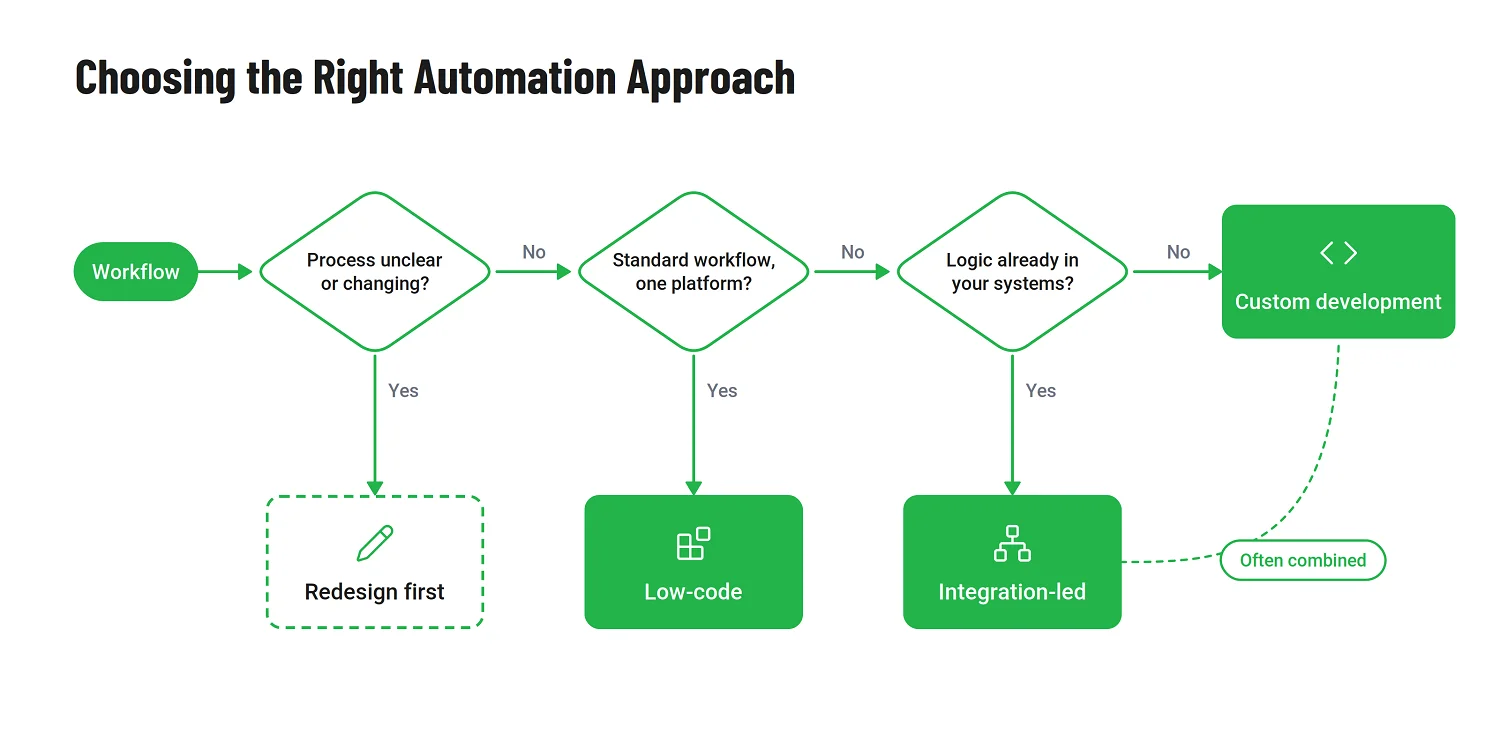
Low-code, integration, and custom development aren't necessarily competing options. A workflow might use an existing platform for approvals, APIs to exchange data, and a small custom service for decisions the platform cannot handle cleanly.
The choice depends on which parts of the process are already supported and where the limitations appear. Combining approaches often makes more sense than forcing the entire workflow into one technology.
Low-code automation
In a Microsoft environment, Power Platform can be a practical choice for approvals, employee requests, notifications, and other repeatable workflows. Much of the required functionality is available without developing a separate application.
That advantage becomes less clear when the workflow needs extensive custom logic, complex exception handling, or integrations that don't fit the available connectors. Licensing, platform limits, and maintenance costs deserve attention early, particularly if the process is expected to grow or change.
Integration-led automation
If the CRM, ERP, and other business systems already contain the necessary logic, rebuilding it in a new application creates another place to maintain the same rules. Integration-led automation connects those capabilities and removes manual handoffs.
The complexity is usually in keeping the systems consistent. Failed API calls, duplicate events, and conflicting updates all need to be handled. Otherwise, employees may end up spending the time saved on data entry reconciling records between applications.
Custom development
Custom development makes sense when the workflow has requirements that available platforms cannot support without significant compromises. That might involve proprietary decision logic, unusual exception paths, a specialized interface, or performance demands that exceed platform limits.
The benefit is greater control over how the solution works and scales. The trade-off is taking responsibility for more of the implementation and its ongoing maintenance, including monitoring, security, upgrades, and support. That cost needs to be weighed against the limitations and workarounds of an off-the-shelf platform.
The matrix below maps common workflow requirements and constraints to suitable implementation approaches. It also covers situations where process redesign should come before automation.
|
Business situation |
Recommended approach |
Why it fits |
Typical use cases |
|
The workflow is standardized, contains limited business logic, and operates mainly within one established ecosystem |
Low-code automation |
Offers a faster implementation path, simpler maintenance, and strong support for repeatable workflows within the platform’s native capabilities |
Approvals, employee requests, notifications, and Microsoft 365 workflows |
|
Existing CRM, ERP, or business applications already contain the required logic, but data and actions do not move between them automatically |
Integration-led automation |
Connects existing capabilities without replacing working systems and concentrates the investments on data exchange, synchronization, and orchestration |
CRM-ERP synchronization, automated order processing, lead routing, and status updates |
|
The workflow spans several systems and requires centralized orchestration, complex routing, or extensive exception handling |
Hybrid integration and custom workflow development |
Combines system connectivity with tailored workflow logic where standard connectors and automation tools reach their limits |
Enterprise request management, cross-department processes, and multi-system approvals |
|
The process contains proprietary rules, complex decisions, or highly specialized user interactions |
Custom development |
Provides full control over workflows, interfaces, data structures, permissions, and business logic |
Specialized operational platforms, complex case management, and proprietary workflows |
|
The workflow has demanding performance, availability, scalability, or latency requirements that standard platform limits may not support |
Custom development or enterprise-grade workflow platform |
Provides greater control over architecture, scaling, resilience, and performance when standard platform capacity, concurrency, or integration limits become a constraint |
High-volume processing, transaction-intensive operations, real-time workflows, and workloads with strict availability or latency requirements |
|
The workflow requires bespoke AI/ML models, specialized data pipelines, custom evaluation logic, or AI capabilities beyond those supported by the selected platform |
Custom development with AI/ML |
Provides control over model development, data pipelines, evaluation, monitoring, governance, and integration when built-in platform AI capabilities are not sufficient |
Proprietary classification models, domain-specific document processing, advanced prediction, custom recommendation systems, and AI-driven decision support |
|
The process is still unclear, rules change frequently, or ownership has not been established |
Process redesign before automation |
Automating an unstable process can preserve inefficiencies and make future changes more difficult and expensive |
Inconsistent approval chains, manual classification, and spreadsheet-based operations |
How We Automate Workflow Processes
We begin by understanding how the process actually works, including the exceptions and manual workarounds that rarely appear in formal documentation. That gives us a basis for choosing the architecture, testing critical assumptions, and building the automation in manageable stages.
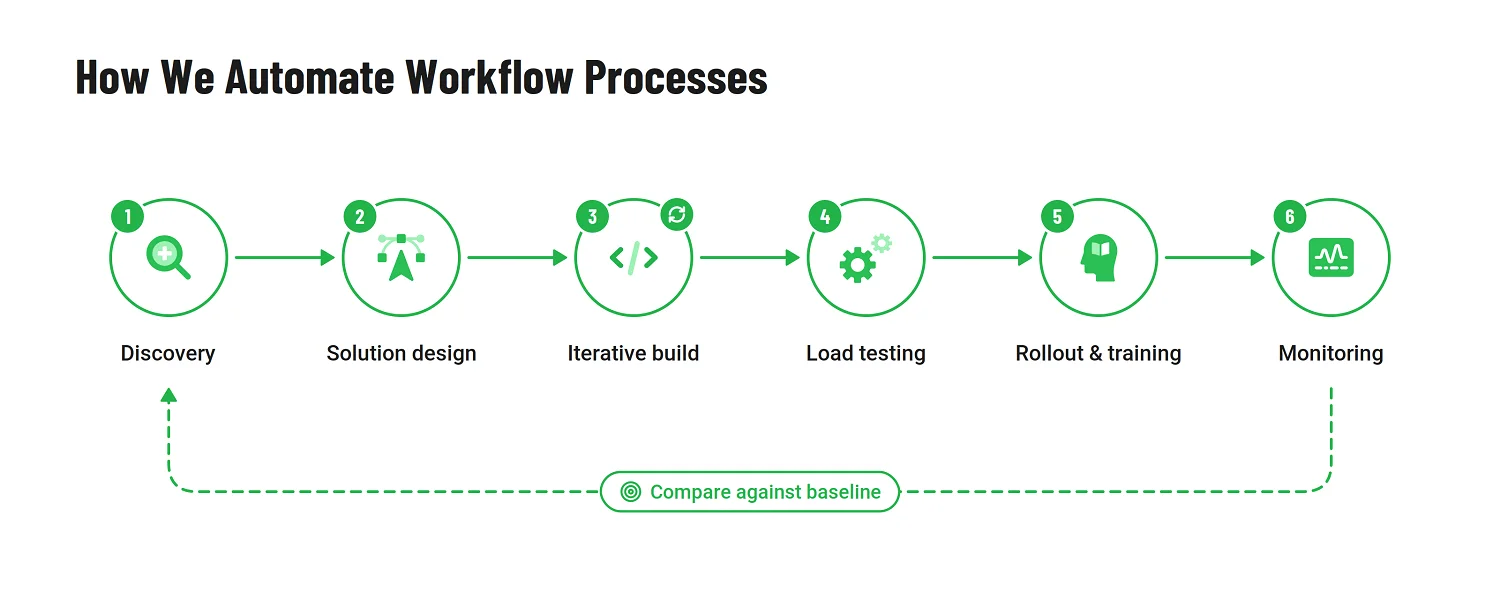
1. Discovery and process mapping
The project starts with structured interviews involving the people who execute, supervise, and depend on the process today. Their input helps uncover not only the documented workflow but also informal workarounds, exception paths, duplicated effort, and decisions that rely on individual knowledge.
The main output is an as-is process map showing:
- Participants and responsibilities
- Systems and data sources
- Handoffs and approval points
- Decision rules
- Recurring exceptions
- Manual tasks and operational bottlenecks
This stage also establishes the baseline against which the automation will later be evaluated. Typical starting metrics include cycle time, error frequency, backlog size, rework volume, and the number of manual touchpoints required to complete one case.
2. Solution design
Once the current process is understood, the team defines the target workflow and the technical structure needed to support it.
Beyond the workflow itself, the design needs to establish which systems own the data, how process state is tracked, who can access or change information, and what happens when a step fails. These decisions are easier to revisit during design than after several applications depend on them.
Where uncertainty remains, lightweight prototypes can validate how a workflow should behave, how users will interact with it, and whether the proposed integration model is practical. The objective is to remove the most important unknowns before committing to the full delivery scope.
3. Iterative development
Automation is developed in short, reviewable increments rather than delivered as one large release at the end of the project.
Stakeholders regularly see working software, test individual workflow stages, and confirm whether the implementation reflects the intended process. This makes it easier to identify misunderstood rules, missing exceptions, and usability problems while they are still limited in scope.
Software prototyping remains useful throughout this stage, especially when a workflow includes unfamiliar interactions, several user roles, or decisions that are difficult to define through documentation alone. Regular demonstrations keep business and engineering teams aligned as the solution evolves.
4. Testing under realistic load
Functional testing confirms that the workflow follows the expected path. Production readiness requires a broader question: will it continue to perform under the volume, timing, and irregularities of real operations?
Our QA services approach includes testing with realistic numbers of requests, documents, leads, transactions, or concurrent users. Where growth is expected, load scenarios can model projected activity at three, six, and twelve months after launch rather than validating only the first-day workload.
Testing should also cover:
- Simultaneous requests
- Duplicate or incomplete data
- Unavailable external systems
- Delayed responses
- Permission conflicts
- Unusual exception paths
- Recovery after a failed step
This helps ensure that the automation remains dependable outside a controlled demonstration environment.
5. Rollout with training, not just deployment
A technically correct workflow can still underperform when users do not understand the new process or when automation introduces friction into familiar tasks.
Rollout, therefore, includes more than releasing the software. End users need role-specific training, administrators need configuration and troubleshooting guidance, and the organization needs a clear support path for questions and incidents after launch.
Documentation should explain not only how to use the system but also how the new workflow differs from the previous one, which responsibilities have changed, and where employees should intervene when an automated path cannot be completed successfully.
6. Post-launch monitoring and optimization
After rollout, the workflow is monitored as an operating process rather than treated as a finished implementation.
The team reviews failed runs, exception patterns, user adoption, SLA breaches, manual overrides, support requests, and changes in the key performance indicators (KPIs) established during discovery. These findings show where additional rules, interface improvements, integration changes, or process adjustments may be needed.
This is also the stage where the original baseline becomes useful. Comparing post-launch performance with the figures captured during discovery provides evidence of whether the automation reduced delays, improved consistency, and created enough capacity to justify the investment.
How to Measure Whether Workflow Automation Worked
Automating 30 steps doesn't tell you much about whether the process improved. Requests may still spend days waiting for approval, or employees may now spend their time correcting integration errors instead of entering data manually.
A better measure is what changed in day-to-day operations: how long requests take, how often something goes wrong, and how much work the team can handle without adding more people.
This measurement gap is common. Gartner reported that hyperautomation remains a staple discipline for 90% of large enterprises, while fewer than 20% of organizations have mastered measuring the results of their hyperautomation initiatives. The figures underline a broader point: adoption is widespread, but disciplined outcome measurement remains much less mature. Gartner’s analysis supports defining success before implementation rather than trying to prove value afterward.
For a practical evaluation, group the evidence into four categories.
Cycle time
Cycle time measures how long the process takes from initiation to completion.
Depending on the workflow, this may include:
- The time required to approve a request
- Lead response or qualification time
- Document-processing duration
- Order-to-fulfillment time
- The average time spent waiting between stages
Automation should shorten delays caused by manual handoffs, repeated data entry, and unclear ownership. It is also worth separating active processing time from waiting time, since the largest improvement may come from eliminating queues rather than accelerating the task itself.
Error rate
Error-rate metrics show whether the automated process produces more consistent results.
Useful indicators can include:
- Incorrect classifications
- Missing or duplicated records
- Failed integrations
- Rework caused by incomplete information
- Incorrectly routed requests
- Manual corrections after completion
A lower error rate often matters as much as faster processing. An automated workflow that finishes quickly but creates more reconciliation or exception work has moved the problem rather than solved it.
Transparency and auditability
Many manual workflows are difficult to inspect because decisions are distributed across email, spreadsheets, chat messages, and individual memory.
Automation should improve visibility into:
- The current owner and status of each request
- The rule or decision path that moved it forward
- Who approved or changed information
- When a handoff or escalation occurred
- Which exceptions required manual intervention
The evidence may be both qualitative and quantitative. Faster audit preparation, fewer status inquiries, clearer ownership, and more reliable reporting all indicate that the process has become easier to govern.
Scalability headroom
Scalability headroom measures how much additional demand the process can absorb before the organization needs a proportional increase in staff, infrastructure, or manual effort.
Relevant questions include:
- Can the workflow handle twice the current volume?
- Does processing time remain stable during peaks?
- Do exception queues grow as demand rises?
- How many cases can one employee supervise after automation?
- At what point does the architecture require expansion?
The goal is not merely to process today’s workload faster. It is to create enough operational capacity for growth without recreating the same bottleneck at a higher volume.
Establish the baseline before implementation
These four categories should be measured before development begins, during discovery, and during process mapping. The team records the current cycle time, error rate, visibility gaps, and capacity constraints, then measures the same indicators again after the automated workflow has been live long enough to stabilize.
Without that before-and-after comparison, organizations can describe what they automated but cannot demonstrate what improved.
Vanity metrics such as “we automated 30 steps” or “the bot processed 10,000 requests” may sound impressive, but they do not establish whether the process became faster, more accurate, more transparent, or better able to support growth.
Some benefits are real but less suitable for precise numerical claims. Employees may find the workflow less frustrating, customers may receive clearer updates, and managers may feel more confident in the information available to them. When reliable quantitative evidence does not exist, document these outcomes through interviews, usability feedback, support trends, and observed behavior rather than convert them into artificial percentages.
Conclusion
There isn't one architecture that works for every automation project. Some processes need little more than clearer rules and better integration between existing systems. Others justify a dedicated workflow platform or custom development. The decision should come from understanding how the process operates, where it breaks down, and what the business needs it to handle.
After launch, the useful questions become more specific: where do requests still get stuck, which exceptions keep returning, and how much additional work can the process handle? Those answers should guide the next improvements.
Frequently Asked Questions About Workflow Process Automation
Workflow automation often raises practical questions about scope, technology, timing, and the role people should continue to play. These answers focus on what matters most when evaluating an automation initiative.
What is workflow process automation?
Workflow process automation uses software to move information, tasks, documents, and decisions through a defined business process with fewer manual handoffs. It is about running a process with less manual work, whether that means routing an approval, classifying a new lead, updating a record, notifying the next participant, or moving a candidate through a recruitment pipeline, instead of relying on emails, spreadsheets, and repeated data entry.
How is workflow automation different from process automation?
Workflow automation focuses on a defined sequence of tasks, decisions, and handoffs. Business process automation is broader and can coordinate multiple workflows, systems, data sources, and teams to automate an end-to-end business process. In industrial contexts, “process automation” can also refer to physical or control systems, so the exact meaning depends on the domain.
How do I know if my workflow is ready for automation?
Common indicators include processing times that increase with volume, frequent errors or rework, limited visibility into request status, and a growing backlog that cannot be resolved simply by adding more people.
Another strong signal is when employees repeatedly copy information between systems or rely on informal knowledge to decide what should happen next. If several of these conditions appear consistently, the workflow is worth assessing, even if the eventual recommendation is to redesign the process before automating it.
Does workflow automation require AI or machine learning?
No. Many high-value automations rely on defined business rules, approvals, notifications, and system integrations without using AI at all.
For example, Emerline implemented an enterprise approval system with Microsoft Power Platform, replacing manual request handling with centralized routing, status tracking, and structured approval flows.
AI and machine learning are useful when the workflow involves decisions that cannot be captured reliably by fixed rules, such as lead scoring, document classification, anomaly detection, or recommendations. They should be introduced because the decision requires them, not simply because AI is available.
How long does a workflow automation project typically take?
The timeline depends on the number of workflows involved, the complexity of the decision rules, the systems that need to be connected, and the number of exceptions the solution must handle.
Data migration, access controls, security requirements, expected transaction volumes, and the condition of existing systems can also affect delivery. A low-code approval flow within Microsoft 365 may take far less time than a custom automation platform that coordinates several enterprise applications. A realistic schedule should therefore be established through discovery rather than inferred from the number of screens or workflow steps alone.
What's the biggest reason workflow automation projects fail?
One of the most common causes is automating a process that has never been properly mapped or challenged.
If discovery involves only managers, the project may miss the workarounds, exception paths, and informal decisions known only to the employees who execute the process every day. The result can be a technically functioning system that reproduces existing inefficiencies more quickly.
A successful automation initiative begins by understanding the real workflow, defining ownership, removing unnecessary steps, and agreeing on how to handle exceptions before development starts.
Which workflow decisions should remain human?
Human involvement should remain where information is incomplete, intent is difficult to interpret, or the consequences of an incorrect decision are substantial.
This often includes unusual exceptions, high-value approvals, legal or compliance judgments, sensitive customer situations, and actions with financial, operational, or reputational impact. In these cases, automation can gather information, apply initial checks, and prepare a recommendation while leaving the final decision to an authorized person.
The objective is not necessarily to eliminate human participation. It is to assign repetitive and predictable work to software while preserving human judgment where context, accountability, and discretion are essential.
Published on Oct 9, 2026