Beyond the Login Screen: What It Really Takes to Build a Customer Portal
Table of contents
- Key takeaways
- What Is a Customer Portal
- Types of customer portals
- Self-service support portal
- Account management portal
- Partner or reseller portal
- B2B2C engagement portal
- Real-world example: a B2B2C benefits and engagement portal
- Why Businesses Need a Customer Portal
- Reduces support dependency
- Creates a single account workspace
- Scales customer operations
- Core Architecture of a Customer Portal
- Single-tenant vs. multi-tenant
- Real-time vs. batch sync
- Designing the Portal Experience
- Role-aware navigation, not just role-aware permissions
- Progressive disclosure prevents the “guest wanders the whole tool” problem
- The first login and empty-state experience
- White-labeling and branding
- Notification UX is a design problem, too
- Data-heavy interfaces need more than tables
- Accessibility and mobile responsiveness
- Search should be where users need it
- Integration Patterns That Actually Matter
- Webhook-based integration
- Polling-based integration
- Event-driven integration
- One scenario, three possible patterns
- AI-Powered Search and Assistants in Customer Portals
- Smart search vs. RAG: what changes in a customer portal
- Authorization-aware retrieval must extend to the retrieval layer
- AI assistant vs. agentic AI: answering versus acting
- Protect PII before it reaches an external model
- Uncertainty handling is part of the architecture
- Security and Compliance Considerations
- Encryption, access control, and auditability are minimum requirements
- Data residency can shape the deployment model
- Regulated portals usually need stronger control patterns
- Build vs. Buy vs. Platform-Based Development
- Customer Portal Development Cost
- Basic/MVP portal: approximately $10,000-$40,000
- Mid-range/standard portal: approximately $40,000-$150,000
- Enterprise/complex portal: approximately $150,000-$500,000+
- Design is a separate budget line
- Ongoing maintenance belongs in the original budget
- Team location also changes the cost model
- Common Pitfalls When Building a Customer Portal
- Over-scoping the first release
- Treating a generic PM tool as a customer portal
- Defining guest boundaries only after a complaint
- Underestimating time tracking and reporting
- Skipping UX testing with real client users
- Choosing a Development Partner
- Conclusion
Somewhere between the tenth support ticket asking for an invoice status and the fifth spreadsheet tracking which client has access to what information, most growing companies reach the same conclusion: manual account management doesn't scale forever. The fix seems obvious on paper. Give customers a place to check their own information and manage their own requests, freeing the support team to address problems that actually need a human.
In practice, the projects that pull this off cleanly and the ones that quietly turn into six-figure maintenance headaches often start from nearly identical requirements documents. The difference rarely comes down to budget size. It tends to come down to a handful of architectural and strategic decisions made early in the process, several of which have little to do with code at all. This article walks through what actually separates a dependable customer portal from one nobody quite trusts, along with realistic cost figures for each stage of the build.
Key takeaways
- Customer portal architecture should follow the account model: B2B and B2B2C portals often require multi-tenant architectures, layered permissions, and stricter data isolation rules than simpler B2C use cases.
- Integrations determine much of the portal’s real complexity: CRM, billing, support, identity, and operational systems need synchronization patterns that match the required freshness, reliability, and API constraints.
- UX is part of the product architecture, not a finishing layer: Role-aware navigation, progressive disclosure, onboarding, search, accessibility, and mobile usability directly influence whether customers adopt self-service.
- Development cost is shaped by more than the number of screens: Integration depth, RBAC and tenancy, AI capabilities, compliance requirements, and custom design have a much greater impact on the final budget.
- The right build approach depends on the business model: Off-the-shelf tools, platform-based development, and fully custom portals each fit different levels of account complexity, differentiation, integration depth, and scale.
What Is a Customer Portal
Before delving into architecture, integrations, or price tags, it's worth being precise about what we mean by "customer portal," since the term gets applied loosely across the industry, everything from a login page to a full self-service platform.
At its core, a customer portal is a secure, authenticated, account-specific web platform: customers log in to interact with account-specific data and functionality, not with general information about your company. That's the line separating a portal from a public help center. A help center is primarily a knowledge and support-content layer that may be public or restricted. A customer portal combines authenticated access with account-specific data, workflows, and actions.
You'll see "customer portal," "client portal," and "self-service portal" used interchangeably throughout this piece. They refer to the same platform category; the interchangeable use here is deliberate rather than careless, since all three terms describe the same underlying structure, depending on who's using them.
The shape of a portal also changes considerably, depending on who's logging in. B2C portals are typically built around a simple relationship: one account, one user, one login. B2B portals rarely have that luxury. A single account might represent an entire company, with a finance lead who needs visibility into invoices, a project manager tracking deliverables, and an IT admin managing user access — all operating under the same corporate account, but with meaningfully different permissions. That layered access requirement alone reshapes how the system needs to be built, long before a single integration enters the conversation.
Whatever form it takes, a customer portal is not a marketing website with a login screen attached, nor is it a generic project management tool with a guest seat handed to your client. It is its own product category, with its own architecture, risks, and economics.
Types of customer portals
Before deciding how to build a portal, it helps to be clear on which kind you're actually building, since the following four common patterns solve different problems.
Self-service support portal
Built around ticketing, a searchable knowledge base, and status tracking, this type is typically anchored to a single primary contact per account, rather than multiple users sharing access.
Account management portal
Centered on invoices, contracts, usage data, and renewals, this is the dominant pattern among enterprise B2B software vendors, where the goal is transparency into the commercial relationship rather than support resolution.
Partner or reseller portal
External partners log in to access shared pipeline data, co-marketing assets, and deal registration. The trust boundary here differs from that of a direct client relationship, since partners occupy a semi-external position relative to the business, rather than being fully inside or outside it.
B2B2C engagement portal
The company is the buyer, but its employees or end customers are the ones actually using the platform day-to-day. This is the most complex permission case of the four, since it involves two nested account layers: the corporate account that purchased the platform and the individual users operating beneath it.
Which of these you're building substantially predetermines a decision covered in the next section: single-tenant versus multi-tenant architecture. A partner portal serving a handful of resellers has very different data isolation requirements than a B2B2C portal serving thousands of end users across hundreds of corporate accounts.
Real-world example: a B2B2C benefits and engagement portal
A mid-size HR-tech company needed a platform that its corporate customers could use to manage employee benefits, wellness perks, and reimbursements. Each corporate customer's employees served as the platform's end users. The build included a permissions system with multiple role tiers:
- A scheduled notification engine covering push, SMS, and email with configurable rules
- Integrations spanning calendar systems, team chat, payment processing, wellness and gift-card vendors
- File transfer for corporate HR data feeds.
A custom reporting layer gave each corporate customer visibility into their employees' engagement and utilization data, without exposing any data across accounts. The platform shipped in under 12 months, with white-labeling options letting each corporate customer apply its own branding, language, and color scheme. Post-launch, the client reported retention and satisfaction metrics in the high-90s, along with a meaningful boost in employee engagement with the platform.
Why Businesses Need a Customer Portal
The case for a customer portal rarely comes down to a single benefit. It tends to show up as a combination of factors: support teams stretched thin, client data scattered across too many tools, and a customer base that's grown past what manual account management can comfortably handle. A portal specifically addresses each of these factors:
Reduces support dependency
Most customers don't want to talk to a live rep in the first place. Research published in Harvard Business Review found that 81% of customers attempt to solve an issue on their own before ever reaching out to a person, and Zendesk's own research puts the share who actively prefer self-service over a conversation with an agent at 67%. That preference translates into real savings when backed by the right infrastructure: Gartner-cited data suggests self-service can cut support costs by up to 25%. A portal is the mechanism that turns that preference into a tangible cost reduction, rather than leaving it as an unmet expectation.
Creates a single account workspace
When contracts, invoices, ticket history, and reports live scattered across email threads and spreadsheets, ambiguity creeps in for everyone involved. Both the client and the internal team end up hunting through old messages trying to remember which thread had that attachment, or which version of a report is current. Centralizing everything in one authenticated workspace removes that friction. It does more than save time: it directly reduces the churn risk tied to issues that never quite get resolved. According to Zendesk's CX Trends 2026 report, 85% of CX leaders say customers will walk away from a brand over an unresolved issue, even after the very first contact.
Scales customer operations
The same self-service mechanics that lower the cost per ticket also decouple account growth from headcount growth. A company's 50th client account shouldn't require its support team to grow at the same pace the client base did to get there. That matters even more, given how expectations have shifted. According to recent CX research from Zendesk, 74% of consumers now expect customer service to be available 24/7, a bar that's genuinely difficult to clear with headcount alone, no matter how good that team is.
Core Architecture of a Customer Portal
Every functioning customer portal, regardless of industry or use case, tends to break down into the same six layers, which are shown below. Understanding what each layer is responsible for and where the boundaries between them should sit is what web portal development comes down to at the architectural level. It's what separates a portal that stays maintainable at scale from one that turns into a tangle of workarounds a year after launch.
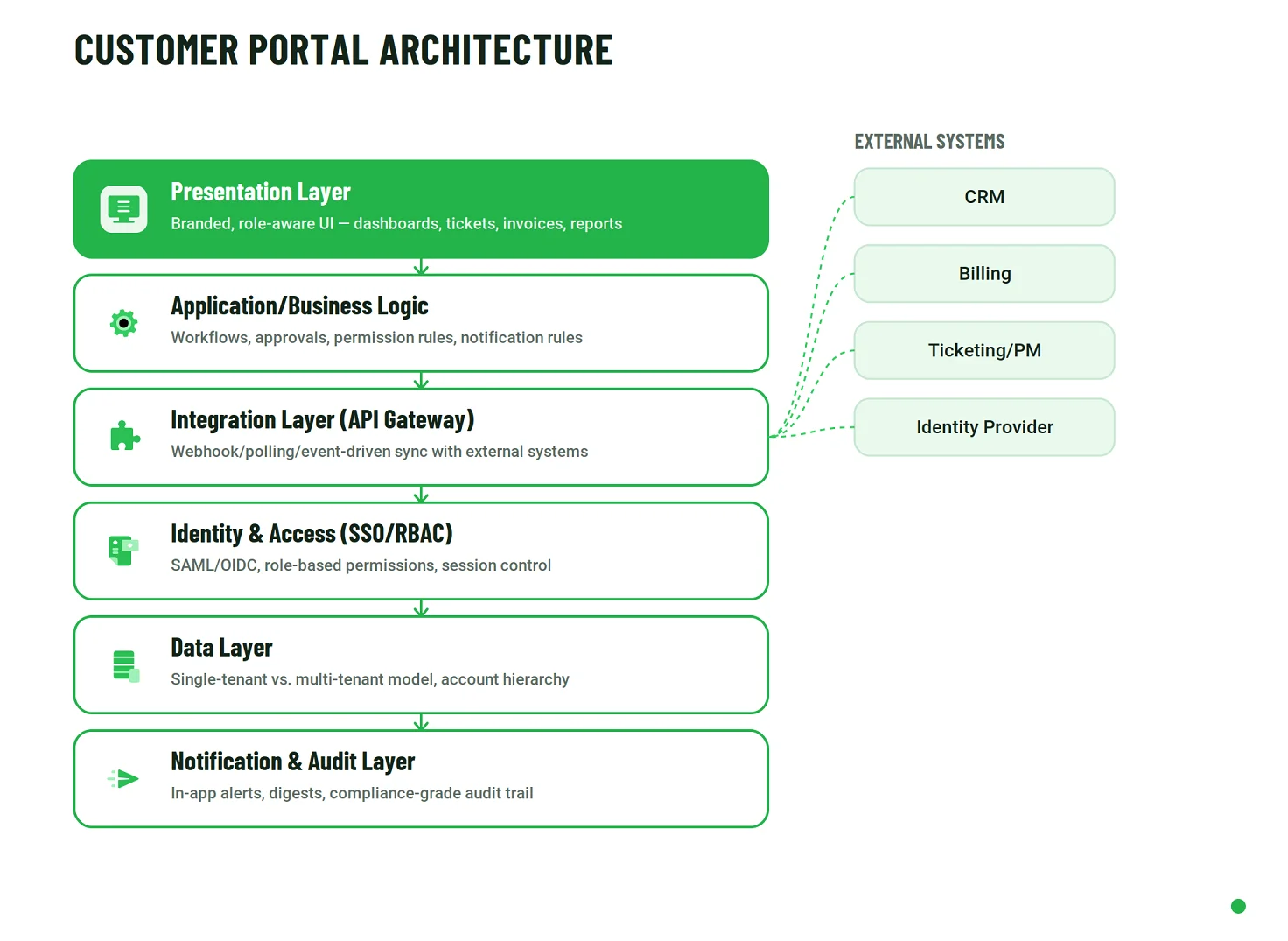
- Presentation layer
This is what the client account actually sees and can click through: dashboards, ticket lists, invoice views, and report screens. It renders based on the signed-in user's role, so two people from the same client account can see genuinely different navigation and data, not just different permissions layered onto the same screen. This layer communicates with the application layer via an API and should contain no business logic of its own, which is exactly where the next layer picks up.
- Application/Business logic layer
This layer owns the rules: who can approve what, what happens when a ticket status changes, and which notification fires on which event. It turns raw data into workflows, an approval chain, a leave request calculation, and a ticket escalation path. Keeping this logic separate from the presentation layer means the same rules apply consistently, whether the client is on web or mobile. This is also the layer that decides when something needs to reach outside the portal entirely, which is where integration comes in.
- Integration and API layer
This layer communicates with everything outside the portal: CRM, billing, ticketing tools, and identity providers. It's usually implemented as an API gateway or a dedicated integration service, rather than scattered calls made directly from the application layer. That kind of scattering is exactly what makes a portal fragile whenever an external system changes its API. Sync direction, field mapping, and retry or failure handling all live here. Once data is flowing in and out reliably, the next question becomes who is allowed to see it.
- Identity and access layer (SSO/RBAC)
This layer decides who can log in and what they can see once they do. For B2B accounts with multiple users, it enforces role-based permissions: the difference between a procurement contact and a technical contact isn't cosmetic; it's an access-control rule enforced right here. Single sign-on, whether SAML or OIDC, also lives at this layer when enterprise clients require it. Everything this layer decides ultimately governs access to what sits underneath: the data itself.
- Data layer
This is where account data actually lives, and it's the layer that decides whether the system is single-tenant or multi-tenant, a decision significant enough to deserve its own explanation below. It also defines the account hierarchy, how a parent company relates to its sub-accounts or multiple users, a structure that every layer above it depends on. Once the data exists and is properly structured, the final step is to make sure the right people know when something in it changes.
- Notification and audit layer
This layer has two distinct jobs: pushing alerts to users — whether in-app, email, or SMS — based on rules defined in the business logic layer, and logging every meaningful action for audit purposes, including who saw what, who changed what, and when. In regulated industries, the audit element isn't a nice-to-have; it's a compliance requirement.
Single-tenant vs. multi-tenant
This decision needs to be made before any other architectural choice, because it determines the database schema itself. Changing it after launch means migrating live client data, not just refactoring code.
With a single-tenant setup, each client gets a separate database or a separate instance of the whole application. It's simpler to reason about, easier to customize per client, and easier to satisfy strict data-isolation requirements, but it doesn't scale cheaply past a handful of accounts, since every client becomes a separate item to deploy, patch, and monitor.
With a multi-tenant setup, all clients share the same database and application instance, with a tenant identifier attached to every row, or — in a stricter variant — a separate schema per tenant within the same database. This scales far more cheaply, since one deployment serves every client. However, it puts more weight on the access-control layer, because a bug in a query's tenant filter can leak one client's data into another client's view. That's the same category of risk as letting a client account see more than it should in the interface, just enforced at the database layer instead of the UI layer.
A practical rule: the tenancy and isolation model should be chosen early, because it affects data access, deployment, operations, and migration complexity. Pooled models usually offer better economies of scale, siloed models offer stronger isolation, and hybrid approaches let teams apply different isolation strategies to different workloads or customer tiers.
Real-time vs. batch sync
Not every integration needs to be real-time; treating all of them as real-time adds cost, and failures surface without adding value.
Real-time, event-driven sync makes sense when the client is actively waiting on the result. For example, when a client submits a support ticket in the portal, it needs to appear in the internal ticketing tool — whether that's Jira, Linear, or GitHub Issues — within seconds, because a team member may be actively triaging incoming tickets. Firing a webhook the moment the ticket is created is the right mechanism here; polling on a schedule would introduce a delay that the client would notice.
Batch or scheduled sync is the right choice when the data doesn't need to be instantly updated, and pulling it constantly would waste resources. A monthly usage report is a good example, as is a nightly sync of invoice data from the billing system into the portal's read-only invoice view. The client checks this every few weeks, so refreshing it hourly adds API load and infrastructure cost for no real benefit.
The rule of thumb is to match the sync mechanism to how the data is actually consumed, not to what's technically easiest to build. A common mistake is defaulting to polling on a fixed schedule for every integration because it's simpler to implement than webhooks. That shortcut quietly turns into either stale data when the interval is too long, or unnecessary API costs and rate-limit problems when the interval is too short.
Designing the Portal Experience
Architecture determines what a customer portal can do; UX determines whether customers will actually use it. For an authenticated, account-specific platform, good interface design is not mainly about visual polish. It is about helping each user reach the information and actions relevant to their role without exposing unnecessary complexity, creating avoidable support demand, or making self-service feel harder than sending an email.
Role-aware navigation, not just role-aware permissions
Permissions should control more than whether someone can edit a record. They should also shape what the person sees in the first place. A procurement contact and a technical lead may belong to the same client account, but their priorities differ: one may need contracts, invoices, and renewal dates, while the other may need implementation status, support tickets, API documentation, or service health information.
Giving both users the same dashboard and simply disabling different buttons technically enforces access rules, but it creates a poor experience. Role-aware navigation should adjust home screens, shortcuts, summaries, and available workflows based on each user's responsibilities.
Progressive disclosure prevents the “guest wanders the whole tool” problem
One common failure in client-facing systems is treating an external user as an internal employee with fewer editing rights. The result is an interface full of modules, menus, and data that the customer does not need to see.
Progressive disclosure addresses the problem at the interface level. Instead of showing the full product and blocking actions later, the portal reveals only the sections, controls, and contextual details relevant to that user. Backend authorization remains essential, but thoughtful UX reduces cognitive load before permissions ever need to be granted.
The first login and empty-state experience
A newly created account rarely has enough activity to populate a useful dashboard. Without deliberate onboarding, the first impression may be a collection of empty tables, zero-value charts, and navigation labels that assume the user already understands the system.
A guided first-login experience can establish momentum much faster. A short setup checklist might prompt an account administrator to invite colleagues, connect an identity provider, upload required documents, configure notification preferences, or complete the first transaction. Empty states should also explain what will eventually appear in a section and what action creates that data, rather than simply displaying “No results.”
White-labeling and branding
Branding influences whether the portal feels like a natural extension of the customer relationship or a third-party product the user happens to access. Depending on the business model, customization may range from a logo and color palette to a custom domain, terminology, language, email templates, and a nearly invisible technology-provider brand.
Espresa provides an adjacent example of this approach: its employee-facing web portal can carry company branding, and administrators can customize details such as the program name shown in the browser tab and the favicon. The appropriate level of white-labeling depends on the portal model, but the decision should be made deliberately rather than left until the final design stage.
Notification UX is a design problem, too
Notifications are useful only as long as users still consider them worth opening. Sending an email for every ticket update, invoice change, comment, or status transition quickly turns an engagement feature into background noise.
A stronger pattern combines an in-app notification center with per-user controls over immediate alerts, scheduled digests, and event categories. This lets customers decide which updates deserve interruption and which can wait. The solution is not simply to rate-limit outbound messages on the backend; it is to design a notification model centered on relevance and user preferences.
Data-heavy interfaces need more than tables
Account management and support portals often accumulate hundreds or thousands of invoices, cases, transactions, documents, users, or service records. At that scale, a long list with a search box is not enough to preserve the promise of self-service.
Saved views, compound filters, sorting, bulk actions, export controls, clear status labels, and sensible defaults let users efficiently work with large datasets. These patterns are especially important for finance, procurement, support, and operations users who may visit the portal to complete repetitive tasks rather than browse individual records.
Accessibility and mobile responsiveness
Accessibility belongs in portal design from the beginning, rather than appearing only as a compliance checkpoint before launch. Keyboard navigation, screen reader support, clear focus states, high contrast, predictable form behavior, and understandable error messages all affect whether users can independently complete essential account tasks.
Mobile responsiveness matters for a similar reason. A portal does not necessarily need a dedicated mobile app, but common activities, such as checking a ticket, approving a request, downloading an invoice, and reviewing a notification, should remain practical on a phone or tablet. A portal that becomes unusable on non-desktop devices has already diminished the value of self-service.
Search should be where users need it
Search usefulness depends as much on placement as on search technology. A powerful search function that is hidden inside a secondary menu will do little for customers who cannot find it quickly.
For portals with substantial knowledge content, documents, tickets, invoices, or account records, the search should be reachable from the screens where users naturally begin their tasks. In many cases, that means a persistent search field or a clearly visible entry point rather than a feature buried several clicks deep. The results themselves should respect account boundaries and permissions, so discoverability never comes at the expense of data isolation.
Integration Patterns That Actually Matter
Most customer portals are not systems of record. They sit between the customer and the business applications that already own sales, billing, service, project, identity, and operational data. A typical portal may pull account details from HubSpot or Salesforce, invoices from SAP or Microsoft Dynamics 365, support and project information from Jira or Zendesk, development activity from GitHub, and authentication from providers such as Okta or Microsoft Entra ID. That makes software integration architecture one of the decisions that most directly affects how current, reliable, and maintainable the portal feels in daily use.
There is no single integration mechanism that fits every connection. The practical choice usually depends on how quickly data must appear, what the external system supports, how expensive its API calls are, and how many downstream applications need to react to the same change.
Webhook-based integration
With a webhook-based pattern, the external system notifies the portal as soon as a relevant event occurs. A CRM, for example, might send a webhook when a contract is signed, so the portal can immediately update the agreement status or unlock the next onboarding step.
The main advantage is low latency, without repeatedly querying the source system to see whether anything has changed. The trade-off is that the external platform must support outbound webhooks, and the receiving side needs to be designed for failure. Deliveries can time out, arrive more than once, or reach the portal out of order, so production implementations need idempotency, retry policies, logging, and a dead-letter or recovery mechanism for events that cannot be processed successfully.
Polling-based integration
Polling reverses the direction of the conversation. Instead of waiting for a notification, the portal calls the external system on a schedule to request records created or updated since the previous check.
This approach works with almost any API, including legacy platforms that cannot emit events, and it can be perfectly appropriate when near-real-time synchronization is unnecessary. Its limitations are equally clear: the portal learns about a change only at the next polling interval; every check consumes API capacity, even when nothing has changed. With rate-limited or usage-priced APIs, frequent polling can become both a technical and commercial constraint.
Event-driven integration
An event-driven model extends beyond a one-to-one callback. Changes are published as events, often through a message broker or queue, and multiple systems can consume them independently. The portal may update its customer-facing view while finance refreshes an internal workflow, and analytics records the same event for reporting.
The added infrastructure is not justified for every portal. It becomes valuable when several applications need to react to the same business event, when processing should be decoupled from the source system, or when the organization needs durable event delivery and independent downstream scaling. In those cases, the event becomes a shared business signal rather than a private synchronization message between two applications.
One scenario, three possible patterns
Invoice-status synchronization shows why the integration pattern should follow the operating context rather than a preferred technology. Suppose SAP or Microsoft Dynamics 365 remains the authoritative source for billing while the portal needs to show whether an invoice is open, paid, overdue, or disputed.
If the billing platform can emit the required event, a webhook can update the portal shortly after the status changes. If it cannot, a scheduled polling job might reconcile invoice states every night or every few hours, depending on how up-to-date the portal needs to be. If that same billing event must independently trigger portal updates, accounting workflows, customer notifications, and analytics processing, publishing it through an event-driven layer may be the cleaner long-term design.
The important question is therefore not which pattern sounds most modern. It is which one provides the right balance of freshness, reliability, API consumption, implementation effort, and downstream independence for that particular integration.
AI-Powered Search and Assistants in Customer Portals
AI can make a customer portal considerably easier to navigate when users are dealing with large knowledge bases, long ticket histories, complex account records, or multiple connected systems. Instead of forcing customers to know exactly where information lives, an AI layer can help them find relevant material, interpret account-specific context, and, in more advanced implementations, complete selected actions on their behalf. The value, however, depends less on adding a chatbot to the interface than on correctly designing the underlying retrieval, permissions, privacy, and escalation.
Smart search vs. RAG: what changes in a customer portal
Traditional full-text search is primarily a matching problem. A user enters keywords, and the system returns documents or records containing those terms (or close variants of them). That can work well for product documentation, FAQs, and structured content, but it still leaves the user to open results and assemble the answer.
Retrieval-augmented generation (RAG) adds another layer. The system first retrieves relevant fragments from an approved knowledge source and then passes that context to a language model, which generates a response grounded in the retrieved material. In a customer portal, the important difference is that the searchable corpus may include much more than public documentation. It can include the signed contract for that account, recent support tickets, invoice history, implementation notes, service entitlements, or account-specific policies.
That makes RAG potentially much more useful than a generic site search, but also much more sensitive. The retrieval process must know not only what is semantically relevant, but what the current user is actually permitted to see.
Authorization-aware retrieval must extend to the retrieval layer
Portal permissions cannot stop at the application screen or API endpoint once semantic retrieval is introduced. If data embedded from multiple customers are stored in the same retrieval environment without sufficiently strong tenant and role scoping, a similarity search can surface information relevant to the query but belonging to another account.
The safer pattern is to enforce authorization as part of the retrieval itself. Depending on the architecture, that may mean separate tenant namespaces or indexes, metadata filters tied to account and role, database-level access controls, or a combination of these mechanisms. A user should never receive a fragment that falls outside their permitted data scope, even before the language model sees it.
This is particularly important in B2B and B2B2C portals, where permissions may differ not only between companies but also between administrators, finance users, managers, and individual end users within the same customer account.
AI assistant vs. agentic AI: answering versus acting
A RAG-based assistant is primarily an information layer. It can retrieve authorized data and generate a contextual response to answer questions such as “When does our contract renew?”, “Which invoices are still open?” or “What did support recommend in the last ticket?”.
An agentic layer can go further by connecting the model to tools and APIs. Instead of only explaining how to check an order, it may call the order management API to return the current status. With appropriate controls, an agent could also create an API key, open a support case, update a notification preference, or initiate a plan-change workflow.
That level of autonomy is still the more advanced end of customer-portal AI rather than the default. Every action introduces additional questions around authorization, approval, reversibility, logging, and what the system should do when intent is ambiguous.
Read more about the distinction between AI assistants and AI agents in our dedicated article.
Protect PII before it reaches an external model
When a portal sends context to a third-party LLM API, the AI architecture needs an explicit policy for personal and account-identifying information. Where raw identifiers are not required for the task, names, email addresses, account numbers, addresses, or other sensitive fields can be masked, tokenized, or removed before the prompt leaves the controlled environment. The model can then reason over the minimum context it needs rather than receiving an entire customer record by default.
Private deployment changes that trade-off, but it does not eliminate data-governance work. A self-hosted model or one deployed within a controlled virtual private cloud can keep more processing inside the organization’s infrastructure boundary, reducing exposure to external providers. In return, the company takes on additional infrastructure, model serving, monitoring, patching, and capacity planning responsibilities.
The right choice, therefore, depends on the sensitivity of the portal data, contractual obligations, expected AI workload, and the operational resources available to run the model layer.
Uncertainty handling is part of the architecture
An AI assistant that always produces an answer is not necessarily a useful one. In a customer portal, a plausible but incorrect statement about an invoice, entitlement, renewal date, or support procedure can create more work than the self-service feature was intended to remove.
The system needs an explicit fallback path for low-confidence situations. That can include showing the sources used to construct an answer, asking a clarifying question, declining to answer when the retrieved evidence is insufficient, or escalating the conversation to a human support team with the context already attached. These behaviors should be designed into the retrieval and orchestration layer rather than added later as interface copy.
Vendor benchmarks can provide useful directional context, but they should not be treated as guaranteed business outcomes. For example, a 2026 Wonderchat RAG benchmark cites a 40–50% deflection rate for routine support tickets with well-implemented AI support. Actual results will depend on the quality of knowledge, query mix, integration depth, escalation design, and the assistant's ability to distinguish answerable questions from cases that require human judgment.
Security and Compliance Considerations
A customer portal sits directly on the boundary between external users and internal business systems, which makes security an architectural requirement rather than a feature to add near release. The required controls will vary by portal type and industry, but several protections should be part of the baseline for any system that exposes account-specific data or actions.
Encryption, access control, and auditability are minimum requirements
Data should be encrypted both in transit and at rest; role-based access control should be enforced consistently across the interface, APIs, background services, and underlying data access paths. The goal is not only to prevent an unauthorized user from editing information, but also to ensure they cannot retrieve, search for, export, or infer information outside their account and role.
Audit logging is equally fundamental. Changes to permissions, account settings, financial records, documents, administrative actions, and other sensitive workflows should produce traceable records that show what happened, when, and under which authenticated identity. Those logs support incident investigation, operational troubleshooting, and, where required, compliance evidence.
Authentication design also deserves more than a basic login form. Depending on the risk profile, portals may need single sign-on, multi-factor authentication, session controls, delegated administration, step-up verification for sensitive actions, or different authentication policies for different customer groups.
Data residency can shape the deployment model
For organizations serving customers across multiple countries or regulatory jurisdictions, the location where portal data is stored, backed up, processed, and transferred may influence cloud region selection and system design.
Rather than treating residency as a hosting detail, teams should identify these requirements during architecture planning. They can affect where databases and object storage are deployed, how disaster recovery is configured, which subprocessors can receive data, and whether a single global environment is appropriate for every customer.
Regulated portals usually need stronger control patterns
Portals used in regulated environments often require a more rigorous version of the same architectural principles, rather than an entirely different technology stack. In healthcare-related scenarios, that may mean stricter handling of sensitive personal records, tightly scoped access, detailed audit trails, and careful control over data shared with third-party services. In fintech scenarios, the emphasis may include transaction integrity, segregation of duties, stronger authentication for high-risk actions, retention controls, and detailed monitoring of account activity.
The specific obligations depend on the organization, jurisdiction, data involved, and applicable regulatory framework. Those requirements should be established with the appropriate legal, compliance, and security stakeholders before implementation begins. It should then be translated into concrete technical controls and acceptance criteria for the portal.
Build vs. Buy vs. Platform-Based Development
Once the portal's requirements are clear, the next question is how much of the solution actually needs to be built. In practice, businesses usually have three paths: adopt an off-the-shelf portal product; configure a platform such as Microsoft Dynamics 365, Salesforce, or ServiceNow using its low-code and extension capabilities; or develop a fully custom portal around their own workflows and systems. None of these approaches is inherently better. The right choice depends on how closely standard functionality matches the operating model, how much control the business needs over data and permissions, and whether the portal itself is expected to become a differentiated part of the customer experience.
|
Evaluation area |
Off-the-shelf |
Platform-based/ low-code |
Fully custom |
|
Time to launch |
Days to a few weeks |
Weeks to a few months |
Months |
|
Upfront cost |
Lowest; often subscription-based |
Medium |
Highest |
|
Guest/RBAC control |
Limited by the product’s guest and permission model |
Configurable within the platform’s authorization framework |
Designed around the required account hierarchy and role model |
|
Integration depth |
Primarily pre-built connectors and supported APIs |
Native connectors plus custom extensions |
Deep integrations designed around existing systems, data flows, and workflows |
|
Branding/white-labeling |
Minimal to limited |
Partial, within platform constraints |
Full control over interface, terminology, and brand experience |
|
Multi-tenant/account hierarchy |
Often limited or not designed for complex hierarchies |
Depends on the platform’s data and tenancy model |
Can be designed around the required tenant and account structure from the outset |
|
Long-term cost at scale |
Recurring per-seat or per-client fees can compound as adoption grows |
Licensing and platform costs generally rise with users, modules, or usage |
No mandatory third-party per-seat portal fee, although infrastructure, support, and operational costs increase with scale and complexity |
|
Best fit |
Straightforward use cases, a small number of client accounts, and fast validation |
Mid-complexity requirements or organizations already invested in an ecosystem such as Dynamics 365 or Salesforce |
Complex account structures, deep integration needs, distinctive customer workflows, or a portal that is an important part of the product itself |
The choice becomes clearer when four factors are considered together. Account complexity determines how much flexibility is required for tenant hierarchies, delegated administration, and role combinations. Integration depth indicates whether standard connectors are enough or whether the portal must coordinate data and workflows across several systems of record. Differentiation matters when the portal is part of the company's product or service proposition rather than simply a convenient access point. And scale changes the economics: subscription pricing can be attractive for a limited customer base, but less predictable as the number of accounts, users, and paid modules grows.
A platform-based approach often occupies the useful middle ground. Organizations already standardized on Dynamics 365, Salesforce, or ServiceNow may gain more by extending their existing ecosystem than by introducing an unrelated portal product or rebuilding capabilities the platform already provides. Fully custom development becomes more compelling when the business model itself requires account structures, workflows, integrations, or user experiences that cannot be expressed cleanly within those constraints.
Customer Portal Development Cost
Customer portal development costs vary widely because the visible interface represents only part of the work. The largest budget drivers are usually the number and depth of integrations, the complexity of role-based access control and multi-tenancy, the addition of an AI or advanced search layer, security and compliance requirements, and the amount of custom UX/UI design required. The figures below are planning ranges rather than fixed quotes. Architecture, legacy-system quality, data migration, delivery model, and testing requirements can move a project substantially in either direction.
Basic/MVP portal: approximately $10,000-$40,000
At the lower end, a portal may provide authenticated access, basic account information, document exchange, and simple status updates. It may rely heavily on existing systems and established components, rather than introducing elaborate workflows or a complex tenancy model.
This range is most realistic when integrations are few, permissions are straightforward, the interface can use an existing design system or template, and the first release is deliberately narrow. It is suitable for validating whether customers will adopt self-service before committing to a broader portal program.
Mid-range/standard portal: approximately $40,000-$150,000
This tier covers many production B2B portals (e.g. custom CRM, billing, support, and identity integrations, multiple user roles, branded UX, workflow automation, reporting, notifications, and more extensive QA. The upper end becomes more likely as the portal begins coordinating multiple systems of record or supporting more complex account structures.
The range is broadly consistent with current custom-software market data. Clutch's 2026 software development pricing guide reports an average reviewed software development project cost of about $132,480, while GoodFirms' 2026 cost survey places 66% of small- to mid-sized custom software projects in the $30,000- $100,000 bracket. Neither benchmark is portal-specific, but together they provide useful context for the middle of the market.
Enterprise/complex portal: approximately $150,000-$500,000+
Enterprise portals move into a different level of engineering when they combine multi-tenant architecture, nested account hierarchies, extensive CRM and ERP integration, AI-powered search or assistants, high-volume data processing, advanced reporting, and demanding compliance or residency requirements.
At this level, cost is driven less by the number of screens than by the number of systems and trust boundaries the portal must coordinate. Data migration, custom identity architecture, auditability, performance engineering, disaster recovery, multiple deployment regions, and formal security testing can each become meaningful workstreams in their own right. Large programs may also be delivered in phases rather than as one release, so the final investment can exceed the initial launch budget considerably.
Design is a separate budget line
The experience decisions discussed earlier in this article have a direct cost impact. A portal using an established component library and a template-based UI may allocate roughly $5,000- $15,000 to UX/UI work. A fully branded experience involving user research, journey mapping, prototyping, usability testing, accessibility considerations, and a custom design system can cost $15,000-$50,000.
For planning purposes, a design-intensive portal may allocate 20-25% of the overall build budget to UX/UI and related discovery, though simpler implementations may fall below that share. The important point is to treat design as product work rather than decorative work: role-aware navigation, mobile behavior, complex data views, onboarding, search, and notification preferences all need to be designed before they can be implemented well.
Ongoing maintenance belongs in the original budget
Launch is not the end of portal spending. Production systems require dependency updates, security patches, bug fixes, infrastructure monitoring, browser and device compatibility work, integration maintenance, and periodic improvements as connected APIs and customer requirements change.
A common planning benchmark is to reserve roughly 15-25% of the initial development cost per year for maintenance and support. The actual amount depends on service-level expectations, release frequency, infrastructure complexity, compliance obligations, and the number of external integrations that need to be kept current. A $100,000 portal, for example, should not be evaluated as a $100,000 lifetime investment; ongoing operating costs should be included in the business case from the beginning.
Team location also changes the cost model
The same portal scope can carry different labor costs, depending on where the engineering and design teams are based. Current market surveys continue to show lower average hourly rates across much of Eastern Europe than in the United States or the United Kingdom, although geography should be considered alongside seniority, communication, domain knowledge, and delivery maturity rather than serving as a proxy for quality.
For distributed development companies, a blended model can combine client-facing coordination close to the customer's market with engineering capacity in European delivery centers. Emerline, for example, is headquartered in Miami and also operates delivery locations across the United States and Europe. This structure can provide flexibility in team composition and working-hour overlap, without reducing the decision to a simplistic "onshore versus offshore" comparison.
The most useful cost estimate, therefore, starts with architecture and operating assumptions, not a feature count alone. Two portals with the same number of screens can have very different budgets when one is a lightly integrated account dashboard, and the other is a multi-tenant application coordinating sensitive data across CRM, ERP, billing, identity, and AI services.
Common Pitfalls When Building a Customer Portal
Customer portal projects rarely fail because a team cannot build a dashboard or connect an API. More often, the problems come from product and architecture decisions made too early: trying to satisfy every stakeholder in the first release, exposing internal tooling instead of designing a client-facing experience, or discovering permission and reporting gaps only after customers begin using the system. The most avoidable mistakes are usually the ones that look harmless during planning.
Over-scoping the first release
A portal does not need to launch with every workflow, integration, report, and automation the business may eventually want. Trying to include the entire long-term roadmap in version one increases delivery time, expands the test surface, and makes it harder to learn which capabilities customers actually use.
A stronger first release focuses on a narrow set of high-value journeys: for example, account access, document exchange, invoice visibility, support status, or a single core self-service workflow. Once those paths are working reliably and customers are using them, the product team has concrete evidence to decide what belongs in the next phase.
Treating a generic PM tool as a customer portal
Project-management platforms are useful for internal collaboration, and many offer guest access. That does not automatically make them suitable as a customer-facing portal.
The mismatch usually appears in navigation, permissions, branding, data presentation, and account structure. External users may be exposed to internal terminology, unnecessary modules, or a hierarchy designed around projects rather than customer accounts. A PM tool can be a reasonable interim solution for a small client base, but once the portal is expected to support structured self-service, differentiated roles, or branded account experiences, the workaround tends to become more expensive to maintain than it first appeared.
Defining guest boundaries only after a complaint
External access should be designed explicitly before launch. Waiting until a customer notices another account name, an irrelevant project, or an internal-only field is not a harmless UX issue; it is evidence that the trust boundary was never fully defined.
The portal should establish from the outset which data, navigation items, actions, exports, search results, and notifications each user type can access. That boundary needs to be enforced consistently across the interface, APIs, background jobs, and retrieval layers rather than patched at the screen level after an incident.
Underestimating time tracking and reporting
Time tracking, utilization reporting, and activity summaries often look straightforward in a feature list. In practice, however, they quickly become complicated once the business needs billable versus non-billable time, approval states, different billing rates, corrections, multiple time zones, project hierarchies, or client-specific reporting periods.
Reporting adds another layer of difficulty because the same underlying data may need to be served to finance teams, account managers, project leads, and customers — all in different formats. Defining the source of truth, calculation rules, editing rights, and reconciliation logic early on prevents the portal from becoming a second reporting system that conflicts with the first.
Skipping UX testing with real client users
Internal stakeholders know the terminology, workflows, and organizational structure behind the portal. Customers do not. That makes internal review a poor substitute for usability testing with the people who will actually log in.
Even a small round of moderated testing can uncover whether users understand the navigation, can locate important records, interpret status labels correctly, and complete core tasks without assistance. Testing before launch is especially valuable for first-login flows, role-specific dashboards, complex filters, mobile use, and any workflow that replaces an existing email- or support-driven process.
The broader lesson is that a customer portal should be treated as a product, not merely as a layer placed in front of internal systems. Keeping the first release focused, defining external-user boundaries early, and validating the experience with real customers reduces the amount of rework that otherwise appears after adoption begins.
Choosing a Development Partner
Selecting a customer portal development partner requires more than comparing technology stacks or hourly rates. The strongest fit is usually the team that can integrate product design, architecture, integration, identity and access control, and long-term operations into a single, coherent delivery approach.
During vendor evaluation, it is useful to specify the areas in which you need concrete answers rather than accepting broad claims about “portal experience.” Multi-tenant architecture is one of them: the team should be able to explain how it has handled account isolation, nested organizations, delegated administration, and growth in client account numbers. Integration architecture is another: look for a clear approach to systems of record, synchronization patterns, failure handling, observability, and ownership of the integration layer, rather than a list of APIs the company has connected.
The RBAC design process deserves the same level of scrutiny. A capable partner should be able to describe how roles and permissions are discovered, modeled, tested, and kept consistent across the UI, APIs, data access, and administrative workflows. This is especially important for B2B and B2B2C portals, where the same customer account may contain several user types with different responsibilities and visibility rules.
Finally, evaluate UX/UI capability as a delivery competency in its own right, not as an optional layer added after backend engineering. The partner should be able to show how it approaches role-aware navigation, onboarding, data-heavy interfaces, accessibility, mobile behavior, and usability testing with external users. A technically sound portal can still fail to earn adoption, if customers find it confusing or cumbersome to use.
The most useful partner conversations, therefore, move quickly from credentials to evidence: comparable architectures, integration decisions, permission models, design artifacts, implementation trade-offs, and examples of how the team handled issues after launch. That makes it easier to distinguish a genuine portal delivery experience from general software-development capability.
Emerline can support this kind of work across discovery, UX/UI design, custom engineering, integration, and ongoing platform evolution. The practical starting point is to define the account model, core customer journeys, connected systems, and operational constraints first, then shape the implementation approach around those requirements rather than around a predetermined technology choice.
Conclusion
A customer portal creates the most value when it is treated as a product rather than a collection of self-service features. The strongest implementations align account structure, permissions, integrations, UX, security, and operating costs around the way customers actually interact with the business.
That is also why early architectural decisions matter so much. Choosing the right tenancy model, integration strategy, delivery approach, and first-release scope can make the difference between a portal that reduces friction as the customer base grows and one that simply moves existing complexity into another interface.
Published on Sep 16, 2026