ERP Implementation Cost and What Actually Drives the Budget
Table of contents
- Key Takeaways
- How Much Does It Cost to Implement an ERP System?
- Small business or limited-scope ERP rollout ($40,000–$150,000)
- Mid-market ERP replacing disconnected systems ($150,000–$600,000)
- Multi-entity or multi-country implementation ($500,000–$1.5M+)
- Heavily customized ERP with complex integrations ($750,000–$2.5M+)
- ERP modernization or reimplementation ($250,000–$1.2M+)
- What these cost ranges actually include
- ERP Implementation Cost vs. Total ERP Cost
- Software licensing or subscription
- Infrastructure or hosting
- Long-term support and upgrades
- Total cost of ownership (TCO)
- Factors that Drive ERP Implementation Costs Up or Down
- Number of users, modules, and business entities
- ERP customization requirements
- Integration complexity
- Data migration effort
- Cloud vs. on-premise deployment
- Testing, training, and change management
- Internal team readiness and partner model
- ERP Implementation Cost Breakdown by Phase
- Discovery and requirements analysis (5–10%)
- Solution design and process mapping (8–12%)
- Configuration and customization (20–30%)
- Integration development (10–20%)
- Data migration and validation (10–15%)
- Testing and QA (10–15%)
- Training and change management (5–10%)
- Go-live and hypercare (3–7%)
- Post-launch support and optimization (5–10%)
- Key cost drivers behind ERP budget overruns
- Internal SME time and stakeholder involvement
- Process redesign and workflow alignment
- Productivity dips during transition
- Data cleanup before migration
- Post-launch stabilization and support
- Reporting, compliance, and security adjustments
- Cloud vs. On-Premise ERP Implementation Cost
- Cloud ERP implementation costs
- On-premise ERP implementation costs
- Hybrid ERP implementation costs
- Which model usually costs less?
- Custom ERP vs. Platform ERP: Which Approach Most Affects the Cost?
- How to Estimate Your ERP Implementation Budget More Accurately
- Define must-have vs. nice-to-have requirements
- Estimate customizations and integrations separately
- Budget for training, testing, and contingency
- Compare phased rollout vs. big-bang rollout
- Ask vendors and partners for line-item estimates
- Can ERP Implementation Costs Be Capitalized?
- Which ERP-related costs can be capitalizable?
- Which ERP costs are usually expensed?
- Why can treatment differ?
- Why does validation with accounting advisors matter?
- How to Reduce ERP Implementation Costs Without Increasing Project Risk
- Tip 1. Use fit-to-standard where possible
- Tip 2. Prioritize essential integrations first
- Tip 3. Clean data before migration starts
- Tip 4. Roll out in phases where it reduces risk
- Tip 5. Use low-code approaches selectively for customization
- Tip 6. Choose an implementation partner that matches your scope
- Wrapping Up
ERP implementation is one of a business’s most significant technology investments, yet its cost is often misunderstood or simplified.
In practice, ERP implementation costs can vary widely. A limited-scope rollout for a small business might start below $50,000, while many mid-market projects fall between $150,000 and $850,000. Large-scale enterprise initiatives, especially those involving multiple systems, regions, and deep customization, can exceed $1 million.
This wide range in pricing is not arbitrary. Several critical factors combine to shape ERP implementation costs. These include system scope, the degree of required customization, the complexity and number of integrations, the extent of data migration, and the chosen deployment model — cloud, on-premises, or hybrid.
Understanding these distinctions is important. ERP implementation costs reflect only the initial investment, while total ERP ownership covers ongoing expenses such as licensing, infrastructure, support, upgrades, and ongoing optimization.
This article breaks down cost ranges, factors, and hidden variables that shape ERP budgets. The goal is to give you a clearer, more practical framework for estimating ERP implementation costs, so you can plan investments confidently and accurately.
Key Takeaways
- ERP implementation costs vary widely depending on project scope and complexity. A limited rollout may start below $50,000, while large multi-entity or heavily customized ERP programs can exceed $1M.
- The biggest cost drivers are not the ERP software itself, but the surrounding ecosystem. Customization, integrations, data migration, deployment model, internal readiness, and change management have the strongest impact on the final budget.
- Implementation cost is only part of the total ERP investment. Businesses should also account for licensing, infrastructure, support, upgrades, training, optimization, and internal resource allocation when estimating total cost of ownership.
- Budget overruns often come from underestimated business-side effort. SME involvement, process redesign, data cleanup, testing, training, and post-launch stabilization should be planned and budgeted from the start.
- The safest way to reduce ERP costs is to control scope without cutting critical work. Fit-to-standard functionality, clean data, phased rollout, prioritized integrations, and the right implementation partner help lower costs while reducing delivery risk.
How Much Does It Cost to Implement an ERP System?
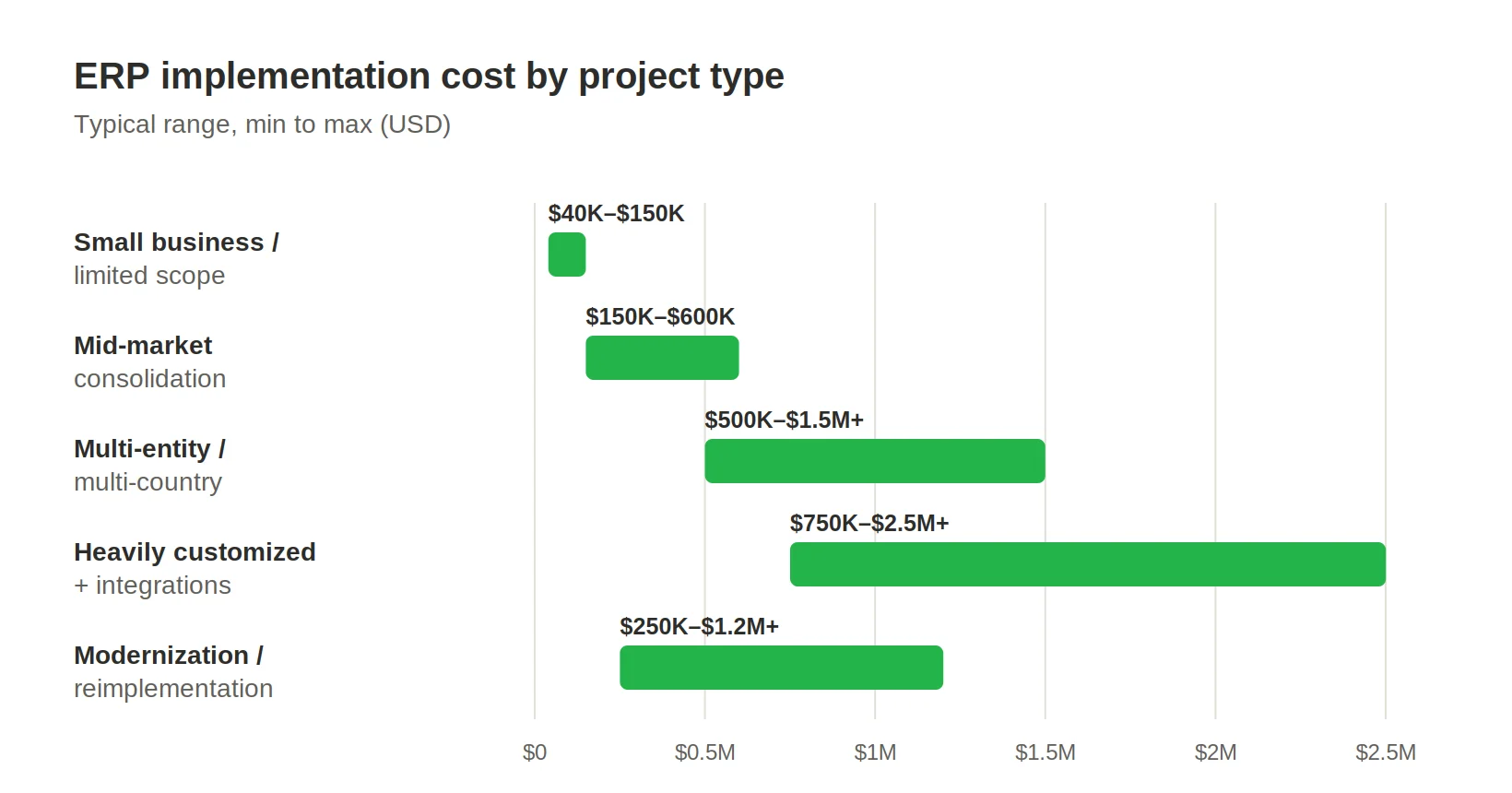
The cost of ERP implementation varies widely depending on organizational size, process complexity, and the depth of transformation involved. Rather than settling on a single price point, it is helpful to view ERP projects in several distinct categories, each with its own cost profile and risk level. Building on this framework, let's explore the details of these key cost categories below.
Small business or limited-scope ERP rollout ($40,000–$150,000)
This range suits smaller organizations or narrowly scoped initiatives targeting specific operational gaps. These implementations often focus on core functions such as finance, inventory, and procurement, that replace spreadsheets and disconnected tools with a unified system.
Costs remain under control when business processes align with standard ERP functionality and require minimal adaptation. Limited ERP integrations, a small user base, and simple data migration also keep budgets within this range. However, even small projects can exceed expectations if data quality or process issues arise during implementation.
Mid-market ERP replacing disconnected systems ($150,000–$600,000)
For mid-sized companies, ERP implementation means consolidating legacy systems into one integrated platform. Spanning finance, supply chain, procurement, and reporting, these projects demand tighter coordination and structured delivery.
At this level, costs increase with larger data migrations, more complex integrations, and cross-team training. Streamlining and redesigning processes is often needed when workflows are fragmented or inefficient. More departments require governance, testing, and change management.
Multi-entity or multi-country implementation ($500,000–$1.5M+)
ERP systems become more complex and more costly when supporting multiple legal entities, geographies, or regulations. Requirements such as multicurrency accounting, tax compliance, localization, and cross-border reporting increase the demands on configuration and validation.
These implementations require stronger governance, detailed rollout planning, and broad user enablement. Testing cycles are longer, integrations are more complex, and deployments often proceed in phases to limit operational risk. As organizational complexity increases, the need for precise coordination across business units and regions grows.
Heavily customized ERP with complex integrations ($750,000–$2.5M+)
This range reflects ERP efforts beyond standard features. Specialized industries or companies with unique processes often need significant customization, automation, and deep system integration.
Integrations with E-commerce, CRM, manufacturing software, logistics, and analytics can expand the scope and budget. Custom workflows, reporting, and interfaces increase development demands. Greater customization increases project risks, testing, and long-term maintenance costs.
ERP modernization or reimplementation ($250,000–$1.2M+)
ERP modernization projects fall between upgrades and full implementations. They replace outdated customizations, boost performance, clean data, and redesign workflows without rebuilding the ERP.
Some assets or knowledge may be reused, but these projects often reveal hidden complexity, especially in data, integrations, and undocumented processes. Costs can rise in the migration and stabilization phases. Careful planning balances improvements with business continuity.
What these cost ranges actually include
These estimates mainly cover ERP implementation, including design, configuration, development, integration, testing, and deployment.
They may not include licensing, infrastructure, or ongoing support. The largest cost variations stem from:
- The level of customization required
- The number and complexity of integrations
- Data migration scope and quality
- Deployment model (cloud, on-premise, hybrid)
- Internal readiness and stakeholder alignment
Understanding these variables is vital for building a realistic implementation budget.
ERP Implementation Cost vs. Total ERP Cost
While implementation is often the main investment, it is only part of the financial picture. To fully understand ERP costs, look beyond implementation and consider long-term investments after go-live. With that in mind, let's examine the factors that contribute to ERP costs after implementation.
A complete financial view means considering the system's full lifecycle, not just implementation.
Software licensing or subscription
ERP platforms are typically licensed as perpetual software or by subscription (SaaS). Licensing costs depend on the number of users, modules, and required functionality.
For cloud models, subscription fees recur and scale with usage. On-prem deployments have higher upfront licensing costs, but ongoing costs shift to maintenance and upgrades. ERP consulting teams help evaluate licensing structures to avoid overcommitting to unnecessary features or capacity.
Infrastructure or hosting
Infrastructure costs depend on the deployment model. Cloud ERP includes hosting in subscription fees, but usage-based pricing can vary with system load, storage, and performance.
On-premise environments require investment in servers, storage, networking, and ongoing maintenance. Hybrid models combine both approaches, which adds complexity. Infrastructure choices affect cost, scalability, performance, and flexibility.
Long-term support and upgrades
ERP systems require continuous maintenance to remain reliable, secure, and aligned with evolving business needs. This includes technical support, bug fixes, performance tuning, and periodic upgrades.
Highly customized systems often incur higher support costs, as updates require careful testing and adaptation. Organizations may rely on ERP consultants to manage support efficiently and maintain the system’s value over time.
Total cost of ownership (TCO)
Total cost of ownership provides a more comprehensive view of ERP investment. It includes implementation, licensing, infrastructure, support, upgrades, training, and internal resource allocation.
TCO is also shaped by factors such as user adoption, process efficiency, and system reliability. A poorly implemented ERP may seem cost-effective upfront, but cause inefficiencies and hidden costs later. A well-planned implementation backed by strong ERP consulting can reduce friction and deliver lasting returns.
Factors that Drive ERP Implementation Costs Up or Down
ERP implementation costs shift based on a combination of technical, organizational, and strategic factors. Understanding what drives these changes is essential for building a realistic budget and avoiding unpleasant surprises during delivery.
Number of users, modules, and business entities
A broader system increases costs. Each added user raises licensing, training, and support needs. More modules, such as finance, supply chain, HR, and manufacturing, mean extra configuration and testing.
Involving multiple entities, subsidiaries, or units requires the system to support different reports, approvals, and rules. This greatly increases the effort required for design, validation, and rollout.
ERP customization requirements
One of the most influential cost drivers is the level of ERP customization. Standard ERP platforms are designed to cover common business processes, but many organizations require tailored workflows, industry-specific logic, or unique reporting capabilities.
Customization increases development, testing, and maintenance costs. It also adds risk, as custom features must be validated during upgrades and integrated with standard components. The further a project deviates from out-of-the-box functionality, the greater the cost and complexity.
Integration complexity
ERP systems rarely operate in isolation. They must connect with CRM platforms, E-commerce systems, logistics tools, payment gateways, analytics environments, and other business-critical applications.
Each integration requires design, development, testing, and monitoring. Real-time data synchronization, API dependencies, and legacy system limitations can further complicate the process. The number, type, and depth of integrations often have a direct and significant impact on the overall budget.
Data migration effort
Data migration can be one of the most resource-intensive parts of ERP implementation. It includes extracting, cleaning, restructuring, and validating data before loading it into the new system.
Poor data quality, fragmented systems, and missing documentation increase effort. Often, organizations discover data issues only after migration begins, causing delays and extra costs.
Cloud vs. on-premise deployment
The deployment model impacts both initial and long-term costs. While cloud-based ERPs reduce infrastructure effort and speed deployment, they incur ongoing subscription fees.
On-premise implementations require investment in hardware, hosting, and internal IT support, but may offer greater control over data and system behavior. Hybrid models combine both approaches but introduce additional integration and management complexity. Each option has cost implications that extend beyond the initial implementation phase.
Testing, training, and change management
ERP implementation is a business transformation, not just a technical one. Testing checks system function, while training prepares users for the new environment.
Change management is critical. Lacking proper communication, onboarding, or support hurts adoption and causes resistance. Skimping may lower short-term costs, but it introduces long-term expenses from errors, rework, and low productivity.
Internal team readiness and partner model
The level of internal preparedness plays a major role in cost efficiency. Organizations with clearly defined processes, engaged stakeholders, and available subject matter experts (SMEs) tend to complete implementations faster and with fewer disruptions.
The delivery model is crucial. Choosing to expand your internal team, engage external specialists, or integrate both strategies will directly influence cost structure, delivery speed, and oversight. Many organizations recruit ERP developers to enhance expertise, particularly during complex project phases. Effective collaboration between internal stakeholders and external experts generally results in more predictable budgets and stronger implementation outcomes.
In practice, ERP implementation costs depend more on the ecosystem—including processes, data, integrations, and organizational readiness—than on the software itself. Greater early clarity and structure around these elements gives you more control over cost and delivery outcomes.
ERP Implementation Cost Breakdown by Phase
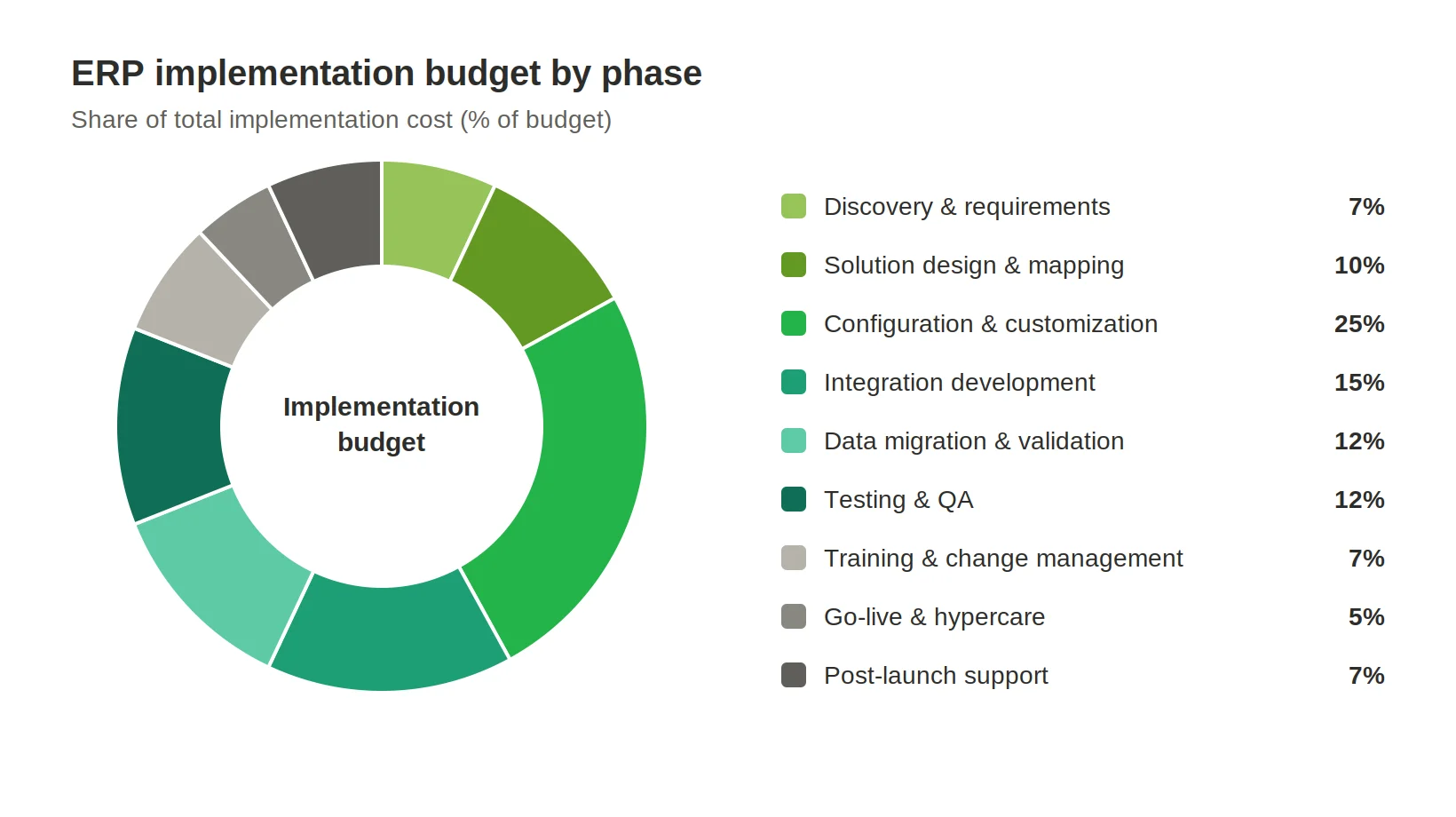
ERP projects unfold across multiple stages, each contributing differently to the overall budget. The percentages below represent directional planning ranges, not universal benchmarks. Actual distribution will vary depending on scope, complexity, and delivery model.
Discovery and requirements analysis (5–10%)
This phase clarifies needs, documents processes, and defines scope. It builds the foundation and helps avoid costly misalignment later.
Solution design and process mapping (8–12%)
Here, business requirements are translated into system architecture and workflows. Teams define how processes will operate within the ERP, including approvals, data flows, and reporting structures.
Configuration and customization (20–30%)
This is typically the largest cost component. It includes setting up ERP modules, configuring workflows, and developing custom functionality where required. The level of customization directly influences the size of this phase.
Integration development (10–20%)
This covers building and testing ERP system connections. More complex integrations, such as real-time or multi-system, increase effort.
Data migration and validation (10–15%)
This covers data migration, cleaning, transformation, and validation. For organizations with legacy systems, this phase can rise to 25% or more, particularly if data is unstructured or poorly maintained.
Testing and QA (10–15%)
Testing ensures workflows work in real-world situations. Cutting corners here is risky; poor testing causes post-launch issues and costly fixes, stretching the project budget.
Training and change management (5–10%)
This phase prepares users with training, documentation, and communication. Strong execution boosts adoption and reduces disruption.
Go-live and hypercare (3–7%)
This stage is final deployment, system stabilization, and immediate post-launch support. Teams monitor, resolve, and keep operations on track.
Post-launch support and optimization (5–10%)
If included, this phase refines workflows, boosts performance, and addresses new demands, ensuring ERP value after launch.
Key cost drivers behind ERP budget overruns
Even well-planned ERP projects can exceed budget. Some cost factors are often missed in early planning.
Internal SME time and stakeholder involvement
Subject matter experts define requirements, validate processes, and support testing. Their time is often underestimated, but crucial to success.
Process redesign and workflow alignment
ERP projects uncover process inefficiencies. Redesigning workflows to fit the new system takes time, collaboration, and validation, which increases scope and cost.
Productivity dips during transition
During and after go-live, teams often slow down while adjusting to new workflows and tools. This temporary dip has real business costs that are rarely calculated upfront.
Data cleanup before migration
Cleaning and structuring data before migration often requires significant effort, especially for organizations with fragmented or outdated systems. Skipping this step causes issues downstream and raises costs.
Post-launch stabilization and support
Even after go-live, systems need stabilization. Unexpected issues and adjustments can stretch support beyond projections.
Reporting, compliance, and security adjustments
After go-live, additional needs for reporting, compliance, or security may surface. Late adjustments increase costs and complexity.
Cloud vs. On-Premise ERP Implementation Cost
The deployment model directly affects ERP implementation costs, influencing not only the initial budget but also the distribution of expenses over time and the degree of retained operational responsibility.
In general, cloud-based ERP solutions reduce the need for upfront infrastructure investment, while on-premise systems shift more costs into the early stages of a project. Nevertheless, the full financial picture depends on much more than infrastructure alone.
Cloud ERP implementation costs
Cloud ERP requires less initial investment, because the vendor manages infrastructure, hosting, and maintenance. This eliminates the need to buy servers or build internal capabilities before deployment.
That said, implementation pricing can still be substantial. Costs rise with complex data migration, multiple integrations, advanced configuration, or extensive user training. Subscription pricing introduces ongoing operational expenses that accumulate and must be considered in long-term planning.
While cloud ERP simplifies the technical entry point, organizations must still navigate the complexities of aligning the system with their real business processes. This consideration is equally important in other deployment options, such as on-premise and hybrid models.
On-premise ERP implementation costs
On-premise ERP solutions require a higher upfront investment, as organizations must build and maintain the entire environment, covering hardware, servers, networking, storage, and physical infrastructure.
Extra costs stem from administration, security, backups, and maintenance. Internal IT or external specialists are needed during implementation and ongoing support.
This model appeals to organizations that need strict data control, regulatory compliance, or highly customized environments.
Hybrid ERP implementation costs
Hybrid ERP blends cloud and on-premise solutions, resulting in a nuanced cost structure. It may limit system replacement needs, but it adds complexity in integration, data sync, and governance.
Maintaining consistency across environments requires careful architectural planning and ongoing operational oversight. As a result, hybrid ERP offers strategic flexibility balanced by new complexities. These factors should be weighed against the possible cost benefits of cloud-only or on-premise deployments.
Which model usually costs less?
From an upfront perspective, cloud ERP is more cost-efficient, while on-premise ERP requires a higher initial investment. Over time, the cost balance depends on factors such as subscription models, infrastructure, IT capabilities, and upgrade strategies.
In reality, the deployment model is only one piece of the equation. The most significant cost drivers remain consistent across all approaches: implementation scope, integration depth, data migration effort, and the extent of customization. These factors often outweigh the differences between cloud and on-premise environments when it comes to total investment.
Custom ERP vs. Platform ERP: Which Approach Most Affects the Cost?
Choosing between a platform-based ERP and a fully custom solution is one of the most consequential decisions in any ERP initiative. It shapes not only the implementation budget but also long-term flexibility, operational efficiency, and the ability to evolve the system over time.
Platform ERP solutions, such as widely adopted enterprise systems, provide standardized functionality that can be configured to meet common business needs. Custom ERP solutions are tailored to an organization’s unique processes, offering greater precision, but requiring more development effort. Understanding these differences is essential before assessing cost impact.
The table below compares these approaches across key dimensions, showing their impacts on cost, complexity, and long-term value.
|
Factor |
Platform ERP |
Custom ERP Solution |
|
Upfront implementation cost |
Usually lower, especially when standard modules and workflows fit the business well. |
Usually higher due to solution design, development, testing, and tailored architecture. |
|
Deployment speed |
Faster, since core functionality already exists and much of the work is configuration-based. |
Slower, because more functionality must be built or assembled specifically for the business. |
|
Customization cost |
Can rise quickly when the business needs non-standard workflows, logic, or user experiences. |
Higher from the start, but more directly tied to actual business requirements. |
|
Integration complexity |
Can become expensive if the platform does not connect cleanly to existing systems. |
Often easier to design around required integrations, though still costly in complex environments. |
|
Process fit |
Best when the business can align with standard ERP processes. |
Best when the system needs to reflect unique or differentiating business processes. |
|
Upgrade and maintenance effort |
Easier when customization is limited, but heavier changes can make upgrades harder and more expensive. |
More control over change, but maintenance remains the company’s responsibility. |
|
Long-term flexibility |
Good within the limits of the platform. |
Higher flexibility for evolving business models, workflows, and user needs. |
|
Best fit for |
Companies prioritizing faster rollout, lower initial cost, and proven standard functionality. |
Companies with complex operations, unique requirements, or strategic reasons to avoid platform constraints. |
|
Main cost risk |
Underestimating the cost of customizations, workarounds, and integrations. |
Underestimating the upfront investment and long-term ownership effort. |
At first glance, platform ERP solutions appear more cost-effective due to their lower upfront implementation effort and faster deployment timelines. This assumption generally holds true when business processes align reasonably well with the platform’s native capabilities.
However, the cost advantage can quickly erode when extensive customization is required. Each additional layer of custom logic tends to trigger a cascade of related work that affect integrations, testing, reporting, security, documentation, training, and post-launch support. In effect, customization does not remain isolated; it reshapes the complexity of the entire implementation.
For this reason, the true cost difference between platform and custom ERP depends not just on the initial build, but on how well the solution fits the business from the start. The more adaptation required, the more total costs approach those of a custom solution, often without providing the same long-term flexibility.
A well-balanced approach typically involves leveraging platform capabilities where they provide strong alignment, while applying customization selectively and strategically, ensuring that added complexity delivers measurable business value rather than unnecessary overhead.
How to Estimate Your ERP Implementation Budget More Accurately
Estimating ERP implementation costs is less about guessing a number and more about structuring the unknowns. The more precisely you define scope, dependencies, and priorities early on, the more predictable your budget becomes.
A reliable estimate does not eliminate uncertainty, but it significantly reduces the likelihood of major overruns.
Define must-have vs. nice-to-have requirements
Start by separating critical business requirements from optional enhancements. Core processes, such as financial management, order processing, or inventory control, should take priority, while secondary features can be deferred or phased in later.
This distinction helps prevent scope creep during implementation. It also allows teams to focus budget and effort on capabilities that directly impact operations, rather than diluting resources across less critical functionality.
Estimate customizations and integrations separately
Customization and integration are two of the most volatile cost drivers, and they should never be bundled into a single estimate. Each requires different expertise, timelines, and testing effort.
For example, integrating ERP with CRM or eCommerce may require API design, middleware, and data synchronization. Customizing workflows could change interfaces, reporting, and approvals. Treat these as separate workstreams for transparency and better cost control.
Budget for training, testing, and contingency
Many ERP budgets focus on building and configuration, but underestimate the effort needed for validation and adoption.
Testing ensures that workflows perform reliably under real conditions, while training enables users to operate effectively from day one. Both are essential for a successful rollout. In addition, a contingency buffer — typically 10-20% of the project budget — helps absorb unexpected challenges such as data issues, integration delays, or process changes.
Compare phased rollout vs. big-bang rollout
The rollout strategy has a direct impact on cost structure and risk exposure.
A big-bang rollout introduces the entire system at once. This can reduce the overall timeline, but it increases risk and requires extensive preparation. A phased rollout, by contrast, spreads implementation across business units, regions, or modules. While it may extend the timeline, it allows for iterative learning, reduces disruption, and can improve budget predictability.
Choosing the right approach depends on organizational readiness, system complexity, and tolerance for operational risk.
Ask vendors and partners for line-item estimates
High-level estimates are useful for initial planning, but they often hide important cost details. Requesting line-item breakdowns, covering configuration, development, integration, testing, training, and support, provides much greater visibility.
This level of detail allows you to identify cost drivers, compare proposals more effectively, and challenge assumptions where necessary. It also creates a stronger foundation for tracking actual spend against planned budget during execution.
Accurate ERP budgeting is about understanding where uncertainty lies and proactively managing it. The more structured your estimation approach, the fewer surprises you will encounter as the project progresses.
Can ERP Implementation Costs Be Capitalized?
In the context of ERP implementation, capitalization refers to the accounting practice of recording certain project costs as long-term assets rather than immediate expenses. Instead of being fully recognized in the profit and loss statement at once, capitalized costs are amortized over time.
This distinction can have a significant impact on financial reporting and investment planning.
Which ERP-related costs can be capitalizable?
Certain implementation activities are often eligible for capitalization, particularly those directly associated with building or configuring the ERP system for long-term use. These may include:
- System configuration and development
- Custom functionality and enhancements
- Integration development
- Data migration (when it contributes to making the system operational)
- Implementation-related software costs
These costs are considered investments that create future value, thereby justifying their amortization.
Which ERP costs are usually expensed?
Other ERP-related spending is generally treated as operating expenses and recognized immediately. These often include:
- Training and user onboarding
- Business process analysis and early-stage consulting
- Ongoing support and maintenance
- Data cleanup activities that do not directly enable system functionality
- Organizational change management
While these costs are essential for project success, they are not usually considered assets from an accounting perspective.
Why can treatment differ?
The classification of ERP costs is not always straightforward. It can vary depending on several factors:
- Deployment model: Cloud-based ERP (SaaS) often has different capitalization rules than on-premise systems.
- Project scope: Custom-built components may qualify for capitalization, while standard configuration may not.
- Accounting policies and standards: Different jurisdictions and organizations apply varying interpretations of accounting guidelines (such as IFRS or GAAP).
As a result, similar activities may be treated differently across companies.
Why does validation with accounting advisors matter?
Because ERP capitalization involves regulatory and reporting requirements, it is crucial to consult with accounting advisors who can validate the cost treatment.
Incorrect classification can cause compliance problems, audit issues, or misstate financial performance. Early alignment between the project and finance teams ensures correct cost tracking throughout implementation.
How to Reduce ERP Implementation Costs Without Increasing Project Risk
ERP cost reduction should never threaten stability or continuity. The goal is to spend intelligently, focusing resources on the greatest value.
Tip 1. Use fit-to-standard where possible
Use standard ERP features when they fit your processes. Avoid unnecessary deviations to reduce development, simplify testing, and ease upgrades.
Tip 2. Prioritize essential integrations first
Focus on integrating critical systems for day-to-day operations and defer secondary connections until after go-live. This helps control scope, accelerates delivery, and reduces integration-related risk early in the project.
Tip 3. Clean data before migration starts
Invest time in preparing and structuring your data before migration begins. Clean, well-organized data reduces transformation effort, minimizes errors, and prevents costly rework during validation and post-launch stabilization.
Tip 4. Roll out in phases where it reduces risk
Adopt a phased rollout when full deployment would introduce too much complexity or risk. Gradual implementation allows teams to validate functionality, adapt processes, and improve system quality without overwhelming the organization.
Tip 5. Use low-code approaches selectively for customization
Apply low code for ERP customization in areas where flexibility is needed but full-scale development is not justified. This can accelerate delivery and reduce costs, provided it is used in a controlled, well-governed manner.
Tip 6. Choose an implementation partner that matches your scope
Choose a partner whose experience matches your project. The right team brings proven methods, realistic estimates, and anticipates challenges, helping you avoid costly mistakes.
Wrapping Up
ERP implementation is one of the biggest operational and financial commitments a business can make, and one of the most misunderstood in terms of cost. While headline figures draw attention, real cost drivers are deeper: scope clarity, process complexity, data quality, integration depth, and organizational readiness.
Across all scenarios, there is no standard ERP implementation cost. A focused rollout can be contained, while a multi-entity, highly customized transformation can become a multi-million-dollar program. The difference is the number of components that must align for the system to work as intended.
It is also important to separate short- and long-term thinking. Implementation cost is only one part of the equation. Choices made during implementation, especially on customization, integrations, and deployment, directly affect maintenance effort, upgrade complexity, and total ownership costs for years to come. As organizations plan their ERP initiatives, these long-term considerations become crucial in shaping both strategy and spending.
For organizations planning an ERP initiative, this means the most effective approach is not to minimize cost at all costs, but to control where and why money is spent. This means:
- Defining priorities early and managing scope discipline
- Investing in data quality, testing, and user readiness
- Choosing the right balance between standard functionality and customization
- Structuring implementation in a way that reduces risk, not just timeline
ERP projects rarely fail because of technology alone. More often, they struggle due to misaligned expectations, underestimated complexity, or poor planning. Well-structured implementations supported by experienced partners and realistic budgets deliver lasting operational improvements, better visibility, and stronger decision-making.
Ultimately, view ERP implementation not as a cost to minimize, but as an investment to optimize. When managed with rigor and foresight, it becomes a foundation for lasting efficiency, scalability, and business growth.
Updated on Jun 9, 2026