How Businesses Reduce App Development Costs Today with AI
Table of contents
- Key takeaways
- Why App Development Costs Keep Rising
- How AI Helps Reduce App Development Costs
- Where AI Delivers the Biggest Savings
- Planning and design
- Development and QA
- Maintenance and support
- AI Use Cases for Cutting Development Spend
- Building MVPs faster
- Shipping features more efficiently
- Reducing QA overhead
- Lowering support costs for legacy apps
- Helping small teams do more with the same resources
- What AI Can’t Replace in App Development
- Conclusion
App development costs rarely spiral because someone wrote too much code. Budgets get eaten by unclear requirements, rework, slow coordination between teams, manual testing, and delivery processes that lose time at every handoff.
AI helps with all of this — not by replacing engineers or product thinking, but by removing friction across the parts of the lifecycle where teams burn hours without moving the product forward. In practice, that means AI's job is less to generate code and more to sharpen how decisions get made, validated, and executed.
Key takeaways
- AI cuts app development costs mainly by eliminating budget overruns tied to unclear requirements, rework, poor collaboration, and manual work.
- The savings come from developer productivity, faster iteration, and catching problems early — not from cutting headcount.
- Planning, development/QA, and maintenance are where AI has the most measurable financial impact.
- AI pays off when it's built into daily workflows, not bolted on as a side experiment.
Why App Development Costs Keep Rising
Rising costs are rarely one bad call. They're usually the compounding effect of small inefficiencies, many of which start long before anyone writes a line of code.
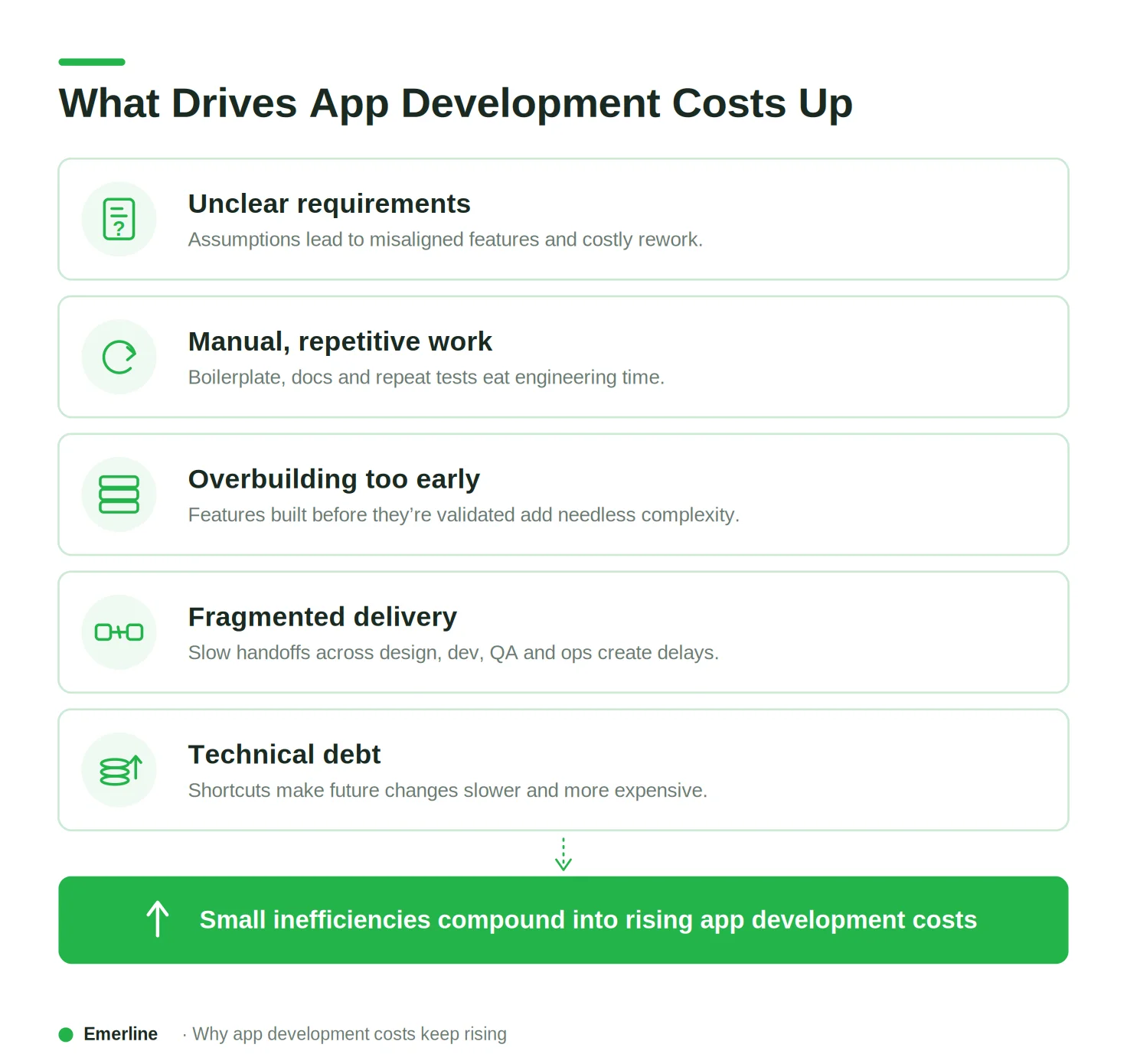
Weak or incomplete requirements are one of the biggest offenders. When teams don't know exactly what they're building, they guess — and guesses lead to features that need to be revised once the real requirement surfaces. That rework is some of the most expensive work a team can do, since it consumes time without adding anything new to the product.
Manual, repetitive work adds up the same way. Writing boilerplate, preparing documentation, running the same test cases sprint after sprint, formatting data by hand — none of it moves the product forward on its own, but all of it takes time away from what does.
Then there's overbuilding: investing in features, architecture, or integrations before anyone's confirmed they're needed. This kind of premature complexity raises both the initial build cost and the long-term maintenance burden.
Fragmented delivery pipelines make it worse. Slow handoffs between design, development, QA, and ops introduce delay and miscommunication at every step — individually minor, but a real drag on the budget once you add them up across a project.
And maintenance is where shortcuts eventually get billed. Skipping architecture planning, documentation, or testing to hit a deadline creates technical debt, and debt makes even small updates more difficult and expensive later.
None of this is a reason to panic — it's a map. It shows exactly where AI can help: not by writing more code faster, but by cutting the specific inefficiencies above.
How AI Helps Reduce App Development Costs
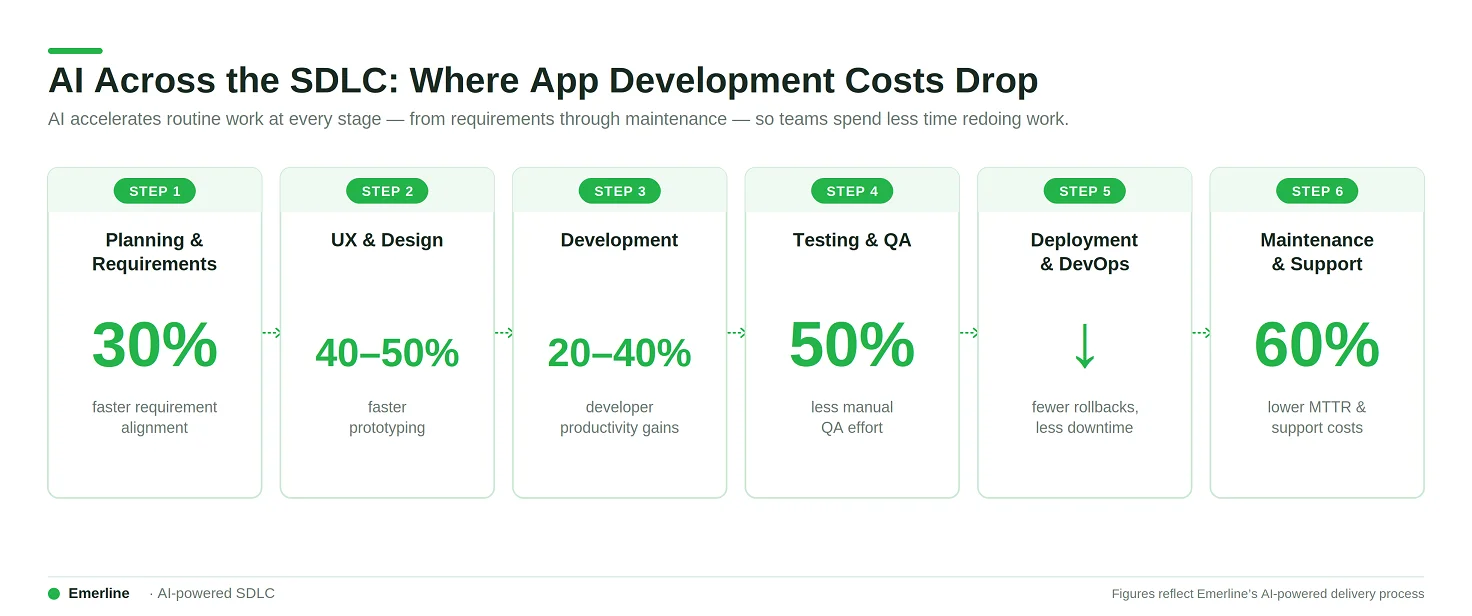
The real savings from AI rarely come from replacing people. They come from accelerating routine tasks and shortening feedback loops — turning work that used to take hours, like drafting docs or writing test cases, into work that takes minutes.
That speed compounds across the lifecycle. Clearer requirements up front mean less rework later. Faster implementation means QA gets a head start. Better test coverage means fewer post-release fixes. Each stage benefits the next.
A lot of the effort AI takes off a team's plate falls into a specific category: necessary, but not strategically valuable. Think:
- Boilerplate code
- Documentation and summaries
- Structuring requirements and user stories
- Repetitive test scenarios
- Digging through logs for recurring issues
None of this requires senior judgment — it just requires time, and AI is good at buying that time back.
What that time gets spent on matters more than the time itself. The teams seeing real cost impact aren't the ones with fewer developers; they're the ones where developers iterate faster, catch issues earlier, and redo less work. AI embedded across planning, building, testing, and operating compounds those gains. Used in one isolated spot, it barely moves the needle.
Where AI Delivers the Biggest Savings
Three stages tend to show the clearest financial impact: planning and design, development and QA, and maintenance and support.
Planning and design
Most cost problems start here, long before anyone touches a keyboard.
AI can turn messy input — workshop notes, half-formed feature ideas, a stakeholder's Slack thread — into something a team can actually work from: user stories, acceptance criteria, scope outlines. That alone removes a lot of the ambiguity that later turns into rework.
It's also useful for finding gaps before they become expensive. Missing requirements, contradictory logic, dependencies nobody flagged, edge cases everyone assumed someone else was handling — catching these during planning is cheap. Catching them in production is not.
AI helps with early prototyping too — generating wireframe copy, mocking up user flows, putting together something testable fast enough that a team can validate an idea before committing real budget to it.
Development and QA
This is usually where the savings feel most immediate, because it's where developers spend most of their time.
On the code side, AI takes over a lot of the repetitive parts: boilerplate, standard API integration patterns, refactoring suggestions, explaining a codebase nobody on the current team originally wrote. GitHub's own research on Copilot found measurable gains here — which frees developers to spend their attention on architecture and business logic instead.
QA benefits in a different way. AI can generate test cases straight from requirements or code, flag edge cases a human might not think to check, help prep regression suites, and cluster similar bug reports so nobody's triaging the same issue five times. When Emerline built an AI-powered document search platform for B2B clients, a big part of getting it production-ready wasn't the AI integration itself — it was rigorously testing multiple LLMs and chunking strategies against real 1,000-page PDFs to find configurations that actually held up, since off-the-shelf ChatGPT alone couldn't process documents at that scale. That kind of disciplined testing is exactly where AI-assisted QA earns its keep: not glossing over edge cases, but surfacing more of them faster.
The bigger win might just be feedback speed. Developers can test an assumption or catch a bug hours after writing the code instead of days later — and every hour shaved off that loop is an hour of rework avoided.
Maintenance and support
Maintenance quietly eats a large share of total application spend — often more than the original build. [Verify]
For legacy systems especially, AI helps developers get oriented faster: explaining what a module does, flagging dependencies that aren't obvious, estimating the blast radius of a change before anyone makes it. That alone cuts down the time spent just figuring out what's safe to touch.
On the support side, AI can help triage tickets, summarize incidents, keep documentation from going stale, and maintain a knowledge base that doesn't rot the moment the person who wrote it changes teams.
A good example of what this looks like at scale: when Emerline built a unified Power BI and Azure analytics platform for an international retail chain, automating reporting and enabling self-service analytics cut reporting cycles by 80% — from days down to minutes or hours — and cut error-handling time in half. Operational efficiency rose 15% overall. None of that came from new features; it came from removing the manual work sitting between data and decisions, which is the same category of savings AI delivers in ongoing software maintenance.
For mature products, this stage can matter as much as the original build — sometimes more, when it comes to total cost of ownership.
AI Use Cases for Cutting Development Spend
Building MVPs faster
Early-stage development is where budgets are most exposed. Teams tend to over-invest in polishing ideas and building features nobody's validated yet.
AI compresses this phase: faster scoping, quicker UX copy and prototype content, a first working version of the core functionality sooner, tighter feedback loops once real users touch it. Teams get to a testable product without spending months refining something unproven.
This isn't theoretical. When Emerline built a custom AI-powered LMS for a global consulting firm, the team deliberately shipped a lean MVP first — a centralized knowledge repository, basic personalized learning paths, a simplified onboarding flow — before building out adaptive testing, gamification, or compliance tracking. That let the client start seeing value and feeding back real usage data within the first sprints, instead of waiting for a fully-featured platform to exist. The system that eventually shipped delivered over £7.5 million in annual operational savings, cut onboarding from 6–8 weeks down to 3–4, and lifted course completion from under 30% to over 48% — outcomes that trace back to validating the core value early rather than over-building it upfront.
A more structured approach to this process is outlined in our AI-driven MVP architecture guide.
Shipping features more efficiently
For products already in the market, the pressure is usually delivering more without growing the team at the same rate. AI helps here by cutting the effort per release cycle: structuring requirements, generating routine integration code, drafting release notes and internal docs, prepping test scenarios.
This matters most for fast-growing products, where hiring almost never keeps pace with demand. An experienced AI development company can help embed these capabilities directly into a team's delivery pipeline rather than treating them as one-off tools.
Reducing QA overhead
QA is essential and also one of the most repetitive parts of the lifecycle — which makes it a good target for AI acceleration. Generating test cases from requirements, surfacing edge cases, prepping regression suites, clustering similar bugs — all of it reduces manual test design time while catching problems while they're still cheap to fix.
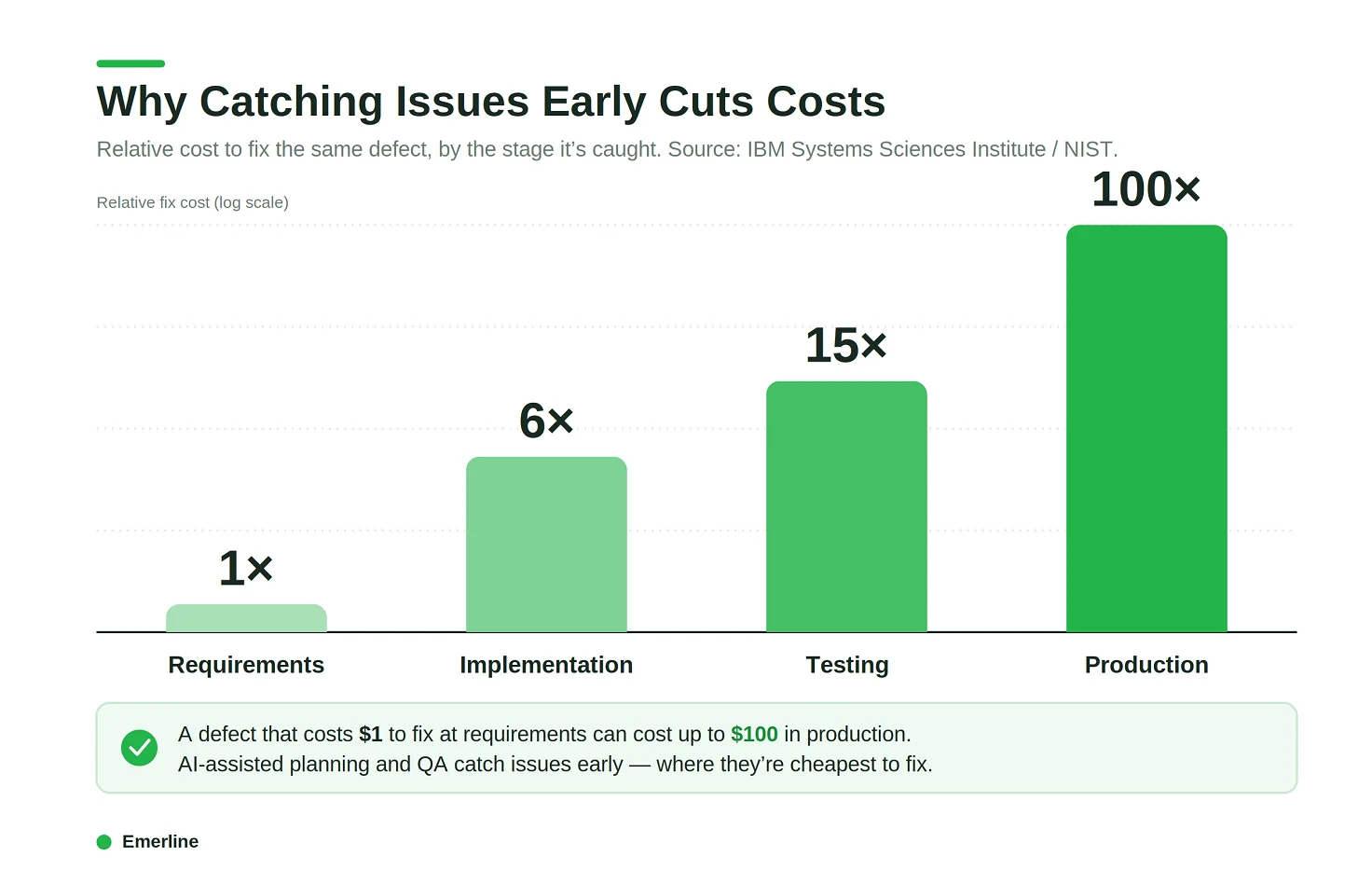
Over time, that means fewer defects reaching production and less rework downstream.
Lowering support costs for legacy apps
Legacy systems tend to cost more to maintain than new ones get to build — thin documentation, aging architecture, and years of accumulated technical debt make even small changes slow. AI can help a team explain unfamiliar code, trace hidden dependencies, generate missing documentation, and support gradual refactoring without a full rebuild.
This matters most for organizations that can't justify replacing a legacy system outright but still need its ongoing costs under control. AI integration done well makes that middle path realistic.
Helping small teams do more with the same resources
Hiring is one of the biggest cost levers in software development, and AI offers a real alternative to just adding headcount. By taking repetitive, low-value work off developers' plates, a smaller team can handle more features and releases in parallel, keep pace without burning out, and put more hours toward the problems that actually need a senior engineer's judgment.
This doesn't remove the need for skilled people. It changes what they spend their time on.
What AI Can’t Replace in App Development
AI has real limits, and knowing where they are matters as much as knowing where the tool helps.
It doesn't replace product strategy, architectural thinking, or senior engineering judgment. Decisions about system design, trade-offs, scalability, and long-term maintainability need context AI doesn't have — and even with strong tooling, someone still has to keep technical decisions pointed at the actual business goal.
Nor should it make unchecked calls in security-sensitive or compliance-heavy environments. AI output can look correct while quietly missing a regulatory requirement, a data protection rule, or an edge case that only a human would catch.
This is exactly why, when Emerline built an AI-powered AML platform for a regional bank, the system was designed around a human-in-the-loop principle instead of full automation. The AI agents handled alert triage, data enrichment, and risk scoring — cutting manual research time by over 75% — but the decision to escalate a case and file a Suspicious Activity Report always stayed with a human investigator. The explainable AI dashboard existed for exactly this reason: every risk score had to be auditable and defensible to a regulator, not just statistically sound. In domains like this, AI accelerating the work and a human deciding isn't a workaround — it's the actual source of trust in the system.
Generated code also isn't production-ready on arrival. It still needs a human pass for code quality, performance, security, and long-term maintainability — skip that, and AI just accelerates how fast technical debt accumulates, with the same undisciplined shortcuts (no structure, no docs, no review) that create debt when a person writes the code.
None of this argues for using AI less. It argues for using it to free up the people who are good at judgment, design, and decision-making, instead of asking it to make those calls on its own.
Conclusion
Cutting development costs isn't about cutting corners. It's about removing the specific things that slow delivery down: unclear requirements, avoidable rework, and maintenance debt that compounds over time.
AI helps with all three when it's actually built into how a team works — not treated as a side experiment, but embedded in planning, building, testing, and running the product day to day. The organizations getting real value from it aren't the ones using AI in one isolated spot; they're the ones who've made it part of the system.
That still requires human judgment at the center — deciding what to build, catching what AI misses, and keeping the whole thing aligned with what the business actually needs. Get that balance right, and AI becomes a real multiplier: more delivered, same team, without cutting corners on quality.
Updated on Aug 18, 2026