How to Automate Payroll Processing: A Strategic Guide for 2026
Table of contents
- What legacy payroll setups actually cost you
- The Evolution of Payroll and Challenges in the Modern Era
- Distributed and international teams
- The mix of full-time staff and contractors
- Non-stop changes in local laws
- Data leaks and security risks
- Where the Friction Lies in the Traditional Payroll Cycle
- 1. Data collection sourced from Silos
- 2. Manual spreadsheet calculations
- 3. Disconnected local tax filings
- 4. Fragmented bank disbursements
- 5. Static and retroactive reporting
- Core Benefits of Payroll Automation
- The Real Numbers behind Manual versus Automated Payroll
- Choosing the Core Platform and What Tool to Use
- UiPath
- SAP Build Process Automation
- Microsoft Power Platform
- Automation Anywhere
- WorkFusion
- Blue Prism
- Our Step-by-Step Implementation Roadmap
- Step 1: Requirement audit and jurisdiction mapping
- Step 2: Strategic vendor selection
- Step 3: Deep data integration and HRIS syncing
- Step 4: Enterprise security configuration
- Step 5: Dual parallel testing
- Step 6: Practical training and employee onboarding
- Step 7: Continuous AI driven auditing
- Next Generation Tech Trends in Agentic Payroll Processing
- Automation in Action Through General Use Cases
- 1. Managing multi state workforce compliance without headcount growth
- 2. Wiping out costly overtime and shift differentials errors
- 3. Syncing global contractor networks and FTE split systems
- Moving Forward with Emerline
- Bulletproof security that matters
- Workflows built around your rules
- True end to end ownership
Managing payroll means constantly shifting between strict regulatory rules and operational speed. For mid-market companies and large enterprises, it is rarely just an administrative task. It represents your largest recurring expense – and your most persistent legal risk.
When your team relies on manual typing, disconnected spreadsheets, and isolated software systems, you lose more than just hours. You open the door to constant friction, calculation mistakes, and unexpected local tax penalties.
What legacy payroll setups actually cost you
Relying on old, manual systems hurts business efficiency in three very specific ways:
- Your team wastes days chasing data – HR and finance managers spend half their week hunting down department leads and typing updates into multiple standalone databases.
- A single typo can ruin your numbers – One wrong keystroke or a broken spreadsheet formula easily throws off tax withholdings, bonuses, and overtime rates across the entire company.
- You are highly exposed to audits – Tracking changing labor laws and regional tax codes using manual tracking sheets practically guarantees compliance penalties.
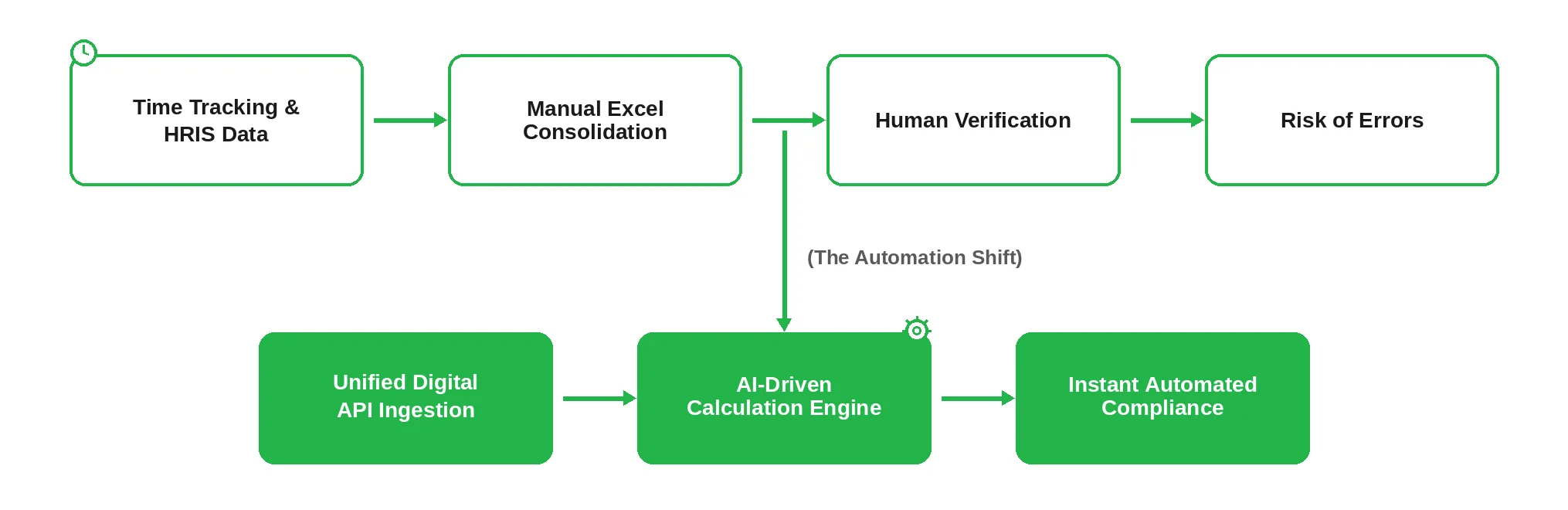
Automating your payroll changes everything, cutting processing time by up to 80%. When you stop passing files back and forth manually, you eliminate the daily chaos and build a clean, secure system that easily handles growth across different countries and regions.
The Evolution of Payroll and Challenges in the Modern Era
Older payroll systems were built for businesses where everyone worked in the same office on a fixed schedule. Today, those old methods just don't work anymore. Modern business is far more complex, and payroll teams have to manage several major headaches at the same time.
Distributed and international teams
When your people work from different regions or countries, tax residency issues pop up immediately. You have to constantly track shifting local tax brackets, regional health insurance rules, and currency conversions. Doing this manually quickly turns into a nightmare.
The mix of full-time staff and contractors
A modern workforce isn't just full-time employees anymore. Today, it’s a fluid mix of permanent staff, freelancers, and outside specialists. If you try to manage this manually, you get bogged down in different payment cycles, a mountain of distinct tax forms, and constant confusion over worker classifications.
Non-stop changes in local laws
Tax reporting is moving closer to real-time requirements, and labor laws change faster than ever. If you rely on your team to manually update your databases every time a local regulation changes, you are practically asking for heavy fines during your next audit.
Data leaks and security risks
Payroll databases are a goldmine for hackers because they hold social security numbers, home addresses, and corporate bank details. Sending this information back and forth through regular emails or shared cloud spreadsheets is the easiest way to expose your business to a major cyberattack.
Where the Friction Lies in the Traditional Payroll Cycle
When a company grows past a few hundred people, the traditional five-step manual payroll process inevitably hits a wall. What worked for a small team quickly turns into a massive operational bottleneck.

1. Data collection sourced from Silos
Payroll teams end up spending days chasing down department heads for missing approvals, pulling hours from separate time-tracking apps, and hunting for new hire updates across isolated HR software. Because the data starts out scattered, the entire payroll cycle faces delays from day one.
2. Manual spreadsheet calculations
Teams still calculate gross-to-net conversions using massive, overly complex Excel workbooks. A single broken cell formula, an outdated deduction rate, or a simple typing slip can instantly miscalculate bonuses, overtime, and benefit deductions for hundreds of employees.
3. Disconnected local tax filings
Tax calculations are usually handled across multiple different regional tax portals. When your team has to manually type withholding amounts and social contributions into separate state and national systems, the likelihood of a reconciliation mismatch skyrocketing is incredibly high.
4. Fragmented bank disbursements
Without a direct connection to your corporate bank accounts, finance teams are forced to manually create and upload bulk ACH or SEPA payment files. This highly repetitive step easily introduces file-formatting errors and leaves you with very narrow bank execution windows.
5. Static and retroactive reporting
Putting together manual labor costing reports requires hours of copying, pasting, and cross-referencing old data. By the time executive leadership actually reviews these spreadsheets, the information is already weeks old, making it useless for real-time financial planning.
Core Benefits of Payroll Automation
Switching to dedicated payroll software moves your HR and finance teams away from stressful data entry and lets them focus on actual operational oversight.
- Accurate tax and salary calculations
Modern platforms build localized tax rules directly into their core software engine. The system handles complex calculations—like progressive tax brackets, local benefit deductions, and unique wage garnishments—with total precision, completely removing the risk of human typing mistakes.
- A better employee experience
People expect fast, easy access to their personal financial details. Automated worker portals give your team instant visibility into past payslips, tax forms, and time-off balances. On top of that, integrated Earned Wage Access lets employees draw from their earned pay before official paydays, giving your company a massive advantage when it comes to keeping top talent.
- Continuous global compliance
Intelligent payroll software automatically rolls out compliance updates the moment local labor laws evolve. The platform adjusts to new statutory limits, minimum wage updates, and employer contribution percentages on its own, without requiring your IT staff to manually rewrite any system rules.
Emerline advice: Getting real value out of your automation investment depends entirely on how you handle the integration. Never deploy payroll software as a standalone silo. True efficiency happens only when your payroll layer acts as a natural extension of your broader IT setup. Make sure the tool you choose features open APIs that talk seamlessly with your core ERP platforms, keeping your data flows clean and unified.
The Real Numbers behind Manual versus Automated Payroll
Transitioning away from manual processing delivers clear, undeniable cost and speed advantages that show up immediately on your bottom line.
| Performance Metric | Manual Payroll Operation | Automated Payroll Ecosystem |
| Processing Cost per Payslip | $12.00 – $22.00 (Heavy admin overhead) | $1.50 – $3.50 (Lean platform execution) |
| Cycle Processing Time | 5 – 7 Business Days | 1 – 2 Hours (Touchless engine run) |
| Calculation Error Rate | 3% – 8% (Requires constant fixes later) | < 0.1% (Software-validated logic) |
| HRIS Integration | Manual file transfers and clunky exports | Real-time API data syncing |
| Audit Readiness | Days of frantic document gathering | On-demand, one-click compliance reporting |
Choosing the Core Platform and What Tool to Use
You cannot build modern, multi-jurisdictional payroll automation on custom office scripts or detached software utilities. To safely process high-volume enterprise transactions, you need a dedicated platform. This software acts as an orchestration layer that connects your employee records, time-tracking logs, and financial databases.
Depending on your current IT infrastructure and enterprise ecosystem alignment, you should focus on the leading automation toolkits.
UiPath
This platform serves as the premier choice for complex, end-to-end payroll automation. If your business runs on legacy accounting software combined with modern front-ends, UiPath bridges the gap smoothly. It uses smart software robots to handle everything from cross-referencing multi-state time cards to automatically logging into distinct banking portals for direct disbursements. It also features certified SAP integration, making it a natural fit for S/4HANA setups.
SAP Build Process Automation
This native SAP BTP solution works best for companies whose entire operational core is embedded in the SAP ecosystem. It lets citizen developers automate repetitive payroll verification tasks without breaking your company’s clean core strategy. It is engineered to pull real-time master data and sync calculations instantly with your central accounting modules.
Microsoft Power Platform
This tool functions as an incredibly agile layer for extending enterprise data into your daily Microsoft ecosystem. It empowers payroll managers and HR staff to handle payroll approvals and view status anomalies directly inside familiar applications like Teams, Outlook, and Power Apps. It is an ideal way to add a modern, accessible interface over heavy backend financial engines.
Automation Anywhere
This cloud-native, AI-centric platform excels at building intelligent AI agents to handle unpredictable payroll data. If your HR department receives timesheets or contractor invoices in varied, unstructured formats, Automation Anywhere uses Generative AI to parse the layouts, extract accurate hours, and validate the entries against your primary database with minimal coding.
WorkFusion
This platform focuses specifically on highly regulated industries with intense compliance rules, such as banking, insurance, and financial services. It combines RPA and Intelligent Document Processing (IDP) with pre-trained AI Agents. This specialized setup allows the system to audit employee credentials, manage complex benefits data, and execute international payroll runs under strict security frameworks.
Blue Prism
This vendor provides highly robust enterprise software built to automate massive streams of routine data. Blue Prism is particularly useful when your company needs to sync payroll data across multiple disconnected environments, like old mainframes, local state tax databases, and external corporate billing channels, ensuring a continuous digital thread without data loss.
Unsure which platform fits your current architecture? We can handle your automated payroll migration from start to finish – from choosing the right tool to full system deployment. Talk to our experts today to see how these automation engines fit your business model.
Emerline advice: High platform capability doesn't matter if your deployment approach breaks your core financial systems. When automating payroll through tools like SAP Build or UiPath, your development teams must avoid building custom, brittle database modifications inside your main ERP backend. Real ROI comes from keeping your digital core clean. Use standardized APIs and certified integration layers to pass workforce data between your systems. This approach ensures your custom automation flows continue to run smoothly even during major ERP platform updates.
Our Step-by-Step Implementation Roadmap
Moving to automated payroll takes a careful, phased approach. You need a clear deployment strategy to make sure your people get paid on time and your daily operations keep running without a hitch.
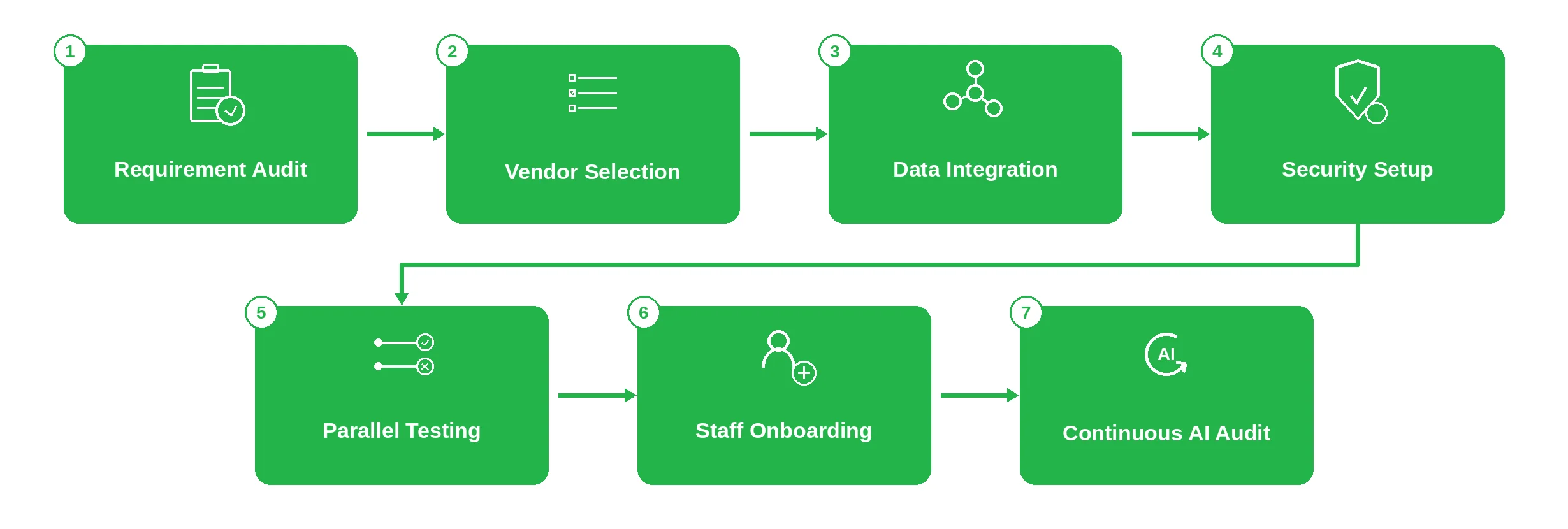
Step 1: Requirement audit and jurisdiction mapping
Start by looking closely at how your company is set up. Look at your mix of full-time employees and international contractors. Write down every local tax jurisdiction, unique benefit plan, and specific labor rule so you have a solid checklist of what your new software needs to handle.
Step 2: Strategic vendor selection
Choose a software framework that fits your corporate structure. You can go with a native cloud SaaS model, a specialized Employer of Record service if you are expanding quickly across borders, or a dedicated payroll module built directly into your current ERP environment.
Step 3: Deep data integration and HRIS syncing
Connect your operational software layers. Build direct API connections that link your new payroll tool with your core HRIS and your time-tracking apps. This automatically feeds employee status changes and approved working hours straight into the payroll calculation engine.
Step 4: Enterprise security configuration
Set up strict Role-Based Access Control to protect sensitive personal and corporate financial data. Turn on end-to-end encryption for files whether they are sitting in the system or being transferred, and require multi-factor authentication across every single login page.
Step 5: Dual parallel testing
Never launch an automated payroll system blindly. Run your old manual process right alongside the new automated engine for at least two full payment cycles. Compare every single line item, tax deduction, and net payout to find and fix any math discrepancies before you turn off the old system.
Step 6: Practical training and employee onboarding
Train your HR specialists and payroll managers so they can comfortably transition from manual data entry to analyzing the new system. Give your employees clear, simple guides on how to use self-service apps, check their payslips, and update their own banking details.
Step 7: Continuous AI driven auditing
Set up continuous monitoring rules that scan your payroll data automatically. The system reviews transactions in real time to instantly flag strange overtime spikes, sudden bank account changes, or unusual payment amounts before any cash actually leaves your bank account.
Next Generation Tech Trends in Agentic Payroll Processing
Enterprise payroll has moved far beyond simple electronic calculations. Modern software setups use machine learning layers and agentic processing workflows to run complex global data runs with near-zero human intervention.
- Real time anomaly and fraud detection
Rushed processing windows make it easy for human reviewers to miss payroll fraud or billing scams. Modern system algorithms eliminate this vulnerability by auditing payroll files in real time. The platform cross-references incoming timesheets with historical averages, instantly flagging odd overtime spikes, unexpected updates to employee bank details, or suspicious duplicate payments before any corporate cash leaves the company.
- Autonomous general ledger coding
Modern tools don't just log hours, they understand financial context. Integrated AI assistants read workforce data and automatically assign general ledger codes based on historical departmental spending patterns. The system catches processing exceptions, matches data fields, and maps raw employee cost details straight to your central enterprise charts of accounts without requiring manual data entry.
- Frictionless multi currency settlement rails
For organizations managing large networks of international contractors and distributed teams, standard bank wires introduce severe friction. Modern automated infrastructure utilizes optimized digital settlement networks and stablecoin rails. This architecture executes secure, cross-border payments instantly, allowing finance leaders to bypass slow intermediary banking systems and eliminate high currency conversion fees.
Automation in Action Through General Use Cases
Theoretical benefits mean nothing without proven execution. When looking at enterprise operations, payroll automation projects typically address three high-impact scenarios. These general use cases show how organizations apply modern orchestration layers to solve real compliance and operational bottlenecks.
1. Managing multi state workforce compliance without headcount growth
A rapidly expanding mid-market enterprise scaled its operations across 15 different states in less than a year. Instead of burying their HR department under conflicting state tax codes or hiring local accounting firms for each region, they deployed a unified payroll orchestration layer. The automated system dynamically tracks shifting state withholding thresholds and local labor mandates. This approach allowed a lean 3-person HR team to manage a complex, multi-state workforce while completely eliminating late-filing tax penalties.
2. Wiping out costly overtime and shift differentials errors
An industrial manufacturing firm with over 2,000 hourly shift workers struggled with manual time card data transfers, leading to frequent payroll corrections and data leakage. To fix this, they integrated an intelligent automation platform directly with their on-site IoT time-clocks and HRIS backend. The system now automatically calculates complex overtime rules, night shift differentials, and holiday pay variations. This architectural shift dropped the payroll processing cycle from five days to two hours and wiped out costly overpayment errors.
3. Syncing global contractor networks and FTE split systems
A global technology organization operates with a fluid mix of 500 full-time employees and hundreds of international independent contractors. Manually verifying varying payment milestones, separate tax forms, and multi-currency invoices created massive administrative bottlenecks for the finance team. By implementing an automated contractor management pipeline alongside their core ERP, they automated contract verification, tax documentation collection, and mass international disbursements, cutting processing costs by 75%.
Moving Forward with Emerline
Fixing an enterprise payroll setup isn't something you want to guess your way through. It takes real, hands-on engineering to link old ERP cores with modern tracking tools without dropping data. We help mid-market companies and large enterprises figure out this exact puzzle. Our engineering teams step in to build reliable, direct pipelines so your HRIS data, daily clock-ins, and central ledgers actually talk to each other without requiring constant human monitoring.
Bulletproof security that matters
We don't treat data privacy as an afterthought. Every single pipeline we deploy is built around strict ISO 27001 standards. This keeps your sensitive corporate details and employee personal data locked down tight, protecting your network from compliance slip-ups and external security threats.
Workflows built around your rules
Your business has its own unique quirks, and standard off-the-shelf software doesn't know how to handle them. We program custom integration logic into your tools to manage multi-state tax variations, specialized corporate benefits, and multi-currency payouts across different borders automatically.
True end to end ownership
We stay with you through every phase of the migration. Our architects start by mapping out your messy legacy workflows, writing the custom API hooks, and managing intense parallel testing runs. We do not walk away until your team feels totally confident using the new system.
Let's get your automation started. Book a free consultation with our integration architects today to find a simpler, cleaner path forward.
Published on Jul 10, 2026