The Complete Guide to Software Integration: Approaches, Costs, and Timelines
Table of contents
- Key takeaways
- What Software Integration Actually Covers
- Legacy system modernization
- Data aggregation for analytics and BI
- Third-party service integration inside a custom application
- Cross-department system sync
- Common Approaches to Software Integration
- Approach #1: Native and pre-built connectors
- Approach #2: Direct API / point-to-point integration
- Approach #3: Middleware and Enterprise Service Bus (ESB)
- Middleware in practice: a fragrance and decor manufacturer
- Approach #4: iPaaS and managed integration platforms
- Approach #5: Event-driven integration
- Approach #6: Data integration using ETL, ELT, or CDC
- What Drives Software Integration Costs
- Number of systems and endpoints being connected
- Presence of legacy systems without modern APIs
- Whether data mapping and transformation can be automated or has to be done manually
- Compliance and security requirements
- One-time build vs. ongoing support and maintenance
- How Long Does It Take?
- Team Composition and What to Ask a Vendor
- What to ask an integration vendor
- How to Choose the Right Software Integration Approach and Partner
- Conclusion
Your sales team re-enters the same order into three different systems because none of them talk to each other. Your monthly report takes two days to compile because someone has to manually reconcile numbers pulled from the ERP, the E-commerce platform, and a spreadsheet nobody quite trusts.
If this sounds familiar, the core problem isn't your team. It's that your systems were never built to share data in the first place, and that gap is why work stays inefficient, labor intensive, error-prone, and harder to scale as your business grows.
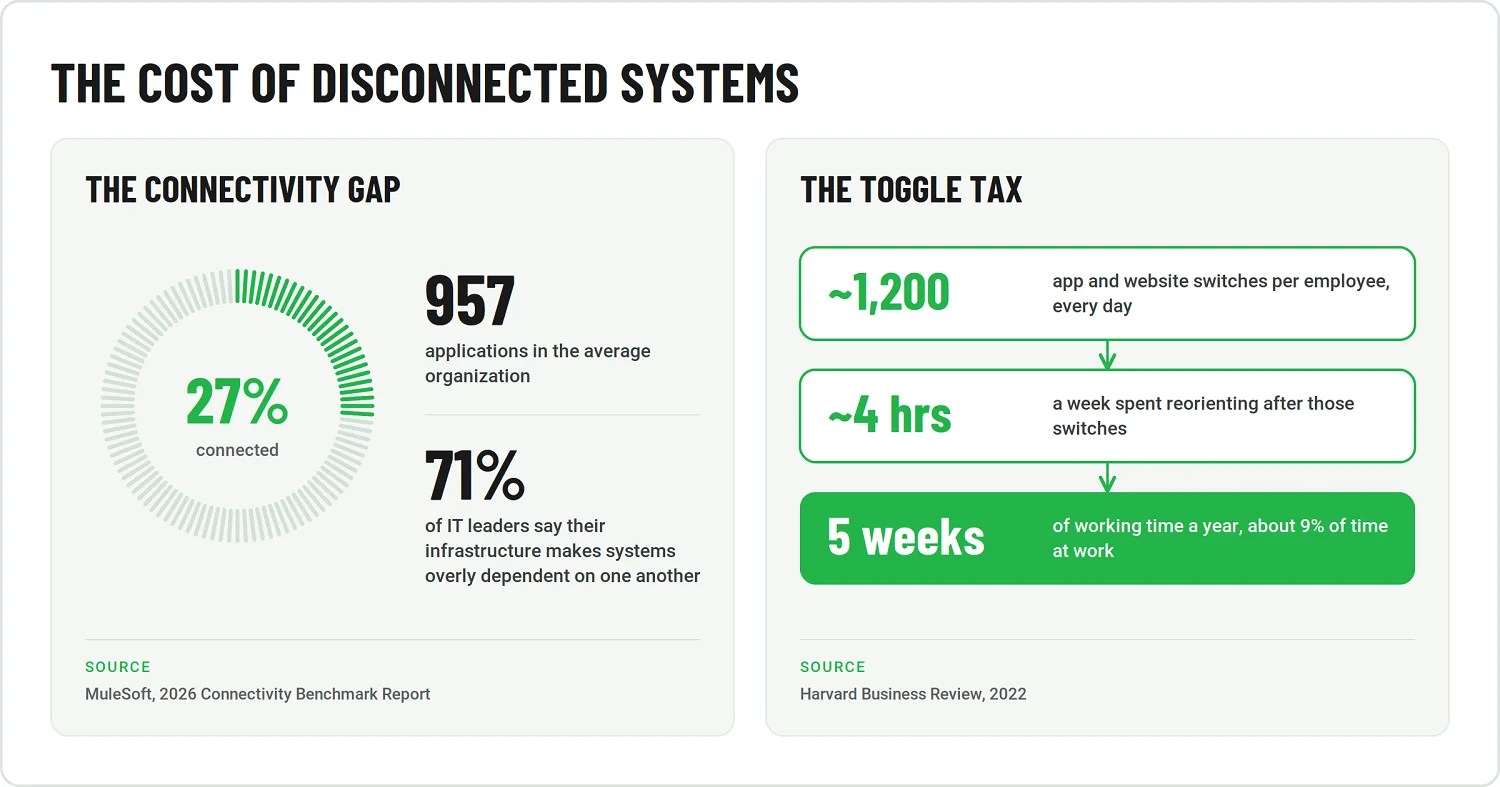
That gap is common enough to qualify as an industry norm rather than an exception. MuleSoft's 2026 Connectivity Benchmark Report, a survey of more than 1,000 IT leaders, found that while the average organization now manages 957 applications, only 27% are connected. At the same time, 71% of IT leaders say their infrastructure makes systems overly dependent on one another. The daily cost of that tangle isn't abstract, either. Harvard Business Review, reporting on research from Soroco, reports that employees toggle between apps and websites roughly 1,200 times a day. This adds up to about 4 hours a week, or somewhere close to 5 weeks a year. This is time that is spent simply moving between tools, rather than doing the work those tools exist to support.
None of this is really about any single piece of software being bad. It's about how those pieces were, or weren't, designed to work together. That's where integration comes in.
This guide explains what integration actually involves. It focuses on the approaches available, what they tend to cost, how long they take, and how to tell whether a vendor knows what they're doing before you sign anything.
Key takeaways
- Software integration is an architecture problem, not just an API task. The core challenge is building dependable connections that support legacy modernization, operational synchronization, embedded third-party services, or data consolidation for analytics.
- The right integration pattern depends on the use case. Native connectors, direct APIs, middleware, iPaaS, event-driven architectures, and data pipelines solve different problems. They often coexist within the same environment.
- Cost and timeline increase with integration complexity. Legacy systems, custom transformation logic, security requirements, the number of connected applications, and ongoing support all influence the final investment.
- Discovery reduces expensive rework later. Data ownership, mappings, synchronization rules, error handling, and acceptance criteria should be clarified before implementation begins.
- A reliable integration partner plans for operations after launch. Relevant platform experience, monitoring, retry, reconciliation mechanisms, and clearly assigned maintenance responsibilities matter as much as the initial build.
What Software Integration Actually Covers
In practice, "software integration" covers a fairly consistent set of scenarios, regardless of the industry the client happens to be in. Here's what that actually looks like, in concrete terms rather than abstract ones.
Legacy system modernization
Connect an older, established platform — an ERP is the classic case — to a modern storefront or application so data doesn't have to be entered twice or manually reconciled between an aging core system and whatever's been built around it since. This saves time and reduces errors. A Magento-to-ERP sync is a common version of setup.
Data aggregation for analytics and BI
Pull data out of operational systems — Azure resources is a typical source — into a reporting layer, like Power BI, so leadership works from one dashboard instead of a handful of exports that all disagree slightly, giving them a clearer view for decisions.
Third-party service integration inside a custom application
Wire payments, communications, or file storage — think Stripe, Twilio, or Dropbox — directly into a product your team builds and maintains, rather than routing users somewhere else to complete those steps, keeping the experience smoother and more self-contained.
Cross-department system sync
Keep data consistent across departments that run their own tools, sales, finance, and support, so the same customer record doesn't quietly drift into three slightly different versions of itself, and teams can work from the same consistent information.
It's worth separating these two categories early, since they are discussed differently throughout this guide. Internal integration connects systems for your own team's operations: the ERP-to-storefront sync and the Azure-to-Power BI reporting layer both fall into this bucket. Customer-facing or product-embedded integration wires third-party services directly into a product your own clients use: Stripe, Twilio, and Dropbox sit inside a platform that end users touch directly.
Common Approaches to Software Integration
Approaches to integration multiply for a fairly simple reason: the average organization is running far more software than most people assume. According to MuleSoft's 2025 Connectivity Benchmark Report, the average organization now runs 897 applications, and 45% run 1,000 or more. At that scale, no single integration approach covers every case, which is exactly why it's worth laying out six of them, instead of forcing every scenario through one.
Approach #1: Native and pre-built connectors
Before building anything custom, check whether your existing tools already ship a native connector for what you need, such as a CRM that already talks to a marketing platform out of the box. This isn't really a full approach in the same sense as the other five; it's a preliminary check that should take place before any of them. It fits best when an existing connector already supports the required systems, objects, and workflows without modification. It can save buyers from paying for custom work they never actually needed.
Approach #2: Direct API / point-to-point integration
A point-to-point integration connects two systems directly, with no intermediary layer between them. It's a solid fit for a limited number of relatively stable connections, but it becomes a maintenance problem beyond that point, since each new connection requires its own custom logic to be built and maintained separately. Emerline's legal-CRM project loosely reflects this pattern: the system connects directly to Stripe, Twilio, and Dropbox rather than routing that traffic through a shared middleware layer.
Approach #3: Middleware and Enterprise Service Bus (ESB)
Middleware is a broad category of software that facilitates communication between applications. An ESB is a centralized integration pattern within that category, handling functions such as routing, transformation, protocol mediation, and governance across multiple systems. It is best suited to complex enterprise landscapes that require centralized mediation, routing, and governance across many connected systems, rather than just a few.
Middleware in practice: a fragrance and decor manufacturer
Challenge. A fragrance and decor manufacturer needed its legacy ERP to communicate with Magento and several other subsystems across the business. Without integration in place, staff were manually re-entering the same order, inventory, and customer data across each disconnected system, a routine that ate into time better spent elsewhere.
Solution. Emerline implemented MuleSoft as the middleware and API service bus connecting the platforms. The choice also matched the client's engineering team's existing expertise, keeping the default API services of both platforms usable, with minimal custom modifications. This made the resulting system easier for that team to maintain going forward.
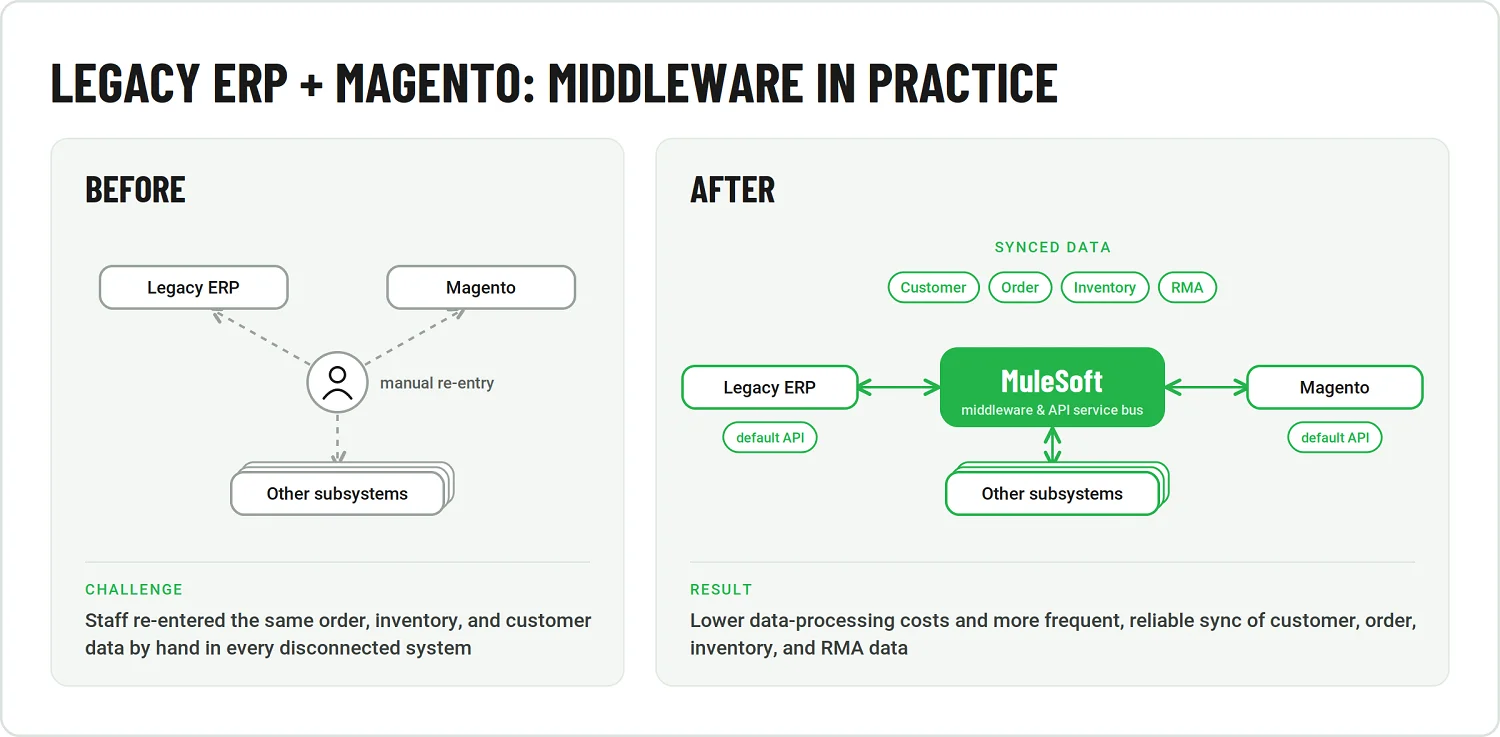
Result. Lower costs in data processing, along with more frequent and reliable synchronization of customer, order, inventory, and RMA data across every connected system. More on the project's timeline and team structure below.
Approach #4: iPaaS and managed integration platforms
iPaaS, short for integration platform as a service, refers to cloud-based platforms that provide managed connectors, orchestration, and transformation capabilities out of the box, rather than requiring a team to build that infrastructure from scratch. It's the right fit when an organization needs managed connectors, orchestration, and transformation, together with a faster path to implementation than a fully custom-built alternative would allow.
Approach #5: Event-driven integration
In an event-driven model, systems publish events (e.g., an order placed or a record updated) to a stream. Other systems subscribe to that stream and react independently, without making direct calls to one another. This approach is best suited to asynchronous, real-time, and loosely coupled processes, where systems need to stay aware of what's happening elsewhere without being tightly bound to each other's uptime or response times.
Approach #6: Data integration using ETL, ELT, or CDC
ETL and ELT pipelines move and transform data between systems, most commonly to support analytics, data platforms, and consolidated reporting. Change data capture (CDC) serves a different, but related, purpose: it detects inserts, updates, and deletes data as they occur and makes those changes available to downstream systems. This makes CDC useful not only for keeping analytics data fresh, but also for replication and operational synchronization, where scheduled batch processing would introduce too much delay. In all of these scenarios, reliable data integration also depends on clear ownership, quality standards, access rules, and other data governance practices, rather than simply moving data from one system to another. Emerline's Power BI and Azure retail project is a real example of this in practice, where governance was explicitly built as its own workstream from the start, rather than treated as an afterthought.
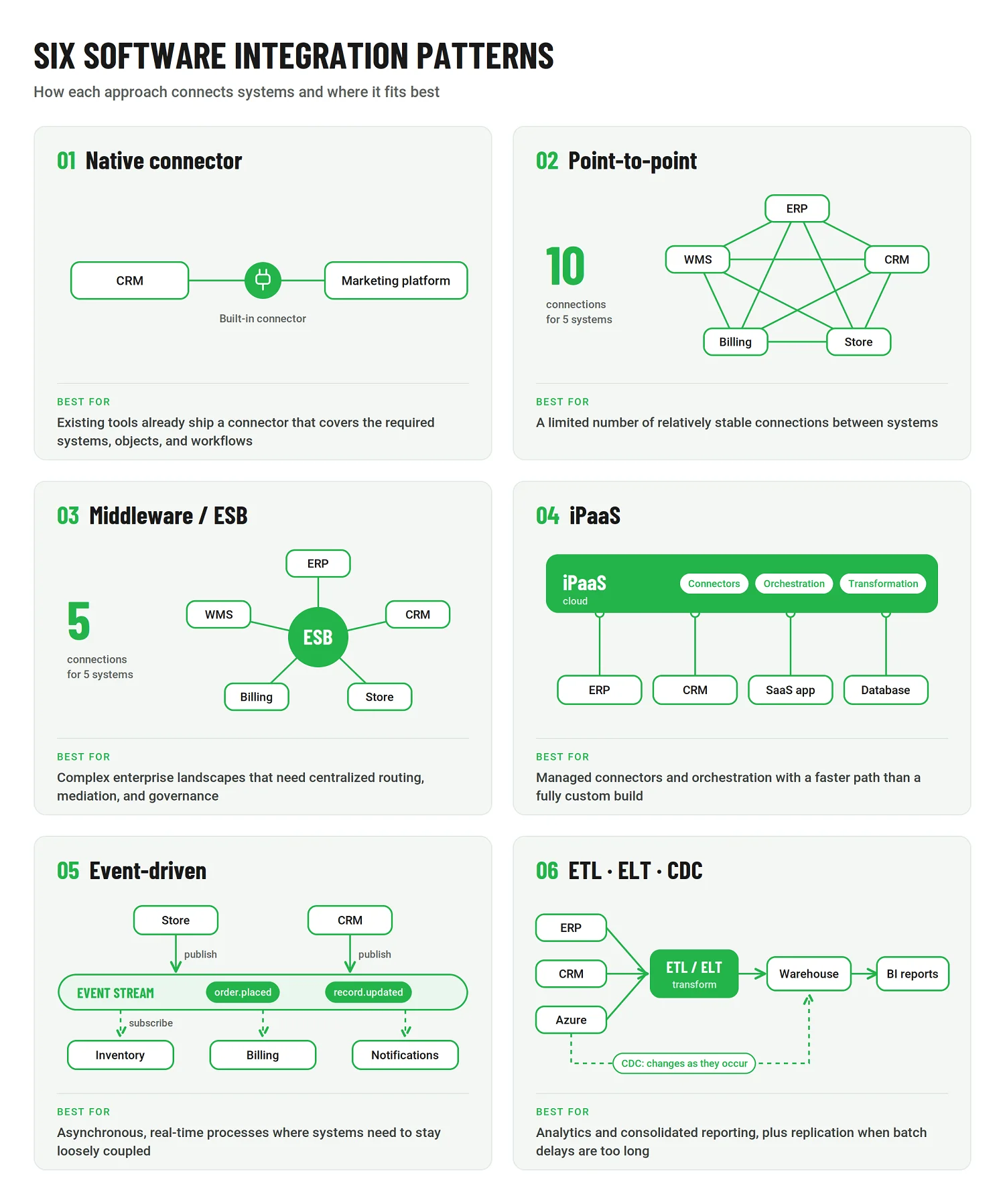
In practice, most real integration landscapes mix two or more of these approaches as they grow. Point-to-point for a couple of simple connections, alongside middleware for the core system-of-record traffic, is a common combination, so remember this is not a menu where you pick only one approach forever.
What Drives Software Integration Costs
Before getting into what drives integration costs up or down, it's worth sitting with what inaction costs, because it's rarely zero. According to Gartner's 2020 Magic Quadrant for Data Quality Solutions, a survey of 154 reference customers found poor data quality costs organizations an average of $12.9 million a year. Much of this data was the result of a the downstream effect of unintegrated, siloed systems.
Separately, MuleSoft's Connectivity Benchmark Report, as covered by ITProToday, found that organizations spend an average of $4.7 million building custom integrations. Yet, up to 70% of applications remain improperly integrated, despite that spending. Either way, money is leaving the building. The real question isn't how much integration costs in general, which is unanswerable without knowing your specific systems. The real question is what makes one integration project cost meaningfully more than another.
Number of systems and endpoints being connected
The more systems and endpoints involved, the more connection logic there is to build and maintain, and that cost compounds, rather than stays flat, as each new connection gets added.
Presence of legacy systems without modern APIs
Older systems that were never built with an API in mind require custom adapters built from scratch, which cost meaningfully more than connecting two modern, API-first tools designed to talk to external systems from day one.
Whether data mapping and transformation can be automated or has to be done manually
When data mapping cannot be automated, it requires more manual effort. This is demonstrated in mismatched data formats between systems, different field names, different units, different structures, and additional engineering work, no matter which integration approach gets chosen.
Compliance and security requirements
Regulated data, financial, health-related, or otherwise personally identifiable, adds validation, audit logging, and access-control work on top of the base integration itself. This has less to do with connecting the systems and more to do with proving that the connection is safe.
One-time build vs. ongoing support and maintenance
A cheap initial build with no maintenance plan attached often ends up costing more over two to three years than a pricier build that includes monitoring, particularly once source systems get updated on their own schedule and quietly break the integration that depended on them staying the same.
The six approaches covered above tend to follow some broad cost patterns, but the integration model alone does not determine the final investment. The central point is that cost rises when custom logic, complexity, and limited reuse increase. Native or pre-built connectors are usually the cheapest option when they fully support the required workflow, since much of the connection logic has already been built and tested.
Point-to-point integration can also start inexpensively, but costs tend to climb as more systems are added. Each connection brings its own implementation and maintenance logic. Middleware and ESB solutions may require more upfront architecture, platform setup, and governance, but they can reduce the incremental effort of connecting additional systems by reusing shared integration capabilities.
ETL, ELT, and CDC-based data integration vary more widely in cost, depending on data volumes, transformation complexity, latency requirements, and the platforms involved, so they do not fit neatly into a single cost tier. In practice, the trade-off is often between minimizing upfront effort and investing in an architecture that becomes easier to extend and maintain as the integration landscape grows.
How Long Does It Take?
Realistic timelines for an integration project tend to follow the same five phases, regardless of the approach chosen, and each phase moves the project toward launch.
- Discovery and workshops
Aligning stakeholders on what needs to connect, what data actually matters, and what the finished system needs to do, before anyone touches a line of code.
- Architecture and tooling selection
Deciding which of the approaches covered above fits the scenario, then choosing the specific platforms or frameworks that will carry it out.
- Build
The development work itself: connectors, transformation logic, error handling, and everything else specified in the architecture phase.
- Validation and checkpoints
Testing the integration against real data and real edge cases, ideally with checkpoints built in at each stage, rather than one large test at the very end.
- Post-launch support
Monitoring, patching, and adjusting the integration as source systems inevitably change on their own schedule.
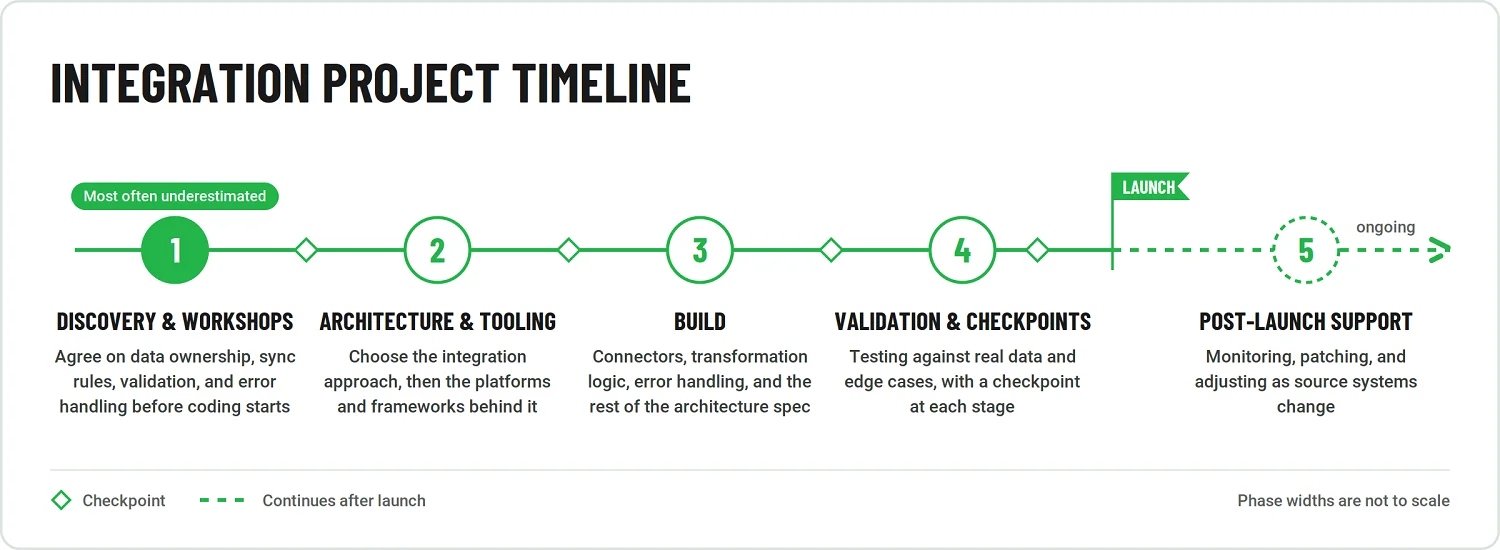
For a sense of scale, in one recent project, a similar-scope integration, the fragrance-manufacturer Magento and ERP case covered above, took about three months from discovery to launch, with checkpoints built in at each stage along the way. That figure is a useful anchor, not a universal promise. Timelines vary considerably depending on the number of systems involved, whether legacy platforms are in the mix, and how much of the data mapping can be automated versus done by hand, which are the same variables that drive cost, as discussed above.
The phase most buyers underestimate is discovery itself. It's tempting to treat workshops and stakeholder alignment as a formality standing between a signed contract and real work starting, but rushing through discovery tends to surface expensive surprises later, once development is already underway and changing course costs far more than it would have upfront. Before development begins, the teams involved should agree on data ownership, synchronization rules, validation requirements, and how errors will be handled. These are decisions that belong in discovery specifically, since building around the wrong assumption on any one of them is expensive to resolve later.
Team Composition and What to Ask a Vendor
Software integration projects are not just about connecting two APIs. Even a mid-sized initiative can require architectural decisions, business process analysis, data mapping, implementation work, testing, and coordination with people who understand the source systems from within the organization. The right team should reflect the number of connected applications, the condition of the legacy environment, and the amount of transformation logic between them.
Our integration project for a fragrance manufacturer offers a useful illustration. On the vendor side, the team included a Magento solution architect, two backend developers, and a business analyst. The client contributed a system engineer and two employees responsible for manual operational tasks needed during the transition.
That composition should not be treated as a universal template. It does, however, show a common pattern for a mid-sized integration: technical architecture and implementation sit alongside business analysis, while the client provides system knowledge, access, validation, and support for processes that cannot be automated immediately.
For larger programs, the team may also include QA engineers, DevOps specialists, data engineers, security experts, or dedicated integration architects. Smaller projects may combine several of those responsibilities within the same roles.
What to ask an integration vendor
Before evaluating estimates or delivery dates, clarify how the vendor will handle the integration tasks that often cause problems after implementation. The questions below are designed to identify those details early.
- Have you integrated our ERP, CRM, commerce platform, or other key system before, and can you show a comparable case?
Experience with the actual platform matters because APIs, extension models, rate limits, and legacy constraints vary considerably between products.
- Who owns data mapping and transformation logic?
Establish whether the vendor will analyze field mappings, validation rules, transformations, and source-of-truth conflicts or whether those decisions are expected to come from your internal team.
- How do you work with legacy applications that do not expose modern APIs?
A credible answer may involve database access, file exchange, middleware, adapters, scheduled jobs, or selective modernization rather than assuming every system can be connected through REST APIs.
- What does the discovery phase actually produce?
Ask for tangible outputs: system and dependency maps, integration architecture, data-flow diagrams, interface specifications, a proof of concept where necessary, implementation estimates, and explicit acceptance criteria.
- How are failed transactions detected, retried, and reconciled?
The vendor should be able to describe monitoring, retry logic, dead-letter handling, alerting, audit trails, and how data inconsistencies will be corrected, rather than simply promising reliable synchronization.
- What happens after go-live?
Clarify who monitors the integrations, how incidents are escalated, what response times apply, and whether maintenance and support are included in the engagement or contracted separately.
These questions expose an important distinction: delivering an integration is one task; operating it reliably as the connected systems, APIs, and business rules continue to change, is another.
How to Choose the Right Software Integration Approach and Partner
Choosing an integration partner also means choosing the right technical starting point. A company that needs two predictable API connections has a very different problem from an enterprise coordinating dozens of applications, while a reporting initiative may require data pipelines rather than transactional integration at all.
The table below provides a practical way to match the integration need with the approach most likely to fit it.
|
Your integration need |
Recommended starting point |
|
Existing applications already provide connectors that support the required workflows |
Native or pre-built connector |
|
You need a limited number of stable connections between systems |
Direct API or point-to-point integration |
|
You need a managed connectors and relatively fast cloud-based implementation |
iPaaS |
|
You operate a complex enterprise environment that requires centralized integration control |
Middleware/ESB |
|
Multiple systems need to react to events in real time without becoming tightly coupled. |
Event-driven integration |
|
The primary goal is analytics, replication, synchronization, or consolidated reporting |
ETL, ELT, or CDC-based data integration |
In practice, few mature integration environments rely on only one of these patterns. Most become hybrid architectures, combining approaches tailored to individual workflows; API-led connectivity can serve as a design principle across several of them, rather than as a separate category.
Need to connect fragmented systems or modernize an existing integration landscape? Explore Emerline’s software integration capabilities to see how they can support your next step.
Conclusion
Software integration is rarely about making two applications exchange data once. The real objective is to create dependable connections that continue to work as systems, business rules, data volumes, and organizational needs evolve.
That is why there is no universally superior integration pattern. A direct API may be entirely sufficient for a few stable connections, while a broader enterprise landscape may require middleware, event-driven communication, managed integration platforms, data pipelines, or a combination of approaches.
The strongest integration strategy starts with the business process and the systems involved, then works backward to the architecture, delivery model, and operating responsibilities required to support them over time and deliver lasting value.
Published on Sep 25, 2026