Power BI Premium to Microsoft Fabric Migration Guide: Architecture, Benefits, Risks, and Step-by-Step Transition
Table of contents
- Key takeaways
- Enterprise Use Case: Modernizing a 45TB Logistics Data Estate
- Legacy infrastructure bottlenecks
- Target Fabric migration architecture
- Typical Migration Performance Benchmarks
- What is Microsoft Fabric?
- Power BI Premium vs. Microsoft Fabric: Core Strategic Differences
- Architecture comparison
- Data storage model
- Query performance: Import vs. DirectQuery vs. DirectLake
- Governance model
- 4.5 cost structure
- Comprehensive architectural comparison matrix
- Why Organizations Migrate to Microsoft Fabric
- OneLake and Zero-Copy Architecture Deep-Dive
- DirectLake Explained: The Technical Engine of Fabric
- How DirectLake Works
- DirectLake vs. Import mode
- DirectLake vs. DirectQuery mode
- Strategic constraints: when DirectLake switches to fallback mode
- Migration Architecture: Before vs. After Transformation
- Legacy Power BI Premium architecture
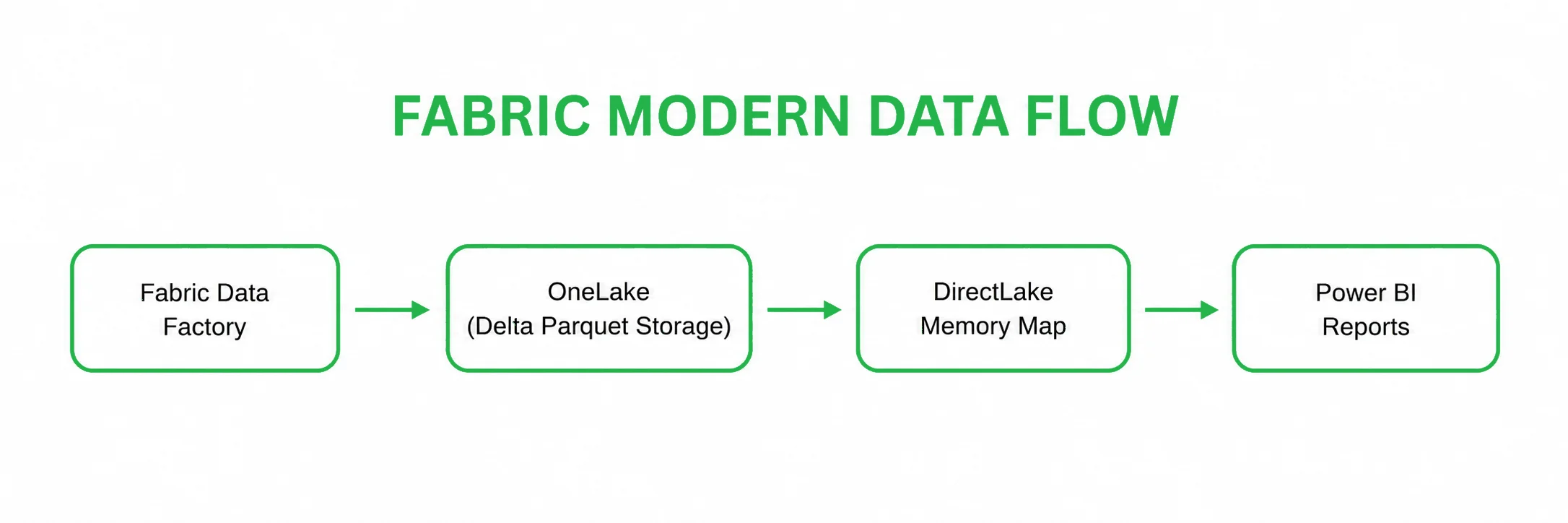
- Modern Microsoft Fabric architecture with OneLake
- Step-by-Step Capacity Migration Guide
- Step 1: Current Power BI capacity audit & sizing alignment
- Step 2: Data source classification and vectoring
- Step 3: Storage layer transition to OneLake
- Step 4: Constructing Lakehouses and relational Warehouses
- Step 5: Refactoring semantic models and enabling DirectLake
- Step 6: Validation, security sync, and production go-live
- Capacity Model, Smoothing, and Performance Management
- System warning for architects: the invisible bottleneck
- Azure Synapse/Premium to Microsoft Fabric Migration Mistakes
- Security Governance Across the Unified Architecture
- Unified active directory authentication
- Downstream security inheritance
- Cost Impact: Power BI Premium vs. Fabric TCO Breakdown
- When Should You Migrate to Microsoft Fabric?
- What Stays Compatible After Migration
- Frequently Asked Questions
- Conclusion: To Migrate or Not to Migrate?
- Partner with Emerline for your data modernization strategy
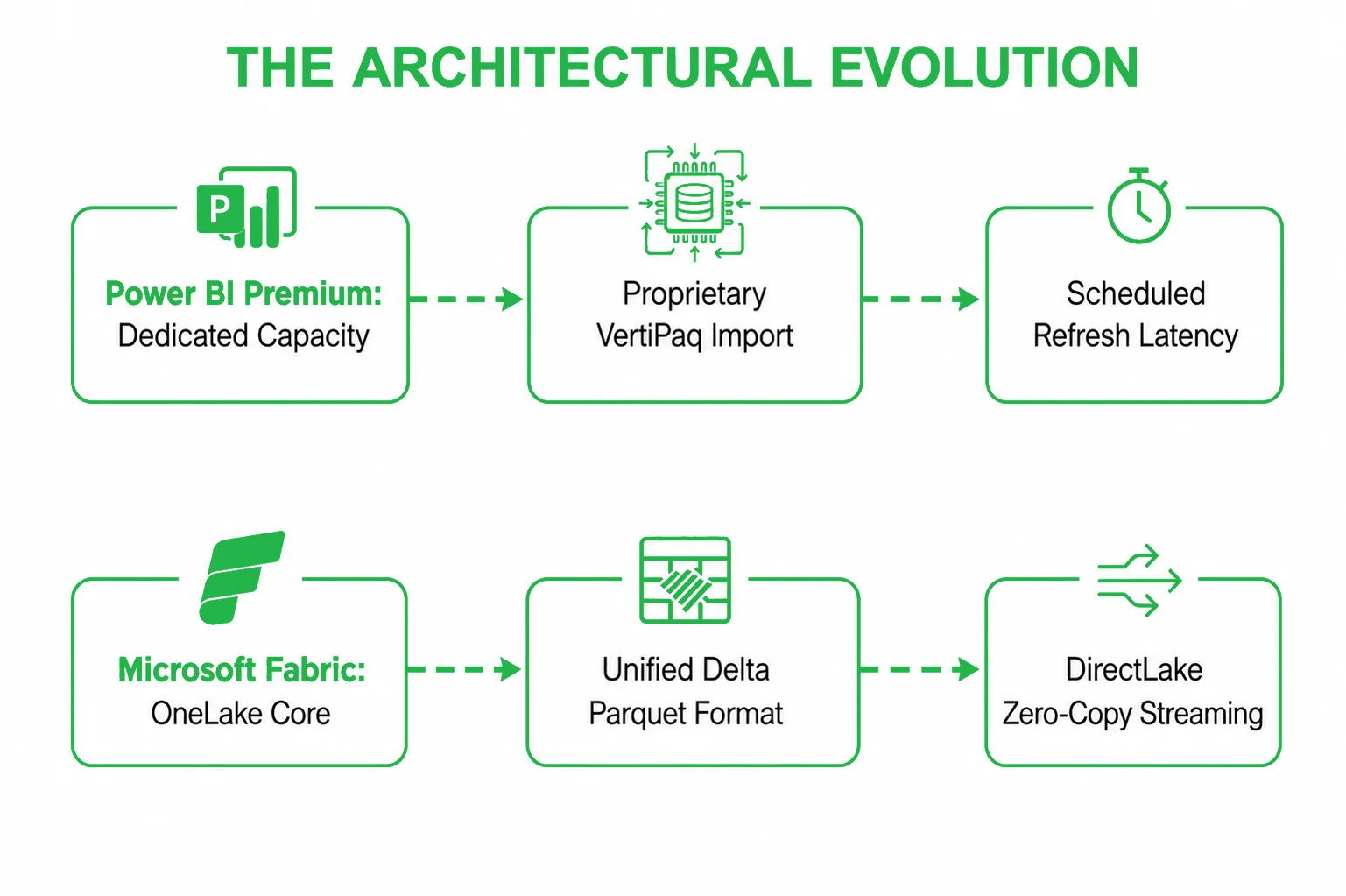
The enterprise data landscape has reached a point where traditional business intelligence boundaries are starting to create unnecessary friction. For years, running analytical reporting on Power BI Premium was the gold standard for global organizations. It delivered dedicated capacities, robust semantic models, and advanced paginated reporting.
However, as data volume scales into the terabyte and petabyte range, traditional architecture begins to struggle. Data engineering teams find themselves stuck managing complex data pipelines just to move records from raw data lakes into separate data warehouses, and then into isolated Power BI import caches. This continuous copying of data introduces latency, drives up storage fees, and complicates access control.
The transition to Microsoft Fabric represents a major evolutionary step for teams currently relying on Power BI Premium. Fabric is not a separate application; it is a unified, end-to-end SaaS data platform that integrates data engineering, data warehousing, real-time analytics, and business intelligence into a single environment.
This technical guide examines why enterprise IT leaders are migrating to Fabric, focuses on the performance shifts behind zero-copy data streaming, outlines the practical steps required to execute this transition safely, and addresses the critical risks involved.
Key takeaways
- Unified infrastructure SaaS: Consolidating disparate data engineering, data science, and business intelligence tools into a single, managed workspace capacity.
- Zero-copy architecture: Eliminating the need to replicate or move data between different architectural layers by adopting open-standard Delta Parquet formatting.
- DirectLake mode streaming: Bypassing traditional data refresh intervals and allowing report layers to read directly from the cloud storage lake at memory speeds.
- Consolidated financial governance: Merging separate compute and storage bills into a single, predictable capacity model to reduce overall resource waste.
Enterprise Use Case: Modernizing a 45TB Logistics Data Estate
To understand how these architectural paradigms translate into a live production environment, let us evaluate a typical enterprise use case involving the modernization of a high-load logistics data estate.
Legacy infrastructure bottlenecks
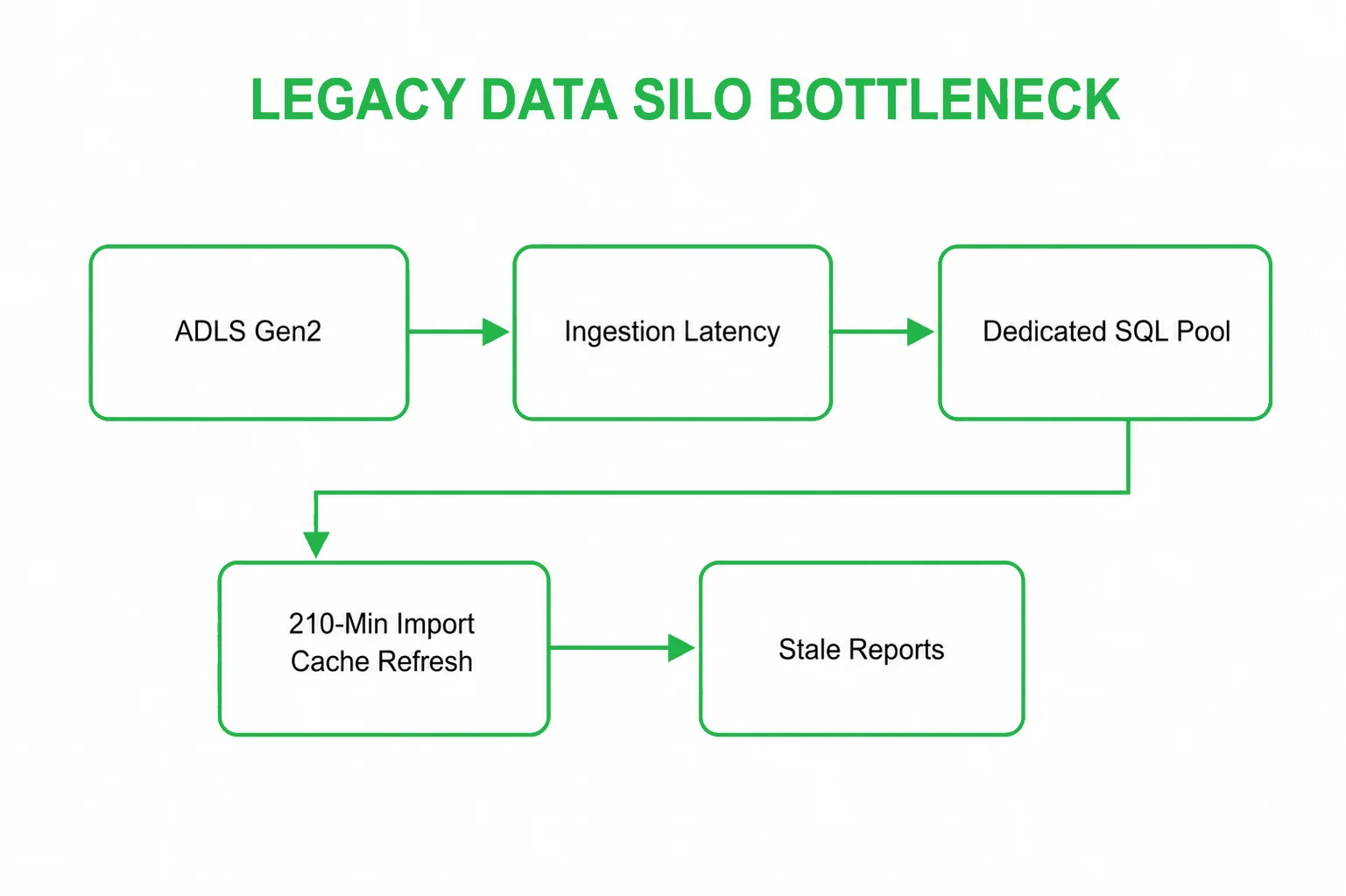
An enterprise managing a 45 TB data estate (comprising structured transactional records and unstructured real-time IoT vehicle telemetry) hits an operational wall using legacy PaaS tools. The architecture relies on 3 Dedicated SQL Pools running at a continuous DWU 2000c footprint and 4 independent Spark Pools for predictive data modeling.
Because data is physically moved and copied between storage lakes, relational warehouses, and separate Power BI Import caches, the system suffers from massive data latency. Nightly ETL processing windows frequently overflow into business hours, causing 140+ active pipelines to stall and resulting in severe reporting delays in executive dashboards.
Target Fabric migration architecture
To eliminate the data refresh cycle and optimize compute spend, the infrastructure is refactored into a unified Microsoft Fabric capacity:
- Storage virtualization: Instead of physically moving data, the existing ADLS Gen2 lakes are linked to Fabric via OneLake Shortcuts, instantly exposing raw files to all compute engines with zero replication.
- Relational layer refactoring: The legacy SQL tables are refactored to remove MPP distribution bottlenecks (such as explicit HASH or ROUND_ROBIN distribution clauses) and ported directly into the serverless Fabric Synapse Data Warehouse.
- Delta standardization & V-order: Ingestion pipelines are updated to standardize all tables on the open-source Delta Parquet format. To maximize query performance, V-Order optimization is enabled across all active Spark notebooks.
- DirectLake streaming activation: By organizing the underlying tables into clean dimensional models (Star Schema), the reporting layer connects via DirectLake Mode. Power BI maps straight to the physical storage files in OneLake at memory-resident speeds, eliminating both the VertiPaq import step and the need for scheduled data refreshes.
Typical Migration Performance Benchmarks
The following operational metrics illustrate the performance gains typically achieved when transitioning identical analytical query workloads and ETL runs from a legacy Synapse/Premium setup to an optimized Microsoft Fabric configuration.
| Performance Metric | Legacy Power BI Premium Architecture | Modern Microsoft Fabric Ecosystem | Operational Advantage |
| End-to-End Nightly ETL Processing Time | 6.5 Hours | 2.8 Hours |
56.9% Faster Ingestion |
| Heavy Complex Query Runtime (Aggregation) | 42 Seconds | 6.4 Seconds | 84.7% Latency Reduction |
| Power BI Dashboard Data Refresh Time | 210 Minutes (Scheduled Import Mode) | 12 Minutes (DirectLake Live Sync) | 94.2% Faster Reporting |
| Average Warmup Cluster Latency | 4.2 Minutes (Spark Pool Provisioning) | 4.8 Seconds (Instant-on Engines) | 98.1% Faster Activation |
| Average Infrastructure Cloud Spend | Baseline Costs ($X / Month) | Optimized Footprint ($Y / Month) |
~30% Average TCO Savings |
What is Microsoft Fabric?
Microsoft Fabric fundamentally reimagines enterprise data infrastructure by replacing fragmented PaaS components with a fully managed SaaS ecosystem. Instead of forcing data teams to stitch together independent data storage, analytics engines, and reporting servers, Fabric unifies these capabilities into a shared workspace capacity.
The platform is constructed from several core execution engines, each optimized for specific data workloads:
- Data engineering: High-performance Apache Spark environments utilizing instant-on routing for programmatic data manipulation, custom notebooks, and heavy batch processing.
- Data warehouse: A fully serverless, distributed relational SQL engine offering industry-standard T-SQL support, traditional database indexing, and parallel query optimization.
- Real-time analytics / Intelligence: An optimized engine engineered to ingest, parse, and alert on high-velocity streaming data, time-series logs, and IoT telemetry.
- Data factory: An enterprise-grade orchestration layer featuring hundreds of native cloud connectors, drag-and-drop dataflows, and robust data integration pipelines.
- Data science: A managed environment for machine learning engineers, featuring native MLflow tracking, automated hyperparameter tuning, and seamless model deployment.
- Power BI: The visualization layer, natively upgraded to stream data straight from the core storage lake without manual data caching.
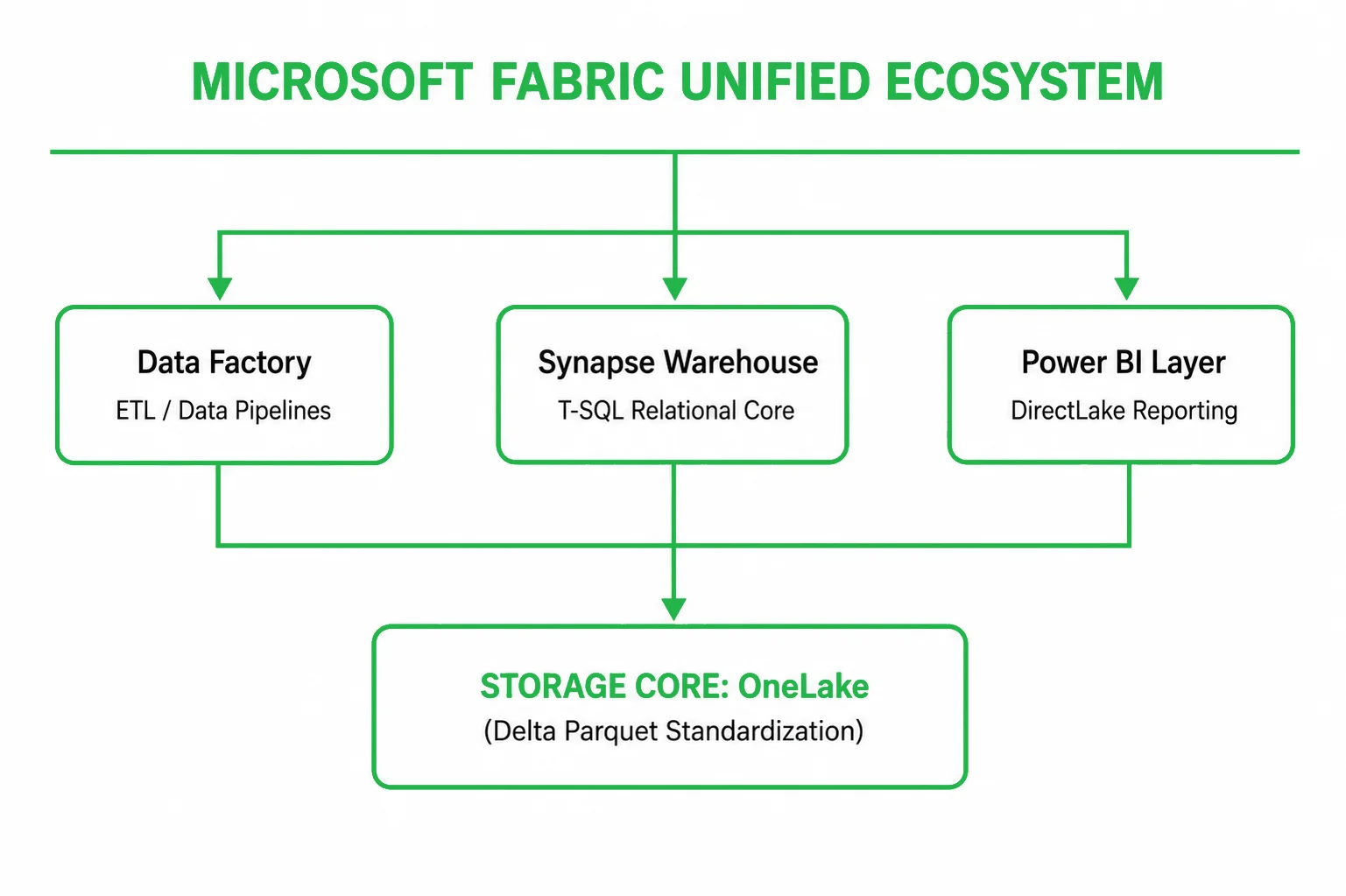
The foundational layer that makes this multi-engine integration possible is OneLake. Modeled as a single, hierarchical, logical data lake automatically provisioned for the entire tenant, it breaks down departmental data silos by ensuring that every engine writes and reads from the same underlying physical storage space.
Power BI Premium vs. Microsoft Fabric: Core Strategic Differences
Understanding the operational boundary between Power BI Premium and Microsoft Fabric requires analyzing how each platform handles compute allocation, data storage, and query execution. Power BI Premium was engineered primarily as a downstream business intelligence target. Fabric, conversely, is an upstream and downstream unified data processor.
Architecture comparison
Power BI Premium acts as an isolated analytical cache node. To supply it with data, organizations must build an external architecture consisting of staging data lakes, relational data warehouses, and semantic processing layer models. Fabric completely flips this architecture. It centers the entire corporate data estate around a single logical core (OneLake) and places instant-on, serverless compute engines directly around the data. This eliminates the technical walls between data engineering tasks and report visualization.
Data storage model
Power BI Premium utilizes a fragmented storage layout. Data is extracted from source databases, transformed via ETL tools, loaded into a data warehouse, and then duplicated again into proprietary data caches inside the Power BI in-memory cache layer. Fabric standardizes the entire enterprise storage blueprint on Delta Parquet. Whether data is generated by an advanced PySpark machine learning notebook, an automated Data Factory pipeline, or a standard SQL data warehouse insert, it is stored as open-source Delta Parquet files inside OneLake. This approach establishes a single, universal source of truth across all business units.
Query performance: Import vs. DirectQuery vs. DirectLake
In a legacy Power BI Premium deployment, data architects face a compromise between reporting speed and data freshness:
- Import mode: Compresses and loads data straight into the in-memory VertiPaq storage engine. While it delivers lightning-fast, sub-second query performance, it requires a scheduled refresh pipeline. For massive datasets, these refreshes take hours, consume significant CPU capacity, and mean that business decisions are always made on lagging information.
- DirectQuery mode: Keeps data fresh by sending live queries straight back to the source data warehouse whenever a user clicks a visual element. The drawback is severe query latency, slow loading times, and a heavy compute load on the source database engine, which frequently causes dashboards to crash under high user concurrency.
Fabric eliminates this compromise via DirectLake Mode. Because the underlying tables inside OneLake are already formatted in open Delta Parquet structures, the Power BI engine can load these data files directly into its memory space at hardware-resident speeds. It delivers the sub-second speed of Import mode with the live data freshness of DirectQuery, completely bypassing the need to run data refresh pipelines or write complex T-SQL translation code.
Governance model
Managing security boundaries across a traditional Power BI Premium data stack introduces significant administrative overhead. Security teams must configure access control lists (ACLs) inside the raw data lake, duplicate those security definitions inside the relational data warehouse, and rebuild them using Row-Level Security (RLS) filters within the individual Power BI semantic models. Fabric implements a Unified Security Inheritance Model. When an IT team applies a security rule, such as row-level data segregation or column-level data masking, at the OneLake or Data Warehouse layer, that exact security context carries down automatically to the Power BI reporting layer. The data boundaries are honored universally, guaranteeing audit-ready compliance across the entire enterprise.
4.5 cost structure
Power BI Premium relies on rigid, fixed dedicated capacities (P-SKUs) allocated strictly to business intelligence and dashboard rendering. Any data engineering or data warehousing workloads running upstream must be paid for separately through independent cloud consumption bills. Fabric converts these disparate expenses into a Unified Capacity Model (F-SKUs). A single Fabric Capacity block provides computing power that can be dynamically shared across data engineering, data warehousing, data science, and Power BI workloads. This allows organizations to eliminate redundant over-provisioning and significantly reduce overall cloud infrastructure spend.
Comprehensive architectural comparison matrix
| Operational Vector | Legacy Power BI Premium Pattern (P-SKUs) | Modern Fabric Integrated Stack (F-SKUs) |
| Primary Structural Goal | Downstream dashboard visualization and semantic model hosting. | Comprehensive, end-to-end data processing, analytics, and business intelligence. |
| Data Storage Approach | Fragmented, proprietary data caches and duplicated report extracts. | Single, open-standard logical repository (OneLake) utilizing Delta Parquet. |
| Compute Engine Logic | Fixed compute resources locked exclusively to BI rendering tasks. | Dynamically shared serverless compute engines for SQL, Spark, and BI. |
| Query Performance | Forced tradeoff between fast Import caches or lagging DirectQuery loops. | Instantaneous memory-speed data streaming via DirectLake Mode. |
| ETL Pipeline Dependency | High dependency on external data movement tools to sync data layers. | Native orchestration via Data Factory; zero data movement required across layers. |
| Data Governance Control | Disconnected permissions configured manually across multiple independent systems. | Native Microsoft Entra ID security inherited automatically from storage to report. |
| Financial Allocation |
Rigid billing models per reporting capacity; separate charges for upstream databases. |
Consolidated capacity limits featuring automated compute smoothing. |
Why Organizations Migrate to Microsoft Fabric
Transitioning your enterprise data infrastructure from Power BI Premium to Microsoft Fabric yields measurable operational advantages across several key dimensions:
- Elimination of data duplication & data inflation: Fabric’s zero-copy architecture ensures data is stored exactly once as a Delta Parquet file inside OneLake. All computing engines interact with this single file, immediately reducing cloud storage costs by removing staging copies and duplicated report extracts.
- Radical reduction in data latency: By leveraging DirectLake mode, the time required to reflect a production transactional record on an executive dashboard drops from hours to seconds. Business analysts interact with live data streams operating at hardware-resident speeds.
- Minimization of ETL pipeline complexity: Data engineering teams frequently spend the majority of their time troubleshooting broken data pipelines that ferry information between storage lakes, staging databases, and reporting layers. Fabric unifies the entire lifecycle within a single workspace, reducing data pipeline failure points.
- Streamlined financial governance: Consolidating separate software bills into a single Fabric Capacity tier gives CFOs and CIOs complete predictability over their data budgets. IT leaders can utilize native utilization metrics to track precisely which department or workspace is consuming computing capacity, enabling accurate corporate chargeback models.
OneLake and Zero-Copy Architecture Deep-Dive
To build a high-performance analytics platform, data architects must understand the underlying technology of OneLake and its Zero-Copy Architecture. OneLake functions as a single, unified logical file system for the entire enterprise, natively built into the fabric of the software ecosystem.
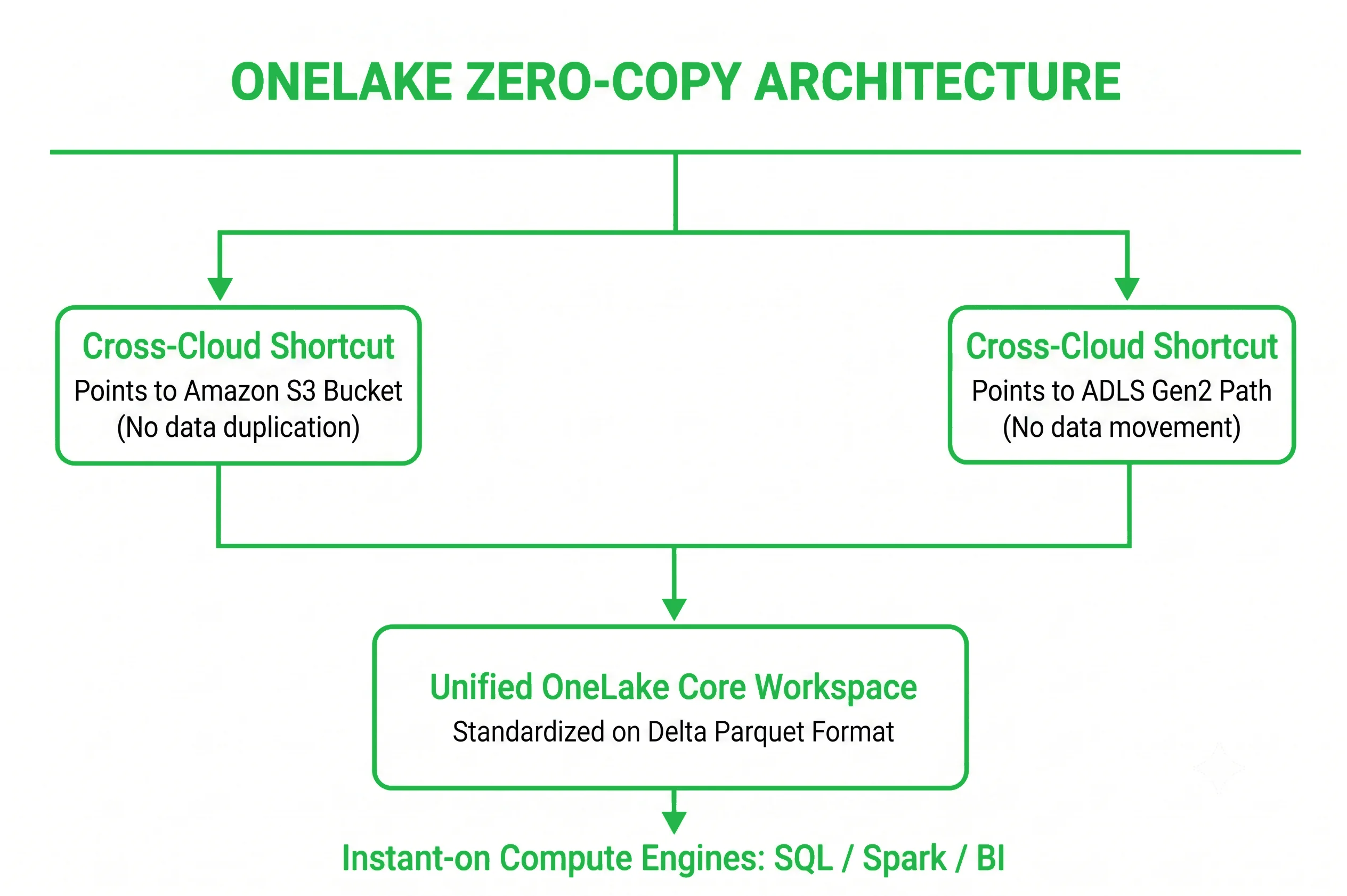
The defining engineering achievement of OneLake is its enforcement of the Delta Parquet data format as the universal standard for all analytical engines. Delta Lake is an open-source storage layer that brings ACID transaction traits to big data workloads. By storing data as highly compressed, columnar Parquet files accompanied by a transaction log, Fabric ensures that data remains reliable, version-controlled, and instantly accessible.
Because every Fabric compute engine, whether it is the distributed SQL execution engine, a PySpark notebook, or the Power BI visualization layer, is designed to read and write Delta Parquet natively, the platform unlocks the Zero-Copy concept:
- Shortcuts: OneLake can create virtual links (Shortcuts) to data stored in external cloud repositories, such as Amazon S3, Google Cloud Storage, or independent Azure ADLS Gen2 accounts.
- Zero Data Movement: These shortcuts map the external data into the local OneLake directory structure. To the Fabric compute engines, this data appears as native local tables.
- Zero Egress/Ingress Inflation: Fabric processes this information live without physically copying the data files, completely removing data replication pipelines, avoiding cloud data egress fees, and eliminating data synchronization lag.
DirectLake Explained: The Technical Engine of Fabric
How DirectLake Works
DirectLake mode represents a significant breakthrough in business intelligence query performance. In a legacy setup, when a user interacts with a chart, the system must either search a pre-loaded local RAM cache (Import Mode) or translate the visual click into an on-the-fly query and send it over the network to a database server (DirectQuery Mode).
DirectLake bypasses this abstraction layer completely. When a Power BI report operating in DirectLake mode is accessed, the Analysis Services engine issues a direct memory map command to the underlying Delta Parquet files inside OneLake. The engine reads the raw data columns straight out of the cloud data lake and loads them directly into its memory space. There is no translation, no intermediary query generation, and no data refresh overhead.
DirectLake vs. Import mode
While Import mode provides fast dashboard rendering, it requires data to be converted into a proprietary format and loaded into memory on a fixed schedule. If your data warehouse is updated continuously but your dataset only refreshes three times a day, your dashboards are inherently inaccurate. DirectLake delivers the exact same sub-second memory execution speeds as Import mode, but ensures your metrics reflect live production data without requiring data refresh tasks.
DirectLake vs. DirectQuery mode
DirectQuery ensures data freshness but strains your infrastructure. Every single visual element on a dashboard sends an independent query back to the relational database. If fifty managers access the report simultaneously, the database is hit with hundreds of complex queries, driving up computing costs and causing report slowdowns. DirectLake mode loads the data columns straight into memory, completely removing the query strain from your relational SQL data warehouse.
Strategic constraints: when DirectLake switches to fallback mode
Data architects must design their data systems carefully, because DirectLake mode features an automatic safeguard mechanism known as Fallback Mode. If certain architectural and structural boundaries are breached, DirectLake will automatically drop back to standard DirectQuery mode, causing report performance to slow down unexpectedly.
DirectLake will trigger a fallback to DirectQuery under the following conditions:
- Capacity memory Limits (Sku-Throttling): Each Fabric Capacity (F-SKU tier) has a strict maximum memory allocation limit per semantic model. If your dataset size exceeds the maximum memory boundary allocated to your specific F-SKU tier, the engine can no longer hold the entire raw column structure in memory and will drop back to DirectQuery.
- Advanced row-level security (RLS) Edge-Cases: If complex, dynamic security constraints are applied to a semantic model that requires evaluations outside of the standard OneLake security inheritance boundaries, the engine will default back to DirectQuery to ensure data isolation.
- Unoptimized schema types: DirectLake operates optimally on clean dimensional models. If your underlying data tables are highly unoptimized, poorly indexed, or contain non-standard data mutations that break Delta transaction logs, DirectLake will disengage to protect data integrity.
Migration Architecture: Before vs. After Transformation
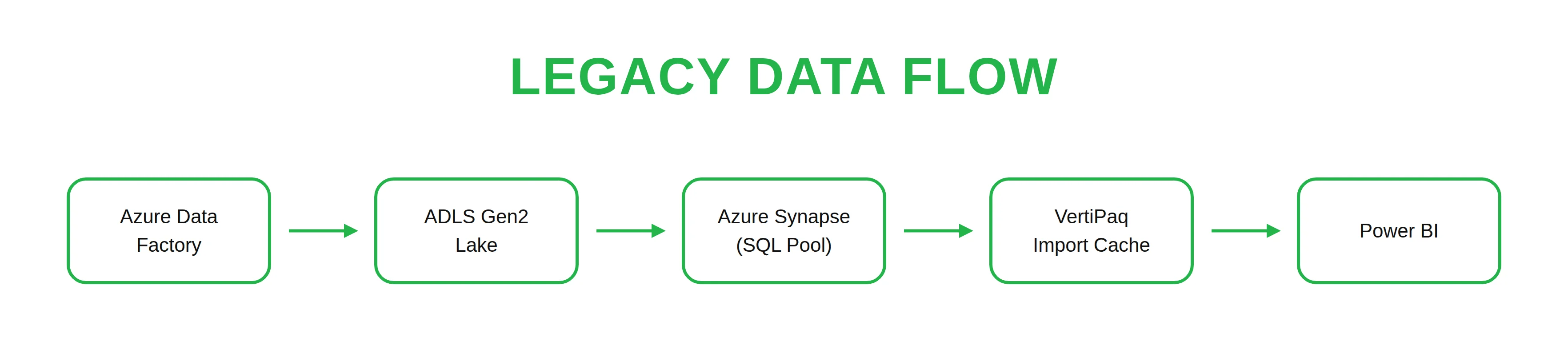
Legacy Power BI Premium architecture
In the legacy deployment pattern, corporate data is highly fragmented across multiple disconnected processing environments. Data must pass through complex ETL layers simply to sync different parts of the infrastructure:
Modern Microsoft Fabric architecture with OneLake
Fabric flattens this multi-tier infrastructure into a single, unified SaaS data layer. All processing engines communicate natively with the same physical data files, unlocking real-time data visibility:
Step-by-Step Capacity Migration Guide
Transitioning an active, enterprise-scale Power BI Premium infrastructure to Microsoft Fabric requires a methodical engineering approach to guarantee data accuracy and avoid business disruption. For a detailed breakdown of the platform's core architecture before getting started, you can explore our introductory Microsoft Fabric guide.
Step 1: Current Power BI capacity audit & sizing alignment
Before purchasing Fabric capacity, map your existing Power BI Premium P-SKU footprint to the equivalent Fabric F-SKU tier. This ensures your new environment has full feature parity and sufficient computing resources to support active users.
- Sizing map baseline: A standard Power BI Premium P1 Capacity maps directly to a Fabric F64 Capacity. A P2 maps to an F128, and a P3 maps to an F256.
- Workload profiling: Use native metrics applications to identify peak utilization windows, memory footprint averages, and background refresh spikes across your legacy workspaces.
Step 2: Data source classification and vectoring
Classify your corporate reporting assets into discrete operational tiers based on freshness requirements and data volume:
- Hot path: Operational reports requiring sub-second data updates and real-time dashboard tracking. These should be targeted for immediate DirectLake mode migration.
- Warm path: Standard corporate reporting datasets updated daily or weekly. These can be migrated to Fabric Lakehouses using scheduled Spark execution scripts.
- Cold path: Historical compliance data and deep archival chunks. These should be moved to long-term OneLake storage and exposed via serverless T-SQL views only when requested.
Step 3: Storage layer transition to OneLake
Update your core data ingestion infrastructure to ensure that all active data flows write straight into OneLake.
- Upgrade data gateways: Update all on-premise data gateways to the latest enterprise runtime version to support high-throughput, parallel data streaming into OneLake.
- Shortcut deployment: For data assets that must temporarily remain inside external cloud buckets (AWS S3 or ADLS Gen2), configure secure Fabric Shortcuts to bring them into the OneLake namespace with zero data duplication.
Step 4: Constructing Lakehouses and relational Warehouses
Establish the analytical core inside your new Fabric workspaces:
- Deploy Fabric Lakehouses: Use Lakehouses for high-velocity, programmatic data transformations where data engineers can interact directly with Delta Parquet files using Spark, Python, or Scala notebooks.
- Deploy Fabric Data Warehouses: Use Data Warehouses for clean relational data modeling, granting analysts full T-SQL support, traditional database indexing, and view creation capabilities.
Step 5: Refactoring semantic models and enabling DirectLake
Convert your legacy reporting models over to Fabric's high-performance streaming architecture:
- Rebuild tables & schema constraints: Reorganize your underlying tables into optimized dimensional frameworks (Star Schema). Strip out any legacy Synapse indexing strategies (like explicit MPP HASH distributions) from your migration scripts.
- Switch semantic modes: Convert your traditional semantic models from legacy Import or DirectQuery configurations over to the optimized DirectLake Mode routing architecture. Point the Power BI reporting layer straight to the underlying physical Delta Parquet files inside your Lakehouse.
Step 6: Validation, security sync, and production go-live
Validate your new environment prior to decommissioning your legacy infrastructure:
- Verify security inheritance: Confirm that your Microsoft Entra ID corporate access groups and Row-Level Security (RLS) parameters transfer correctly from your storage layer to your dashboards.
- Run parallel performance audits: Route a segment of your corporate traffic to the new Fabric workspace and benchmark load times, query response times, and capacity unit (CU) consumption under real-world concurrency. Once performance targets are met, safely transition your remaining users and decommission your old Power BI Premium nodes.
Capacity Model, Smoothing, and Performance Management
The shift from legacy Power BI Premium capacities to Microsoft Fabric Capacity (F-SKUs) introduces a completely new way of managing cloud infrastructure costs. Power BI Premium operates on a strict, rigid resource model; if a heavy dataset refresh exhausts your allocated memory or CPU limits, the system drops subsequent user queries, causing report errors.
Fabric resolves this issue by introducing a performance management feature known as Smoothing.
Smoothing dynamically balances your infrastructure load by spreading out large, brief compute spikes (such as running a heavy PySpark notebook or processing a massive data warehouse query) over a continuous 24-hour window. This allows your data pipelines to "burst" past your base capacity limits temporarily to ensure fast execution, without crashing the system or forcing you to upgrade to a higher, more expensive pricing tier.
System warning for architects: the invisible bottleneck
While smoothing does an exceptional job of keeping your user dashboards stable, it can easily obscure underlying query inefficiencies. If your data teams migrate poorly structured, unoptimized legacy tables into the new Fabric Lakehouse, the continuous background processing will eventually exhaust your capacity limits. This leads to system Throttling.
When throttling occurs, background ETL tasks stall and interactive user reports slow down dramatically. To prevent these performance bottlenecks, data teams must not treat Fabric's scalable capacity as a license to write unoptimized queries. Continue to build clean dimensional models (Star Schema) inside your Lakehouses, and use the native Fabric Capacity Metrics App to set up automated alerts that flag long-running compute operations before they impact user dashboards.
Azure Synapse/Premium to Microsoft Fabric Migration Mistakes
Most industrial migration guides cover the fundamental implementation paths but omit what can fail during production shifts. Through auditing multiple enterprise environments, data engineering teams have cataloged the top ten architectural pitfalls encountered during a Synapse/Premium-to-Fabric transition:
- Migrating HASH distribution syntax directly into DDL scripts: Azure Synapse relied extensively on explicit MPP distribution strategies (HASH, ROUND_ROBIN, REPLICATE) to position data across computing nodes. Fabric Data Warehouse handles indexing and optimization automatically via a serverless execution engine. Retaining legacy distribution parameters inside your statements will trigger DDL execution faults.
- Under-provisioning or misconfiguring F-SKU capacity allocations: Selecting a Fabric Capacity tier (F-SKU) without auditing peak utilization metrics leads to massive performance throttling. Teams frequently run heavy data engineering batches concurrently without configuring auto-scaling, which locks users out of interactive dashboards.
- Neglecting V-Order Delta optimization settings: Fabric compute engines run at maximum velocity only when data is stored using Microsoft’s optimized V-Order Delta Parquet sorting algorithm. Omitting this setting from your Spark notebooks results in a significant performance penalty during warehouse queries.
- Overlooking identity column and constraints behaviors: While Synapse Dedicated Pools managed strict sequential identity generation natively within its relational engine, Fabric handles identity constraints with high-throughput distributed parallelization. If data pipelines insert keys out of sync without proper constraint validation, transaction processing can fail.
- Blindly treating Fabric migration as a "Lift-and-Shift" project: Treating Fabric as just another cloud database instance prevents you from capitalizing on its unified architecture. Organizations that do this continue to build old-fashioned data movement pipelines instead of using Fabric's native Shortcuts, which completely defeats the purpose of OneLake's zero-copy architecture.
- Misconfiguring DirectLake governance boundaries: DirectLake mode bypasses standard Power BI dataset size constraints by reading directly from OneLake. However, if your data architects fail to configure fallback thresholds, heavy ad-hoc reporting queries can trigger an automatic fallback to DirectQuery mode, placing an unexpected computation load on SQL warehouse engines.
- Failing to establish comprehensive workspace separation: In PaaS architectures like Synapse, data access was controlled through complex database-level permissions and networks. Fabric relies on Azure AD / Entra ID workspace boundaries. Placing dev, test, and production data assets within a single workspace cluster will compromise data security.
- Retaining outdated Data Factory Link Syntax: Many legacy Synapse pipelines use specific integration activities like Synapse Link for SQL or Cosmos DB. These tools do not translate directly into Fabric Data Factory without adjustment. Data engineers must re-architect these ingest points to use native Fabric connectors or Mirroring options.
- Ignoring data drift and Lakehouse schema evolution policies: Fabric Spark jobs write straight to Delta tables. If your upstream source APIs mutate their payload structures without explicit schema validation checks built into your incoming pipelines, you risk corrupting your core Delta tables, which can disrupt your downstream reporting tools.
- Omitting unified data lineage configurations: Failing to integrate Fabric assets with data governance tools early in the migration process creates an invisible metadata environment. Without end-to-end data lineage tracking configured from day one, tracking data transformations from ingestion up to final dashboard visualizations becomes a massive manual headache.
Security Governance Across the Unified Architecture
Managing data permissions across a fragmented data stack introduces massive administrative overhead and increases the risk of compliance errors. Traditionally, security teams had to configure data access policies inside the source database, mirror those rules inside the ETL data movement pipeline, and rebuild them yet again using Row-Level Security (RLS) inside individual Power BI semantic models.
Fabric simplifies this administrative overhead through a unified security model that flows directly down from OneLake.
Unified active directory authentication
Because Fabric is an integral part of the SaaS ecosystem, it relies entirely on Microsoft Entra ID for all identity and access management. Security teams can define explicit data governance roles, manage workspace access permissions, and enforce multifactor authentication for all data departments from a single, centralized control portal.
Downstream security inheritance
When you apply a security rule, such as row-level data segregation or column-level data masking, within a Fabric Data Warehouse or Lakehouse, that security context automatically carries through to the report rendering layer. Whether an executive is looking at an audited Power BI dashboard or a data engineer is querying raw files via a Python notebook, the system respects the exact same data boundaries, guaranteeing comprehensive, audit-ready data governance.
Cost Impact: Power BI Premium vs. Fabric TCO Breakdown
Migrating to Fabric unifies separate computing and storage bills into a single capacity model, reducing overall resource waste and lowering total cost of ownership (TCO).
By eliminating the need to cache duplicate data copies across different reporting layers, organizations can significantly reduce storage duplication expenses. Furthermore, because Fabric brings data warehousing, factories, and dashboards under a single licensing tier (P-SKU -> F-SKU transition), organizations can consolidate separate software bills into one predictable budget.
When Should You Migrate to Microsoft Fabric?
Enterprise organizations should prioritize a migration to Microsoft Fabric when they hit specific operational thresholds:
- Data scale challenges: Analytical data volumes expand deep into the terabyte and petabyte range, causing traditional cache refreshes to stall.
- Freshness requirements: Business leadership demands real-time data visibility without sacrificing report loading speed.
- Pipeline complexity: Data engineering teams spend excessive hours troubleshooting broken pipelines that ferry data across disconnected tools.
- Governance challenges: Compliance teams face friction syncing data permissions and security rules across multiple independent systems.
What Stays Compatible After Migration
Migrating to a Fabric capacity ensures complete backward compatibility for your existing business intelligence assets. Your existing Power BI reports, dashboards, and semantic models will continue to run seamlessly without modification.
Fabric supports a partial, gradual migration path. You can shift your active workspaces to a Fabric capacity immediately to enjoy performance smoothing, and then refactor your back-end pipelines to use OneLake and DirectLake mode at your own pace.
Frequently Asked Questions
Do we need to rewrite all our existing Power BI reports when migrating?
No. Existing Power BI reports, dashboards, and semantic models run seamlessly within Microsoft Fabric capacities without any code modifications, thanks to full backward compatibility. You can migrate your workspaces to an F-SKU capacity immediately and refactor your pipelines over time.
Is Microsoft Fabric replacing Power BI?
No, Fabric integrates Power BI. Fabric is a unified environment that wraps Power BI reporting together with data warehousing, data factories, and engineering workloads inside a single SaaS platform.
What is DirectLake in simple terms?
DirectLake is a streaming mode that allows Power BI reports to read raw open Delta Parquet files straight from cloud storage at memory speeds, completely bypassing data import and refresh phases.
Is Fabric suitable for small companies?
Yes, because Fabric combines separate data engineering, warehousing, and BI tool costs into a single, predictable capacity model, reducing resource waste and simplifying billing.
What breaks during migration?
While existing reports remain backwards compatible, unoptimized legacy queries or unindexed tables can cause system throttling and slow down user dashboards if they exhaust capacity limits. On-premise data gateways must also be updated to support high-throughput parallel data loads.
Conclusion: To Migrate or Not to Migrate?
Transitioning from Power BI Premium to an integrated Microsoft Fabric environment is a definitive architectural shift, not a superficial tool replacement.
- When to migrate: If your organization handles multi-terabyte datasets, struggles with complex ETL pipeline overhead, requires real-time dashboard performance, or is preparing to build custom AI agents on top of corporate data, migration is highly recommended. Standardizing on a unified OneLake foundation using open Delta Parquet files eliminates costly data duplication, unlocks sub-second DirectLake memory performance, and streamlines security governance down to individual reports.
- When to wait: If your current data estate is small, your existing scheduled refresh windows complete well within your operational boundaries, and you lack a broader data engineering or data science footprint, a full Fabric capacity investment may exceed your immediate needs.
Partner with Emerline for your data modernization strategy
Transitioning a high-capacity data ecosystem requires a secure roadmap, meticulous capacity optimization, and deep architectural design. Minor misconfigurations in workload isolation or table structures can trigger capacity unit throttling and impact user dashboards.
As an established Microsoft Solutions Partner with deep expertise across the entire Microsoft enterprise ecosystem, Emerline helps organizations mitigate transition risks, eliminate technical legacy debt, and restructure backend architectures via expert data engineering services. We evaluate your active Power BI Premium footprint, optimize data models for DirectLake connectivity, and ensure your unified analytics infrastructure is production-ready.
Contact our enterprise data and analytics engineers today to schedule a technical evaluation of your data platform roadmap, map your capacity milestones, and establish a high-performance modern data estate.
Published on Jun 26, 2026