Excel Modernization: Replacing Legacy Excel Tools with Cloud Applications
Table of contents
- Key Takeaways
- The Hidden Operational Vulnerabilities of Spreadsheet Architecture
- 1. Zero Access Isolation
- 2. Blind Data Silos
- 3. Untraceable Logic Decay
- Choosing the Right Cloud Platform for Excel Modernization
- Reporting Workbooks → Power BI, Tableau, or Looker
- Data Entry Spreadsheets → Power Apps or Low-Code Web Frameworks (Retool / AppSheet)
- Shared Departmental Files → SharePoint Online or Enterprise Cloud Workspaces
- VBA-Driven Workflows → Power Automate or Serverless Microservices (AWS Lambda / n8n)
- Business-Critical Excel Systems → Cloud Data Warehouses & Core Relational Databases
- Highly Specialized Models → Custom Cloud Solutions (AWS / Azure / GCP)
- 7 Signs Your Organization Has Outgrown Excel
- Emerline Operational Advice: Moving Past the Lift-and-Shift Trap
- When Excel Remains the Right Choice
- Step-by-Step Modernization Roadmap
- Phase 1: Logic Extraction and Data Modeling
- Phase 2: Building Collaborative Storage Hubs
- Phase 3: Developing the Secure Web Interface
- Phase 4: Automating Business Logic
- Emerline Strategic Advice: Preserving Workflow Tempos
- Excel Modernization Verification Checklist
- Comparison of Operational Estates
- Business Benefits of Excel Modernization
- Frequently Asked Questions
- How long does it typically take to migrate a complex financial spreadsheet to the cloud?
- Can we still export our data back out to Excel if we move our processes to a web application?
- What happens if our cloud app needs to connect to other internal software systems?
- Can low-code web applications completely replace Excel?
- What happens to existing VBA macros during modernization?
- Can Excel modernization be performed incrementally?
- How secure are cloud internal applications compared to Excel?
- What is the typical cost of Excel modernization?
- Expert Systems Modernization Support
It is one of the most common operational risks in the corporate world: an enterprise grows into a multi-million- or billion-dollar organization, yet its core financial models, supply chain forecasts, or resource allocation processes remain dependent on a single, complex Excel workbook. Originally created years ago as a temporary solution, this spreadsheet gradually evolves into a business-critical system held together by nested formulas, hidden worksheets, and undocumented Visual Basic for Applications (VBA) macros.
The real danger emerges when unmanaged spreadsheets interact with the complexity of modern enterprise data environments. A single broken reference, an accidental modification to a critical data range, or a failed macro execution can compromise reporting accuracy and disrupt downstream business processes.
When critical business decisions depend on a file that lacks version control, automated audit trails, and role-based security, organizations are exposed to significant operational risk. What appears to be a familiar productivity tool often functions as an undocumented application with little governance, limited visibility, and substantial failure potential.
Moving beyond spreadsheet dependencies does not require teams to abandon familiar workflows. Instead, effective modernization focuses on preserving core business logic while rebuilding it within a secure, scalable, and collaborative cloud environment. This guide outlines a structured approach for transforming legacy Excel tools into modern cloud solutions without disrupting day-to-day operations.
Key Takeaways
- De-risking Core Workflows: Eliminating operational vulnerabilities caused by unmanaged, macro-heavy spreadsheets by migrating logic to a centralized cloud footprint.
- Structured Collaborative Spaces: Replacing fragile local files with collaborative web-based cloud interfaces and secure relational data layers.
- Preserving Calculation Logic: Auditing and extracting hidden VBA macro logic to rebuild it inside modern, maintainable cloud-native expressions or backend services.
- Enforcing Strict Compliance: Establishing automated data validation and audit trails that comply perfectly with internal risk-mitigation frameworks.
Looking to transform business-critical spreadsheets into secure, scalable cloud applications? Partner with Emerline’s data management team to eliminate operational risk, preserve business logic, and accelerate your digital transformation journey.
The Hidden Operational Vulnerabilities of Spreadsheet Architecture
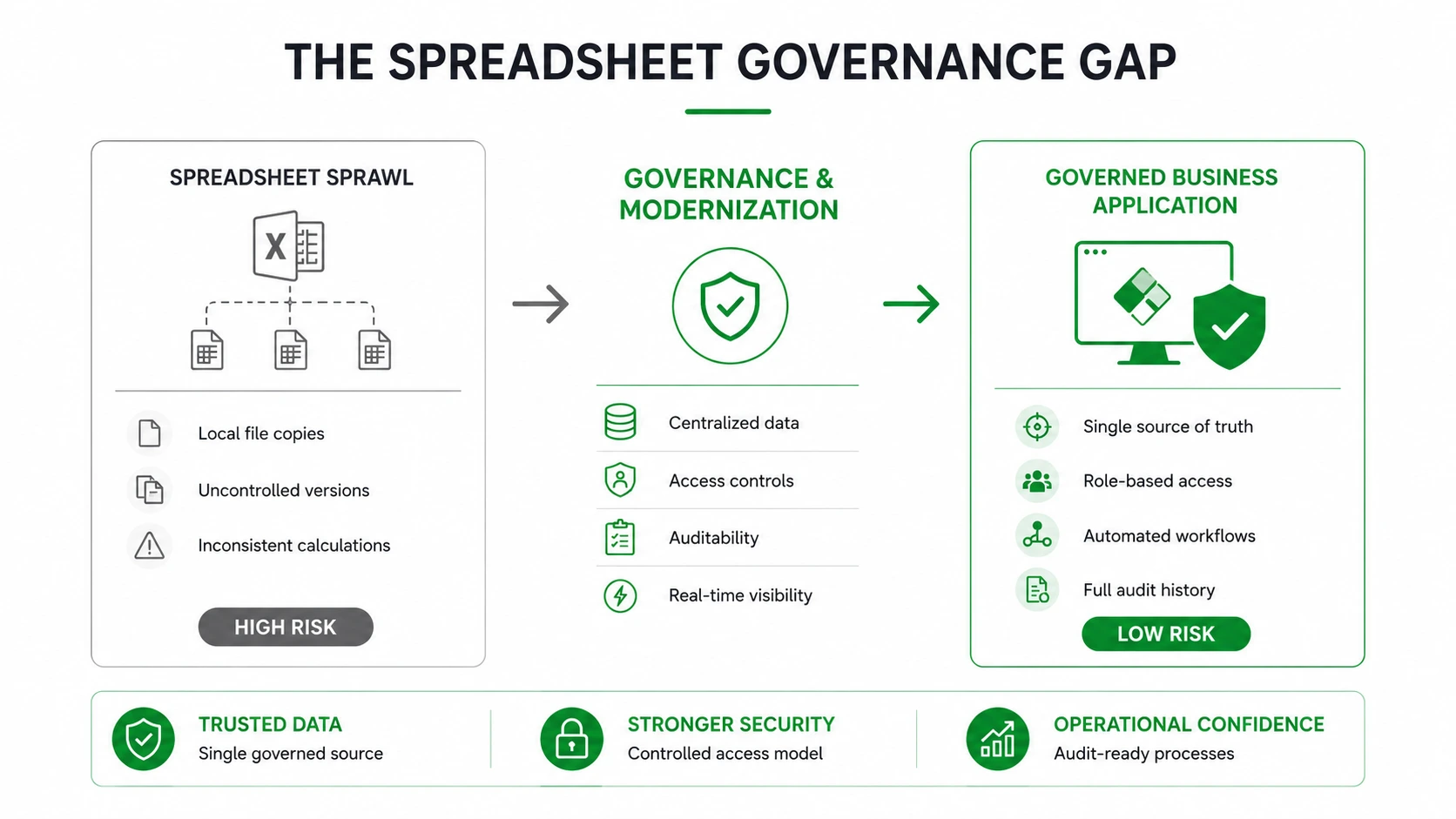
Relying on legacy Excel tools to manage enterprise workflows introduces three distinct operational bottlenecks that traditional software engineering avoids:
1. Zero Access Isolation
Excel does not possess a native method to enforce granular role-based security down to the individual row or field level. If a user is granted write access to a spreadsheet, they can typically alter any formula, override historical inputs, or corrupt calculation blocks. A single accidental cell manipulation can silently change financial outputs without generating an error flag.
2. Blind Data Silos
When multiple departments work out of local spreadsheet copies, version control collapses. Changes made by a regional office on a local drive do not sync with the master file, creating a fragmented landscape of conflicting records. Reconciling these sheets at the end of a quarter requires hundreds of hours of manual labor, leading to reporting delays and administrative fatigue.
3. Untraceable Logic Decay
VBA macros operate inside a closed environment. They do not automatically scale with cloud storage assets, they cannot easily process high-velocity API data streams, and they offer zero trace visibility. When a legacy macro fails during a background execution, finding the specific line of broken code requires specialized developer profiling, leaving your operations stalled in the meantime.
Choosing the Right Cloud Platform for Excel Modernization
Not all Excel solutions should be modernized in the same way. The optimal target architecture depends on how the spreadsheet is used, who relies on it, and what business processes it supports.
Modern enterprise architectures offer both Microsoft-centric and Vendor-Agnostic / Open Cloud alternatives to match your corporate infrastructure strategy:
|
Current Excel Usage |
Recommended Microsoft Solution |
Leading Non-Microsoft / Cloud Alternatives |
Primary Business Benefit |
|
Reporting and dashboards |
Centralized reporting and real-time analytics |
||
|
Data collection and manual entry |
Retool, AppSheet, Salesforce Flow |
Structured forms and improved data quality |
|
|
Shared trackers and simple records |
Google Workspace, Airtable Enterprise |
Version control and collaborative access |
|
|
Approval processes and notifications |
Zapier, Make, n8n, AWS Step Functions |
Workflow automation and auditability |
|
|
Multi-user operational applications |
Power Apps + Dataverse |
Retool + PostgreSQL / Snowflake |
Governance, security, and scalability |
|
Business-critical enterprise systems |
Azure-based custom solutions |
AWS Core Cloud Services (Lambda, RDS) |
Advanced functionality and long-term flexibility |
Reporting Workbooks → Power BI, Tableau, or Looker
Many organizations use Excel as a reporting platform, manually consolidating data from multiple sources into recurring dashboards and management reports. Cloud BI platforms automate data ingestion pipelines and deliver real-time dashboards through a governed environment, completely removing manual copy-paste risk.
Data Entry Spreadsheets → Power Apps or Low-Code Web Frameworks (Retool / AppSheet)
Spreadsheets frequently evolve into operational tools for collecting budgets, forecasts, project updates, inventory records, or service requests. Transitioning to modern internal application builders allows organizations to replace spreadsheet-based data entry with structured web forms, strict validation controls, and role-based access management while preserving the underlying business process.
Shared Departmental Files → SharePoint Online or Enterprise Cloud Workspaces
Many teams maintain shared Excel files simply because they need a central place to store and update information. For simple tracking scenarios, enterprise-grade cloud workspaces (like Google Workspace or Airtable Enterprise) provide centralized storage, document versioning, permission management, and audit history tracking.
VBA-Driven Workflows → Power Automate or Serverless Microservices (AWS Lambda / n8n)
When spreadsheets rely heavily on VBA macros to trigger emails, approvals, reminders, or recurring tasks, those processes can be rebuilt as cloud-based workflows using automation engines or standalone, serverless microservices. This approach improves visibility, reliability, and maintainability while reducing dependence on desktop-based automation.
Business-Critical Excel Systems → Cloud Data Warehouses & Core Relational Databases
Some spreadsheets become unofficial enterprise applications supporting finance, operations, procurement, or compliance processes. These solutions typically require stronger security controls, audit trails, relational data management, and integration capabilities than Excel can provide. Migrating the data tier to managed databases (PostgreSQL, MySQL) or cloud data platforms (Snowflake, BigQuery) offers a governed foundation for long-term modernization.
Highly Specialized Models → Custom Cloud Solutions (AWS / Azure / GCP)
Not every spreadsheet is a candidate for low-code modernization. Advanced financial models, planning engines, and highly customized operational systems may require dedicated cloud applications built on Amazon Web Services (AWS), Google Cloud Platform (GCP), or Microsoft Azure using custom development frameworks.
7 Signs Your Organization Has Outgrown Excel
Not every spreadsheet requires modernization. However, when Excel evolves from a personal productivity tool into a shared operational platform, the risks and maintenance costs increase dramatically.
Your organization has likely outgrown Excel if:
- More than 10–15 employees regularly edit the same workbook.
- Critical workflows depend on VBA macros maintained by a limited number of individuals.
- Multiple versions of the same spreadsheet exist across departments.
- Business users spend significant time manually consolidating reports.
- Sensitive financial, customer, or operational data is stored in local files.
- The workbook requires frequent integrations with ERP, CRM, or third-party systems.
- Reporting errors or formula-related issues have already affected business decisions.
Emerline Operational Advice: Moving Past the Lift-and-Shift Trap
When organizations decide to modernize their legacy Excel-based tools, development teams frequently make the mistake of performing a literal "lift-and-shift" migration of the existing code. They copy the exact VBA macro logic line-for-line into a basic cloud application web canvas.
This is an architectural anti-pattern. Enterprise spreadsheets often contain years of accumulated technical debt, redundant formulas, and inefficient workarounds built by employees who have long since left the company. Directly copying this unoptimized logic simply moves an expensive, messy process into the cloud without fixing the underlying structural issues.
To achieve long-term system stability, you must treat your modernization project as an opportunity to audit and clean your business logic. Before writing any cloud code, sit down with your operational leads to validate the calculation rules. Separate the critical data-processing steps from unneeded layout scripts, and rebuild that core logic using structured dimensional data models.
When Excel Remains the Right Choice
Despite its limitations, Excel remains an excellent tool for many business scenarios. Modernization should not be pursued simply because a spreadsheet exists.
Excel may remain the preferred option when:
- The workbook is maintained by a single user.
- Data volumes are relatively small.
- The spreadsheet is used primarily for ad-hoc analysis.
- Regulatory and audit requirements are minimal.
- No complex workflow automation is required.
The modernization threshold is typically reached when a spreadsheet becomes a shared business application supporting multiple users, approvals, integrations, and compliance requirements.
Step-by-Step Modernization Roadmap
Transitioning away from a critical spreadsheet tool requires a structured, multi-phase engineering approach to guarantee zero business downtime.
Phase 1: Logic Extraction and Data Modeling
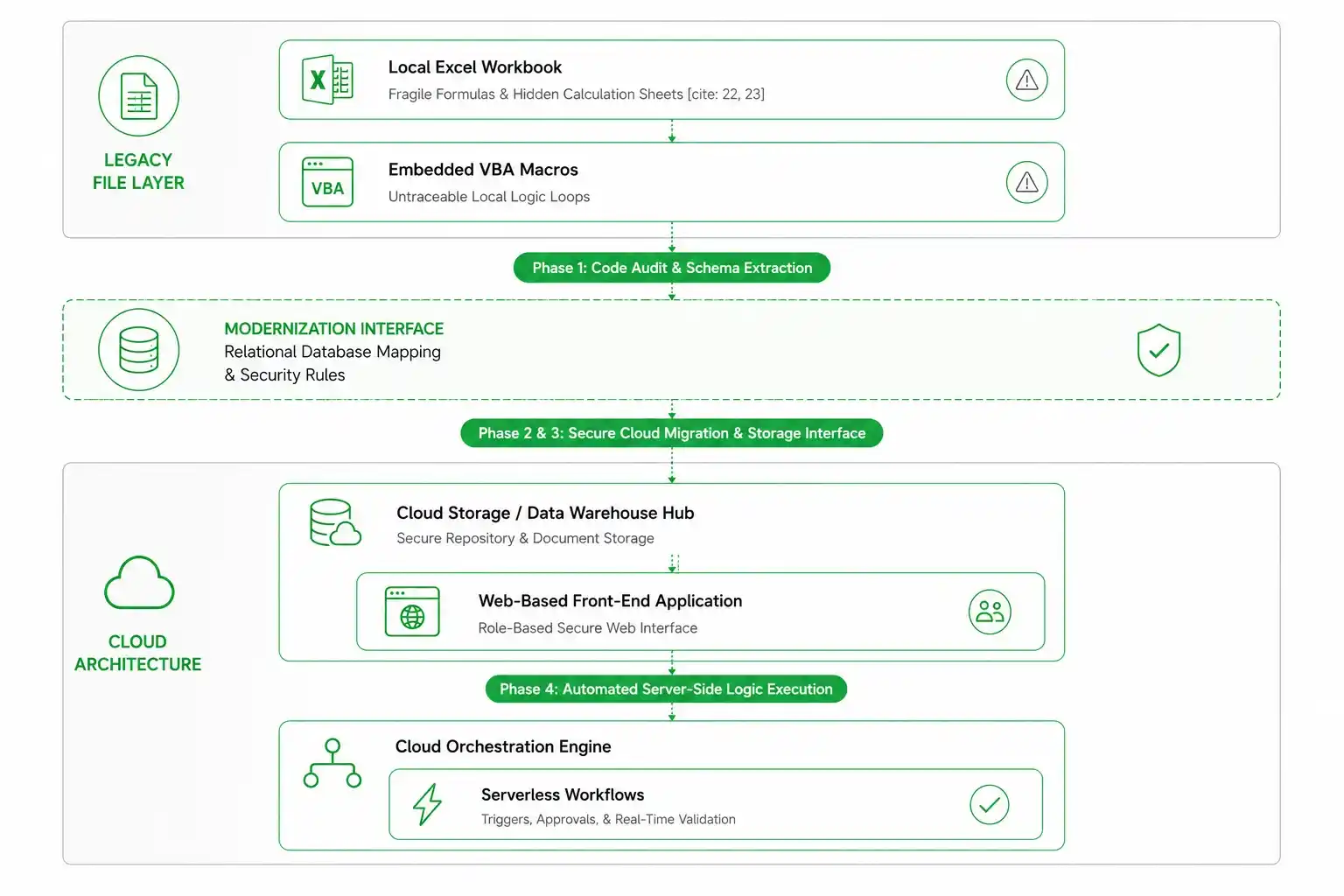
The first phase involves isolating the database layer from the presentation layer. Engineers map out the existing data structures inside the spreadsheet, identifying all unique inputs, calculated values, and static lookup tables. This flat schema is then normalized and mapped into a modern cloud database structure, such as a secure relational database (PostgreSQL, SQL Server) or a multi-cloud data warehouse.
Phase 2: Building Collaborative Storage Hubs
To provide a secure environment for data collaboration and user file tracking, the target architecture leverages custom enterprise document management and cloud storage solutions. Secure file repositories serve as the content layer, allowing teams to store associated project files and document assets while automatically inheriting corporate Single Sign-On (SSO) security permissions.
Phase 3: Developing the Secure Web Interface
Rather than forcing employees to interact with raw rows and columns, engineers build a clean, web-based front-end application (using low-code tools like Power Apps, Retool, or custom React code frameworks). This application references the secure cloud database and presents data through structured input forms. Users can view, edit, and submit entries based on their explicit corporate permissions, while the application prevents them from accidentally viewing or modifying the underlying calculation logic.
Phase 4: Automating Business Logic
The legacy VBA macros that used to handle alerts, emails, and data movements are replaced by server-side cloud workflows or serverless automation routines. When a user submits an entry through the web app, the automation engine catches the event, executes the business rules, triggers necessary manager approvals, and logs the entire transaction to an automated audit trail.
Emerline Strategic Advice: Preserving Workflow Tempos
When transitioning away from legacy tools, user adoption is often your biggest bottleneck. Employees develop strong muscle memory around their spreadsheets; they are used to specific keyboard shortcuts, copy-paste routines, and visual layouts. If you deploy a new cloud application that adds friction to their daily routine or forces them to click through dozens of unfamiliar menus to complete a simple task, compliance will drop, and teams will look for ways to spin up unauthorized local Excel sheets again.
To preserve your operational velocity, design your new front-end interface around the actual user journey. Incorporate high-throughput grid-editing interfaces that mimic the ease of data entry found in spreadsheets, while enforcing input validation behind the scenes.
By partnering with an experienced team that offers specialized enterprise excel modernization services, you can bridge the gap between user comfort and enterprise-grade security, deploying tools that are both highly secure and intuitive for your staff to adopt.
Excel Modernization Verification Checklist
Before decommissioning a legacy spreadsheet tool and routing live business workflows into your new cloud application, your infrastructure teams should validate the following parameters:
- Formula Integrity Audit: Have all calculated fields from the original spreadsheet been verified against the new cloud logic layers using identical historical test datasets?
- Access Permission Mapping: Have you verified that user permissions inside the web application and cloud workspaces perfectly align with your corporate directory to prevent internal data leaks?
- Input Validation Controls: Are all web-form fields configured with strict data-type constraints to prevent users from submitting incomplete or corrupted entries into the master database?
- Audit Trail Verification: Does the system generate a tamper-proof log for every modification, tracking exactly who made the change, when it occurred, and the precise before-and-after values?
- Offline Resiliency Capacity: Is your cloud app interface optimized to handle unexpected network drops gracefully, saving user drafts locally until connectivity to the cloud database is restored?
Comparison of Operational Estates
|
Operational Vector |
Legacy Excel & VBA Setup |
Modernized Multi-Cloud Environment |
|
Data Integrity |
High risk of accidental manual formula corruption |
Protected server-side calculation rules and schemas |
|
Version Management |
Fragmented local copies with manual alignment |
Single cloud-hosted source of truth updated in real time |
|
Audit Capabilities |
Untraceable edits and hidden macro execution blocks |
Automated, user-stamped transactional history logs |
|
Security Enforcements |
Basic, easily bypassed workbook passwords |
Enterprise Identity Provider (SSO) role-based access control |
Business Benefits of Excel Modernization
Organizations that successfully modernize spreadsheet-driven processes typically achieve benefits across four key areas:
- Improved Data Accuracy: Business logic is centralized and protected from accidental user modifications, reducing formula errors and inconsistent reporting.
- Increased Productivity: Employees spend less time reconciling spreadsheets, manually entering data, and maintaining duplicate files.
- Stronger Governance and Compliance: Role-based access controls, audit logs, approval workflows, and automated validation improve operational oversight and support regulatory requirements.
- Better Scalability: Cloud-based solutions can accommodate growing data volumes, additional users, and complex integrations without the performance limitations commonly associated with large Excel workbooks.
Frequently Asked Questions
How long does it typically take to migrate a complex financial spreadsheet to the cloud?
The timeline varies depending on the complexity of the underlying math and the volume of VBA macros involved. A straightforward tool with basic data entry and low automation can be moved into a modern cloud app setup in a few weeks. A massive, multi-department financial model containing thousands of interconnected formulas and legacy macros requires a structured approach, typically taking several months to thoroughly audit, map, test, and deploy safely without disrupting your business momentum.
Can we still export our data back out to Excel if we move our processes to a web application?
Yes. Moving your master workflow to a secure cloud platform does not eliminate your ability to use Excel for ad-hoc analysis. The target architecture allows authorized users to export clean, real-time data sets from the cloud database directly into Excel with a single click. The key difference is that the spreadsheet is used purely as a passive viewing tool; the actual master logic and data storage remain protected inside the cloud.
What happens if our cloud app needs to connect to other internal software systems?
Unlike legacy VBA macros, which struggle to communicate outside of local files, a modernized cloud platform is built for integration. By utilizing built-in connectors and custom web APIs, your new web apps and secure databases can sync data automatically with your primary ERP, CRM, or external supply chain databases, turning your old siloed spreadsheet into an active participant in your company's broader digital ecosystem.
Can low-code web applications completely replace Excel?
In many operational scenarios, yes. Low-code and custom web applications can completely replace spreadsheet-based workflows, forms, approvals, and data-entry systems while providing stronger security, governance, and scalability. Excel may still be used for ad-hoc analysis and ad-hoc reporting.
What happens to existing VBA macros during modernization?
VBA logic is analyzed, documented, and rebuilt using modern cloud automation workflows, Python scripts, serverless microservices, or custom APIs depending on its architectural complexity.
Can Excel modernization be performed incrementally?
Yes. Many organizations modernize one business process at a time rather than replacing every spreadsheet simultaneously. This phased approach reduces operational risk and improves user adoption.
How secure are cloud internal applications compared to Excel?
Modern cloud applications support enterprise-grade security through corporate Single Sign-On (SSO / IAM), role-based permissions, automated audit logging, conditional access policies, and centralized tenant governance controls.
What is the typical cost of Excel modernization?
Costs vary depending on workbook complexity, the total number of active users, integration requirements, and the volume of underlying VBA logic. Simple departmental trackers may require only a few weeks of agile engineering, while business-critical enterprise applications form part of larger modernization initiatives across AWS, Azure, or GCP footprints.
Expert Systems Modernization Support
Migrating business-critical operations away from fragile, error-prone spreadsheets into governed, automated cloud architectures requires deep data normalization modeling, system integration precision, and an intuitive approach to user interface design. As a certified global systems integrator, Emerline collaborates directly with corporate IT leadership to isolate operational risks, clean technical legacy infrastructure debt, and deploy performant cloud solutions built for modern enterprise scalability.
Contact our Systems Modernization and Cloud Engineers today to arrange a comprehensive evaluation of your legacy spreadsheet tools, optimize your cloud collaboration infrastructure, and establish a secure, automated source of operational truth.
Published on Apr 30, 2026