Connecting Power BI with Enterprise ERP Systems
Table of contents
- Designing the Hybrid Integration Architecture
- Data flow example for multi-ERP integration
- 1. Cloud-to-cloud native ingestion
- 2. Bridging the on-premise chasm via enterprise gateways
- Emerline integration advice: eliminating the DirectQuery latency trap
- Optimizing Heavy Queries for Enterprise Scale
- Emerline architectural advice: slashing resource waste with FinOps
- Verification Checklist for Multi-ERP Integrations
- Strategic Comparison of Connection Patterns
- Frequently Asked Questions
- Expert Systems and Data Integration Support
Building a unified analytical view becomes a significant challenge when corporate data is fragmented across multiple critical systems. In most enterprise environments, operational data is rarely centralized. Financial records might live inside SAP, customer management tracks through Microsoft Dynamics 365, and legacy supply chain metrics sit inside isolated on-premise relational databases.
When leadership demands real-time cross-functional dashboards - such as tracking order fulfillment costs against live customer service pipelines - data teams often resort to manual spreadsheet exports or fragile, custom-coded extraction scripts. This fragmented approach introduces immediate reporting delays, leads to conflicting versions of data, and creates security gaps across the organization.
Achieving true end-to-end business intelligence requires connecting Power BI directly to these diverse ERP platforms through a managed integration tier. This technical guide examines how to bridge cloud analytics with heterogeneous data sources, maps the architecture of on-premise data gateways, and breaks down query optimization strategies to prevent system slowdowns.
Key takeaways
- The single pane of glass: Consolidating disparate data streams from Dynamics, SAP, and legacy mainframes into unified Power BI semantic models.
- Secure hybrid connectivity: Utilizing enterprise-grade On-Premise Data Gateways to establish encrypted inbound communication tunnels without altering local firewalls.
- Query performance optimization: Offloading heavy computation tasks from the BI rendering layer down to the source ERP databases through aggressive query folding techniques.
- Governance and lineage control: Enforcing centralized compliance boundaries that respect data access permissions from the origin database all the way to the end-user visual.
Designing the Hybrid Integration Architecture
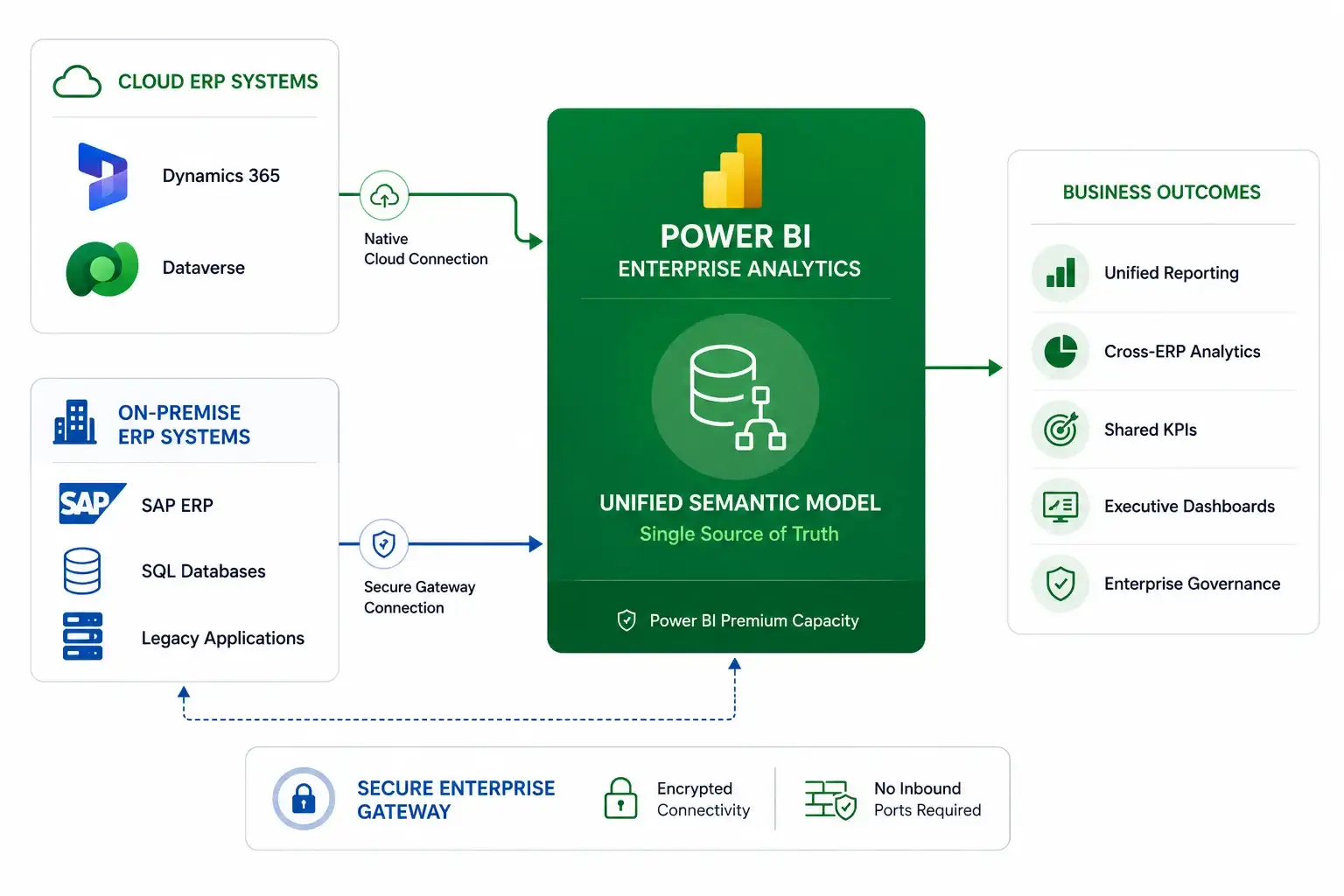
To build a sustainable multi-ERP integration, the system must handle data resting in the cloud (like Dynamics 365) alongside data locked deep within on-premise infrastructure (such as localized SAP installations or SQL servers).
Data flow example for multi-ERP integration
1. Cloud-to-cloud native ingestion
For modern SaaS platforms like Microsoft Dynamics 365, Power BI communicates natively through the Azure cloud backbone. By using the built-in Dataverse connector, the BI platform reads operational data without requiring custom API endpoints. It automatically inherits the underlying metadata schemas, significantly accelerating initial dashboard development.
2. Bridging the on-premise chasm via enterprise gateways
When extracting data from on-premise SAP clusters or legacy transactional databases, the architecture requires an On-Premise Data Gateway.
The gateway acts as a secure reverse-proxy bridge. It is installed inside the local network perimeter and establishes a secure, outbound connection to the Azure Service Bus relay. When a user interacts with a dashboard, Power BI sends an encrypted request to the cloud relay. The local gateway pulls the query down, executes it against the local database, encrypts the resulting dataset, and pushes it back up to Power BI.
Because the handshake originates from inside the bank or corporate data center, IT security teams do not have to open dangerous inbound firewall ports.
Emerline integration advice: eliminating the DirectQuery latency trap
When connecting Power BI to massive enterprise resource planning databases like SAP, development groups often rely too heavily on DirectQuery mode. The logic seems sound: instead of waiting for long data refreshes, the report queries the ERP database live every time a user modifies a dashboard filter.
In a real-world enterprise setting, this pattern often degrades performance. ERP databases are highly indexed and optimized for transactional speed (writing entries), not analytical processing (aggregating millions of rows). Sending dozens of simultaneous, complex SQL or MDX queries from a high-concurrency Power BI workspace can quickly exhaust the ERP's processing threads, slowing down the operational core of the company and causing dashboard timeouts.
To safeguard your primary business systems, build a composite data model architecture. Keep your massive, slow-changing historical records inside an optimized Power BI Import mode cache, or stream them through a modern cloud lakehouse. Reserve DirectQuery exclusively for the tiny fraction of operational metrics that require absolute, minute-by-minute accuracy.
To review how to structure your core operational data layers and clear away technical infrastructure debt before deploying advanced cloud-native reporting, explore our strategic guide on the fundamentals of the Microsoft enterprise ecosystem.
Optimizing Heavy Queries for Enterprise Scale
A successful integration must be engineered to prevent massive data payloads from clogging your network. When pulling data from an ERP, the most critical performance mechanism to enforce is Query Folding.
Query folding is the ability of Power BI’s Power Query engine to translate your data preparation steps - such as filtering rows, grouping columns, or joining tables - into a single, native database query (like a clean SQL statement) and push that execution down to the source server.
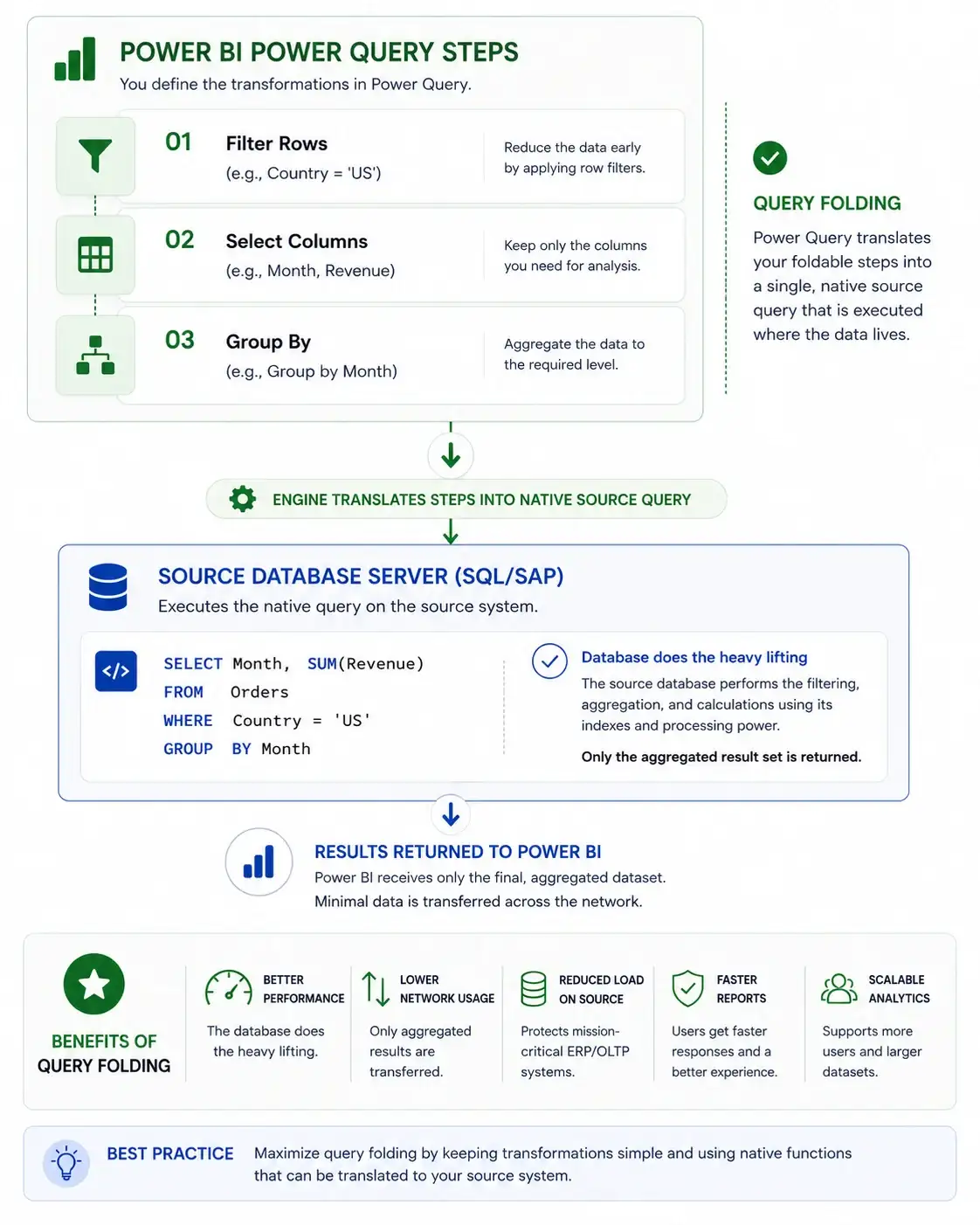
When query folding occurs smoothly, the source database handles the heavy computational lifting and returns only the highly compressed, finished results back across the network to Power BI.
If you introduce a transformation step that breaks query folding - such as writing a highly complex custom column using non-standard M-code formulas - Power Query is forced to pull the entire un-filtered, raw database table across the data gateway into the cloud memory to process the step locally. For tables containing tens of millions of rows, this breaks your integration, exhausts gateway resources, and drives up cloud infrastructure compute bills.
Emerline architectural advice: slashing resource waste with FinOps
High-volume data pipelines that span across hybrid environments can quickly generate unexpected infrastructure expenses if left unmonitored. Every unoptimized data refresh cycle that pulls millions of rows through an enterprise gateway consumes substantial processing power on your cloud nodes and drives up data egress fees.
To keep your operations sustainable, don't wait for your monthly cloud bill to reveal architecture inefficiencies. Implement a strict data governance framework early in your deployment cycle by leveraging professional power bi integration services.
By structuring incremental refresh policies - where Power BI only scans and imports rows that have actively changed within the last hour rather than re-reading the entire historical table - you minimize data transit overhead, lower compute usage, and drop your overall background resource consumption by up to 90%.
To deeply understand how continuous code-level refactoring, incremental data lifecycles, and performance profiling prevent systemic waste across your digital assets, explore our comprehensive guide to the operational benefits of managed cloud computing.
Verification Checklist for Multi-ERP Integrations
Before opening an enterprise analytics platform to corporate end-users, infrastructure and security engineering teams should validate the following parameters:
- Gateway cluster redundancy: Is your On-Premise Data Gateway deployed in a high-availability cluster across multiple physical servers to guarantee load balancing and automatic failover?
- Query folding validation: Have your database engineers utilized the Power Query Diagnostics tool to verify that all heavy extraction pipelines are folding queries successfully to the source ERP?
- Service account isolation: Are the gateway connections configured using isolated, dedicated database service accounts that restrict Power BI to read-only access on approved tables?
- Scheduled refresh staggering: Are your semantic model refresh intervals explicitly staggered throughout off-peak corporate hours to prevent simultaneous capacity spikes on your production ERP databases?
- Credential management security: Are all source system connection credentials stored securely inside Azure Key Vault or encrypted locally by the gateway machine, ensuring no clear-text passwords ever sit in the cloud tenant?
Strategic Comparison of Connection Patterns
| Integration Vector | Cloud Native (Dynamics 365) | On-Premise Hybrid (SAP / Local SQL) |
| Network Security | Cloud-to-cloud secure Azure backbone | Outbound-initiated On-Premise Data Gateway |
| Connector Type | Native Dataverse web API endpoint | Specialized enterprise drivers (e.g., SAP .NET Connector) |
| Query Mechanism | Direct CDM schema mapping | Query folded native SQL / MDX statements |
| Credential Management | OAuth 2.0 / Entra ID user identity | Gateway-encrypted database service accounts |
Frequently Asked Questions
Can we connect Power BI to SAP ERP without purchasing expensive third-party database drivers?
Yes. Microsoft provides powerful, built-in connectors designed specifically for SAP environments, including the SAP HANA database connector and the SAP Business Warehouse (BW) Application Server connector. To connect to SAP HANA, the SAP HANA ODBC driver must be installed on the machine where the connection is configured. For SAP BW connections through an on-premises data gateway, you also need to download and install the standard, free SAP .NET Connector library provided directly by SAP. Installing these official components enables secure Power BI integration with SAP systems without requiring additional third-party software licensing.
What happens to our dashboards if an on-premise database goes offline during a scheduled refresh?
If an on-premise data source goes offline or encounters a local network drop during its scheduled data refresh window, the specific refresh cycle will fail, and Power BI will send an automated alert notification to system administrators. Crucially, your active end-user dashboards and reports remain completely online and accessible; they simply continue to display the data state captured during the last successful refresh cycle, protecting your front-facing business analytics from local server downtime.
How do we map our local database user permissions directly into Power BI reports?
You can map user permissions by aligning your local data authorization models with Power BI’s Row-Level Security (RLS) engine through your corporate identity provider. By synchronizing your on-premise Active Directory with Microsoft Entra ID, Power BI can read the active user's email address or security groups via built-in functions. The semantic model then dynamically filters the visual results, ensuring that internal department boundaries are maintained perfectly without needing to build separate report files for different user access levels.
Expert Systems and Data Integration Support
Consolidating fractured enterprise resource planning data into a single, high-performance business intelligence layer requires specialized hybrid architecture expertise, database optimization mastery, and a thorough understanding of enterprise security frameworks. As a certified Microsoft solutions partner, Emerline works alongside corporate IT departments to modernize legacy reporting silos, refactor complex data pipelines, and deploy stable, secure analytical infrastructures tailored to demanding global business environments.
Contact our enterprise systems and data engineers today to arrange a comprehensive evaluation of your ERP integration strategy, optimize your hybrid data gateway architecture, and establish a reliable source of operational truth.
Disclaimer
The technical architectures, pipeline blueprints, and data transformation strategies presented in this article are intended solely for general informational and educational purposes. Connecting enterprise-grade ERP systems (including but not limited to SAP S/4HANA, Microsoft Dynamics 365, and Oracle) with analytical tools like Power BI and Microsoft Fabric involves intricate database dependencies, specific API rate limits, and complex licensing frameworks that are subject to modification by their respective vendors.
While we make every effort to outline high-availability integration patterns, Emerline makes no representations or warranties of any kind, express or implied, about the completeness, database performance stability, or operational suitability of these guidelines for any specific network environment. Any direct queries, data modeling extraction scripts, or middleware configurations executed based on this material are performed strictly at your own risk.
In no event will Emerline be liable for any database performance degradation, production table write locks, transaction log drops, or accounting reconciliation discrepancies arising out of, or in connection with, the use of this guide. We strongly recommend conducting rigorous capacity planning, query profiling, and full regression testing within isolated staging sandboxes before executing any analytical extraction routines against active production ERP databases.
Published on Jun 10, 2026