Migrating from Tableau to Power BI and Microsoft Fabric
Table of contents
- Key takeaways
- How to Plan the Migration Strategy
- Target migration data architecture
- Emerline architectural advice: overcoming the lift-and-shift performance penalty
- Setting Up Security and User Access
- Mapping row-level security to Entra ID
- Sharing access rules with Fabric
- Emerline integration advice: accelerating adoption with Fabric consulting services
- Technical Checklist for IT Teams
- Comparing Tableau with the New Microsoft Stack
- Frequently Asked Questions
- Expert Analytics and Integration Support
The enterprise business intelligence landscape is undergoing a massive consolidation. For years, major organizations maintained fragmented data estates - running parts of their visual analytics on Tableau, orchestrating corporate reporting via legacy data warehouses, and leaving data engineering teams to manage disparate data lakes.
However, recent shifts in software licensing models, the heavy financial burden of redundant infrastructure, and the operational demand for unified data governance have changed the equation. Enterprise IT leaders are actively pivoting toward an integrated data ecosystem.
The migration from standalone visualization tools like Tableau to an integrated stack powered by Power BI and Microsoft Fabric is no longer just a frontend redesign. It is a fundamental transformation of your entire data infrastructure.
This technical guide bypasses the basic interface comparisons and outlines a strategic, end-to-end migration roadmap. We examine how to safely transition analytical logic, preserve complex security boundaries, and harness unified data lakes without introducing system bottlenecks or unexpected cloud costs.
Key takeaways
- The paradigm shift: Moving away from isolated data extracts toward a single semantic model layer that serves both real-time business intelligence and predictive AI workloads.
- Architectural consolidation: Eliminating data duplication by utilizing Microsoft Fabric OneLake as a single, unified repository, effectively ending the need for expensive data egress and siloed storage.
- Logic optimization: Preventing memory exhaustion and capacity overruns by refactoring Tableau’s calculation logic into native, high-performance Data Analysis Expressions (DAX).
- Deterministic access governance: Preserving strict internal compliance frameworks by mapping legacy data entitlement models directly to Power BI Row-Level Security (RLS) and Fabric security groups.
How to Plan the Migration Strategy
A successful enterprise migration must avoid the trap of simply rebuilding dashboards piece by piece. The goal is to restructure the underlying data pipelines to exploit the performance benefits of a modern unified SaaS data platform.
Target migration data architecture
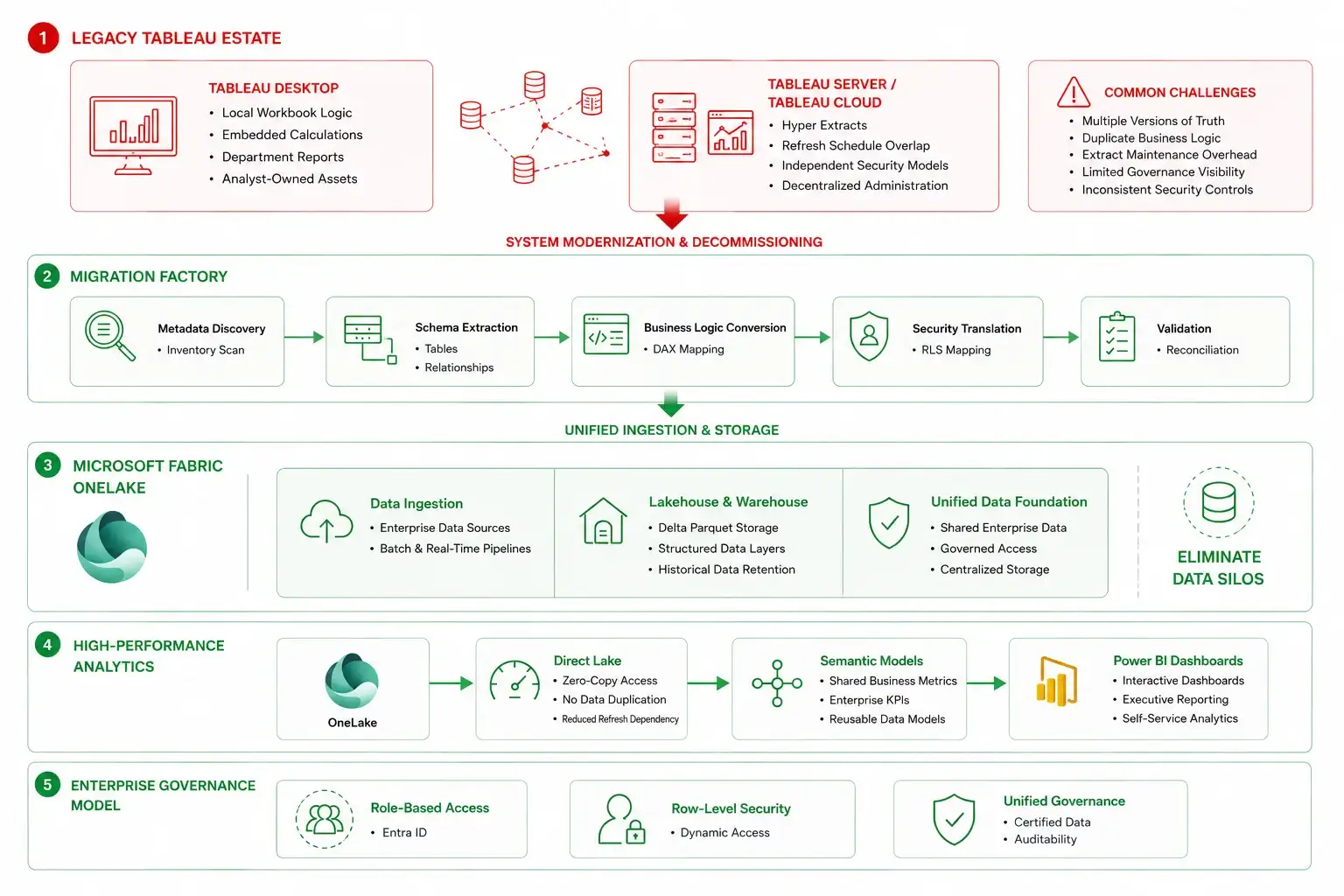
Phase 1: Auditing existing reports
Before writing a single line of code, infrastructure teams must catalog the existing Tableau footprint. This means auditing workbook usage metrics to separate active business-critical assets from abandoned legacy reports.
During this phase, engineers map out underlying data sources, identifying where Tableau workbooks rely on custom SQL overrides or local .hyper extract files that hide unmanaged business logic.
Phase 2: Moving data into OneLake
Instead of replicating Tableau's model of creating isolated data extracts for individual reports, the target architecture leverages Microsoft Fabric OneLake. Data from disparate enterprise platforms is ingested into a Fabric Lakehouse using open-standard Delta Parquet formatting.
Because OneLake operates as a single logical data lake for the entire organization, it completely eliminates data duplication. The same underlying table can feed finance dashboards, supply chain logs, and corporate data science models simultaneously.
Phase 3: Connecting via DirectLake
The core performance engine of the new estate relies on Power BI Premium connecting to Fabric via DirectLake mode. Traditional BI setups force architects to choose between Import mode (which is fast but requires slow, memory-intensive data refreshes) and DirectQuery mode (live queries that do not copy data but heavily strain the source database).
DirectLake mode changes this dynamic. It allows Power BI to read Delta Parquet files directly from OneLake storage at memory speeds, completely bypassing the need to import or refresh data inside the BI model itself.
Emerline architectural advice: overcoming the lift-and-shift performance penalty
When migrating analytical infrastructure, development teams frequently make the mistake of performing a literal "lift-and-shift" migration of calculation logic. In Tableau, complex analytics are often built using Level of Detail (LOD) expressions or deeply nested table calculations that assume a specific client-side rendering behavior.
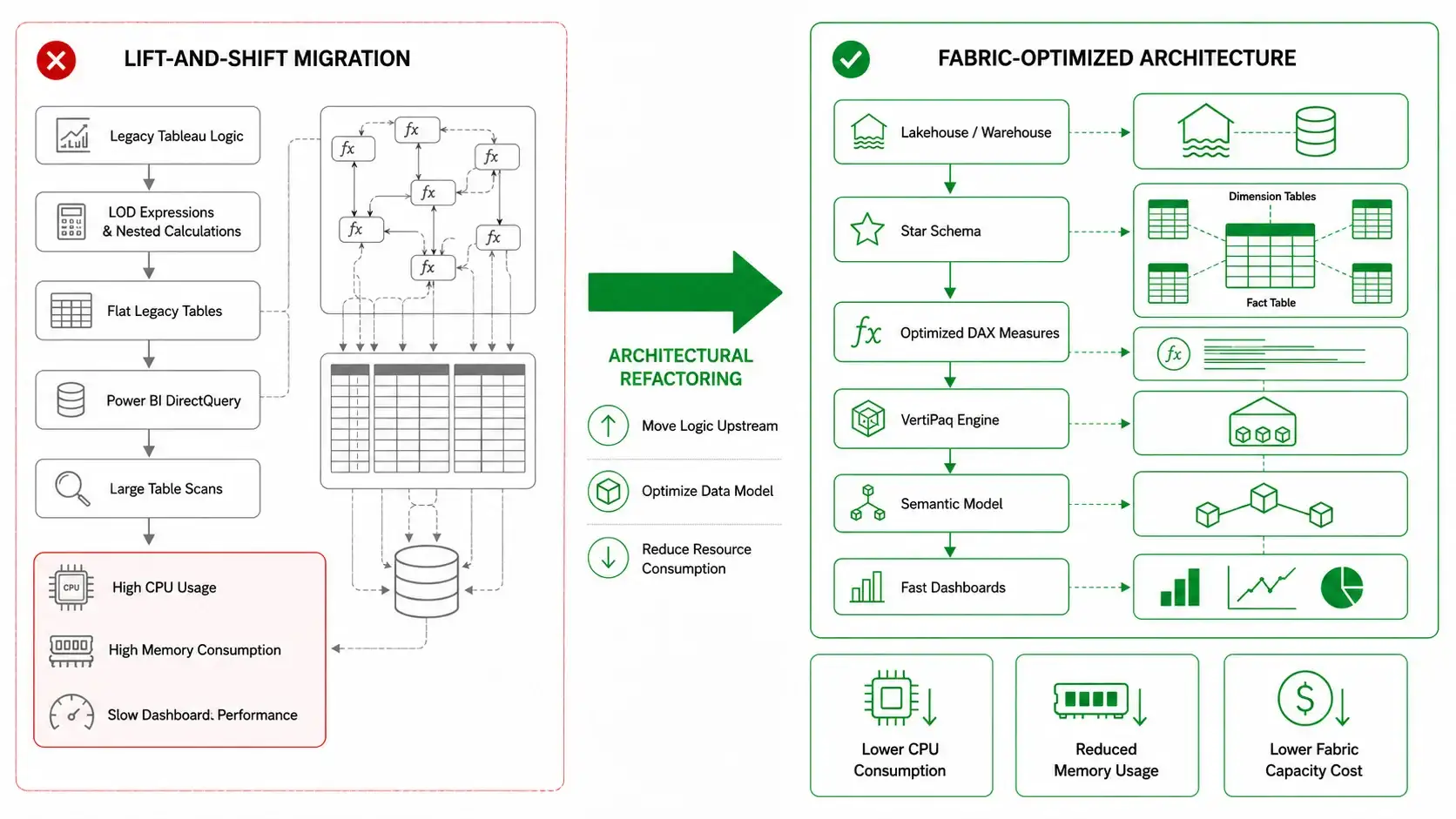
Attempting to translate these calculations line-for-line into Power BI without structural adjustments is an operational anti-pattern. Power BI's underlying analytical engine, VertiPaq, is an in-memory columnar database optimized for star-schema relationships. It evaluates data using filter context and row context through Data Analysis Expressions (DAX).
If you force a DirectQuery or heavy DAX expression to scan flat, un-modeled tables with tens of millions of rows, you will trigger massive CPU spikes on your Fabric capacity and rapidly exhaust available server RAM.
To ensure long-term platform stability and maintain sub-second dashboard response times, you must refactor your data structures early. Move heavy computational logic away from the report canvas and push it upstream into the data warehouse or Lakehouse layer. Transform flat legacy tables into clean dimensional models (Star Schema), utilizing explicit DAX measures optimized for column-store indexing.
Resolving this structural data debt prevents systemic resource waste, lowers your monthly capacity costs, and ensures a smooth end-user adoption experience. To understand how continuous code-level refactoring and performance profiling impact your infrastructure costs at scale, see our comprehensive guide to the operational benefits of managed cloud computing.
Setting Up Security and User Access
Maintaining strict corporate data entitlement is a non-negotiable requirement during an analytics migration. If a regional sales manager is restricted from viewing global performance metrics in Tableau, that perimeter must hold perfectly inside the new Power BI workspace.
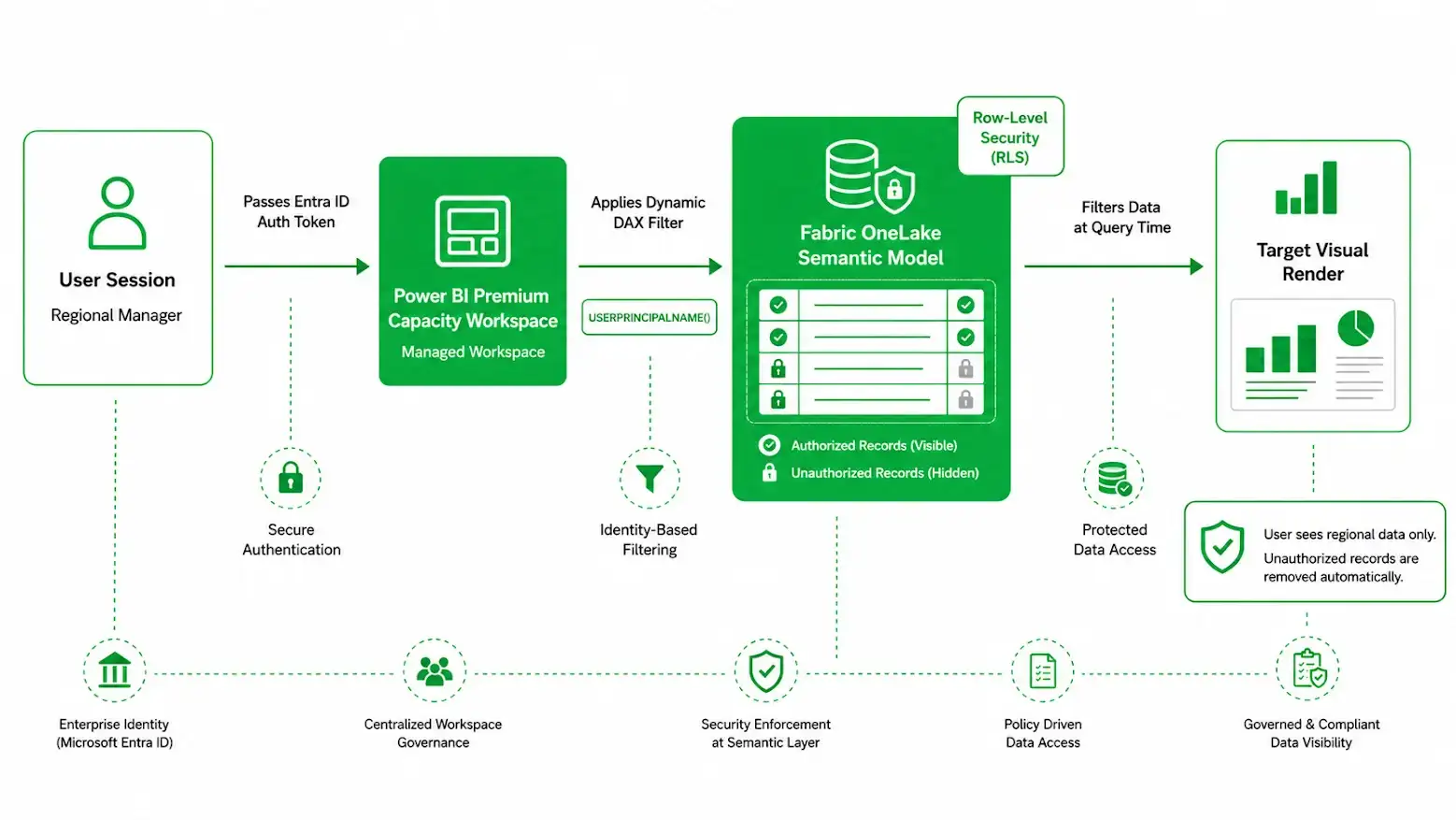
Mapping row-level security to Entra ID
Rather than building separate, hardcoded dashboards for different teams, a compliant infrastructure utilizes Dynamic Row-Level Security (RLS) within Power BI.
During the model migration, engineers implement DAX filtering expressions - such as leveraging the USERPRINCIPALNAME() function - within the semantic layer. When a user opens a dashboard, Power BI references your synchronized corporate directory (Microsoft Entra ID) and dynamically filters the underlying rows based on the user's explicit organizational data entitlements.
Sharing access rules with Fabric
With the introduction of Microsoft Fabric, security controls extend beyond the visual report layer. By configuring security directly within the Fabric Lakehouse or Data Warehouse, data access policies are inherited downstream.
This means that if a data scientist accesses the raw data lake via a Python notebook or an external SQL endpoint, the exact same row-level restrictions and column-level masking rules apply automatically, ensuring absolute data governance across all analytical tools.
Emerline integration advice: accelerating adoption with Fabric consulting services
Transitioning to a unified modern data platform like Microsoft Fabric involves significant architectural dependencies. Because Fabric unifies data engineering, data warehousing, and business intelligence into a single SaaS interface, organizations often hit an internal adoption wall due to fragmented development pipelines. Data teams struggle to balance access management, compute capacity allocations, and version control across multiple workspaces.
To avoid operational friction during large-scale migrations, organizations should engage certified Microsoft Fabric consulting services early in the planning cycle. Establishing clear governance boundaries - such as defining explicit capacities for development versus production workloads and configuring automated CI/CD deployment pipelines - ensures that your engineering teams can deploy new data assets without interrupting active corporate reporting.
To review how your core operational infrastructure and database structures should be aligned for modern cloud platforms, read our strategic guide on the fundamentals of the Microsoft enterprise ecosystem.
Technical Checklist for IT Teams
Before decommissioning legacy analytics infrastructure and deploying a modernized Power BI and Fabric estate, enterprise data leads should validate the following technical parameters:
- Semantic model normalization: Have all flat-file legacy datasets been refactored into star-schema dimensional models to maximize VertiPaq engine compression?
- DirectLake connectivity review: Are your primary enterprise datasets configured for DirectLake mode to eliminate data refresh overhead and drop query latency?
- Security entitlement audit: Has an end-to-end audit verified that dynamic DAX RLS rules match the row-level data restrictions previously used in Tableau?
- Capacity planning and throttling: Is your Microsoft Fabric capacity configured with automated alerting to notify admins if background data processing causes compute utilization to spike near maximum limits?
- Data lineage mapping: Are unified data lineage logs established within the Fabric portal, allowing security teams to track data paths from raw ingestion down to downstream report components?
Comparing Tableau with the New Microsoft Stack
| Architectural Parameter | Legacy Tableau Setup | Modern Fabric + Power BI Stack |
| Data Ingestion Model | Proprietary extract processing (.hyper silos) | Open-standard Delta Parquet unified in OneLake |
| Storage Strategy | Duplicated data caches across workbooks | Zero-copy storage architecture (DirectLake mode) |
| Calculation Paradigm | Client-side visual calculations (LOD expressions) | Server-side optimized semantic models (DAX measures) |
| Identity & Security | Independent local groups or basic SAML sync | Native Microsoft Entra ID with end-to-end RLS inheritance |
Frequently Asked Questions
Can we reuse our existing Tableau server infrastructure when migrating to Power BI?
No. Power BI and Microsoft Fabric run on a completely different, modern SaaS architecture managed natively within the Microsoft cloud ecosystem. While your on-premise data sources can remain in place using secure Microsoft On-Premise Data Gateways, the reporting, semantic modeling, and compute orchestration move into a centralized cloud workspace capacity, allowing you to decommission legacy on-premise visualization servers and lower your physical infrastructure maintenance costs.
How do we handle complex Tableau dashboard actions and custom parameters in Power BI?
Tableau actions and parameter sweeps are migrated using Power BI's native Bookmarking, Field Parameters, and Conditional Formatting engines. Field parameters allow users to dynamically change the dimensions or measures displayed within a visual without needing to build multiple standalone charts. This refactoring reduces dashboard complexity, keeps the visual layout clean, and optimizes report memory consumption.
What is the single biggest risk during a Tableau to Power BI migration?
The largest risk is user resistance due to broken reporting habits. Tableau and Power BI handle interactivity differently. Trying to make Power BI perfectly mimic Tableau's visual quirks usually results in messy, unoptimized reports. The most effective approach is a clear user-adoption plan that focuses on data availability, sub-second performance, and native Power BI functionality, rather than trying to replicate legacy UI layouts.
Expert Analytics and Integration Support
Migrating an entire enterprise data estate from isolated standalone visualization environments to a unified Microsoft Fabric and Power BI ecosystem requires deep expertise in data warehousing, high-performance DAX engineering, and end-to-end cloud infrastructure security. As a certified Microsoft Solutions Partner, Emerline works alongside enterprise IT departments to modernize legacy data architectures, refactor complex analytical logic, and deploy resilient, high-throughput analytical platforms designed for demanding compliance and operational workloads.
Contact our enterprise data and analytics engineers today to arrange a comprehensive evaluation of your analytics infrastructure, map your system migration milestones, and establish a high-performance modern data estate.
Disclaimer
The information provided in this article is for general informational and educational purposes only. Enterprise data architectures, licensing frameworks, and software functionalities (including features related to Tableau, Power BI, and Microsoft Fabric) are subject to continuous updates and changes by their respective vendors.
While we strive to ensure the accuracy and reliability of the technical strategies and architectural blueprints presented herein, Emerline makes no representations or warranties of any kind, express or implied, about the completeness, accuracy, reliability, or suitability of this information for any specific corporate network, system migration, or business environment.
Any reliance you place on such material is strictly at your own risk. In no event will Emerline be liable for any operational downtime, data loss, performance degradation, or financial metrics impacts arising out of, or in connection with, the implementation of the migration patterns described in this guide. We strongly recommend conducting a comprehensive system audit and sandbox testing before executing any production architecture changes.
Published on Jun 8, 2026