Retail Automation: Processes, Technologies, and Real-World Use Cases
Table of contents
- What Is Retail Automation?
- Retail automation vs. AI in retail
- Which Retail Processes Can Be Automated?
- Inventory management and demand forecasting
- Store operations automation
- Checkout and POS automation
- Computer vision and in-store automation
- Merchandising, assortment, and pricing automation
- Customer experience, personalization, and returns automation
- Retail supply chain and fulfillment automation
- AI agents and autonomous retail workflows
- Back-office automation
- Measuring the Business Impact of Retail Automation
- Challenges of Retail Automation
- How To Plan a Retail Automation Initiative
- Choose the right process first
- Fit automation into the existing retail stack
- What affects the cost of retail automation?
- Build, buy, or extend existing software?
- The Next Phase of Retail Automation
- Wrapping Up
- Retail Automation FAQ
- What is retail automation?
- What are some common examples of retail automation?
- How is AI used in retail automation?
- What is retail automation software?
- How should retailers decide what to automate first?
Barcode scanning, point-of-sale systems, warehouse conveyors, and rule-based replenishment have supported retail operations for decades. Today, automation extends further into planning, decision-making, and the physical store environment, where many processes once relied on manual observation or analysis.
Machine learning now supports demand forecasting and optimization, computer vision adds visibility into physical stores, and generative AI is being used for associate support. Agentic systems are beginning to take on selected actions in connected applications.
Retailers are also putting more budget behind these technologies. In a 2025 National Retail Federation survey of 56 AI leaders at U.S.-based retailers, 39% expected AI to account for more than 10% of their technology budgets within three years.
This guide looks at retail automation across inventory, stores, merchandising, fulfillment, customer operations, and the back office, with particular attention to where AI is adding practical value and where more autonomous workflows are beginning to emerge. For a wider view of the underlying technology landscape, see Emerline’s retail software development expertise.
In short:
- Retail automation covers both digital and physical operations, from forecasting and inventory workflows to checkout, fulfillment, and customer service.
- The right technology depends on the process: predictable workflows often need conventional automation, while AI is better suited to prediction, interpretation, and context-dependent decisions.
- Automation maturity varies widely. Checkout, back-office workflows, and warehouse automation are established; AI agents and more autonomous decision-making are still emerging.
- Successful automation depends on reliable operational data and integration with systems such as POS, ERP, OMS, WMS, PIM, and CRM platforms.
Planning an automation initiative? Emerline can help assess suitable use cases, shape the architecture, implement AI or workflow automation, and support the solution after launch.
What Is Retail Automation?
Retail automation is the use of software, connected devices, and digital workflows to perform or coordinate retail processes with less manual intervention.
Some applications are straightforward. A replenishment rule can create an order when inventory falls below a defined threshold; an order management system can route an online purchase according to stock availability, location, or delivery rules. These processes do not require AI to be effective.
Other tasks depend on information that changes constantly or is difficult to reduce to fixed conditions. Forecasting demand, interpreting shelf images, answering an employee’s operational question, or choosing the next action in a multi-step workflow may draw on AI and machine learning, computer vision, optimization, or several technologies working together.
Retailers therefore use different forms of automation for different kinds of work:
|
Approach |
Best suited for |
Retail examples |
|
Rule-based automation |
Repeatable processes with known conditions and actions |
Approval workflows, order routing, data synchronization |
|
Predictive AI and machine learning |
Forecasting and optimization using historical and current data |
Demand forecasting, inventory planning, pricing |
|
Generative AI |
Working with language and other unstructured information |
Associate assistants, customer support, merchant analysis |
|
AI agents |
Multi-step workflows that involve decisions and actions across connected systems |
Replenishment actions, purchasing, customer service resolution |
|
Computer vision |
Processes that depend on visual information |
Shelf monitoring, loss prevention, automated inspection |
|
Robotics and connected devices |
Physical movement, sensing, or repeated observation |
Warehouse picking, shelf scanning, material handling |
Retail automation vs. AI in retail
For stable processes with well-defined inputs and outcomes, conventional workflow automation is often the better engineering choice. AI becomes useful when the task involves prediction, visual or language interpretation, optimization, or decisions that cannot be expressed comfortably as a fixed set of rules.
In production systems, the two frequently work together. A forecasting model may estimate demand, while business rules determine when that forecast should trigger replenishment. A generative AI assistant may interpret an employee’s question but retrieve the answer from approved company documentation rather than generate it from memory.
Which Retail Processes Can Be Automated?
Retail automation reaches across stores, digital channels, distribution networks, merchandising, customer operations, and the back office. The maturity of these applications varies considerably, from established checkout and fulfillment systems to agentic workflows that are only beginning to scale.
The table below maps the main areas covered in this section to the technologies commonly used in them.
|
Retail area |
Process being automated |
Common technologies |
Typical maturity |
|
Inventory and demand |
Forecasting, replenishment, allocation, stock transfers |
Machine learning, optimization, workflow automation, AI agents |
Scaling |
|
Store operations |
Task management, scheduling, associate support |
Workflow software, generative AI, mobile tools |
Scaling |
|
In-store visibility |
Shelf monitoring, price verification, loss prevention |
Computer vision, sensors, robotics |
Scaling |
|
Merchandising |
Assortment, pricing, markdowns, performance analysis |
Machine learning, optimization, generative AI |
Scaling |
|
Supply chain and fulfillment |
Warehousing, order orchestration, routing, delivery |
Robotics, optimization, AI |
Established |
|
Agentic workflows |
Shopping, purchasing, support resolution, operational actions |
Large language models (LLMs), AI agents, APIs |
Emerging |
|
Back office |
Reconciliation, invoices, reporting, document processing |
Robotic process automation (RPA), workflow engines, document AI |
Established |
|
Checkout and POS |
Transaction processing, self-checkout, product recognition, payments |
POS software, computer vision, sensors, payment integrations |
Established |
|
Customer experience |
Personalization, loyalty, support, returns, post-purchase workflows |
Machine learning, generative AI, CRM/CDP automation, AI agents |
Scaling |
Inventory management and demand forecasting
Inventory automation now extends from forecasting into replenishment, allocation, and stock transfers. Historical sales still provide an important foundation, but forecasting models can also incorporate seasonality, promotions, local demand patterns, and other signals before passing their output into planning or execution workflows.
That connection between prediction and operations is already visible at scale. Walmart’s Self-Healing Inventory detects inventory imbalances and redirects excess stock to stores where it is needed. Walmart says the system has saved the company more than $55 million.
Planners still handle cases where historical patterns offer limited guidance, including supplier constraints, new products, and unusual shifts in demand. Much of the recurring analysis, however, can happen earlier and feed operational decisions directly. Forecasting and optimization built around proprietary retail data often draw on the same methods used in data science, especially when standard planning models cannot capture the retailer’s assortment, geography, or operating rules.
Store operations automation
Store operations involve far more than checkout. Managers coordinate tasks and schedules, employees look up procedures and product locations, equipment needs attention, and unexpected events have to reach the right person quickly. When those activities sit across separate applications, messaging tools, printed documentation, and manual routines, even simple work can take longer than it should.
Automation can connect those activities more closely to what is happening in the store. An inventory event might generate a task automatically; scheduling software can account for expected workload; mobile applications can direct associates to a product or surface the relevant procedure while they are working.
Generative AI is finding a practical role in the same environment because much of the necessary operational knowledge already exists but can be difficult to retrieve quickly. Target’s Store Companion, for example, was developed to answer questions about store processes, coach employees, and support day-to-day operations. After a pilot covering roughly 400 stores, Target announced a rollout to team members across nearly 2,000 locations.
The trend extends beyond Target. In McKinsey’s April 2026 survey of 43 North American grocers, 82% expected store associates to use more digital tools in their daily work over the following two to three years; 61% anticipated greater use of data-driven decision tools such as dashboards and AI.
For associate-facing AI, useful answers increasingly depend on operational context. An employee’s location, current task, available inventory, or the equipment involved can all change what information is relevant.
Checkout and POS automation
Checkout is one of retail’s most established automation environments, but it no longer follows a single model. Conventional staffed lanes now coexist with self-service checkout, mobile POS, scan-and-go applications, automated product recognition, and integrated payment flows.
Target’s recent changes show how fluid that mix can be. In 2024, the retailer introduced Express Self-Checkout, limiting those lanes to 10 items or fewer at most of its nearly 2,000 U.S. stores while expanding access to staffed checkout. A year later, Target reported that overall transaction times had improved by nearly 8%, while a larger share of customers were choosing traditional lanes.
Regulation is beginning to shape the operating model as well. Rhode Island enacted legislation in 2026 requiring grocery stores with self-service checkout to maintain at least one manual checkout station for every three operating self-service stations. The requirement takes effect on January 1, 2027, and similar staffing rules have appeared at the city level in Long Beach, Costa Mesa, and Santa Ana.
For POS software development, this means supporting several transaction modes within the same store environment while accounting for payments, returns, promotions, loyalty, customer assistance, and loss prevention. Store format and customer behavior will continue to influence how much of the checkout journey retailers choose to automate.
Computer vision and in-store automation
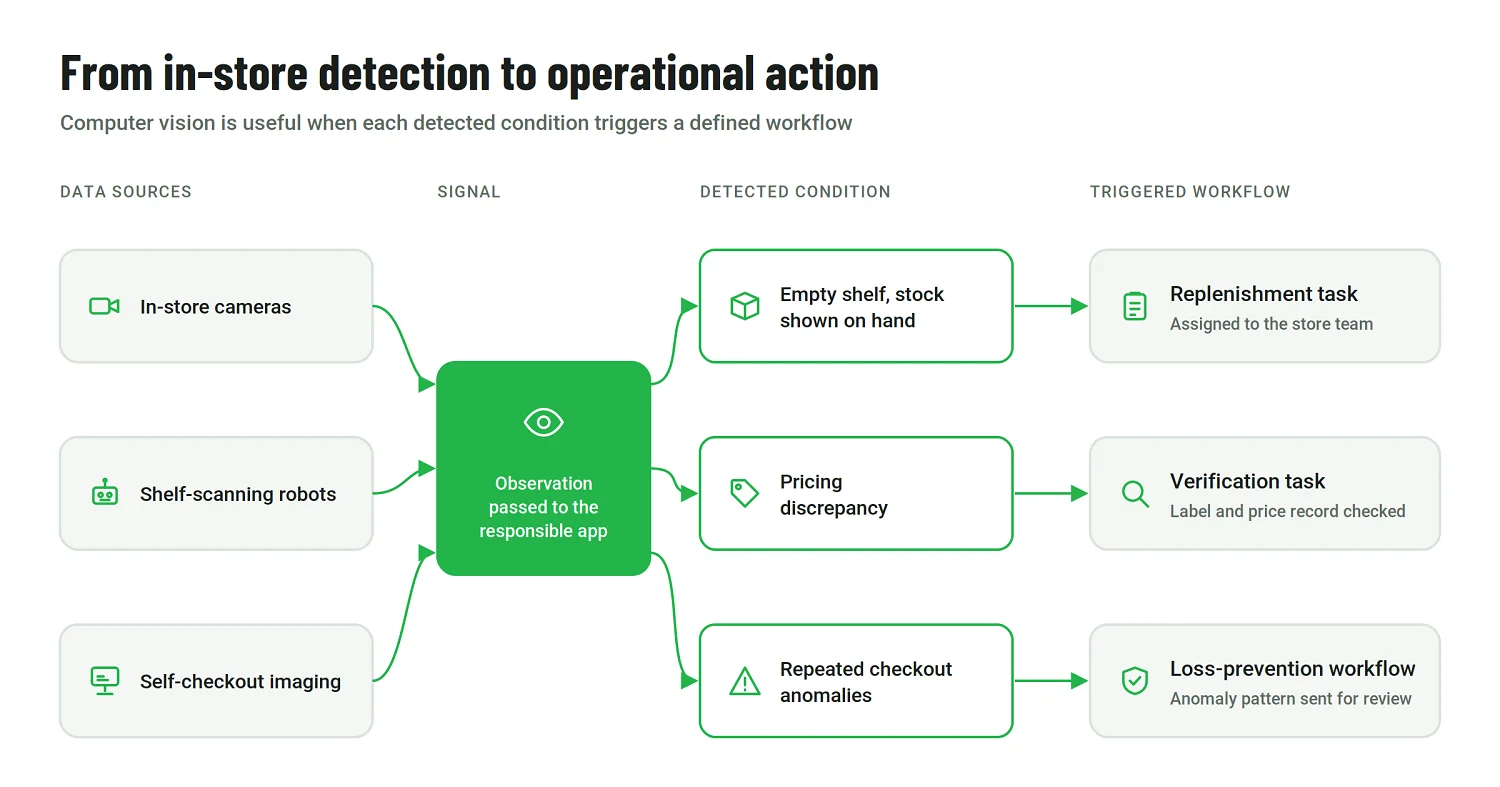
A retailer can have an accurate product record and still have the wrong physical situation on the sales floor. The shelf may be empty although the system shows stock on hand; a price label may be incorrect; merchandise can be placed in the wrong location; or an action at self-checkout may differ from what the POS records.
Computer vision gives retail systems another source of operational data. Cameras and imaging systems can identify shelf conditions, verify product placement and prices, detect checkout anomalies, and pass those observations to the applications responsible for responding. Shelf-scanning robots perform a similar role by repeatedly collecting aisle-level information.
Harmons expanded its deployment of Simbe’s Tally shelf-scanning robot from five pilot stores to 17 locations. Simbe reports that the pilot reduced out-of-stocks on key high-velocity products by 20% and saved 15–30 labor hours per store each week by replacing manual shelf checks.
Detection becomes operationally useful when it leads somewhere. An out-of-stock alert can generate a replenishment task, a pricing discrepancy can be sent for verification, and repeated checkout anomalies can feed a loss-prevention workflow.
Merchandising, assortment, and pricing automation
Merchants work with large volumes of sales, inventory, pricing, promotional, and category data, and a significant amount of time can disappear into preparing that information before a decision is made. Automation already supports activities such as markdown optimization, assortment planning, pricing analysis, and category-performance reporting; generative AI is now being added as another way to work with those datasets.
Walmart’s Wally merchant assistant automates data entry and analysis, performs calculations, answers operational questions, and looks for possible causes behind product performance. Walmart has also said it plans to develop the tool toward tactical execution within configurable guardrails.
Current adoption remains uneven. In a December 2025 McKinsey survey of 114 merchants across regions, 71% said the AI merchandising tools they had used had delivered limited or no business impact so far. Another 61% described their organizations as only slightly or not at all prepared to scale AI across merchandising, with fragmented systems, data quality, and uneven adoption among the constraints identified by McKinsey.
For now, many merchandising applications remain assistive. They accelerate analysis or recommend an action, while merchants retain decisions tied to assortment strategy, supplier relationships, and brand positioning. More bounded actions — such as changing a markdown within predefined limits — lend themselves more readily to automation.
Customer experience, personalization, and returns automation
Customer-facing automation now covers much more than chatbots. Browsing and transaction data can shape product discovery and offers; loyalty systems can apply rewards automatically; post-purchase workflows can send updates or route support requests without requiring an employee to initiate every step.
Returns provide a particularly clear workflow. Once the original transaction is identified, software can check eligibility, select a return route, and initiate a refund or exchange according to the retailer’s rules, sending exceptional or suspicious cases for review.
Walmart has been extending this type of execution through its AI-powered Customer Support Assistant. According to the company, the assistant can recognize a customer, retrieve the relevant order, and take actions such as managing a return rather than limiting the interaction to an answer.
Investment is following the same direction. In McKinsey’s April 2026 survey of North American grocers, 67% of large grocers reported significant AI or advanced-analytics investment in customer service, and the same proportion reported significant investment in marketing and personalization.
These workflows depend heavily on customer and transaction data being consistent across channels. Personalization, loyalty, support, and returns are considerably harder to coordinate when each operates from a different view of the customer.
Retail supply chain and fulfillment automation
Warehouses have used conveyors, sortation equipment, automated storage, and robotics for years. More recent investment is increasingly focused on coordinating the decisions around those physical systems: where an order should be fulfilled, how picks should be batched, whether inventory should move, and which delivery route makes sense under current conditions.
Omnichannel retail makes those decisions more interconnected because the same location may serve walk-in customers, pickup orders, and local delivery simultaneously.
Walmart describes several examples in its Retail Rewired overview. Its Dynamic Delivery algorithm considers traffic, weather, product locations, and order complexity when calculating routes and estimated arrival times, while Dynamic Express and Fulfillment AI coordinate batching and assignment across picking and delivery operations.
That level of orchestration depends on access to reliable order, capacity, inventory, and transportation data. In practice, building or extending supply chain software in these environments often involves connecting existing operational platforms rather than automating an isolated warehouse task.
AI agents and autonomous retail workflows
Agentic retail becomes tangible when software is allowed to carry an action through several steps instead of stopping after a recommendation.
Amazon’s Shop Direct and Buy for Me illustrates the idea in online commerce. Shop Direct surfaces products from external stores, while Buy for Me uses agentic AI to complete eligible purchases on the merchant’s website. In 2026, Amazon said Shop Direct covered more than 100 million products from over 400,000 merchants, with tens of millions available through Buy for Me.
The same approach can extend to replenishment, procurement, customer service, merchandising, supplier communication, and internal operations. Once an agent can change data or initiate a transaction in another application, however, its permissions and available actions need to be explicit. Those constraints are as much a part of building production AI agents as the model and tools themselves.
Back-office automation
Many high-value back-office processes remain well suited to conventional workflow automation. Invoice processing, reconciliation, supplier data management, recurring reporting, and employee administration are frequent, structured activities where reducing manual handling can deliver practical gains without introducing advanced AI.
Depending on the inputs, retailers can combine workflow engines with robotic process automation or document AI to extract and validate information, route exceptions, and update enterprise systems. The engineering work in these cases centers on reliable processing, validation, and exception handling rather than maximizing autonomy.
Measuring the Business Impact of Retail Automation
The business case for automation changes with the process. A shelf-monitoring system might be judged by on-shelf availability and how quickly teams respond to detected issues. Meanwhile, an automated invoice workflow is more likely to be measured by processing time, exception rates, and manual effort.
Across retail operations, automation can reduce repetitive work, shorten decision cycles, improve availability, and make execution more consistent across locations. Those gains are only meaningful, however, if the organization can measure the process before and after implementation.
Establish a baseline before implementation and choose a small set of operational metrics tied directly to the workflow:
|
Automation area |
Useful performance measures |
|
Inventory and forecasting |
Forecast error, stockout rate, inventory turnover, excess inventory |
|
Store operations |
Labor hours per task, task completion time, exception resolution time |
|
Checkout |
Queue time, transaction time, employee intervention rate, shrink |
|
Computer vision |
On-shelf availability, price accuracy, detection-to-action time |
|
Merchandising |
Sell-through, gross margin, markdown rate, promotion performance |
|
Supply chain and fulfillment |
Cost per order, pick rate, order cycle time, on-time delivery |
|
Customer workflows |
Conversion rate, repeat purchase rate, support resolution time, return-processing time |
Challenges of Retail Automation
Many retail automation projects quickly run into integration work. A forecasting engine may need transaction data from the POS, promotion history, inventory records, and product master data before it can produce a usable recommendation. A customer service agent may have to retrieve orders and account details while respecting role-based access. Store automation adds hardware, network connectivity, and edge systems to the equation.
The quality of those inputs is also important. If the inventory system shows stock that is no longer on the shelf, any replenishment or fulfillment decision based on that record starts from the wrong premise. Retail workflows also produce various exceptions, from substitutions and damaged goods to supplier delays and location-specific constraints, so production systems need a defined path for cases they cannot resolve reliably.
AI introduces additional governance requirements once software moves beyond analysis and begins initiating actions. In the 2025 National Retail Federation survey cited earlier, 86% of respondents said their organizations already had AI governance policies. In practice, retailers need clear rules around model access, approval thresholds, automated actions, and audit trails, particularly when a system can place an order, modify operational data, or initiate a customer transaction.
Physical automation comes with its own engineering constraints. Cameras depend on placement and lighting; sensors need to remain accurate over time; robots require maintenance and must operate safely around employees and customers. These factors can make deployment and support very different from a software-only project.
Finally, the workflow has to work for the people using it. A technically sound system can still underperform if employees have to duplicate work, switch between too many interfaces, or repeatedly correct outputs they do not trust. Adoption is much easier when automation fits into the existing process and reduces effort from day one.
How To Plan a Retail Automation Initiative
A useful automation initiative starts with a specific operational problem and a way to measure whether solving it creates value. That keeps technology choices tied to the workflow instead of turning the project into a search for somewhere to apply AI.
Choose the right process first
The strongest candidates usually involve recurring manual effort, reasonably structured inputs, and an outcome that can be measured.
Before designing the solution, map the current workflow. How often does it run? Where does employee time go? Which decisions genuinely require judgment? Where do delays or errors occur? And what happens when the process falls outside the normal path?
Data readiness should be assessed at the same stage. A promising use case can become difficult to automate if the required inputs sit in disconnected systems, arrive too late, or are too inconsistent to support an operational decision.
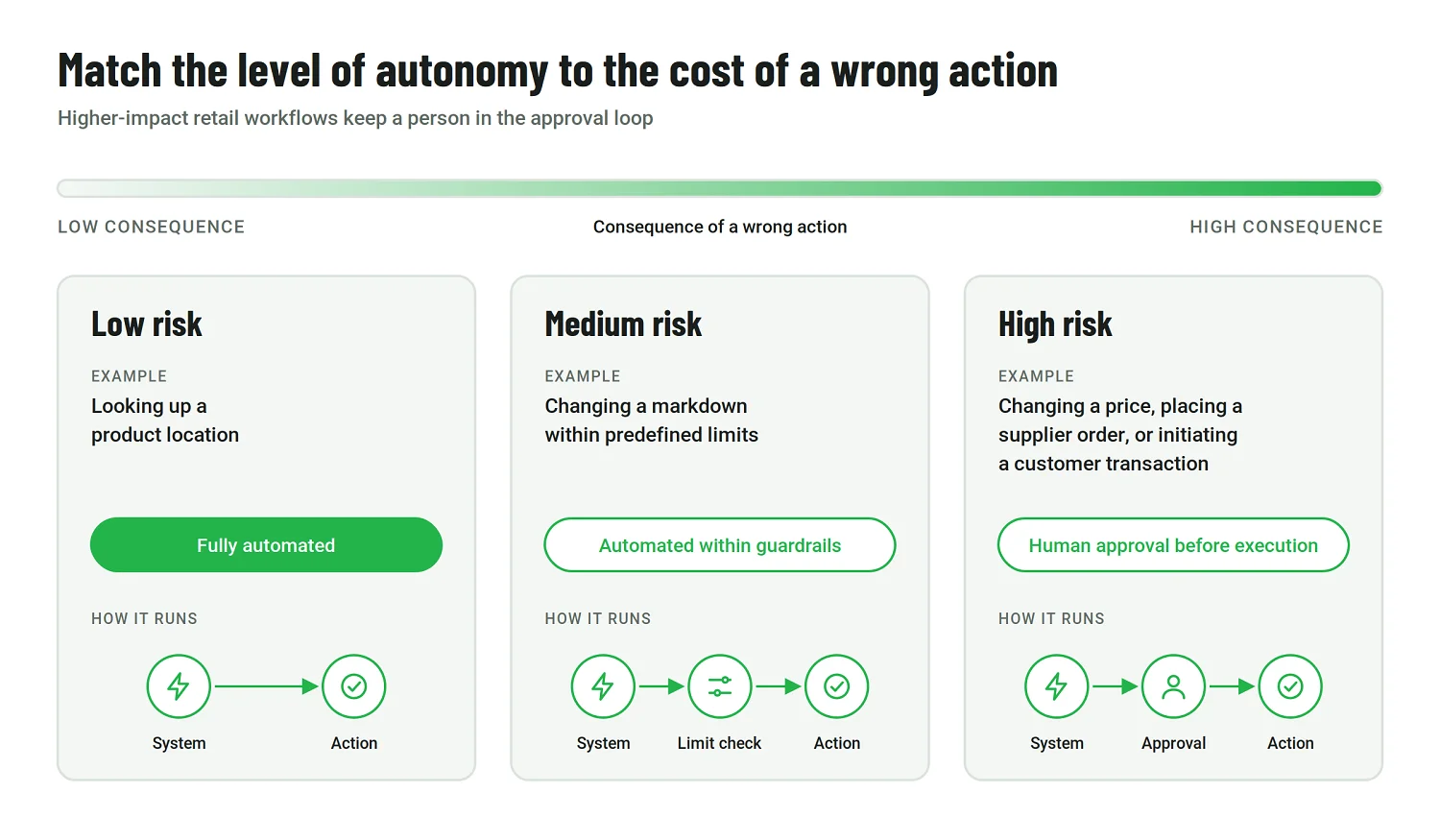
The acceptable level of autonomy also depends on the consequence of a wrong action. Looking up a product location carries little risk; changing a price or placing a supplier order does not. Higher-impact workflows may be better introduced with approval steps before more execution is delegated to the system.
Fit automation into the existing retail stack
Retailers rarely start from a clean technology environment. POS, ERP, OMS, WMS, PIM, CRM, e-commerce, and supplier platforms already hold critical operational data and support established workflows.
New automation therefore needs to work across that landscape. APIs and data pipelines can expose the required information, while rules, optimization services, or AI models make decisions and workflow components pass approved actions back to the relevant application. This kind of AI integration becomes especially important when automation spans several systems rather than operating inside a single platform.
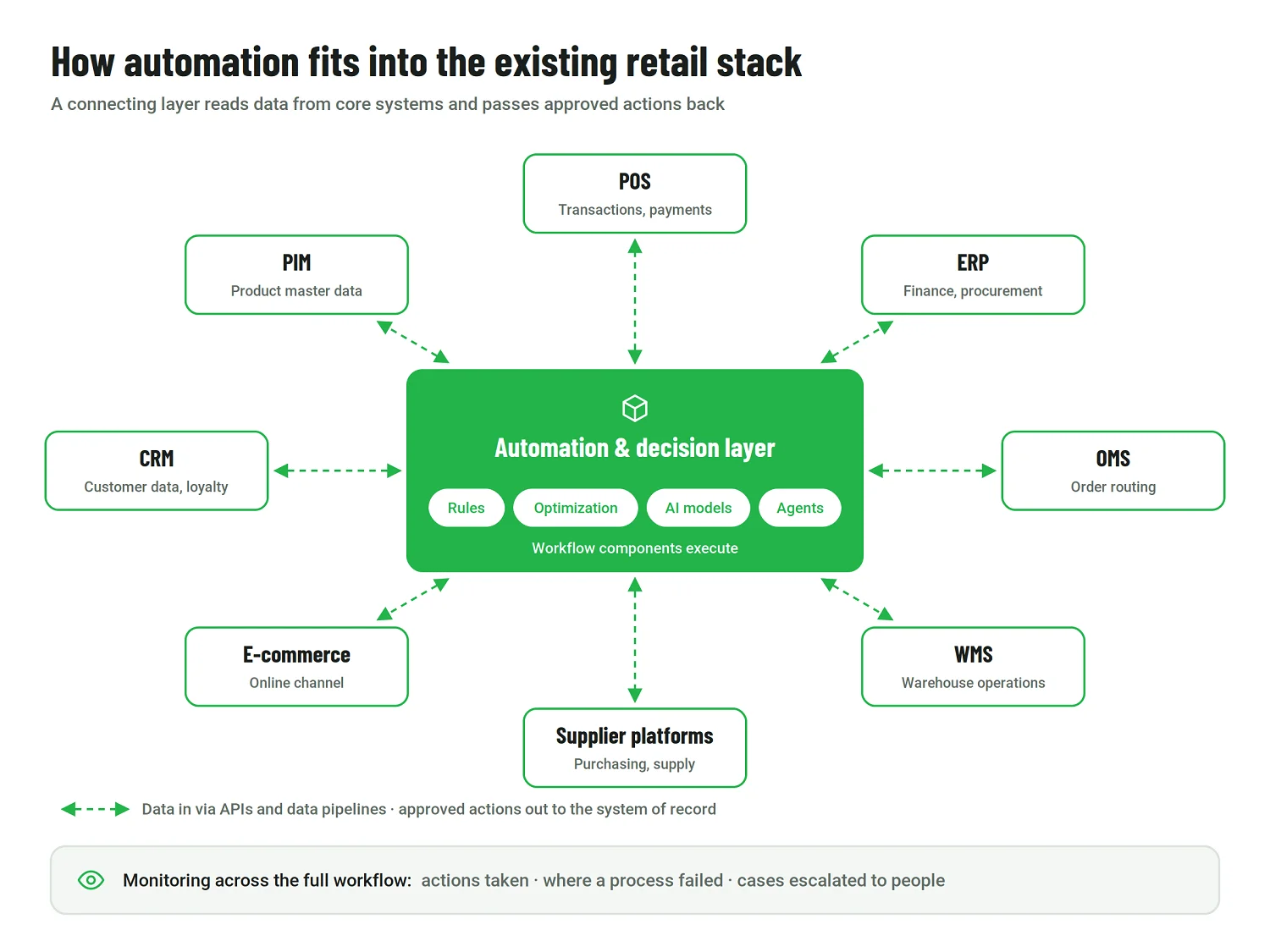
Monitoring should cover the full workflow as well. Teams need to know which actions were taken, where a process failed, and which cases required escalation. For AI agents, that means looking beyond the model itself to permissions, tool access, business rules, and recovery paths.
What affects the cost of retail automation?
Retail automation covers projects with very different cost structures. A back-office workflow, a computer vision rollout across hundreds of stores, and warehouse robotics cannot be estimated meaningfully from the same average project price.
Cost estimates should begin with the scope of the workflow and the environment in which the solution will operate.
|
Cost driver |
Why it matters |
|
Scope of automation |
A single workflow requires less engineering and change management than an end-to-end process spanning several functions |
|
Existing system landscape |
Legacy POS, ERP, OMS, or WMS platforms may require custom APIs, middleware, or additional work |
|
Number of locations |
Store-level configuration, connectivity, rollout, and support grow with the physical footprint |
|
Hardware |
Cameras, sensors, robots, smart carts, and edge infrastructure add costs that software-only projects do not have. |
|
Data readiness |
Historical data may need cleaning, reconciliation, labeling, or restructuring before it can be used reliably |
|
AI requirements |
Custom models add evaluation, monitoring, infrastructure, and inference costs |
|
Security and governance |
Access controls, approvals, auditability, and compliance requirements affect architecture and testing |
|
Ongoing operation |
Cloud services, model usage, support, maintenance, and physical hardware servicing continue after deployment |
This makes a defined workflow far more useful for budgeting than a broad “retail automation” estimate. Once the process, systems, locations, data, and operating requirements are known, the cost range becomes much easier to structure.
Build, buy, or extend existing software?
The right approach depends largely on how standard the process is and how much of the retailer’s competitive or operational logic is unique.
|
Approach |
Best fit |
Main trade-off |
|
Buy an existing product |
The process is standard and mature, such as common workforce-management or warehouse capabilities |
Faster deployment, but less control over workflows and differentiation |
|
Build a custom solution |
The process depends heavily on proprietary data, business logic, or workflows |
More flexibility and control, but greater development and ownership responsibility |
|
Extend and integrate |
Core systems already work well, but additional automation or AI capabilities are needed across them |
Preserves the existing stack, but places more emphasis on integration and architecture |
For many enterprise retailers, extending the current stack is a practical middle ground. An ERP, OMS, or WMS can remain in place while a forecasting service, computer vision capability, or AI agent is added around it.
A phased rollout can reduce implementation risk further. Instead of automating an entire end-to-end process at once, teams can introduce one decision or workflow, validate how it performs in production, and expand from there.
The Next Phase of Retail Automation
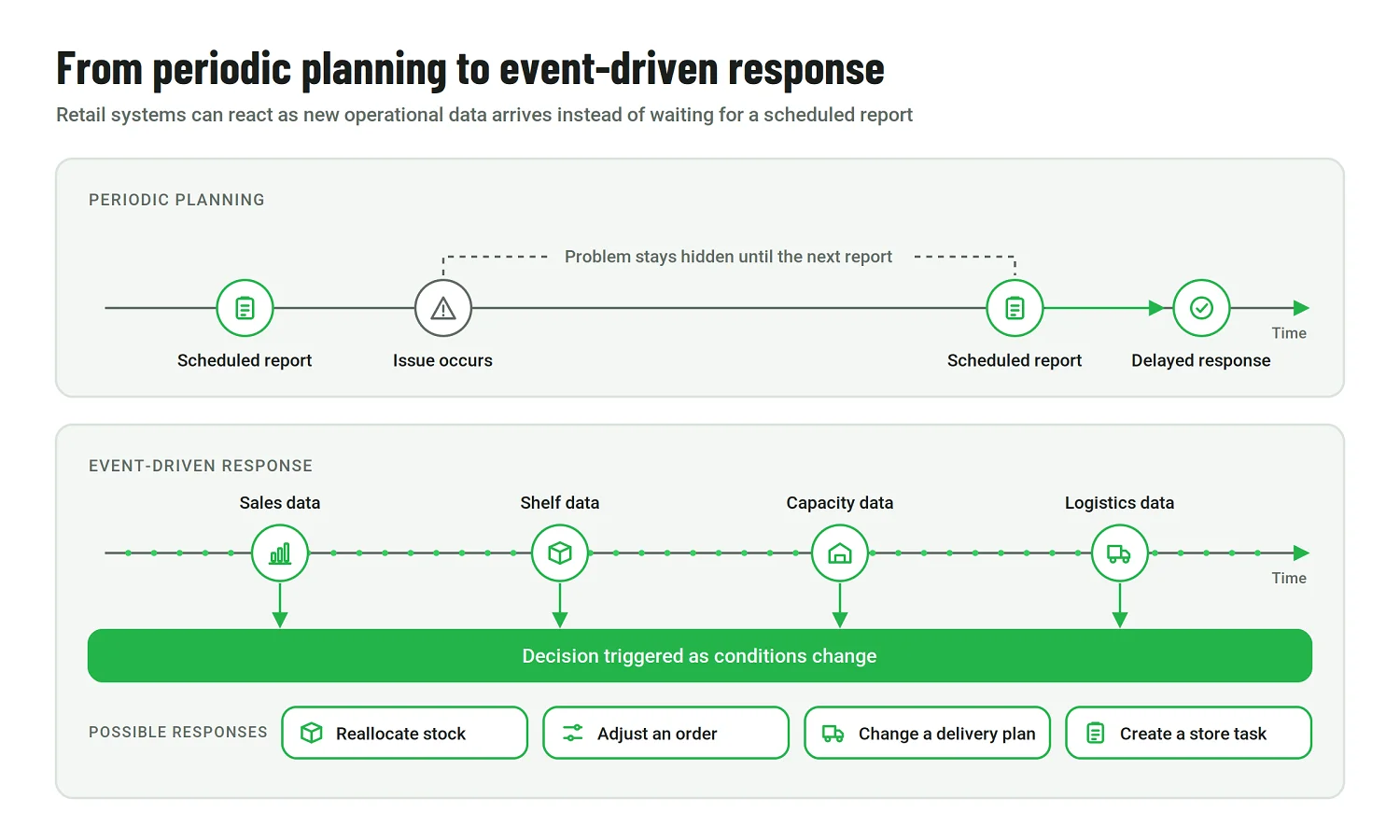
Retail systems are becoming capable of reacting to operational signals faster and more continuously. Scanning, sorting, routing, and data synchronization will remain part of everyday operations, but the information they generate can increasingly trigger decisions as conditions change.
This is already shifting some workflows away from periodic planning. Instead of waiting for a scheduled report to expose an inventory or fulfillment problem, retailers can react as new sales, shelf, capacity, or logistics data arrives. The response might involve reallocating stock, adjusting an order, changing a delivery plan, or creating a task for a store team.
Agentic systems add another layer by giving software more ability to carry approved actions across connected applications. In its discussion of Walmart’s agentic AI strategy, the company describes purpose-built agents for retail workflows and says some of its generative AI copilots are evolving toward more autonomous capabilities.
The larger change will come from connecting functions that have traditionally optimized their own workflows. An inventory signal can affect merchandising, fulfillment, store operations, and customer communication at the same time. As those systems become better connected, automation in the retail industry can move from isolated workflow improvements toward coordinated operational decisions.
Wrapping Up
Retail automation now covers a wide spectrum, from long-established transactional and warehouse systems to newer applications of computer vision, generative AI, and autonomous agents. The examples throughout this article also show that maturity varies considerably by process: technologies that are routine in one part of retail may still be experimental in another.
For retailers, the opportunity is increasingly practical rather than theoretical. The technology is available; the harder work lies in applying it to workflows where it can improve how the business actually operates and then scaling what proves useful in production.
Retail Automation FAQ
What is retail automation?
Retail automation means using software and connected technologies to handle parts of a retail process with less manual work. It can be as simple as a rules-based replenishment workflow or as advanced as a system that forecasts demand, interprets visual data, or carries out approved actions across several applications.
What are some common examples of retail automation?
Retailers automate everything from demand forecasting and replenishment to store tasks, shelf monitoring, pricing, checkout, warehouse operations, order fulfillment, customer service, and back-office work.
The technology behind those workflows varies. Some rely on straightforward business rules; others use machine learning, computer vision, robotics, or AI agents.
How is AI used in retail automation?
AI is useful where fixed rules are not enough, for example, when a system needs to predict demand, interpret images or language, optimize a decision, or respond to changing conditions.
In retail, that can mean forecasting demand by location, detecting shelf issues with computer vision, helping store employees find operational information, or allowing an AI agent to complete an approved task in another system.
What is retail automation software?
There is no single type of retail automation software. Depending on the use case, automation may be built into an ERP, OMS, WMS, POS, CRM, or another retail platform. It can also take the form of a dedicated application or a custom layer that connects several existing systems and coordinates a workflow between them.
How should retailers decide what to automate first?
Start with the process rather than the technology. The strongest candidates usually involve frequent manual work, reasonably reliable data, and an outcome the business can measure.
Risk matters too. A product lookup can often be automated with little consequence if something goes wrong; changing a price or placing a supplier order needs stronger controls. That difference should determine whether the first version acts automatically or keeps a person in the approval loop.
Published on Oct 6, 2026