Can AI Replace Humans in Usability Testing?
Table of contents
- Key Takeaways
- What AI Lacks (And Why It’s Important)
- Usability testing measures human cognition
- AI misses what it hasn't been trained on
- The human loop matters
- AI predicts things but doesn’t truly “understand” them
- So Where Does That Leave the Tools?
- The Lineup
- LLMs-Powered Design Inspection
- The result
- Summary
- AI Agents: AnthrAI Figma Plugin
- Single-screen evaluation
- The result
- Summary
- Flow evaluation
- The result
- Summary
- AI agent usability test
- The result
- Summary
- Synthetic Users: SyntheticUsers App
- The result
- Summary
- Traditional UX Research Tools
- What AI actually does in these tools
- Summary
- Final Thoughts
- Need Usability Testing With Real People?
AI is transforming UX and design workflows from component generation and rapid prototyping to design‑to‑code translation and automated documentation. UX research is no exception. Today’s tools offer AI‑powered summaries, sentiment analysis, automated theme tagging, and even AI‑moderated interviews.
But a more ambitious question is, can AI replace the human participant altogether?
The promise is tempting. Faster testing, lower costs, no recruiting. If AI agents or synthetic users could reliably simulate real people, the impact on product development would be profound.
We set out to investigate. In this article, we evaluate the current landscape of AI‑driven usability testing tools: what they offer, how they perform, and where they fall short. But before we look at the tools, let's examine why the idea itself faces some fundamental challenges.
Key Takeaways
- AI is transforming UX research: automated analysis and simulated testing now drive faster, scalable usability insights.
- Each AI approach delivers a distinct value: LLM-based design reviews, AI agents, and synthetic users all bring unique strengths and trade-offs.
- AI-generated insights demand scrutiny: while many tools offer useful observations, they also risk inaccuracy, generic assumptions, and missing context.
- Human context is non-negotiable in usability testing: understanding real behaviors, decisions, and motivations still requires actual users.
What AI Lacks (And Why It’s Important)
As UX practitioners, we see a fundamental issue with the premise. Here’s why.
Usability testing measures human cognition
Usability testing exists to answer a fundamental question: Do real people notice key options, follow logical paths, and interpret designs in ways that align with their goals? The answer depends on factors AI cannot replicate, including users’ unique life experiences, technical literacy, prior exposure to similar applications, and familiarity with industry‑specific workflows. AI cannot reliably simulate distraction, fatigue, or the fragmented attention that characterizes many real work environments.
AI misses what it hasn't been trained on
Consider a simple example. Show an algorithm a million images of people with bird wings, and it will confidently label an owl as a person because it recognizes shared visual patterns. Show a human the same dataset, and they immediately grasp the distinction. Algorithms detect patterns but lack the contextual understanding that humans apply instinctively. Users can catch what algorithms miss (and vice-versa).
The human loop matters
Usability testing is about observing and understanding people. Real users tell us what they think and why. We interpret their feedback through our own lived experience, asking follow‑up questions, probing assumptions, and connecting insights to broader product decisions. AI can participate in this exchange (AI moderators already do), but it cannot draw on lived experience the way we do. It has no personal context to bring to the conversation, no intuition shaped by years of similar challenges. That limits how deeply it can probe and interpret things.
AI predicts things but doesn’t truly “understand” them
Large language models (LLMs) are, at their core, sophisticated pattern‑matchers. Trained on vast datasets, they excel at predicting the next text or image. But prediction is different from comprehension. An LLM has no understanding of what it outputs — no intent, no awareness, no genuine reasoning. For a discipline built on understanding human behavior, this distinction is critical.
To learn more about LLMs, read our detailed article about them.
So Where Does That Leave the Tools?
None of this means AI has no role in usability testing. In fact, a growing number of tools promise to automate parts or even all of the process. Some offer AI‑powered heuristic inspections. Others claim to replace human participants entirely with synthetic users or AI agents.
We tested some of these tools to see whether they deliver real value.
The Lineup
We evaluated four categories of tools:
- LLMs: ChatGPT, Perplexity, Gemini
- AI agents: AnthrAI (Figma plugin)
- Synthetic users: SyntheticUsers app
- Traditional UXR tools: Maze, Trymata, UXArmy, Loop11, and others
We prepared a set of static mockups and clickable Figma prototypes representing different business applications — similar to what our team typically works on: data-heavy, with complex logic. Let's take a look at the results.
LLMs-Powered Design Inspection
As of March 2026, the LLM-based tools we tested — ChatGPT, Perplexity, and Gemini — cannot interact with clickable Figma prototypes. Instead, we uploaded static mockups and provided evaluation criteria: heuristics, design consistency, suitability for the target audience, and the like.
This is not traditional usability testing. There is no task completion, no navigation, no observed behavior. But the results were still worth examining.
The result
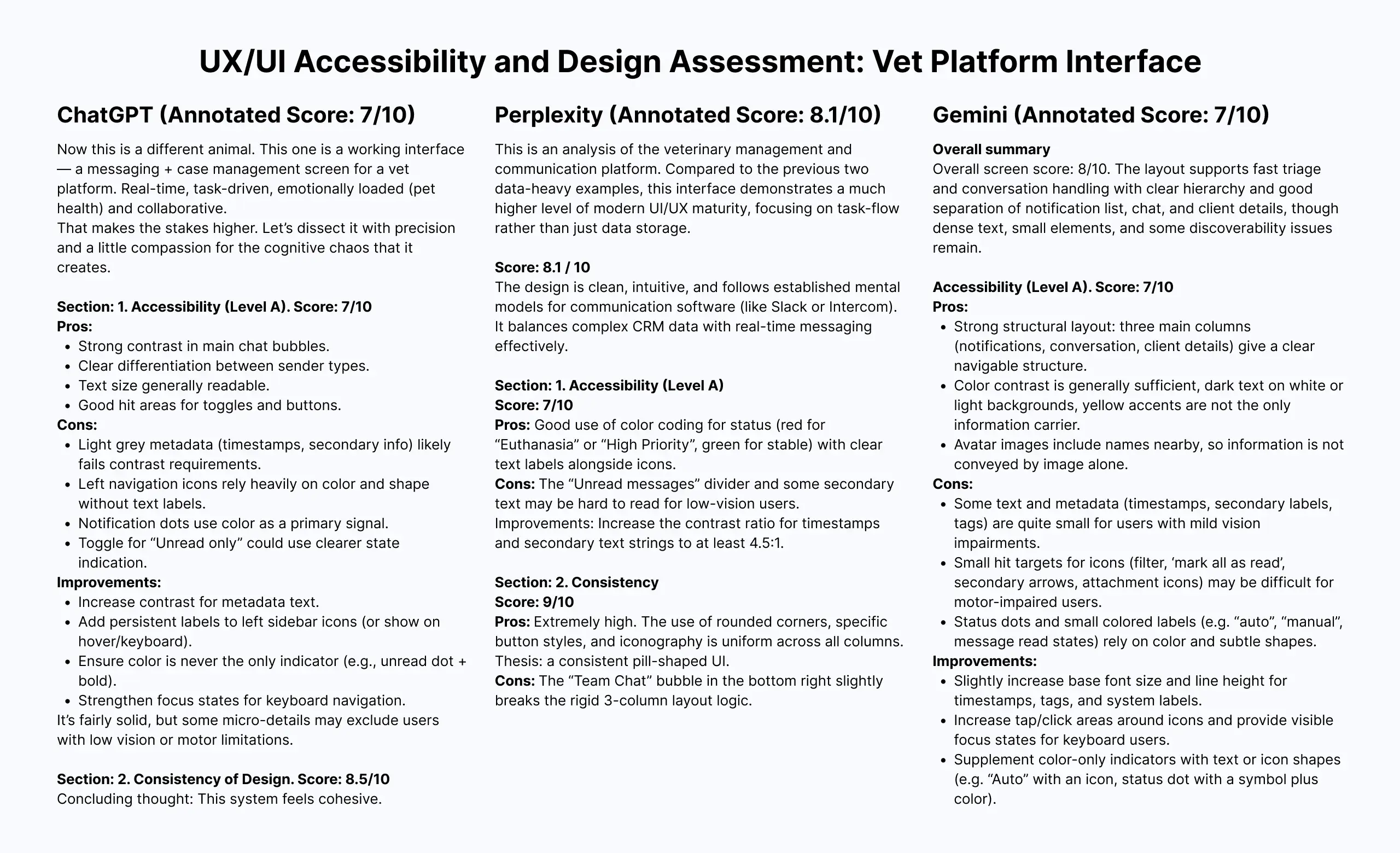
LLM-based inspection can surface useful observations, but it comes with significant limitations. The tools provide a fresh perspective — something seasoned designers often need after staring at the same product for months — but their output must be treated as suggestive, not definitive.
Here's what we learned:
Context improves output, but not enough. You can upload personas, project objectives, user needs, or business constraints. This helps tailor feedback. However, LLMs can generate stereotypical representations of "average users" — something human-centered practitioners have long known leads to misleading conclusions.
Custom evaluation parameters are a strength. Want to assess visual accessibility? Typography? Pattern familiarity? Your prompt sets the rules. This flexibility is valuable, especially for designers who know exactly what they want to test.
The broader project context is missing. LLMs don't account for client requirements, technical limitations, budget constraints, or market strategy — the kind of decisions product teams make daily. Many of these nuances never make it into documentation; they live in stakeholder conversations and inside the team's heads, especially in Agile environments where extensive documentation is rarely a priority.
Screen‑by‑screen only, no flows. As of March 2026, these tools analyze one screen at a time. Connected behavior across multiple steps — the essence of user journeys — is invisible to them.
Manual export is still the norm. You must export or take a screenshot of each screen and upload it manually.
Note: Recent launches like Figma MCP can give LLMs access to static design data (frame structures, styles, component properties), but this applies only to design files. Clicking through a live prototype or imitating human behavior remains out of reach (at least for now).
Paid subscriptions unlock full potential. For analyzing multiple screens at acceptable quality and for access to more capable models, a paid subscription is typically required.
Summary
LLM-based design inspection is a useful supplement, not a replacement for usability testing. It can offer a quick, customizable heuristic review and help uncover blind spots. But its lack of flow testing, manual workflow, and absence of real project context mean its value ultimately depends on human expertise to filter, interpret, and apply the feedback.
AI Agents: AnthrAI Figma Plugin
We discovered AnthrAI while researching this topic and were intrigued. The free tier of the Figma plugin offers enough functionality for a meaningful evaluation. The plugin provides three testing options:
- Single-screen evaluation: static analysis of individual frames
- Flow evaluation: journey analysis across multiple screens
- AI agent usability test: simulated user behavior with personas, success rate tracking, and drop-off analysis
Single-screen evaluation
The plugin integrates directly with Figma, so no manual export is required. For a single-screen evaluation, you provide a brief statement of the design goal. The output includes seven design principle ratings, strengths and weaknesses, and actionable suggestions.
The result
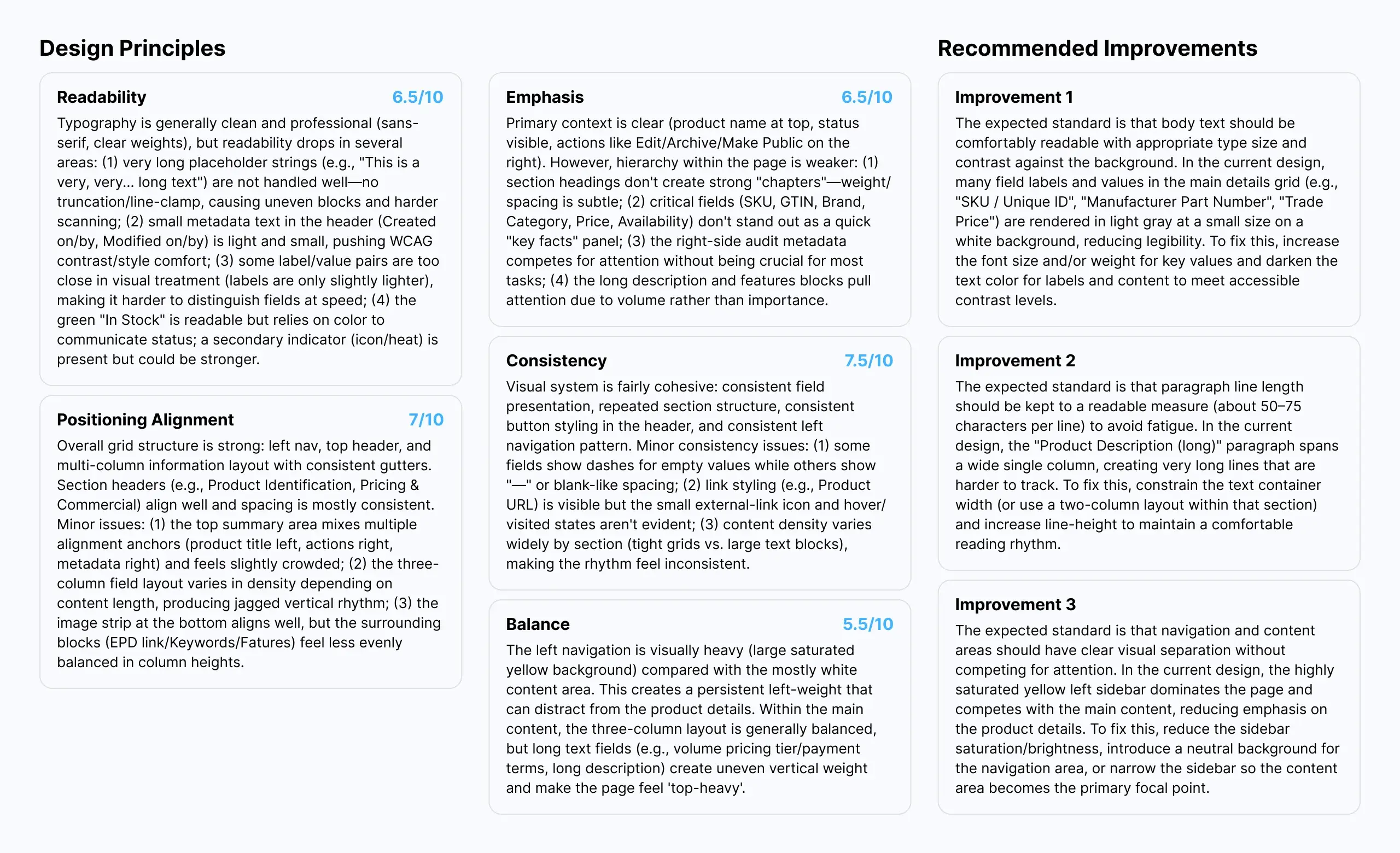
The single-screen evaluation produced recommendations similar to those of standard LLMs — mostly focused on visual aspects. For a novice designer or someone who has been staring at the same screens for too long, this can provide a useful, unbiased perspective.
However, we encountered several issues:
Misrecognition of basic UI states. The tool struggled with fundamental recognition. It claimed an enabled button was disabled (despite clear visual and component state), confused outlined buttons with filled ones, and mistook static text inputs for read-only text.
Contradictory advice. Some recommendations went against established best practices. For example, it suggested that all buttons share the same style, even when one is a primary action (used frequently), and others are secondary.
No project context. You cannot provide background information or explain why certain design decisions were made. The tool has no awareness of business goals, user research findings, or technical constraints.
Over‑reliance on generic "best practices." The tool leans heavily on universal design rules that often don't hold up in practice. In reality, good UX depends on the user, the context, and the task. Based on our experience with previous interviews and usability tests, B2C users prefer less information‑dense screens, while B2B users become frustrated when information is spread across multiple screens, forcing excessive clicks. Truly universal best practices are rare.
Fixed evaluation criteria. Unlike LLM‑based inspections, AnthrAI offers no way to specify custom evaluation parameters. You are limited to a predefined set of metrics, which makes the output visually focused but often too generic.
Summary
This type of tool can serve as a useful assistant for a seasoned professional — a fresh pair of eyes. But only an experienced practitioner can judge whether a recommendation makes sense, aligns with business and project objectives, or respects technical limitations and stakeholder needs. Used uncritically, it could do more harm than good.
Flow evaluation
Flow evaluation allows you to select multiple screens (no need to prototype them) for overall journey analysis, cross‑screen consistency inspection, and usability heuristics evaluation.
The result
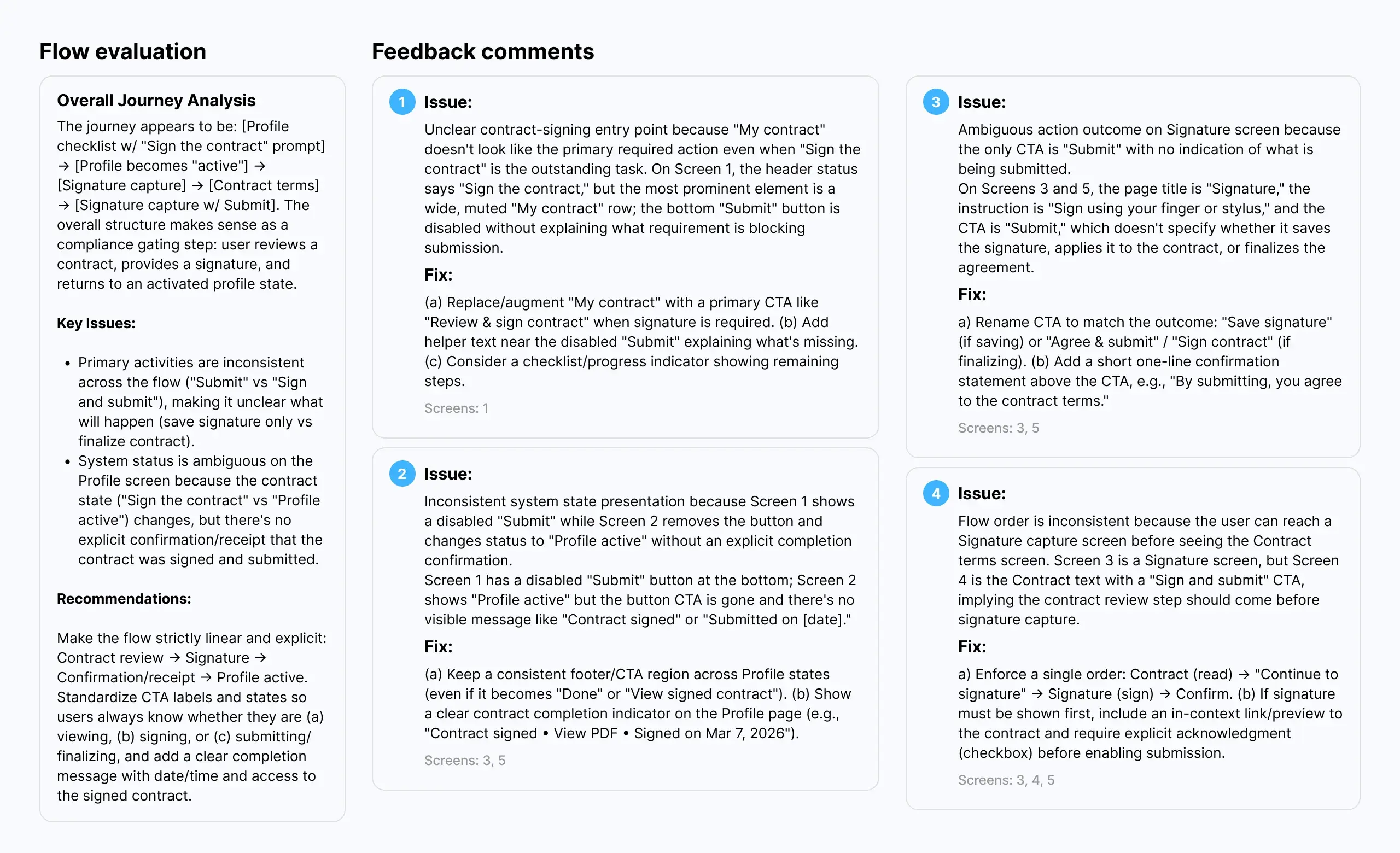
The results were more impressive than a single-screen evaluation. The tool does a better job assessing user experience across a journey. Many recommendations reference established heuristics, for example, "when uploading a file, the user should be able to stop the process at any moment" (Nielsen's "user control and freedom").
However, we discovered several issues:
Questionable recommendations. The tool suggested, for example, that showing a progress bar during file upload and a success toast after accepting a proposal represent two distinct patterns and that we should use a single universal pattern instead. A puzzling suggestion.
Glitches and blind spots. It failed to recognize a modal title and repeatedly insisted the name should be changed. It also does not recognize prototyping nuances, such as "after delay" transitions (e.g., a splash screen that auto‑advances), or interactive elements like hover states, dropdown menus, or other conditional interactions. The tool sees only what is statically present on the canvas.
No practical constraints. The tool does not consider deadlines, budget, scope of work, technology stack, audience goals and needs, or stakeholder input. It delivers generic recommendations. For someone without deep UX expertise, this is dangerous — they might attempt to implement everything the tool suggests, regardless of feasibility or appropriateness.
Summary
Flow evaluation is more useful than single-screen analysis, but the same caveats apply. AnthrAI can surface potential issues and offer a structured heuristic review. But its recommendations require human judgment to filter, prioritize, and adapt to real‑world constraints. And its inability to recognize dynamic prototype behaviors, such as delays, hovers, and conditional logic, means it misses a significant part of the interactive experience.
AI agent usability test
To conduct the test, you need a clickable prototype with clearly connected start and end points for the journey being tested. The plugin allows you to select from a handful of user types (Distracted, Power, Casual, Senior, etc.), specify the maximum number of steps allowed, and enter the task objective.
The final report is extensive. It includes detailed recommendations, key metrics (success rate, time on task, drop‑offs), a heatmap, design suggestions, a list of critical issues, and more.
The result
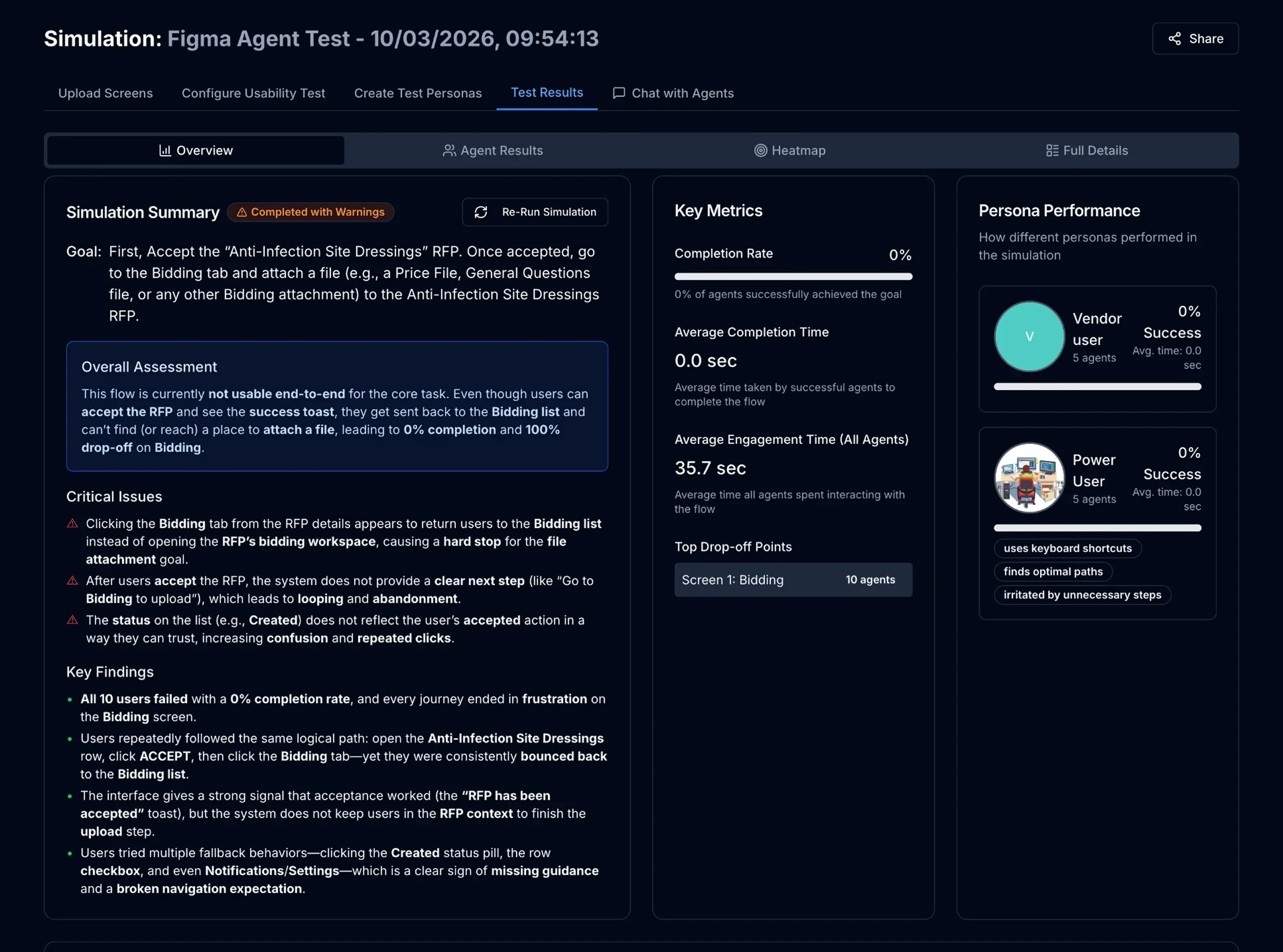
The AI agent usability test produced contradictory results. The agents struggled even with the most basic tasks, such as clicking a table row or a tab, regardless of the selected user type (including "Power user") or the level of detail in the instructions.
A telling example: agents were given a task to upload a document, but the upload area was located on a different tab. Instead of exploring the tabs, the agents repeatedly clicked the breadcrumb, returned to the previous screen, drilled down again, and repeated this cycle 14 times. The tool ultimately reported a 0% success rate.
Would real users behave the same way? Possibly, but not necessarily. It depends on the audience. Some users are highly computer‑literate; others are not. The point is that design decisions should be driven by who your actual users are, not by generic best practices or simulated agent behavior.
Beyond the core behavioral issues, we identified several other limitations:
Setup effort can take time. The test requires a highly detailed prototype and clear, very detailed instructions. The task prompt often needed several rounds of refinement before the agents could understand it at all.
Occasional glitches. The tool can be buggy. Tests sometimes failed or produced unexpected behavior for no clear reason.
No real‑world context. The agents cannot simulate prior domain or application experience — a critical gap for B2B, B2C, or line‑of‑business scenarios where user familiarity with the ecosystem heavily influences behavior.
Unverified results. To date, no independent validation studies have compared AnthrAI's AI agent findings against real human usability testing across representative samples. Without that evidence (ideally multiple comparative studies using diverse interfaces and participant pools), the tool's results remain unconfirmed. The research literature on AI usability inspection consistently shows that while LLMs can surface many real issues, they also produce false positives and miss context-dependent problems. Until similar validation is conducted for AI agents in interactive prototype testing, treat their output as suggestive rather than definitive.
Summary
The AI agent usability test shows promise. The reports are rich with data (heatmaps, metrics, recommendations, critical issues), and the approach is genuinely interesting. That said, we believe the tool would benefit from additional validation. Testing on more real‑world projects, with realistic tasks and fully developed prototypes, would help clarify how well its results align with traditional usability testing. For now, we see it as an interesting supplement rather than a replacement. A tool that may offer value alongside human testing, not in place of it.
Synthetic Users: SyntheticUsers App
We discovered SyntheticUsers while researching this topic. The concept sounds similar to standard LLMs, and in fact, they share the same underlying engines. However, synthetic users are designed to simulate user behavior and represent different user classes and personas.
The app offers several research options. We tried the Solution Testing feature, as it was the closest to what we needed.
A note on terminology: the Solution Testing feature is closer to solution feedback than to standard usability testing. You upload a design image, describe your personas, or provide other relevant project details, and the app generates synthetic personas and begins the study. The system asks these generated personas probing questions and then prompts them to provide feedback on the uploaded design.
Note: As of April 2026, the app is now offering a beta User Testing feature, which we are planning to put into test as well.
The result
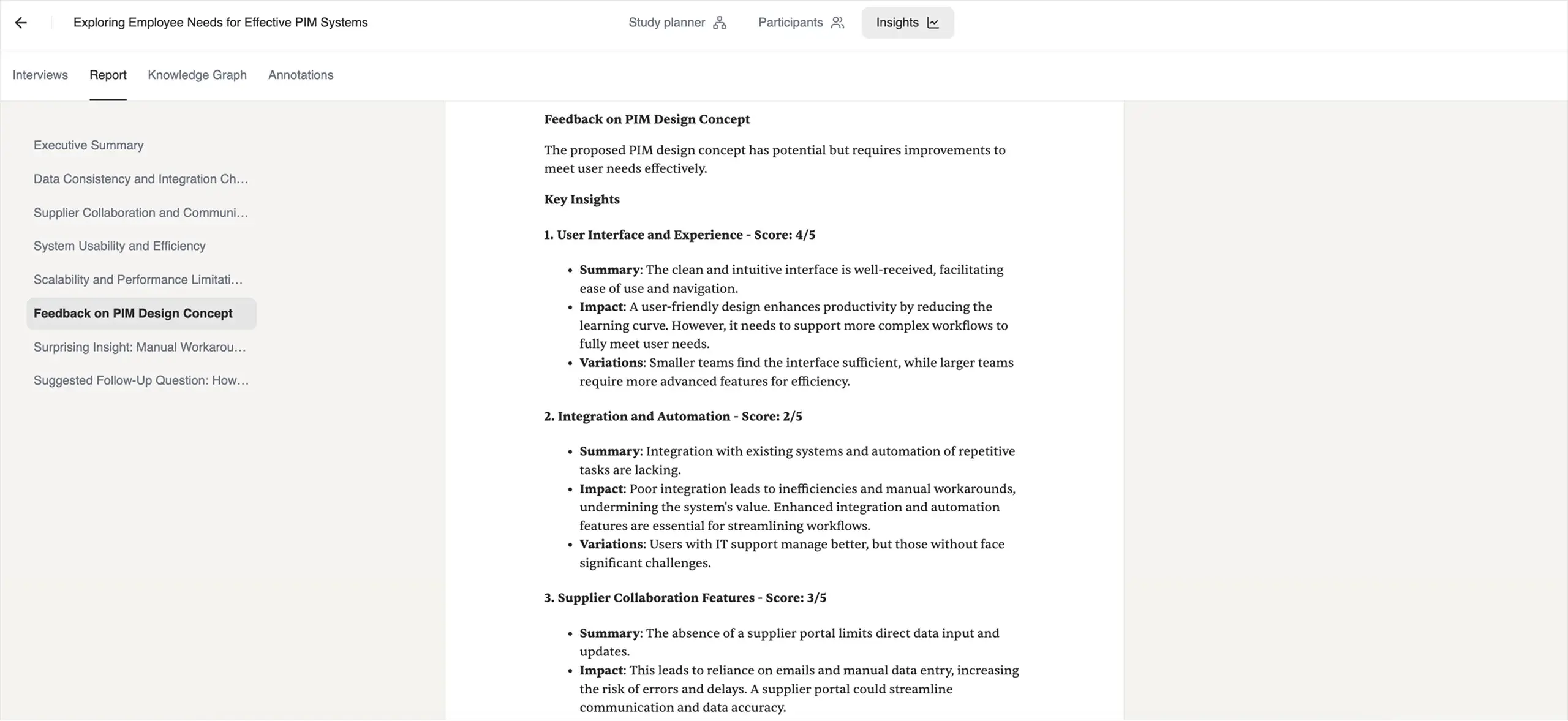
The system generates a long and comprehensive report. It details each interview separately and includes a summary with recommendations, key takeaways, verbatim responses, and more.
The information provided by synthetic personas about their challenges, needs, pain points, distractions, and context of use was interesting. Some of it aligned with what we heard from real users in interviews. Other information did not.
We also noticed that the responses felt a bit too perfect. Synthetic personas gave extensive information in response to every question, often explicitly proposing solutions. Based on our experience, real people are rarely that tidy and concrete in their responses. Their answers are more fragmented, hesitant, and shaped by factors they themselves may not fully articulate. The synthetic output, by contrast, felt polished, as if the AI were drawing on a mental model of how a user should respond rather than how a real person would. It is possible that the output is simply a mix of stereotypical information about the user types you described, stitched together by the AI.
That said, we identified several limitations:
No prototype testing. The Solution Testing feature did not allow us to upload prototypes. Feedback was limited to a single static image per study.
Unverified results. As with other tools we tested, there is currently no definitive proof that the information generated by synthetic agents fully correlates with what real users say. The question of the verifiability of results remains open.
Potential for stereotypes. The responses felt clichéd at times, as if the AI was drawing from generic assumptions about user archetypes rather than genuine insights.
Summary
SyntheticUsers appears to be a promising tool for discovery work. Based on the report structure and the depth of responses, it could serve as a useful assistant for conducting initial exploratory research, helping teams form hypotheses and prepare for real user interviews. The platform is also explicit about this: they do not claim to replace real research, but rather to supplement it.
We are excited to see what comes next for them, and we will keep an eye on future updates, including the beta User Testing feature. For now, we see SyntheticUsers as a potentially valuable addition to the discovery phase, not a substitute for validation with real users.
Traditional UX Research Tools
We also examined a range of established UX research platforms, including Maze, UserTesting, UXtweak, UXArmy, Trymata, and Loop11. These tools are widely used for usability testing, but they operate on a fundamentally different model than the AI‑first tools we have discussed so far.
The short version is this: none of them offer fully automated usability testing without human participants.
What AI actually does in these tools
These platforms have integrated AI, but in a supporting role rather than as a replacement for human testers. Here is where AI steps in:
Test creation. UserTesting offers AI‑powered test creation: you describe what you want to learn, and the platform generates a test plan. Maze and others provide templates and automated task generation based on prototype structure.
Participant recruitment assistance. Some platforms help source participants from their own panels using AI‑driven targeting. But these are still real people.
Transcription and annotation. AI automatically transcribes recorded sessions and tags key moments (for example, when a user expresses frustration or encounters an error).
Sentiment analysis and theme detection. Once data is collected, AI processes it to surface recurring themes, sentiment patterns, and behavioral highlights across multiple participants.
Summary generation. Platforms like UserTesting and UXArmy provide AI‑generated summaries of findings, helping teams quickly identify what matters without watching every video in full.
What these tools do not do is replace the human participant. As UserTesting itself puts it: "We're not replacing human feedback in UserTesting... AI can help validate things like font contrast, accessibility, and design best practices before you ever bring in human participants."
Summary
Traditional UXR platforms have embraced AI, where it adds genuine value — accelerating test creation, automating transcription, surfacing themes, and summarising results. But none of them claim to eliminate human participants. The core element remains unchanged: real people performing real tasks and providing real feedback.
Final Thoughts
After evaluating LLM-based inspections, AI agents, synthetic users, and traditional UXR platforms, our position remains consistent with where we started: today's AI tools, for all their promise, do not yet offer a viable replacement for human participants in usability testing.
We say this not because the tools are poorly built. Some of them are genuinely impressive. And not because we resist new technology — we actively track developments in this space and regularly test emerging tools. The reason is simpler: usability testing exists to understand human behavior, cognition, and context. And current AI possesses none of these.
AI has no lived experience. It does not get distracted, fatigued, or frustrated. It brings no prior knowledge of industry‑specific workflows, no technical literacy shaped by years of practice, and no unique life experiences that color how someone interprets a design. What AI offers instead is pattern recognition: often useful, sometimes surprising, but fundamentally different from genuine human understanding.
That said, AI still has a valuable role to play. Based on our testing:
- LLMs can provide a fresh perspective and help uncover blind spots in static designs.
- AI agents can surface potential usability issues and generate rich reports with heatmaps and metrics.
- Synthetic users can assist with exploratory research and hypothesis formation.
- Traditional UXR tools can accelerate test creation, transcription, and analysis while keeping real humans at the center.
We view these tools as valuable additions to the UX researcher's toolkit. They can save time, spark ideas, and help teams ask better questions. But they are not a shortcut around talking to real people, at least not yet.
We will continue to monitor the space, test new tools as they emerge, and share our findings. Technology will evolve. So will our stance. For now, our approach remains the same: use AI to prepare, supplement, and analyze, but always validate with real users.
Need Usability Testing With Real People?
If you are designing a data‑heavy B2B application, a complex workflow, or any solution where human behavior and context matter (and they almost always do), our team can help.
We conduct professional usability testing with real participants, tailored to your product, your audience, and your goals. From study design and recruitment to moderation and actionable insights, we bring real users back into your process.
Contact us to learn how we can help!
Updated on May 19, 2026