E-Commerce Website Design and Development in 2026
Table of contents
- Key takeaways:
- How E-commerce Experience Affects ROI
- E-commerce Architecture and Strategy
- Headless and composable commerce
- Platform-led vs. composable approaches
- Mobile-first and omnichannel strategy
- E-Commerce Website Design Best Practices
- Product content that helps customers decide
- Make the buying journey easy to follow
- Performance where it matters
- Visual hierarchy and design consistency
- Search, navigation, and checkout
- Use personalization and AI selectively
- Key Elements of a Trustworthy E-Commerce Website
- Clear costs and policies before customers commit
- Payment confidence goes beyond familiar logos
- Mobile interactions that work as expected
- Social proof customers can check
- How to Design an E-commerce Website: A 5-Step Process
- Step 1: Start with the business problem
- Step 2: Work out the journey before polishing the screens
- Step 3: Build consistency into the interface
- Step 4: Test the experience with real users
- Step 5: Build and validate the finished experience
- Real-World E-commerce Projects by Emerline
- DRiV: Reducing catalog costs while preparing for growth
- Modernizing a direct-sales E-commerce model
- Building E-commerce around a new sales model
- Supporting global growth for a home and fragrance retailer
- The Bottom Line
- Common Questions About E-commerce Website Design and Development
- Can an E-commerce platform be migrated without losing SEO visibility or disrupting sales?
- Should a redesign and a platform migration happen at the same time?
- What accessibility requirements should an E-commerce business plan for in the U.S. and the EU?
- What happens if the website faces a traffic spike or one of its services goes down?
- Do all historical customer and commerce data need to move to the new platform?
In today’s competitive digital market, winning a customer's click is just the first step. The experience also has to help them find what they need, complete a purchase, and come back. As the business expands, the platform has to keep pace. If buying feels like work, shoppers can simply go elsewhere.
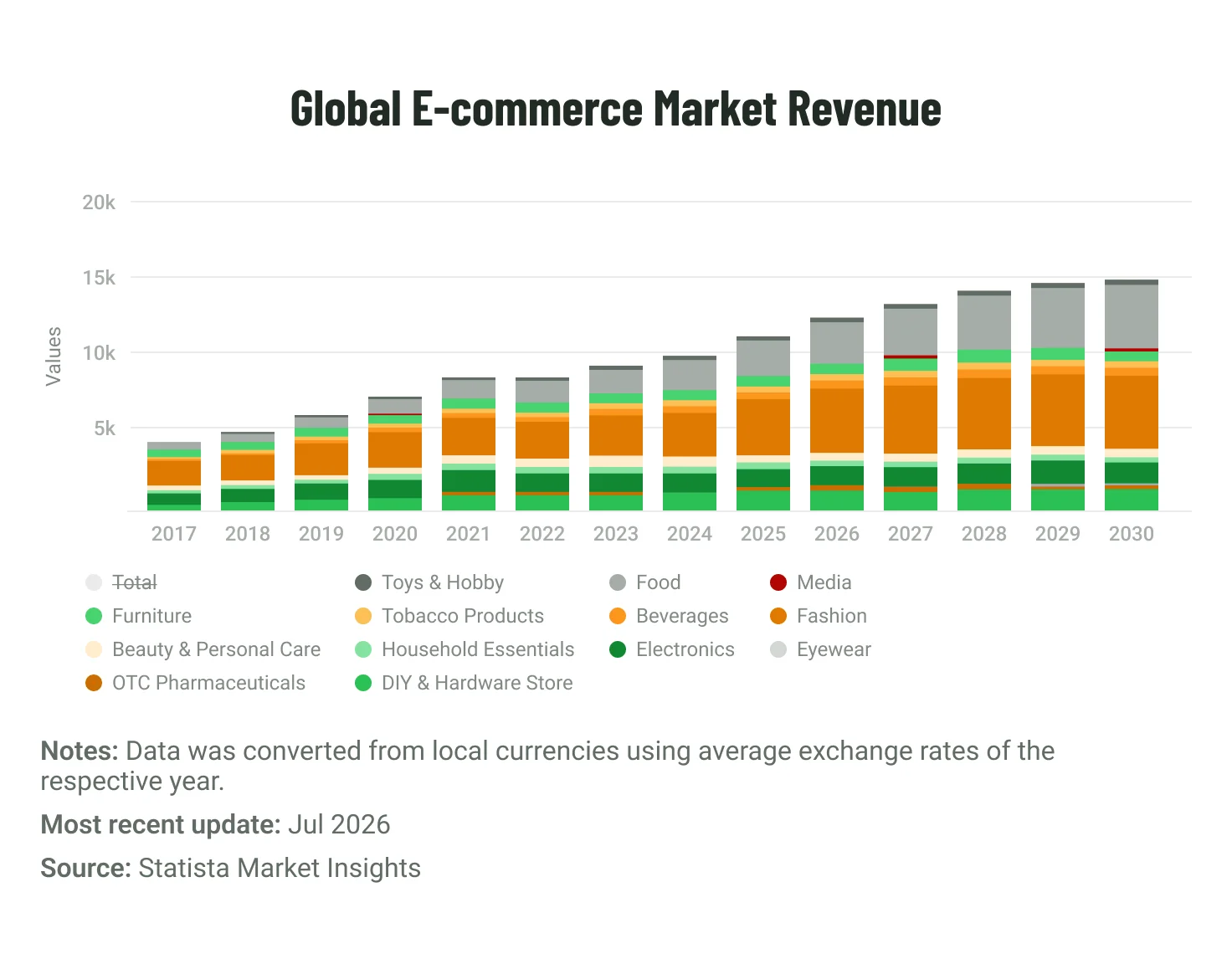
The opportunity is still expanding. Statista expects global E-commerce revenue to grow 6.2% annually through 2030, reaching $4.91 trillion. By then, the number of E-commerce users is projected to total 4.1 billion. A larger market creates more room for retailers, but also more alternatives for customers. That raises the bar for the experience itself.
Customers do not need to know what powers the website. They notice whether it works smoothly or gets in their way. For the company, the question is different: how much work will it take to adapt the platform as needs evolve? The point is not to choose the newest technology, but to support the experience customers need without making future changes unnecessarily costly. This guide looks at those trade-offs, when different approaches make sense, and what to consider when designing or modernizing an E-commerce website.
Key takeaways:
- More traffic cannot compensate for the friction that stops customers from buying
An E-commerce website can attract the right audience and still lose sales when choosing a product, seeing the full cost, or paying takes too much effort. A good E-commerce website design removes those barriers rather than simply making individual pages look better.
- Growth can turn small platform changes into bigger projects
New markets, sales channels, and connected systems add more moving parts to the E-commerce setup. When one update starts affecting everything else, even routine work can become costly. One way to reduce that dependency is to let parts of the setup evolve more independently, an approach known as composable commerce.
- A website can load and still feel slow
Product information may appear late, a button may respond with a delay, or the layout may shift just as someone tries to act. Core Web Vitals give teams a way to measure these issues and pinpoint where performance disrupts the path to purchase.
- AI is not an improvement by default
AI can reduce the effort involved in finding and choosing a product. AI-enabled UX applies it at those decision points through smarter search, relevant recommendations, or timely shopping assistance. The question is which moments in the buying journey actually benefit from AI.
How E-commerce Experience Affects ROI
To decide where E-commerce improvements are worth the investment, it helps to tie them to measurable outcomes. In practice, their impact tends to show up in two places: customer behavior and the effort required to run and change the platform. Looking at both gives businesses a broader view than conversion alone, because the same design and platform decisions can affect completed orders and the cost of adapting the website over time.
External benchmarks can provide context, but they do not tell the whole story. Performance, checkout abandonment, and mobile traffic can be compared with broader market data. Product discovery, personalization, and platform flexibility are often more useful when measured against the company’s own results over time.
The table combines current market benchmarks with company-level metrics that can show where customer friction or platform constraints are affecting revenue and cost.
| Core pillar | Key metric / benchmark | Business & ROI impact |
| Performance | Core Web Vitals measure three parts of the page experience that customers notice: how quickly the main content appears, how quickly the page reacts after an interaction, and whether content moves unexpectedly. Google measures these through LCP, INP, and CLS, with “good” thresholds of 2.5 seconds, 200 milliseconds, and 0.1, respectively, for at least 75% of visits. In Shopify’s 2026 analysis, every additional 100 milliseconds of load time was associated with about 3.5% lower conversion. | Slow loading or delayed interactions can interrupt the path to purchase. Google’s thresholds show whether performance needs attention, while Shopify’s data gives businesses a reference point for judging whether small delays are worth addressing. |
| Checkout UX | Baymard puts the average documented cart abandonment rate at 70.22%. | The benchmark shows how often shoppers leave before completing an order. A company’s own abandonment data can then show where checkout improvements are most likely to recover sales. |
| Trust and transparency | In Checkout.com’s research across more than 18,000 consumers in 16 countries, 66% said payment performance was the key driver of trust at checkout. Separate U.S. research by VTEX found that 82% of consumers considered clear pricing and no hidden fees essential to a better shopping experience. | Trust is shaped both by whether payment works reliably and whether customers know what they will pay before they commit. Failures in either area can give an otherwise ready-to-buy customer a reason to stop. |
| Personalization | In Twilio’s consumer research, 48% said they had made a repeat purchase from a company based on the personalization they received. | Personalization matters when it helps customers find relevant products and return to buy again. Purchases influenced by recommendations and repeat purchases are more useful measures than interaction counts alone. |
| Mobile experience | 77% of traffic to retail sites came from mobile devices in 2025, according to Contentsquare. | When roughly three quarters of retail visits happen on mobile, problems with navigation, product selection, performance, or checkout can affect a large share of customers. |
| Platform flexibility | Track the time and cost required to enter a new market, add a payment method or sales channel, or connect another business system. | Tracking these changes over time shows whether the platform is making routine growth initiatives slower or more expensive than they need to be. |
Baymard’s breakdown shows how different those causes can be, from extra costs and slow delivery to trust concerns and website errors.
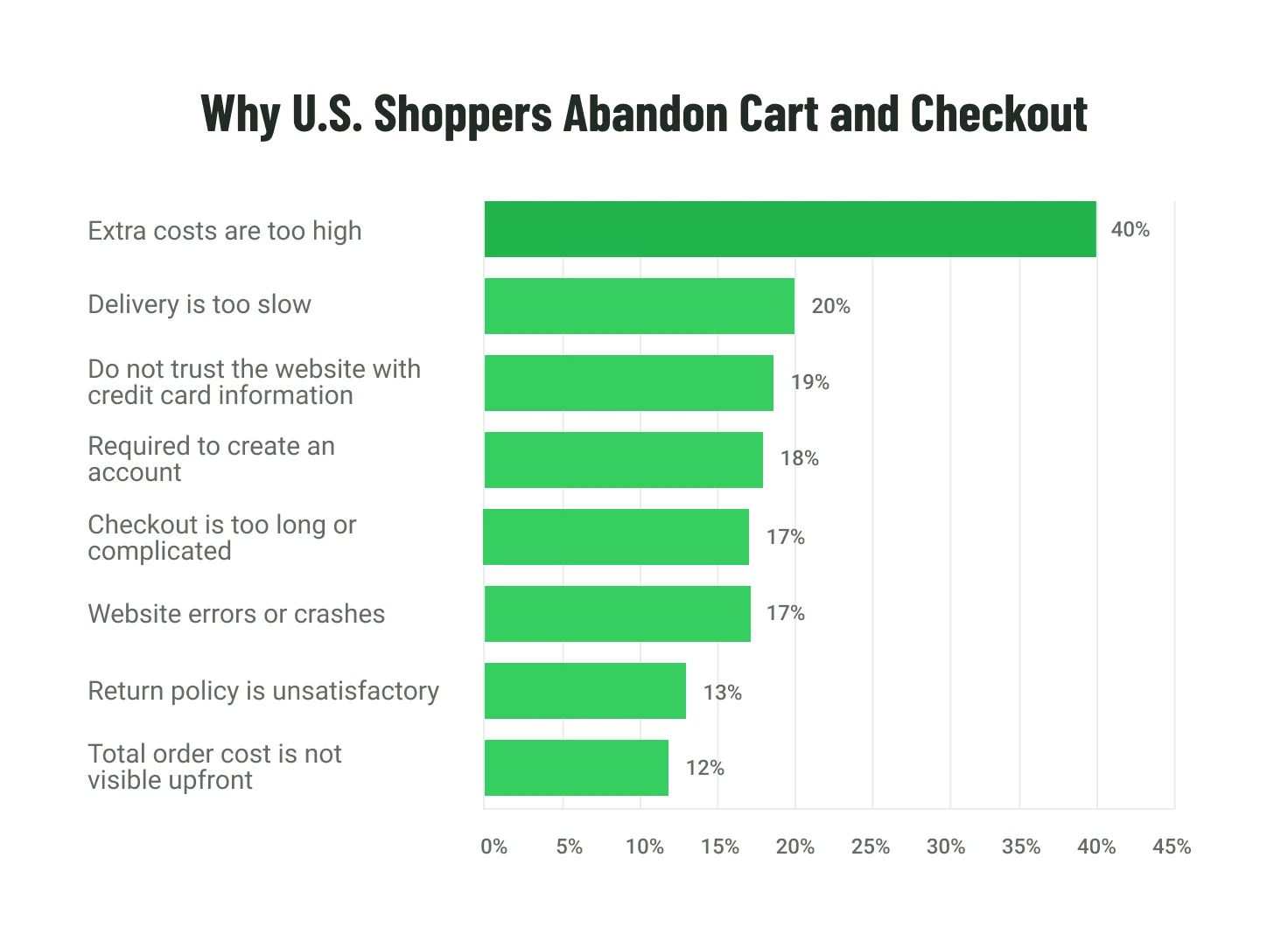
- Extra costs are too high — 40%
- Delivery is too slow — 20%
- Do not trust the website with credit card information — 19%
- Required to create an account — 18%
- Checkout is too long or complicated — 17%
- Website errors or crashes — 17%
- Return policy is unsatisfactory — 13%
- Total order cost is not visible upfront — 12%
Leading reasons for cart and checkout abandonment, excluding shoppers who were simply browsing or not ready to buy. Source: Baymard Institute.
Which issues deserve attention first will vary by business model, product, and purchase complexity.
That leads to the next decision: how much flexibility does the company need from its E-commerce setup, and how much complexity is it prepared to own?
E-commerce Architecture and Strategy
Architecture becomes a business concern when even simple changes take too long, affect too many systems, or become expensive to implement.
Headless and composable commerce
Consider a familiar situation: the marketing team wants to change the customer-facing website, the commerce team needs a new payment provider, and a regional team needs a different buying flow. If these changes depend on the same tightly connected systems, a local request can create work across several teams and components.
It helps to separate what customers use from what runs behind it. The storefront is the customer-facing part of the commerce setup where people browse and buy, while the commerce platform handles functions such as products, orders, and payments.
A headless setup separates these layers, so customer-facing changes can often be made without rebuilding core commerce functions. For the business, that can reduce the scope, time, and risk of each change: teams can update a storefront or launch a market-specific experience without making the same release alter checkout, order, or inventory logic.
Composable commerce takes the same idea further. Capabilities such as search, content, or payments can be replaced or extended more independently. This becomes valuable when recurring changes are expensive because too many parts of the platform have to move together.
Platform-led vs. composable approaches
Platform-led and composable approaches are not mutually exclusive. A platform-led solution can use a headless storefront, while a composable setup can still include ready-made services. What matters is how much the business wants a core platform to handle and where it needs more control.
See how the trade-offs shift between the two approaches in the table below.
| Decision factor | Platform-led approach | Composable approach |
| Implementation effort | More commerce capabilities are already integrated, which can reduce upfront implementation work. | Usually requires more design, integration, and testing upfront. |
| UX flexibility | Works well when standard commerce flows cover most customer and business needs. | Better suited to custom buying journeys, market requirements, or business logic. |
| Growth and expansion | Growth stays within the platform’s built-in capabilities and extension model. This is often enough when new markets, channels, or product lines follow similar commerce flows. | Individual capabilities can evolve more independently when growth introduces different requirements by market, channel, or product line. |
| Integrations | Existing connectors can reduce the effort of connecting customer, inventory, order, payment, and other business systems. | Gives more control over complex integrations, but also increases responsibility for maintaining them. |
| Ongoing ownership | A more integrated platform can reduce the amount of cross-service integration, testing, and vendor coordination the business has to manage. | More independently managed capabilities can increase integration, monitoring, vendor coordination, and governance work, even when vendors operate the underlying infrastructure. |
| Cost over time | Lower initial complexity, although subscriptions, extensions, and workarounds can add up as requirements grow. | Higher initial investment and ongoing ownership, but frequent changes may be easier to isolate instead of affecting the whole setup. |
The initial build is only part of the cost. Companies also need to account for what the system will cost to run, maintain, integrate, secure, and change over time. Together, these costs make up the total cost of ownership (TCO). A setup with more independent services can also mean more vendors, data flows, and security or compliance controls to coordinate.
Emerline's recommendation. A platform-led approach is often the more economical choice when a mature commerce platform already covers most customer and operational needs. Composable architecture becomes easier to justify when platform constraints repeatedly make important changes slower, more expensive, or harder to isolate.
Mobile-first and omnichannel strategy
Mobile-first and omnichannel address different parts of the buying journey. Mobile-first makes key actions work well on smaller screens and touch devices. Omnichannel focuses on continuity when customers move between the website, apps, physical stores, or marketplaces. In practice, that translates into a few concrete choices about how customers browse and complete a purchase across channels.
- Mobile-friendly interactions. Key tasks such as filtering, adding a product to the cart, and paying should remain easy to reach and complete on a phone.
- Continuity across devices. Where account and privacy settings allow, carts and account information can follow the customer across devices. A shopper can start choosing products on a phone and finish the purchase later on a laptop without searching for the same items or rebuilding the cart.
- Inventory customers can trust across channels. Product availability should stay consistent across the website, apps, and physical stores where possible. That helps customers see whether an item can be shipped, collected locally, or purchased in store before they commit.
- Flexible fulfillment and returns. Where the business model supports it, customers may want to buy online and pick up in store, or return an online purchase to a physical location. Supporting those journeys can reduce friction between channels and make fulfillment more convenient without forcing the customer into a separate process.
- Order continuity across channels. Customers and service teams should be able to access the same relevant order status and purchase information across digital and store interactions, subject to account and privacy rules.
- Express checkout. Digital wallets and other fast payment methods can reduce the amount of information customers have to enter, which is particularly useful on mobile.
- App-like features that add value. Modern web technologies can let a mobile website support features such as home-screen installation, offline access, or push notifications without requiring customers to download a separate app. These features are worth adding only when they solve a real customer need.
The right architecture should make change easier without adding complexity the business does not need. It should support today’s buying journeys and leave room for what comes next. From there, the focus shifts to the customer experience: how easily people can find what they need, understand their options, and complete a purchase.
E-Commerce Website Design Best Practices
With the broader platform decisions settled, design comes down to a series of smaller choices that either make buying easier or add another reason to hesitate. The useful test is practical: does a feature help customers understand the product, make a decision, or complete an important task?
Product content that helps customers decide
Online shoppers cannot pick up a product or examine it in person, so product content has to close part of that gap.
- Show the details that affect the decision. High-resolution images make important features easier to inspect, while short videos can demonstrate scale, fit, movement, or use more clearly than additional copy. That gives customers a better basis for choosing and can reduce avoidable returns caused by expectations that do not match the product.
- Add a real-world perspective. User-generated content (UGC), such as customer photos and videos, shows the product outside the brand’s own presentation and can answer questions that polished product imagery does not.
- Use 3D or AR when there is something difficult to judge online. Three-dimensional (3D) views or augmented reality (AR) can help customers assess size, shape, or placement before they buy. For products where those factors drive hesitation or returns, that added confidence may justify the extra production and maintenance cost.
Make the buying journey easy to follow
Small moments of uncertainty add up. People need to know whether an action worked, whether the content is still loading, and what happens next.
- Give clear feedback. A button changing state after a customer adds an item to the cart, or a visible placeholder while content loads, confirms that the website is responding. That reduces uncertainty, repeated clicks, and the chance that a customer leaves because the page appears to have stopped working.
- Show important costs early. Delivery estimates and shipping charges should appear before checkout, where possible. The customer can then judge the purchase with the actual cost in view instead of discovering it at the last step.
- Build accessibility in early. An accessible website allows people with different needs to navigate, understand, and complete key actions. The Web Content Accessibility Guidelines (WCAG) provide a practical benchmark, while legal requirements vary by market. Building accessibility in from the start is usually easier and less costly than fixing it after launch.
Performance where it matters
The Core Web Vitals discussed earlier help identify when performance is interfering with the buying journey. The next question is where improvement will make the most difference.
Product discovery, product pages, the cart, and checkout are sensible places to start. Improvements should focus first on the parts of the journey where waiting can interrupt a purchase. Heavy images and video can be optimized, unnecessary page weight reduced, and the content customers need first can be given priority so they are not left waiting for the rest of the page.
Some interactions depend on information coming back from other systems, such as search, inventory, or checkout. For these high-value actions, a response within a second can be a useful target where the product and infrastructure make it realistic. It is an aspiration, not a requirement every page must meet.
Visual hierarchy and design consistency
A page should guide the eye, not make the customer decide what deserves attention first. That means giving the right weight to price, delivery details, availability, product information, and the main action. On a smaller screen, poor hierarchy shows up fast.
Then comes the scaling problem. What works on ten pages can become inconsistent across hundreds. A design system helps keep the same patterns in place and reduces the amount of design and development work needed when those patterns change.
Dark mode deserves the same practical test as any other feature: who needs it, and is that need strong enough to justify another version of the interface to maintain?
Search, navigation, and checkout
Customers should not have to understand the catalog structure as well as the company does.
- Match navigation to how people shop. Categories and filters should reflect the criteria customers actually use to compare products rather than only the company’s internal catalog structure.
- Make search more forgiving. Natural-language and AI-powered search can handle less precise queries, spelling mistakes, and different ways of describing the same product. That can reduce failed or zero-result searches and make it more likely that customers reach a relevant product instead of leaving. Visual search can help when an item is easier to recognize than to describe.
- Do not put a new requirement in front of a customer who is ready to buy. Guest checkout avoids forcing account creation before purchase, while digital wallets and other express payment methods reduce manual data entry.
- Keep the mobile path short. Smaller screens make unnecessary fields, menus, and interruptions more costly in terms of customer effort, so the path to purchase needs particular discipline here.
Use personalization and AI selectively
The question with personalization is not how much of the website can change for each customer, but which changes actually make the buying decision easier.
- Start with useful first-party data. Information collected through a company’s own customer interactions can support more relevant hyper-personalization, including product recommendations, listings, and content.
- Get the practical details right first. Language, currency, taxes, and available payment methods may need to adapt by market before more sophisticated personalization adds much value.
- Use AI for decisions that benefit from assistance. A shopping assistant can compare products, suggest a size, or identify compatible components. The value is highest where customers genuinely need help choosing, rather than where AI simply adds another interface.
- Treat dynamic offers and pricing with more care. The more prices, offers, or recommendations vary by customer, the more questions arise around privacy, transparency, fairness, and regulation. First-party data still carries privacy obligations, and more advanced profiling may require additional controls depending on the market.
Every extra feature comes with a bill: design, development, testing, and maintenance. If it does not remove a real obstacle or help someone make a decision, that bill becomes harder to justify.
Key Elements of a Trustworthy E-Commerce Website
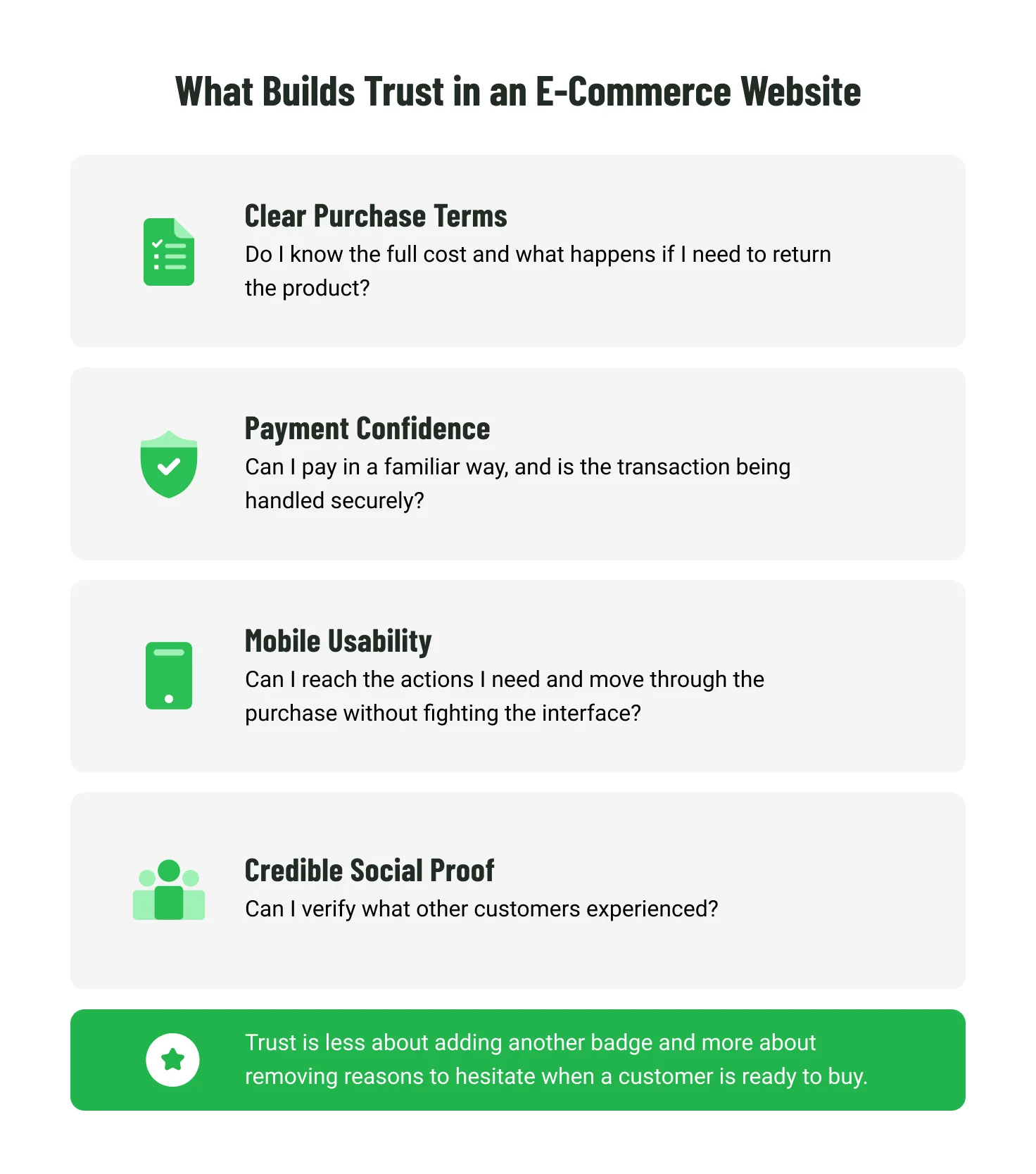
A smooth buying journey can still fall apart when it is time to commit. Customers need clarity about the purchase, confidence that the process is reliable, and a reason to trust the seller.
Clear costs and policies before customers commit
By the time someone reaches payment, there should be little left to discover. The full price, including applicable taxes and delivery charges, should already be clear, and any return or refund terms that could change the decision should be easy to find.
Unclear terms do more than put a sale at risk. They can also create support requests, disputes, and refunds after the purchase.
Payment confidence goes beyond familiar logos
Payment methods customers already know can remove some uncertainty at checkout. That may be a digital wallet such as Apple Pay, Google Pay, or Shop Pay, or a buy now, pay later (BNPL) service such as Klarna or Affirm.
Familiarity is not the same as security. Card payments are also subject to the Payment Card Industry Data Security Standard (PCI DSS), which sets requirements for protecting payment data. The checkout model affects how much of that work stays with the retailer. Using a PCI DSS-compliant payment provider and keeping card data out of the retailer’s own systems can reduce the security and compliance scope the retailer has to manage. The business still needs to verify the provider’s compliance and meet the requirements that remain on its side.
Each additional payment or checkout integration can mean another provider, another path for customer or payment data, and more ongoing oversight.
Mobile interactions that work as expected
On mobile, confidence also depends on whether the website behaves the way customers expect. Key actions such as filtering, adding a product to the cart, and opening the cart should be easy to reach with one hand. Product galleries can support familiar swipe gestures without making them the only way to navigate, while filters and other controls should avoid interactions that feel awkward on a small screen. When basic actions take unnecessary effort, customers have another reason to stop before purchase.
Social proof customers can check
Customers are more likely to trust what they can verify for themselves, especially when the brand is unfamiliar. Recent reviews, verified purchases, customer photos and videos, and independent ratings give them that reference point. A realistic mix of current feedback can be more convincing than flawless praise. There is also a compliance side to this: incentivized or “verified” reviews need to be handled in line with applicable consumer-protection rules.
How to Design an E-commerce Website: A 5-Step Process
The principles above matter most when they carry through the entire project. The five steps below show how to do that, from defining the business case to validating the finished website.
Step 1: Start with the business problem
The project should begin with a clear view of what needs to change and why. Discovery then connects that goal with customer needs, the current buying journey, and the wider business context, while setting the measures that will show whether the investment worked.
Some decisions can reshape the scope and budget before visual design begins:
- Existing systems and migration. ERP or CRM connections and a move from a legacy platform can add integration work and migration risk.
- Payments, data, and security. The way customer and payment data is handled can affect vendor choices, implementation scope, and ongoing compliance work.
- Market requirements. Accessibility, privacy, and local rules may change what needs to be designed, built, and tested.
The result of discovery should be a shared view of what the project needs to accomplish and what the business will have to support around it.
Step 2: Work out the journey before polishing the screens
The next question is whether the website is structured around the way customers actually shop. This starts with information architecture, the way content, products, and navigation are organized. Rough page layouts, or wireframes, then make key buying flows visible without the distraction of finished visual design.
At this stage, teams can see whether customers can find products, compare options, and move toward checkout without the website forcing them to understand the company’s internal structure.
Step 3: Build consistency into the interface
Once the journey makes sense, visual design can focus on clarity, brand expression, and consistency across the website.
A design system provides reusable rules for common interface patterns rather than treating every page as a separate design exercise. As the website grows, it makes changes easier to apply consistently and reduces the amount of redesign and redevelopment needed later.
Mobile behavior and accessibility should be part of those rules from the start. The goal is an interface that can expand without becoming harder to maintain or less consistent for customers.
Step 4: Test the experience with real users
A clickable prototype may look convincing to the people who created it. Real users may still hesitate, miss a step, or misunderstand what to do next. Usability testing helps catch those barriers before the business pays to build them into the finished website. Product selection and checkout deserve particular attention because confusion there can directly interrupt a purchase. Instead of relying only on internal assumptions, the team can see which parts of the experience actually need to change.
Step 5: Build and validate the finished experience
Testing does not end when the prototype is approved. Once the experience is connected to live commerce systems and payment flows, issues can appear that design alone could not reveal.
The implementation still needs to be checked against the experience that was approved. Handoff, design review, and final QA help catch gaps before launch, while accessibility, security, and performance need to hold up under real conditions.
Core Web Vitals are one useful check. The larger question is whether customers can complete the buying journey reliably once the website is live.
Real-World E-commerce Projects by Emerline
There is no single version of a successful E-commerce project. Business models, existing systems, and growth plans create different constraints. The examples below show how we have worked through those trade-offs with our clients.
DRiV: Reducing catalog costs while preparing for growth
Challenge. DRiV’s website and product catalog were becoming harder to scale as the business and its sub-brands grew. The existing catalog also depended on a third-party provider, creating significant annual support costs. Any migration had to protect data and avoid business downtime across multiple websites.
Solution. Emerline moved the main website and product catalogs to a new setup that gave the business more control over product information, using Adobe Experience Manager (AEM) as the underlying platform. We also redesigned the catalog to make products easier to manage and find.
Impact and results. Removing the need for third-party catalog support reduced infrastructure costs and gave the business more room to scale. Product searches also became faster for customers and support teams.
Modernizing a direct-sales E-commerce model
Challenge. A U.S. household goods distributor was relying on a legacy system that limited analytics and no longer supported the experience needed by its nationwide network of direct-sales consultants.
Solution. Our team modernized the customer experience and moved the commerce platform to Adobe Commerce, connecting it with the company’s existing ERP and order fulfillment systems.
Impact and results. The project was still underway when we documented the case, so final commercial results were not yet available. Early signs included better usability and operational efficiency, backed by positive feedback from consultants.
Building E-commerce around a new sales model
Challenge. A children’s apparel distributor needed more room to grow, simpler product management, and a better customer experience. It also wanted affiliate selling to become part of the commerce model rather than a separate marketing layer.
Solution. We built a multi-brand E-commerce platform on Magento and integrated affiliate selling directly into the commerce setup. The platform also brought inventory, promotions, and performance data into one place.
Impact and results. The new setup gave the business more room to expand while making product management and affiliate sales easier to coordinate.
Supporting global growth for a home and fragrance retailer
Challenge. A U.S.-based manufacturer and retailer faced limits in global selling, product distribution, inventory management, and its ability to consolidate data across markets.
Solution. We brought brand, inventory, promotion, and performance management into a single global E-commerce platform, giving the business a more consistent way to coordinate operations across markets.
Impact and results. The more unified setup supported expansion into new markets, while the new webstore contributed to a 10% increase in sales and revenue and a 20% increase in customer engagement and satisfaction.
The Bottom Line
A platform does not have to be broken to become expensive. The stronger warning sign is when the same limitations keep returning, and working around them becomes part of normal operations.
That is when the cost of staying with the current setup deserves as much attention as the cost of changing it. A focused improvement may still be enough. If the underlying platform has become the constraint, a broader shift is easier to justify.
The scope of the solution should follow the scale of the problem, not the appeal of the newest technology. If the case for change is becoming clearer, talk to us about what comes next. We can help turn that decision into a practical plan for the E-commerce setup.
Common Questions About E-commerce Website Design and Development
Not every question around an E-commerce redesign is about the interface. The ones below tend to come up when a website is changing in a more substantial way.
Can an E-commerce platform be migrated without losing SEO visibility or disrupting sales?
You can protect both, although no migration comes with a guarantee that traffic and rankings will stay completely still.
Much of the SEO risk comes from breaking connections that already exist. A product page that ranks today should not simply disappear after the move. Keep its URL if you can. If you cannot, the old address should take people and search engines to the corresponding new page. Internal links, sitemaps, and other search information have to follow.
Sales need watching separately. Search can look fine while checkout, payments, or product discovery are causing trouble. Those journeys should be tested before launch and monitored once real customers start using the new setup.
One complication is changing too many things together. If the platform, domain, and website structure all change in the same release, a drop in traffic is much harder to explain. The same goes for a drop in sales. On a large website, there may be good reasons to move in stages instead.
Should a redesign and a platform migration happen at the same time?
They do not have to. Say the website needs a better product journey, but the existing platform can support it. Replacing that platform at the same time adds another stream of work without necessarily improving the redesign.
The situation is different if the platform is already dictating what the new experience can and cannot do. Perhaps a required checkout flow cannot be supported, a key integration has become a recurring workaround, or expansion into another market is being held back. Then, separating the two projects may just mean solving around the same limitation twice.
What accessibility requirements should an E-commerce business plan for in the U.S. and the EU?
This is one area where location changes the answer. In the U.S., the Americans with Disabilities Act (ADA) can apply to online goods and services offered by covered businesses. For private businesses, however, the Department of Justice does not set one detailed technical standard for websites. The Web Content Accessibility Guidelines (WCAG) are commonly used as a practical reference when teams design and test for accessibility.
In the EU, the European Accessibility Act has applied since June 28, 2025, to consumer-facing E-commerce services within its scope. Microenterprises providing services are exempt, while larger retailers generally need to plan for compliance, subject to the Act’s scope and other applicable exceptions.
The expensive scenario is discovering the applicable requirements after the website is already built. By then, the changes may reach beyond development into content, design, and testing as well.
What happens if the website faces a traffic spike or one of its services goes down?
A sale can change the conditions very quickly. A website that behaves normally on an ordinary Tuesday may struggle when thousands of customers arrive after the same campaign email.
And traffic is only part of the problem. The storefront may still be online while payments, search, or inventory data are unavailable. Before launch, somebody needs to know what must keep working in that situation, how the team will spot the failure, and who is expected to deal with it.
For a retailer that makes a large share of its revenue during seasonal peaks or major promotions, those questions can affect capacity, testing, vendor commitments, and the support needed around launch.
Do all historical customer and commerce data need to move to the new platform?
Usually not. Start with the data the business needs to keep operating, then decide what actually has to move to the new platform and what can remain elsewhere during the transition. Open orders, for example, may be migrated, synchronized between systems, or completed in the legacy platform. Customer profiles may move or be recreated, while passwords can require a separate transition depending on what the new platform supports.
Older transaction history may not need to live in the new commerce platform at all. Some records still have to be retained for accounting, legal, privacy, or reporting purposes, but retention and migration are different decisions.
Updated on Jan 1, 2026