Adobe Commerce Pricing Explained: Cost Factors for 2026
Table of contents
- Key takeaways:
- Adobe Commerce Total Cost of Ownership
- Adobe Commerce Deployment Options and Pricing Models
- Magento Open Source
- Adobe Commerce On-Premises
- Adobe Commerce on Cloud
- Adobe Commerce as a Cloud Service (ACCS)
- Adobe Commerce options compared
- A related modernization option: Adobe Commerce Optimizer
- Which deployment model fits your business?
- How Adobe Commerce Pricing Is Calculated and What Affects the Cost
- How Much Does Adobe Commerce Cost for Different Business Sizes?
- Small merchant (under $1 million annual GMV)
- Mid-market ($1 million to $10 million in annual GMV)
- Enterprise (more than $10 million in annual GMV)
- Hidden Adobe Commerce Implementation and Operational Costs
- ERP and back-office integrations
- PIM and catalog data
- Legacy data migration and SEO
- Extensions and custom code
- Security, upgrades, and performance
- Payment and fraud costs
- Adobe Commerce B2B Pricing Beyond the License
- The Long View: Adobe Commerce Costs Over Three Years
- Adobe Commerce Pricing Compared to Alternatives
- Final Thoughts
- Frequently Asked Questions About Adobe Commerce Pricing
- Does Adobe Commerce charge transaction fees per order?
- What happens if the business exceeds its contracted GMV or order tier?
- Do B2B and B2C storefronts require separate Adobe Commerce licenses?
- Are AI-powered search and product recommendations included?
- Does Adobe offer monthly billing for Adobe Commerce?
- What environments are included with Adobe Commerce on Cloud?
- Can a business start with Magento Open Source and move to Adobe Commerce later?
- Is Adobe support enough, or is separate maintenance still needed?
- How do Adobe Commerce implementation agencies structure their pricing?
- Can Adobe Commerce pricing be negotiated?
Adobe Commerce is built for complex enterprise commerce, which can make it difficult to accurately estimate its cost. Unlike platforms with standardized public plans, Adobe provides customized pricing. The selected offering, business model, technical requirements, deployment approach, and commercial agreement all influence the final quote.
The license represents just one part of your overall investment. A complete total cost of ownership (TCO) may also include custom implementation, system integrations, data migration, maintenance, and the internal resources needed to operate and develop the platform. The final budget tends to grow with operational complexity. Launching multiple international storefronts, supporting advanced B2B workflows, or connecting legacy ERP and PIM systems can substantially increase the implementation scope and long-term cost. Infrastructure is budgeted separately for self-managed deployments, while Adobe’s PaaS and SaaS offerings include the underlying cloud infrastructure.
This guide explores the primary cost drivers behind Adobe Commerce. It will help you build a realistic budget and choose a deployment approach that fits your business before committing to a major replatforming initiative.
Turning that estimate into a workable delivery plan may require deeper technical validation. If you need expert guidance, the engineering team at Emerline supports complex Adobe Commerce projects throughout their lifecycle. Our Adobe Commerce development services cover technical discovery, implementation, data migration, system integrations, and ongoing platform development.
Key takeaways:
- Implementation can outweigh the license:
The planning ranges used in this guide place annual Adobe Commerce licensing at $22,000 to more than $190,000, while implementation may range from $50,000 to more than $500,000. The larger budget question is often, “What does it take to successfully launch and operate the platform?”
- Revenue is not a reliable implementation formula:
Two companies with similar gross merchandise value (GMV) may need very different budgets once their processes, data, integrations, and customization requirements come into view.
- Cloud deployment moves costs rather than eliminating them:
PaaS reduces much of the underlying infrastructure work, while SaaS also shifts core platform updates to Adobe. Neither model eliminates the need for application ownership and ongoing development.
- The B2B tools may be included, but the business fit is not:
Depending on the selected offering and commercial agreement, Adobe Commerce may provide the core functionality. The cost comes from tailoring it to your commercial terms, purchasing workflows, and connected business systems.
- A cheaper launch can cost more over three years:
Maintenance, extensions, integration changes, and technical debt can gradually diminish the economics of an attractive Year 1 proposal.
Adobe Commerce Total Cost of Ownership
When budgeting for Adobe Commerce, planning for the initial build is only the first step. True financial predictability comes from understanding the long-term costs of running, supporting, and enhancing your store. We recommend using the following formula to capture the full picture:
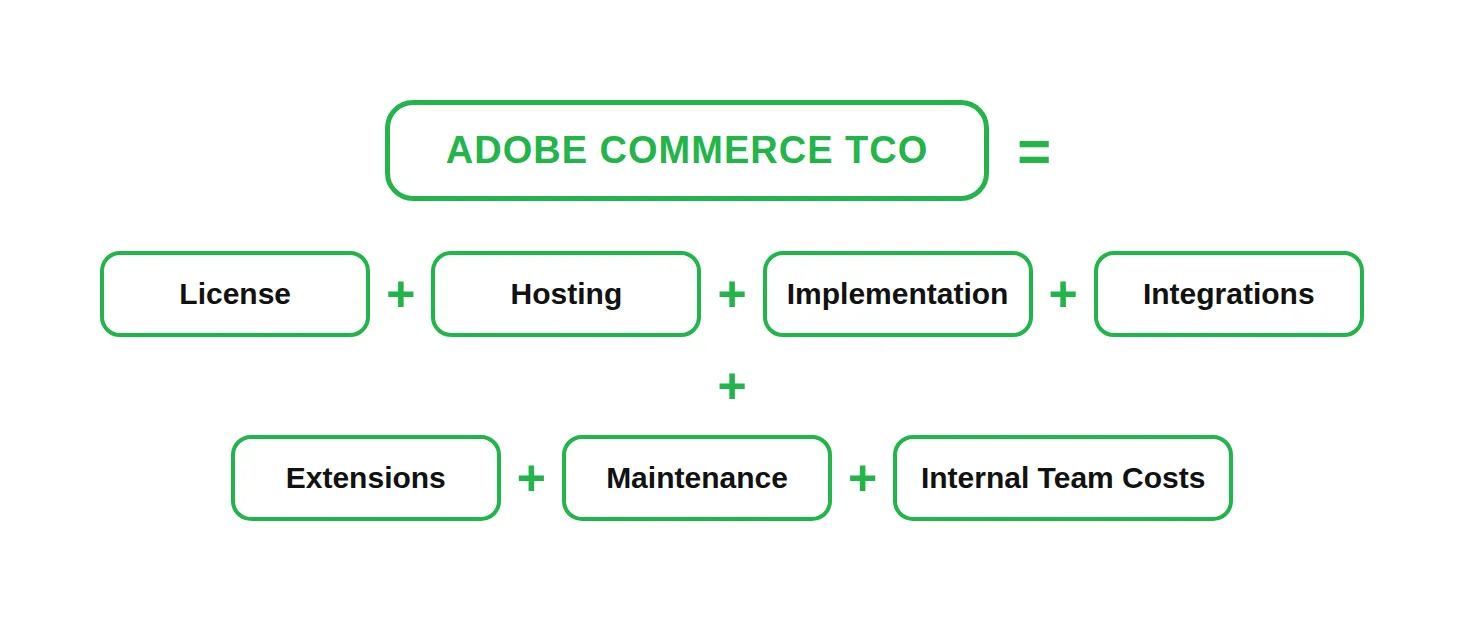
Below, we provide typical planning ranges for each cost category. Use them as budgeting benchmarks rather than official Adobe quotes. Your actual costs will depend on the project scope, custom workflows, business requirements, and selected deployment model.
| Cost category | Typical planning range | What affects the cost |
| License | $22,000 to more than $190,000 annually | Contract terms, business scale, and the selected Adobe Commerce offering |
| Implementation | $50,000 to more than $500,000 | Number of storefronts, markets, features, and custom workflows |
| Integrations | $10,000 to more than $250,000 | ERP, PIM, CRM, OMS, payment, and fulfillment systems |
| Extensions | $5,000 to more than $30,000 | Number of extensions, licensing terms, and customization needs |
| Maintenance | 15% to 30% of the initial build cost, annually | Platform complexity, custom code, support level, and release frequency |
| Hosting | Varies by deployment model | Traffic, performance, availability, and infrastructure responsibility |
| Internal team | Varies by staffing model | Required business, technical, operational, and content expertise |
A lower initial price may still lead to higher costs over time, if the platform requires more specialists, infrastructure work, or upgrade effort. Looking at TCO helps businesses compare the available deployment and operating models based on the resources they will need throughout the platform’s lifecycle. The next section examines these options in more detail, including how they differ in infrastructure responsibility, upgrade ownership, control, and long-term cost.
Adobe Commerce Deployment Options and Pricing Models
The next major cost decision is how Adobe Commerce will be deployed. The deployment model also determines who maintains the infrastructure, plans upgrades, manages security, and supports the platform as the business grows.
Today, businesses evaluating the Adobe Commerce ecosystem have four main options:
- Adobe Commerce on Cloud (PaaS): Adobe provides and manages single-tenant cloud infrastructure, while the business and its implementation partner remain responsible for the application, custom code, integrations, testing, and version upgrades.
- Adobe Commerce as a Cloud Service (SaaS): Adobe manages the multi-tenant infrastructure, core application, scaling, and platform updates. Businesses extend the solution through supported APIs and external applications.
- Adobe Commerce on-premises: The business hosts and manages the infrastructure and takes responsibility for application operations, upgrades, security, and performance.
- Magento Open Source: This is a separate, license-free alternative, rather than an Adobe Commerce deployment model. The business selects and manages its hosting, extensions, technical support, and ongoing development.
Although Adobe continues to support on-premises deployments, much of its current product investment is focused on cloud services. Adobe continues to enhance Adobe Commerce on Cloud, while its SaaS offering provides continuously delivered updates and cloud-native services.
New AI-driven capabilities and cloud automation are being introduced across the cloud portfolio, although availability and release models vary. Therefore, long-term planning should consider not only what the business needs today, but also how each option receives new capabilities and how much upgrade work remains with your team.
Regardless of which option you select, API-based integrations with external systems are possible. Headless and composable storefronts describe how the broader solution is designed, not a separate Adobe Commerce deployment model.
The table below compares the main cost, control, and operational considerations.
| Option | Hosting model | Application upgrade responsibility | Pricing approach | Main business consideration |
| Magento Open Source | Managed by the business or a hosting provider | Business or implementation partner | No license fee | Lower entry cost, with full responsibility for hosting, security, upgrades, and support |
| Adobe Commerce on-premises | Managed by the business or a hosting provider | Business or implementation partner | Commercial license | Greater control, with higher infrastructure and operational responsibility |
| Adobe Commerce on Cloud | Adobe-managed, single-tenant PaaS infrastructure | Business or implementation partner | Custom quote | Less infrastructure work, while retaining extensive customization options |
| Adobe Commerce as a Cloud Service | Adobe-managed, multi-tenant SaaS infrastructure | Adobe | Custom quote | Reduces routine core maintenance and makes it easier to connect new digital channels through supported integration interfaces |
Security and compliance are not simply included or excluded based on the deployment model. Adobe’s cloud offerings follow a shared responsibility approach. Adobe may secure the infrastructure and core platform for its cloud offerings, while the business remains responsible for areas such as user access, data, custom code, integrations, payment configuration, and its own compliance obligations.
Magento Open Source
The absence of a license fee is attractive. It is also easy to overvalue. Magento Open Source can be downloaded, installed, and extended without paying for a commercial Adobe Commerce license. Businesses are free to select their infrastructure, implementation partner, extensions, and support model.
Everything needed to operate the platform still has a cost. The business must budget for hosting, monitoring, backups, security patches, performance, upgrades, and technical support. A growing collection of custom modules and third-party extensions can also make future upgrades slower and more expensive.
Magento Open Source may be cost-effective when a company has the right technical capabilities and does not need the full commercial offering. The relevant comparison is not license fee versus license fee. It is the cost of licensing versus the cost of operating the platform independently.
Adobe Commerce On-Premises
For some organizations, a high degree of control is a strict business requirement. An on-premises deployment allows the company to define how its infrastructure, integrations, and release processes are managed. This model can make sense when regulatory, security, or data residency requirements limit the use of managed cloud services.
That independence comes with a substantial operational footprint. Alongside the commercial license, the business must fund server environments, monitoring, backups, performance management, upgrades, and the specialists responsible for keeping the platform running. A well-resourced IT department may be comfortable with this setup. Without an established technical team, however, building and retaining the required capabilities can cost more than the additional control is worth.
Adobe Commerce on Cloud
Adobe Commerce on Cloud occupies the middle ground. Adobe provides dedicated, single-tenant cloud infrastructure, removing much of the work associated with running the underlying environment. The merchant and its implementation partner still manage the commerce application, including custom code, integrations, patches, testing, and version upgrades.
This distinction has a direct impact on TCO. Moving to Adobe Commerce on Cloud can reduce infrastructure work, but it does not eliminate the need for development, maintenance, and application support. New releases still need to be tested, and an upgrade can still affect extensions, integrations, and business-critical workflows.
The cloud offering includes baseline protection against common network threats. Businesses with greater exposure to automated abuse, malicious bots, or sophisticated application-level attacks may need additional security services and budget.
For businesses that need extensive customization, but do not want to manage the underlying cloud infrastructure, this model can offer a practical balance.
Adobe Commerce as a Cloud Service (ACCS)
ACCS changes the operating model more fundamentally. Adobe manages the core application, infrastructure, scaling, and updates. The platform is versionless, which means businesses no longer plan major core upgrades in the same way they do with PaaS or on-premises deployments.
The business still owns important parts of the solution, including its data, integrations, access policies, storefront work, and custom applications. What changes is the way custom functionality is built. As the core application is not modified directly, businesses build custom features through external services and APIs. This makes core updates easier to manage, although older custom modules and tightly coupled integrations may need to be redesigned during migration.
That can reduce ongoing platform maintenance, but migration costs deserve careful attention. Existing PHP modules, core modifications, themes, and tightly coupled integrations may need to be redesigned rather than transferred directly. Adobe supports full, phased, and incremental migration approaches. The right strategy depends on Adobe’s current migration guidance, the existing architecture, business priorities, and the approach recommended by the implementation partner.
ACCS may be a strong fit for companies that want to reduce infrastructure and core upgrade work. It requires a closer assessment when the current platform depends heavily on customizations that cannot move into a SaaS model unchanged.
Adobe Commerce options compared
The first table focused on cost and operational responsibility. The comparison below looks at the capabilities and technical trade-offs that can influence the implementation scope.
| Comparison area | Magento Open Source | Adobe Commerce on-premises | Adobe Commerce on Cloud (PaaS) | Adobe Commerce as a Cloud Service (SaaS) |
| Core commerce and catalog management | Included | Included | Included | Included through cloud-native Commerce services |
| B2B capabilities | Usually require extensions or custom development | Commercial B2B capabilities, subject to the selected offering and agreement | Commercial B2B capabilities, subject to the selected offering and agreement | Core B2B capabilities are available, with additional implementation needed for business-specific processes |
| Search and merchandising | Native functionality, with extensions often used for advanced requirements | Adobe services and extensions may be added, depending on the package | Adobe services and extensions may be added, depending on the package | Cloud-native search, recommendations, and merchandising services; subject to package limits |
| Customization model | Source-level customization, extensions, and APIs | Deep application customization, extensions, and APIs | Deep application customization, extensions, APIs, and external applications | APIs, events, and external applications; no direct modification of the core application |
| Infrastructure | Managed by the business or hosting provider | Managed by the business or hosting provider | Adobe-managed, single-tenant infrastructure | Adobe-managed, multi-tenant infrastructure |
| Core upgrades | Managed by the business or implementation partner | Managed by the business or implementation partner | Managed by the business or implementation partner | Managed and delivered by Adobe |
| Typical operational profile | Lower licensing cost, with high internal ownership | Maximum infrastructure control and high operational responsibility | Extensive customization with less infrastructure work | Lower routine core maintenance, with a different approach to extensions and customization |
| Strongest fit | Businesses with capable technical teams and requirements that do not justify the commercial offering | Organizations that require infrastructure control for operational or regulatory reasons | Businesses that need extensive customization without managing the underlying cloud environment | Businesses prioritizing scalability, continuous updates, and lower core platform maintenance |
Feature availability, service limits, and commercial packaging should always be confirmed in the sales order.
A related modernization option: Adobe Commerce Optimizer
Adobe Commerce Optimizer is not included in the deployment comparison, because it is not a separate Adobe Commerce deployment model. It is designed for businesses that want to modernize storefront, catalog, search, and merchandising capabilities while keeping their existing commerce engine in place.
This can reduce the scope of a full replatforming. However, Optimizer still needs to connect with the systems responsible for cart, checkout, orders, and back-office operations. For some businesses, it serves as a practical step toward modernization rather than a replacement for a full Adobe Commerce implementation.
Which deployment model fits your business?
There is no universal winner. More control usually brings more operational responsibility. Moving more platform management to Adobe can reduce routine work, but it may also change how the business builds, integrates, and extends its commerce solution.
At Emerline, we do not start with the question of which model offers the most control. We begin with what your business is equipped to manage. That includes the skills available internally, the complexity of current customizations and integrations, compliance obligations, and plans for future growth. The right choice should give the business enough flexibility without making every upgrade, security change, or platform limitation an expensive operational problem.
How Adobe Commerce Pricing Is Calculated and What Affects the Cost
Once the deployment model has been selected, the next step is to understand how Adobe structures the commercial quote. Adobe’s licensing metrics have evolved over time and may vary according to offering and commercial agreement. Depending on the sales order, pricing may reflect gross merchandise value (GMV), average order value (AOV), order volume, capacity limits, or another contract-specific tier.
A B2B manufacturer processing a limited number of high-value purchases has a different transaction profile from a retailer handling thousands of smaller daily orders. These differences may affect the pricing level and capacity included in the agreement.
GMV alone does not determine the final quote. Two businesses with similar annual sales may require different environments, store views, platform capacity, or additional Adobe services.
These commercial metrics help shape the license quote, but they do not explain the full cost of implementing and operating Adobe Commerce. The broader budget is also affected by:
- Implementation and custom development:
The number of storefronts and markets, B2B or B2C workflows, custom modules, and business-specific functionality.
- Integrations and third-party services:
Connections to ERP, PIM, CRM, OMS, payment, shipping, and fulfillment systems, as well as extension licenses and subscription fees.
- Design, content, and growth tools:
Theme development, UX improvements, content operations, SEO, search, merchandising, personalization, and marketing services.
- Data migration and platform preparation:
Data cleanup, mapping, media transfer, URL redirects, validation, and test migrations.
- Infrastructure, performance, and security:
Hosting where applicable, platform capacity, monitoring, backups, CDN services, compliance work, and additional security controls.
- Training, support, and maintenance:
Staff onboarding, technical support, monitoring, patches, regression testing, release management, and platform upgrades where applicable.
Payment processing fees, fraud-prevention tools, fulfillment charges, and other third-party operating expenses may not determine the Adobe license itself, but they still belong in the total cost of ownership.
For the commercial quote specifically, businesses should be prepared to share:
- Annual GMV and projected growth
- Average order value and transaction volume
- The number of storefronts, brands, and markets
- The sales model, whether B2B, B2C, or hybrid
- Catalog size and expected traffic peaks
- Required environments, capacity, and additional Adobe services
The agreement should also clarify what is included, which usage limits apply, and what happens if the business exceeds its contracted GMV, order, or capacity tier. Having this information ready gives Adobe and the implementation partner more reliable assumptions to work from. It also helps identify potential licensing and capacity changes before growth turns them into unexpected costs.
How Much Does Adobe Commerce Cost for Different Business Sizes?
Two companies with similar sales can receive very different implementation estimates. One may need a focused storefront. The other may be replacing manual pricing, connecting several business systems, or coordinating commerce across countries.
The scenarios below show how implementation scope and budget may vary across businesses of different sizes. GMV provides a convenient way to group typical business profiles, but it does not determine implementation effort on its own. Process complexity, integration depth, customization requirements, and deployment scope usually have a greater impact on the final estimate.
These ranges are planning estimates rather than official Adobe prices. They cover the initial build and exclude the commercial license, internal staffing, and ongoing operations.
The implementation scenarios in this section can be summarized as follows:
Note: The figures below should not be read as an Adobe license price schedule.
| Business profile | Annual GMV | Typical implementation scope | Initial implementation planning range |
| Small merchant | Under $1 million | A focused storefront, essential payment and shipping setup, catalog configuration, and limited B2B customization | $50,000 to $100,000 |
| Mid-market | $1 million to $10 million | ERP or PIM integration, tailored pricing and catalog rules, data migration, and storefront redevelopment | $100,000 to $250,000 |
| Enterprise | More than $10 million | Multiple brands or regions, extensive integrations, non-standard workflows, complex migration, and platform governance | $250,000 to $500,000 or more |
The commercial license is quoted separately by Adobe. Its cost may depend on the selected offering, commercial agreement, GMV and AOV tier, order volume, capacity requirements, or other contract-specific metrics. These figures should not be read as an Adobe license price schedule.
Small merchant (under $1 million annual GMV)
Imagine a specialized distributor running a single storefront. Sales volume is modest. However, buyers expect configurable products, negotiated pricing, account-specific catalogs, and multi-step approval workflows. Adobe Commerce can be a viable option when these advanced B2B capabilities justify the additional investment and the implementation scope remains tightly focused.
- What shapes the estimate: Storefront delivery, catalog configuration, essential payment and shipping setup, and limited B2B workflow customization.
- Planning range: $50,000 to $100,000.
If your business does not have this level of complexity and your requirements are mostly standard, it is worth considering a simpler option. Magento Open Source or a managed SaaS alternative will generally deliver a better return on investment and a lower total cost of ownership.
Mid-market ($1 million to $10 million in annual GMV)
Think of a regional distributor finding its growth restricted by its current commerce platform. Product data sits across several systems, customer pricing requires manual updates, and sales teams regularly step in to resolve online orders. The project is no longer just about replacing the storefront. It must also reduce the operational friction surrounding it.
- Key cost escalators: ERP or PIM integration, tailored catalog and pricing rules, data migration, storefront redevelopment, and structured post-launch support.
- Planning range: $100,000 to $250,000.
Measure the deployment budget against the compounding cost of manual labor, disjointed technology, and a forced replatforming down the line.
Enterprise (more than $10 million in annual GMV)
Take a global enterprise operating multiple brands across different regions for B2B and B2C buyers. Here, the platform must coordinate localized storefronts, intricate purchasing logic, and a wide web of back-office software.
- What drives the budget: System integration depth, international deployment scope, non-standard business workflows, complex data migration, strict performance requirements, and platform governance.
- Planning range: $250,000 to $500,000 or more.
Revenue alone does not justify a large custom implementation. A high-revenue business with a straightforward operating model may require less investment than a smaller company with complex B2B processes.
These scenarios provide a starting point for budgeting. The final scope should reflect the processes and constraints Adobe Commerce must support, not GMV alone.
Hidden Adobe Commerce Implementation and Operational Costs
Some costs are obvious from the first proposal. Others appear only when real data, systems, and business rules enter the project. The following areas are especially likely to move the budget.
ERP and back-office integrations
A ready-made connector can shorten the path to SAP, NetSuite, Microsoft Dynamics, CRM, WMS, OMS, or fulfillment systems, but it rarely covers the full business process. Pricing rules, inventory updates, customer data, and orders still need clear ownership and reliable synchronization. The added effort can increase the implementation budget. In return, the business gets fewer manually corrected orders, more accurate inventory, and consistent data across operational teams.
See how Emerline connected Magento with a legacy ERP and related business systems for a fragrance and decor manufacturer.
PIM and catalog data
Akeneo or Pimcore can make a large catalog easier to manage across storefronts and markets. First, however, product attributes must be mapped, media transferred, and inconsistent source data cleaned. That preparation adds to the implementation scope. It also gives the business cleaner product information, faster launches, and fewer catalog errors across channels.
Legacy data migration and SEO
Data rarely moves cleanly from a legacy platform. Customer accounts, complex order histories, active promotions, product relationships, and other records may need to be cleaned, transformed, or rebuilt before the new platform can use them. This is where migration costs often escalate.
Passwords create a particular risk, because legacy credentials may not be transferable in a compatible format. If customers have to reset their passwords after launch, the added friction can affect repeat purchases and conversion. If you neglect URL mappings and redirects, the migration can also reduce existing organic traffic and the sales it generates. A well-planned Adobe Commerce migration should include data cleanup, mapping, validation, media transfer, test runs, and SEO migration planning.
Extensions and custom code
An extension may solve today’s requirement quickly. Then come renewals, updates, compatibility testing, security reviews, and, occasionally, replacement. Conflicts between modules or custom code are a common source of unplanned development work, particularly during upgrades. The purchase price is only the beginning. Every dependency must create enough business value to justify its ongoing maintenance over the platform lifecycle.
Security, upgrades, and performance
A small platform update can trigger regression testing across pricing, checkout, payments, shipping, and order processing. Meanwhile, large catalogs, live integrations, personalized prices, and peak traffic may expose performance issues that were invisible during development. Neglecting this work can lead to unsupported platform versions, security incidents, emergency downtime, slower pages, abandoned carts, and lost peak-season revenue.
Payment and fraud costs
Offering multiple payment methods and currencies can improve conversion and support expansion into new markets. However, expanding your checkout options also introduces transaction fees, provider-specific configurations, and more complex fraud monitoring.
Integrating a payment gateway involves much more than simply connecting to a provider. You must test and support refunds, failed-payment scenarios, disputes, and fraud controls. These systems require a careful balance; controls should reduce costly chargebacks without creating unnecessary friction for legitimate buyers.
Payment processing fees and fraud-related expenses are not specific to Adobe Commerce. They apply to most commerce platforms, but they still belong in the broader operating budget used to evaluate the investment.
This section covers implementation-related costs and selected commerce operating expenses associated with the Adobe Commerce solution. It does not include general business expenses, such as advertising, content production, shipping, or product fulfillment.
Discovery cannot remove every unknown. It can expose the expensive ones while there is still time to adjust the scope, protect the launch, and avoid carrying preventable problems into daily operations.
Adobe Commerce B2B Pricing Beyond the License
Note: The figures below are line-item estimates for B2B configuration, customization, integration, and testing. They sit within the broader Implementation and Integrations ranges in the TCO model, rather than representing additional Adobe license fees. The estimates are not cumulative because the workstreams often share business logic, integrations, data preparation, and testing effort.
Wholesale commerce involves more than processing larger orders. The platform must reflect negotiated contracts, company structures, purchasing rules, and customer-specific pricing. This is why B2B complexity can become a significant part of the Adobe Commerce implementation budget.
The platform provides native tools for company accounts, catalogs, quotes, and purchasing workflows. The larger cost usually lies in configuring them around the company’s existing processes and back-office systems.
Based on Emerline’s implementation experience, the following planning ranges illustrate how individual B2B workstreams can affect implementation budgets. They are implementation planning estimates rather than market benchmarks or Adobe pricing.
- Custom catalogs and contract pricing ($20,000 to $50,000):
The estimate depends on how many customer-specific assortments, negotiated rates, and volume rules the platform must support. When those terms originate in an ERP, the B2B e-commerce ERP integration must keep pricing logic and customer entitlements consistent across systems. Reliable synchronization, traceability, and testing help prevent pricing errors, protect margins, and reduce manual corrections.
- Company accounts and purchase approvals ($10,000 to $20,000):
The lower end may cover basic buyer roles and a standard approval path. Company hierarchies, spending limits, several approval levels, and account-specific exceptions require more configuration and testing. The result is greater customer autonomy without losing purchasing control.
- Quote workflows ($15,000 to $30,000):
A straightforward request-and-response flow is relatively contained. Multiple negotiation rounds, custom discounts, internal approvals, and integration with sales systems push the cost higher. When designed well, the workflow keeps negotiations visible and reduces reliance on email and spreadsheets.
Adobe Commerce provides the core B2B capabilities described above, subject to the selected offering and commercial agreement. The additional $45,000 to $100,000 typically reflects implementation services rather than separate fees for configuration, customization, integration, and testing. This range should not be calculated by simply adding the individual estimates, because configuration, integration, data, and testing work often overlaps across several B2B workstreams. The final total may therefore be lower or higher, depending on the project architecture and scope.
Ask Adobe and your implementation partner to separate what is included in the commercial offer from the cost of configuration, integrations, B2B data migration, testing, and ongoing support. A feature may be available in the platform, but that does not mean the company’s processes are ready to use it out of the box.
These figures cover B2B-specific configuration, customization, integration, and testing. They exclude the Adobe Commerce license, data migration, broader enterprise integration work outside the B2B scope, and ongoing support. Final estimates should be validated against the project scope.
The Long View: Adobe Commerce Costs Over Three Years
Many organizations treat a commerce migration as a one-time investment and focus most of their attention on the launch budget. That view captures the largest single outlay, but not the full financial commitment. After launch, spending does not disappear. It shifts toward annual platform costs, support, security, optimization, and the changes required as the business evolves.
The breakdown below shows how the structure of that investment typically changes. Exact timing depends on the deployment model, release schedule, and pace of business growth.
| Timeline | Primary cost drivers | What is often missed |
| Year 1 | License, hosting, discovery, implementation, migration, integrations, extensions, and training | Contingency, post-launch stabilization, and internal team time |
| Year 2 | License, hosting, support, security, optimization, and minor enhancements | Extension renewals, integration changes, and regression testing |
| Year 3 | License, hosting, support, upgrades, new markets, and new capabilities | Unsupported modules, accumulated technical debt, and replacement work |
Deployment note: For Adobe Commerce on Cloud (PaaS) and on-premises deployments, Year 3 often includes planning and budget for platform version upgrades. With Adobe Commerce as a Cloud Service, Adobe manages core platform updates, so investment typically shifts toward business enhancements, integrations, storefront development, and custom extensions rather than core upgrade projects.
A three-year estimate should combine the initial launch investment with recurring costs and a realistic budget for change. License and hosting continue throughout the period, while maintenance, upgrades, and enhancements depend on how the platform and the business evolve.
Three-year TCO = Initial build + three years of license and hosting + maintenance + planned upgrades + enhancement roadmap
This model separates the cost of getting Adobe Commerce live from the cost of keeping it reliable and relevant. It also prevents planned improvements from being treated as unexpected overruns later.
Year 1 usually carries the heaviest investment. Year 2 changes the rhythm: the build budget falls, but monitoring, security work, internal ownership, and smaller improvements continue. Maintenance alone may represent 15% to 30% of the initial build cost annually.
The less predictable part is change. A new market, B2B workflow, payment provider, or integration replacement can create another concentrated period of development and testing in any year.
Consider two proposals. One lowers the launch price by relying heavily on third-party extensions. The other costs more upfront, but uses fewer dependencies and a cleaner integration architecture. The first may look more economical in Year 1. Over three years, renewals, compatibility fixes, module replacements, and slower upgrades can make it the more expensive option.
The cheapest proposal in Year 1 may not be the cheapest option over three years. Compare the cost to launch, the committed annual cost to operate, and the budget reserved for change. The assumptions and exclusions behind those figures matter as much as the totals themselves.
Adobe Commerce Pricing Compared to Alternatives
The pricing pages suggest a simple comparison, but real budgets are rarely simple. Adobe Commerce, Shopify Plus, BigCommerce, and Salesforce Commerce Cloud distribute costs differently across licenses, implementation, integrations, and ongoing operations. That makes business complexity a more useful point of comparison than the headline fee alone.
| Platform | Commercial model | Relative TCO | Strongest fit | Key cost drivers |
| Adobe Commerce | Customized quote; SaaS and PaaS options | Higher | Complex B2B and B2C commerce, multiple brands and markets, and deep back-office integrations | Custom development, migration, deployment model, upgrades, and internal ownership |
| Shopify Plus | Standard published pricing, with variable fees or negotiated enterprise terms for more complex businesses | Moderate | Fast-growing businesses that can work largely within native platform patterns | Apps, custom development, additional brands, and payment processing |
| BigCommerce Performance, formerly Enterprise | Customized quote based on business scale and requirements | Moderate | Mid-market and enterprise businesses seeking SaaS with open integration options | Integrations, partner services, third-party tools, and payment architecture |
| Salesforce Commerce Cloud | Contact pricing; GMV-based pricing for some editions | Higher | Large organizations connecting commerce with the wider Salesforce ecosystem | Implementation, add-ons, integrations, support, and ecosystem complexity |
The TCO ratings are directional planning estimates, not vendor quotes. Actual costs depend on scope, transaction volume, integrations, customization, and staffing.
Not every business needs the flexibility Adobe Commerce is built to provide. Its higher cost is easier to justify when negotiated B2B processes, multiple brands, regional operations, and extensive integrations are part of everyday commerce. Companies with fewer exceptions may spend less with Shopify Plus or BigCommerce, while Salesforce Commerce Cloud has a natural advantage where Salesforce already sits at the center of the customer technology stack.
In our experience, the real cost gap often comes from exceptions: custom workflows, integrations, and manual workarounds. The strongest fit is the platform that requires the fewest exceptions.
Final Thoughts
The final decision should not compare Adobe Commerce with doing nothing. Nor should it compare license fees in isolation. The useful benchmark is the next-best platform that could realistically support the business.
Calculate the three-year cost of both options using the same requirements and assumptions. Then examine the difference. Would Adobe Commerce reduce enough manual work, pricing errors, integration workarounds, launch delays, or future replatforming risk to justify its additional cost?
Sometimes the answer will be yes. For a business with complex B2B rules, several markets, and deeply connected back-office systems, the operational gains may outweigh the higher investment. A company with standard processes may reach the opposite conclusion — and avoid paying for flexibility it will not use.
That is the real Adobe Commerce business case: not whether the platform is expensive, but whether the problems it removes cost more than the additional TCO.
Frequently Asked Questions About Adobe Commerce Pricing
Does Adobe Commerce charge transaction fees per order?
Adobe Commerce does not apply a universal fee to every order. Separate charges may still apply through payment gateways, processors, or other payment services. The exact fee structure depends on the selected payment solution and commercial agreement, so the contract should distinguish Adobe Commerce licensing from payment processing costs.
What happens if the business exceeds its contracted GMV or order tier?
The agreement defines what happens when contracted limits are exceeded. Depending on the sales order, crossing a GMV, order, or capacity tier may lead to additional charges, a capacity adjustment, revised pricing, or changes at renewal. It is worth discussing projected growth and a reasonable buffer before the first peak season, rather than waiting until the business reaches its limits.
Do B2B and B2C storefronts require separate Adobe Commerce licenses?
Not necessarily. Adobe Commerce supports B2B and B2C within the same solution. One instance can manage multiple websites, domains, stores, and store views. That technical flexibility does not settle the commercial question. The quote still needs to specify which sites, capabilities, capacity, and B2B components are included.
Are AI-powered search and product recommendations included?
Adobe’s current packaging presents AI-powered search, product recommendations, and merchandising as Commerce capabilities. Turning them on is not the whole job. Catalog preparation, storefront integration, behavioral data collection, testing, and tuning can all add implementation effort. Package details and service limits should still be confirmed in the sales order.
Does Adobe offer monthly billing for Adobe Commerce?
Adobe publishes customized pricing rather than a standard monthly subscription or public invoicing schedule. Treat payment cadence as a contract term, not an assumption. Before finance approves the agreement, confirm the contract length, invoice timing, renewal mechanics, and whether add-ons are billed separately.
What environments are included with Adobe Commerce on Cloud?
Adobe Commerce on Cloud includes environments for development, staging, and production. Their configuration depends on the selected plan. That setup is usually sufficient for a straightforward release process. Teams supporting parallel development, regional launches, or several release streams may need additional isolated staging environments. Adobe offers additional staging capacity for projects that require more separation between development and testing activities.
Can a business start with Magento Open Source and move to Adobe Commerce later?
Yes, but moving is not the same as flipping a license switch. The products share a technical foundation, so a clean, current implementation may carry forward with less disruption. Unsupported extensions, core modifications, old themes, and infrastructure decisions can change the scope quickly. We would assess those dependencies before treating the transition as straightforward or predictable.
Is Adobe support enough, or is separate maintenance still needed?
Adobe support and application maintenance cover different responsibilities. Adobe supports the platform components and services covered by the selected offering and support agreement, while the business remains responsible for its custom development, third-party modules, integrations, and the operation of the complete implemented solution. Maintaining those elements requires monitoring, regression testing, release management, and clear technical ownership. An internal team, an implementation partner, or both can take responsibility for that work.
How do Adobe Commerce implementation agencies structure their pricing?
Fixed-price agreements work best when the scope, assumptions, and acceptance criteria are genuinely stable. Time-and-materials billing leaves more room for discovery and change, but it also demands transparent reporting and disciplined governance. In our experience, the label matters less than what sits underneath it: team composition, exclusions, change control, release ownership, and post-launch support. Adobe partner levels recognize demonstrated capabilities and success. They are not a public agency rate card.
Can Adobe Commerce pricing be negotiated?
The quote is customized, so there is room to discuss its structure. That does not guarantee a discount. The more useful negotiation points are often the ones behind the headline price: included capabilities, usage metrics, environments, add-ons, support, contract length, renewal rules, and what happens as the business grows.
Updated on Mar 17, 2025